
Darshan Parmar
UI/UX & Product Designer | SaaS • AI Products • Dashboards
New to Contra
Darshan is building their profile!
💻 Project Description
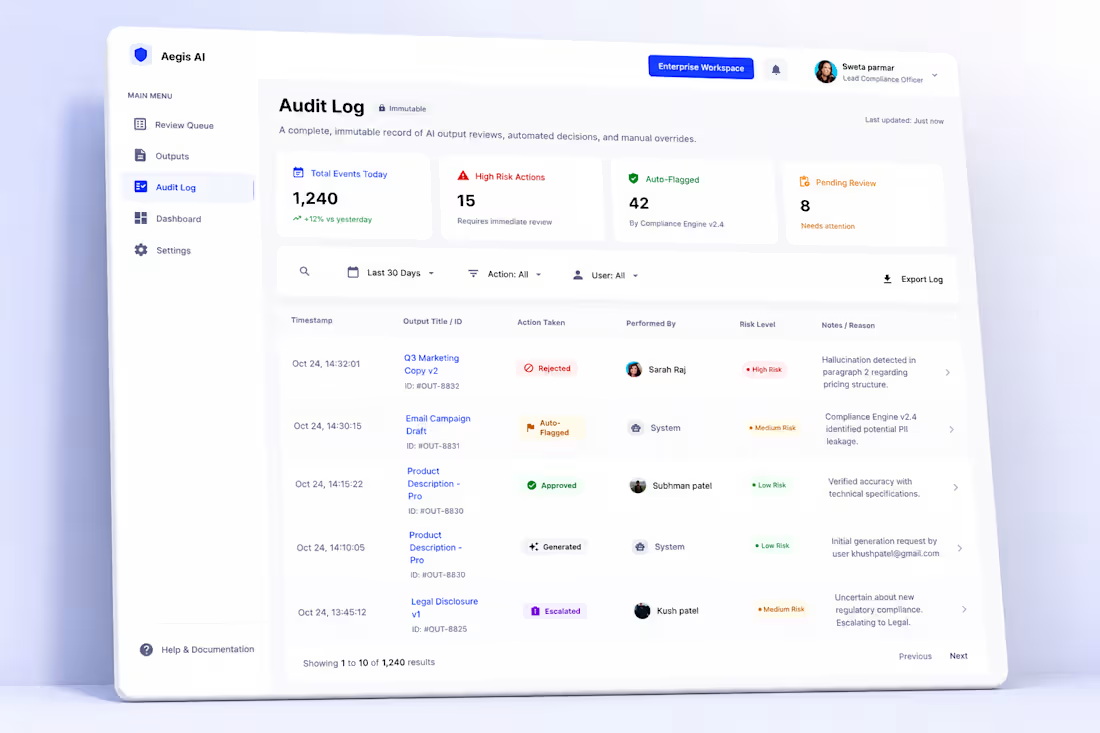
Aegis AI is a comprehensive B2B enterprise SaaS platform built to govern, audit, and secure AI-generated outputs across organizations. The platform solves the critical challenge of AI safety by introducing structured human-in-the-loop workflows, dynamic permission controls, and immutable compliance logging.
Design Approach & Solutions
Granular Rules & Permissions (Image 1 & 2): Designed an intuitive settings interface that allows admins to toggle global compliance checks (e.g., High-Risk Content, PII Auto-Redaction) and manage specific role permissions (AI Producer, Reviewer, Admin) with zero learning curve.
Streamlined Review Queue (Image 3): Engineered a high-efficiency dashboard tracking pending AI outputs. Implemented a smart filtering system by risk-level and status, using clean layout hierarchy to help compliance officers review, assign, and process massive volumes of content efficiently.
Immutable Audit Logs (Image 4): Designed a robust compliance ledger tracking automated system actions, manual overrides, and approval timestamps. Used micro-interactions and explicit status tags (Approved, Auto-Flagged, Rejected) to ensure total system transparency.
Premium UX & Responsive Presentation: Focused on building an enterprise-grade UI with meticulous spacing, crisp typography, and an adaptable layout presented across high-fidelity tablet and desktop environments.
🛠️ Tools Used
Figma (Advanced Variants, Auto-layout, Scalable B2B Design System)
High-Fidelity Device Mockups (Commercial Context Presentation)
Skills :-
Enterprise Product Design
SaaS Dashboard Design
UI/UX Design
Information Architecture
B2B Platform Design
1
8
About the Project
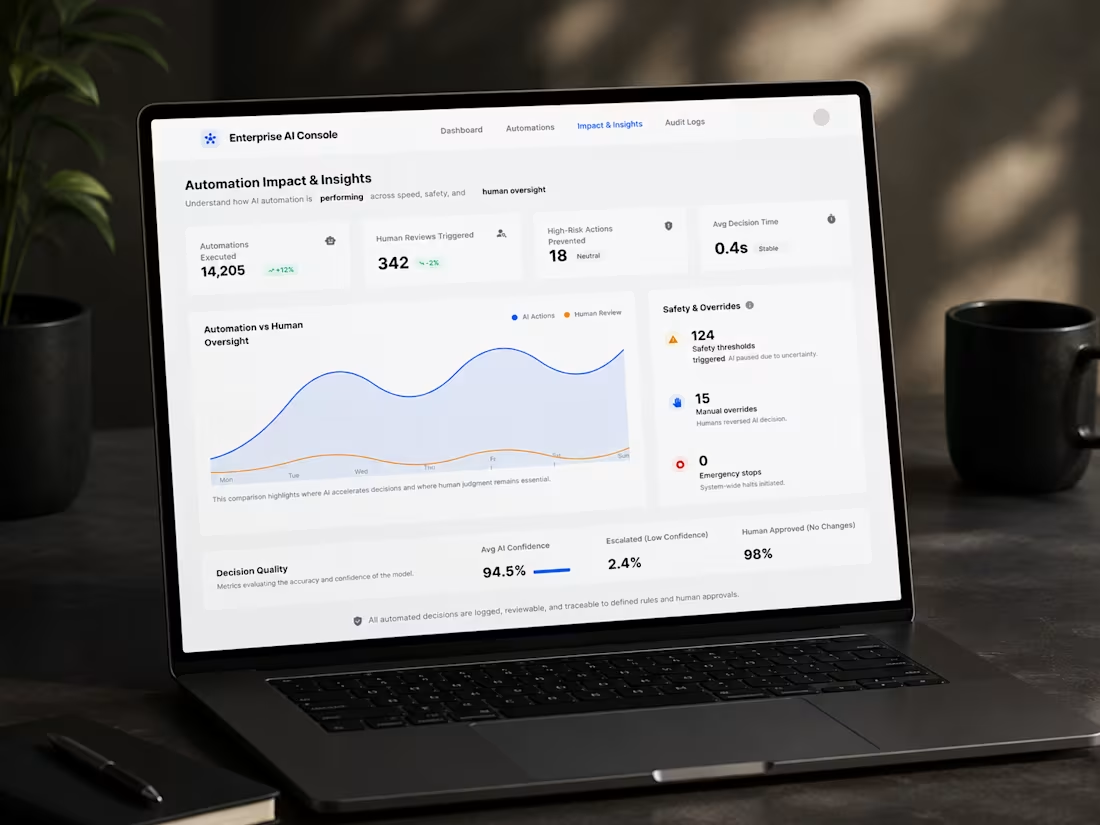
Enterprise AI Governance Console is a sophisticated, high-fidelity SaaS dashboard designed for enterprises to manage, simulate, and monitor AI automations. The core challenge was to design an interface that provides deep analytical insights, clear safety boundaries, and interactive simulation tools while maintaining an ultra-clean, intuitive, and user-friendly enterprise aesthetic.
Design Approach & Solutions
Data Density & Analytics (Image 1): Structured a comprehensive analytics dashboard mapping "Automation vs Human Oversight." Used clean data visualization charts, clear KPI cards, and safety threshold alerts to let managers assess system health in under 5 seconds.
Interactive Simulation Studio (Image 2): Designed a step-by-step "Simulation & Preview" environment where users can test JSON/synthetic data inputs against AI rules before deploying them live, reducing deployment risks to zero.
Granular Guardrails & Rule Management (Image 3 & 4): Created a seamless boundary-setting interface ("AI Automation Boundaries"). Implemented clear categorization for autonomous actions, required human judgments, and strictly restricted zones using distinct, recognizable visual tags.
Enterprise UX Consistency: Focused on precise spacing, uniform typography, and scalable UI components (tables, toggles, side navigation) built for complex B2B systems.
🛠️ Tools Used
Figma (Advanced Component Architecture, Auto-layout, Design System)
High-Fidelity Laptop Mockups (Premium Contextual Presentation)
Skills
SaaS Dashboard Design
B2B Product Design
UI/UX Design
Data Visualization
Figma Design System
1
13
About the Project
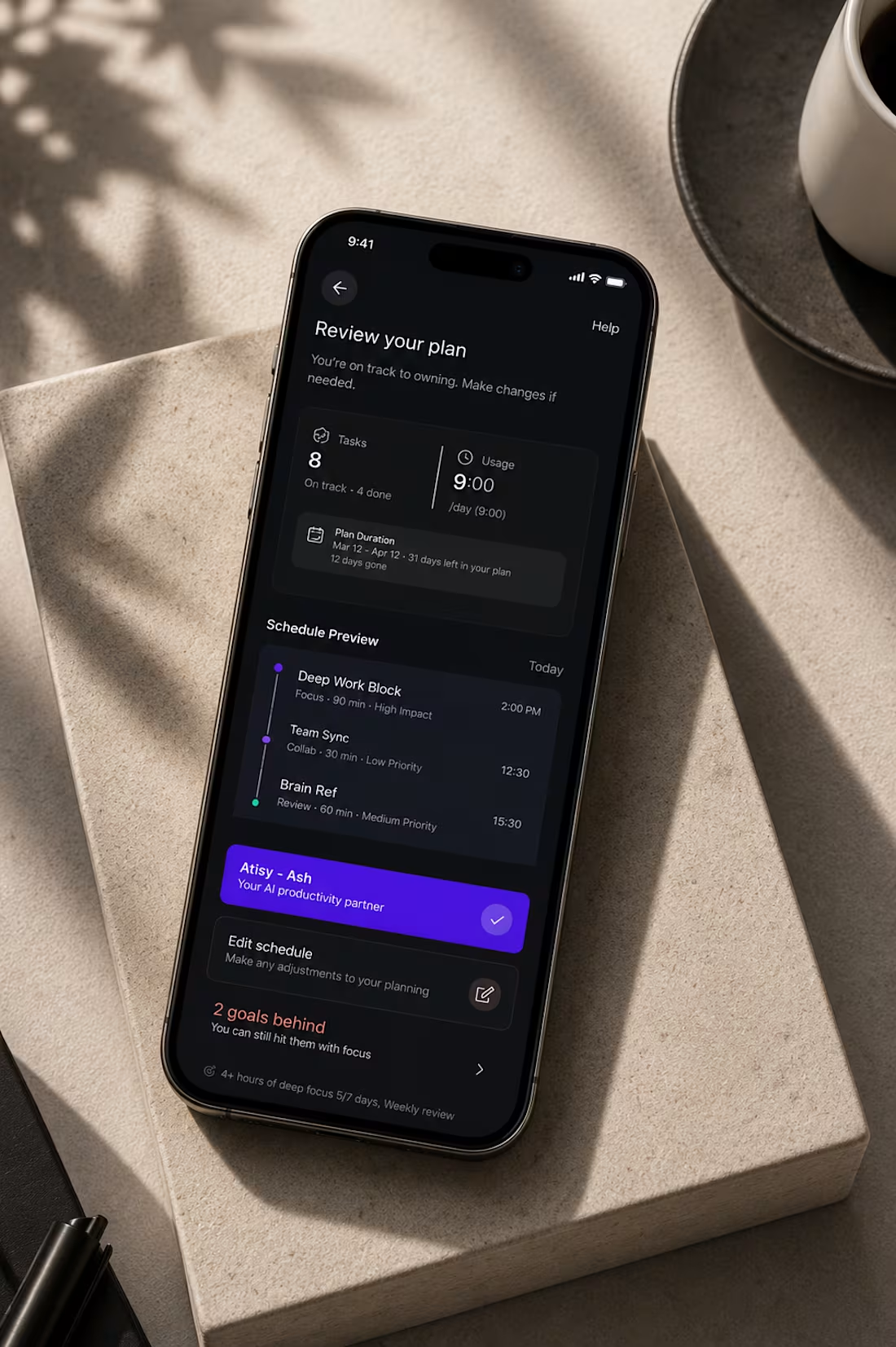
Priora is a premium, minimalist productivity and task management mobile application designed to help busy professionals "decide better, not more." The goal was to create a clean, dark-mode interface that reduces cognitive overload and allows users to focus on high-impact tasks without clutter.
Design Approach & Solutions
Seamless Onboarding: Designed a sleek, distraction-free authentication flow (Email, Google, Apple) with high-contrast typography to ensure effortless user entry.
Intelligent Task Hierarchy: Created an intuitive "Today's Focus" dashboard that highlights high-confidence tasks, using subtle color-coded indicators for priority levels (High, Medium, Low Confidence).
One-Tap Automation: Integrated a prominent "Auto-plan my day" action button utilizing vibrant brand colors to drive user engagement and simplify daily scheduling.
Comprehensive Review Analytics: Developed a detailed "Review your plan" screen tracking tasks, usage duration, and schedule previews to help users stay accountable and visualize their progress.
Figma (UI/UX Design & Prototyping)
High-Fidelity 3D Mockups (Presentation)
1
20