The network for creativity
Join 1.25M professional creatives like you
Connect with clients, get discovered, and run your business 100% commission-free
Creatives on Contra have earned over $150M and we are just getting started
Back to feedPost

𝐏𝐫𝐨𝐣𝐞𝐜𝐭: StockPilot
𝐓𝐲𝐩𝐞: Product Concept / Interactive Prototype
𝐈𝐧𝐝𝐮𝐬𝐭𝐫𝐲: Automotive parts / warehouse operations / inventory management
𝐎𝐛𝐣𝐞𝐜𝐭𝐢𝐯𝐞: Design a simple, barcode-first inventory system for small parts distributors that have outgrown spreadsheets but do not need the complexity or cost of a full ERP system.
𝐓𝐚𝐫𝐠𝐞𝐭 𝐮𝐬𝐞𝐫: Small distributors managing roughly 1,000–20,000 SKUs from a single warehouse
𝐅𝐨𝐜𝐮𝐬: Receiving, barcode scanning, bin locations, order reconciliation, stock visibility, and low-stock monitoring
The concept was inspired by a common operational problem: small warehouse teams often manage thousands of SKUs using spreadsheets, while still relying on manual checks during receiving and fulfillment.
The goal was to design a system that keeps the simplicity of the spreadsheet workflow while adding the accuracy and visibility of modern warehouse software.
The Challenge
For a small parts distributor, spreadsheets can work surprisingly well — until the physical warehouse starts moving faster than the spreadsheet.
Typical issues include:
Manual stock updates
Inventory quantities that do not match what is physically on the shelf
Receiving staff manually comparing delivered quantities against purchase orders
Products stored in the wrong location
No easy way to identify shortages or overages during receiving
Difficulty seeing what is currently on order
Limited visibility into safety stock and reorder requirements
For a three-person company with one warehouse worker, implementing a large ERP or warehouse management platform can create another problem entirely: too much complexity.
The challenge was therefore not simply to “build inventory software.”
It was to answer a more specific question:
How can a small warehouse gain barcode-level inventory accuracy without changing the simple workflow the team already understands?
The Solution
I designed StockPilot as a lightweight inventory operations platform built around a simple workflow:
𝐔𝐩𝐥𝐨𝐚𝐝 𝐎𝐫𝐝𝐞𝐫 → 𝐒𝐜𝐚𝐧 𝐏𝐫𝐨𝐝𝐮𝐜𝐭𝐬 → 𝐌𝐚𝐭𝐜𝐡 𝐐𝐮𝐚𝐧𝐭𝐢𝐭𝐢𝐞𝐬 → 𝐅𝐥𝐚𝐠 𝐃𝐢𝐬𝐜𝐫𝐞𝐩𝐚𝐧𝐜𝐢𝐞𝐬 → 𝐔𝐩𝐝𝐚𝐭𝐞 𝐈𝐧𝐯𝐞𝐧𝐭𝐨𝐫𝐲
The product concept focuses on four core operational areas.
𝟏. 𝐁𝐚𝐫𝐜𝐨𝐝𝐞 𝐑𝐞𝐜𝐞𝐢𝐯𝐢𝐧𝐠
Warehouse staff can upload an incoming purchase order using Excel or CSV and begin scanning the manufacturer barcodes already attached to the products.
As each barcode is scanned, the system:
Identifies the SKU
Displays the product and bin location
Updates the scanned quantity
Matches the scanned quantity against the expected order
Highlights completed items
Flags unexpected products
Detects shortages and overages
𝐄𝐱𝐚𝐦𝐩𝐥𝐞:
Toyota Brake Pad Set
Expected: 24
Scanned: 24
Status: MATCHED
NGK Spark Plug
Expected: 30
Scanned: 28
Status: SHORT 2
Denso Sensor
Expected: 12
Scanned: 13
Status: OVER 1
The goal is to surface discrepancies while the shipment is still being received — not days later when the inventory mismatch becomes harder to investigate.
𝟐. 𝐁𝐢𝐧 𝐋𝐨𝐜𝐚𝐭𝐢𝐨𝐧 𝐌𝐚𝐧𝐚𝐠𝐞𝐦𝐞𝐧𝐭
Each SKU can be assigned a physical warehouse location.
For example:
Warehouse 01
Aisle A
Rack 14
Bin 03
Displayed simply as:
A-14-03
This gives warehouse staff an immediate answer to one of the most common inventory questions:
“Where exactly is this part?”
The same location data can later support receiving, stock counts, picking, and order fulfillment.
𝟑. 𝐈𝐧𝐯𝐞𝐧𝐭𝐨𝐫𝐲 𝐕𝐢𝐬𝐢𝐛𝐢𝐥𝐢𝐭𝐲
The inventory interface is designed to give small teams the information they actually need without overwhelming them with enterprise-level complexity.
Each product can display:
On-hand quantity
Allocated stock
Available stock
Quantity currently on order
Safety stock
Bin location
Stock status
𝐄𝐱𝐚𝐦𝐩𝐥𝐞𝐬 𝐨𝐟 𝐬𝐭𝐨𝐜𝐤 𝐬𝐭𝐚𝐭𝐞𝐬 𝐢𝐧𝐜𝐥𝐮𝐝𝐞:
Healthy
Low Stock
Reorder
Out of Stock
The interface also supports searching by SKU, product name, or barcode.
𝟒. 𝐒𝐩𝐫𝐞𝐚𝐝𝐬𝐡𝐞𝐞𝐭-𝐂𝐨𝐦𝐩𝐚𝐭𝐢𝐛𝐥𝐞 𝐖𝐨𝐫𝐤𝐟𝐥𝐨𝐰
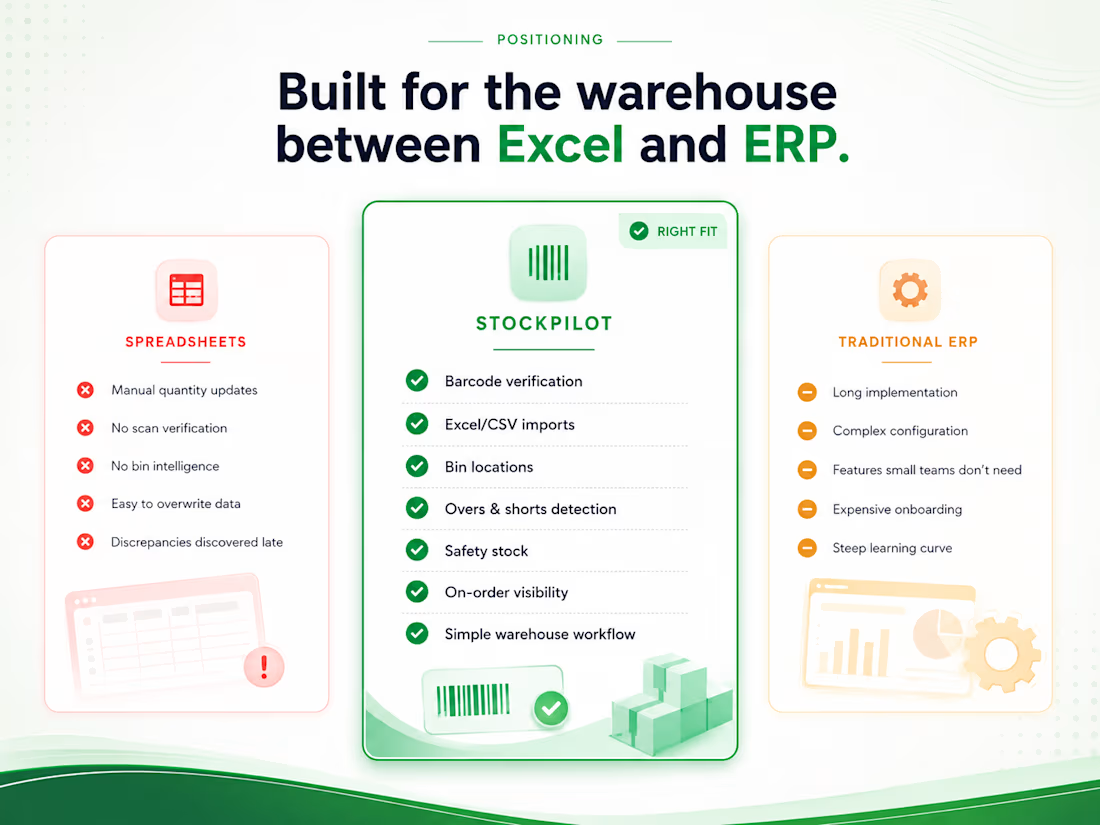
Instead of forcing businesses to immediately abandon the tools they already use, StockPilot is designed to work alongside existing spreadsheet workflows.
Incoming or outgoing orders can be uploaded through Excel or CSV.
The system then adds operational controls that spreadsheets alone cannot provide:
Barcode verification
Real-time quantity matching
Physical bin locations
Overs and shortages
Low-stock visibility
On-order quantities
Safety-stock monitoring
This creates a simpler transition from spreadsheet-based inventory management to structured warehouse software.
𝐏𝐫𝐨𝐝𝐮𝐜𝐭 𝐄𝐱𝐩𝐞𝐫𝐢𝐞𝐧𝐜𝐞
The prototype was designed around one principle:
The warehouse worker should understand the system in minutes, not weeks.
Rather than creating a traditional ERP interface filled with menus and configuration screens, the experience focuses heavily on the actions warehouse staff perform every day.
The primary receiving interface shows:
Purchase order number
Supplier
Expected units
Scanned units
Remaining units
Current discrepancies
Barcode scanning area
Last scanned product
Bin location
Expected vs scanned quantities
Receiving status
The interface also simulates barcode scans so prospective users can immediately understand how the workflow would operate in a real warehouse.
𝐃𝐞𝐬𝐢𝐠𝐧 𝐀𝐩𝐩𝐫𝐨𝐚𝐜𝐡
The interface was intentionally designed to feel like professional operational software rather than a typical marketing dashboard.
The visual system uses:
Clean enterprise typography
High-contrast data tables
Minimal navigation
Subtle operational status colors
Green for successful matches
Amber for warnings
Red for significant discrepancies
Simple cards and metrics
Large, readable scanning states
Responsive layouts for desktop and mobile
The product UI is deliberately understated so warehouse staff can focus on completing tasks instead of learning the interface.
𝐂𝐨𝐫𝐞 𝐅𝐞𝐚𝐭𝐮𝐫𝐞𝐬 𝐄𝐱𝐩𝐥𝐨𝐫𝐞𝐝
𝐁𝐚𝐫𝐜𝐨𝐝𝐞 𝐑𝐞𝐜𝐞𝐢𝐯𝐢𝐧𝐠
Scan manufacturer barcodes and verify products against uploaded purchase orders.
𝐎𝐫𝐝𝐞𝐫 𝐑𝐞𝐜𝐨𝐧𝐜𝐢𝐥𝐢𝐚𝐭𝐢𝐨𝐧
Automatically compare expected quantities against scanned quantities and flag shortages, overages, or incorrect items.
𝐈𝐧𝐯𝐞𝐧𝐭𝐨𝐫𝐲 𝐓𝐫𝐚𝐜𝐤𝐢𝐧𝐠
Track stock movement across receiving, available inventory, allocated stock, and outgoing orders.
𝐁𝐢𝐧 𝐋𝐨𝐜𝐚𝐭𝐢𝐨𝐧𝐬
Assign SKUs to warehouse locations and quickly identify where stock is stored.
𝐒𝐩𝐫𝐞𝐚𝐝𝐬𝐡𝐞𝐞𝐭 𝐈𝐦𝐩𝐨𝐫𝐭
Import Excel and CSV purchase orders or stock data without rebuilding the company's entire workflow.
𝐒𝐚𝐟𝐞𝐭𝐲 𝐒𝐭𝐨𝐜𝐤
Set minimum stock thresholds for frequently used products.
𝐎𝐧-𝐎𝐫𝐝𝐞𝐫 𝐕𝐢𝐬𝐢𝐛𝐢𝐥𝐢𝐭𝐲
See incoming replenishment quantities alongside current stock levels.
𝐋𝐨𝐰-𝐒𝐭𝐨𝐜𝐤 𝐌𝐨𝐧𝐢𝐭𝐨𝐫𝐢𝐧𝐠
Identify inventory approaching reorder levels.
𝐈𝐧𝐯𝐞𝐧𝐭𝐨𝐫𝐲 𝐒𝐞𝐚𝐫𝐜𝐡
Search products using SKU, barcode, product name, category, or storage location.
𝐓𝐚𝐫𝐠𝐞𝐭 𝐈𝐧𝐝𝐮𝐬𝐭𝐫𝐢𝐞𝐬
Although the initial concept was designed around OEM automotive parts distribution, the same workflow can apply to inventory-heavy businesses such as:
Automotive parts distributors
Industrial components suppliers
HVAC distributors
Electrical wholesalers
Plumbing suppliers
Machinery spare-parts businesses
Bearing and fastener distributors
Electronics components suppliers
Small B2B warehouses
The common pattern is the same:
Many SKUs, physical inventory, small operations teams, and a spreadsheet that is starting to become difficult to trust.
𝐊𝐞𝐲 𝐓𝐞𝐜𝐡𝐧𝐨𝐥𝐨𝐠𝐢𝐞𝐬 / 𝐓𝐨𝐨𝐥𝐬
𝐏𝐫𝐨𝐝𝐮𝐜𝐭 𝐃𝐞𝐬𝐢𝐠𝐧 UX strategy, workflow mapping, interface design, responsive product UI
𝐅𝐫𝐨𝐧𝐭𝐞𝐧𝐝 𝐏𝐫𝐨𝐭𝐨𝐭𝐲𝐩𝐞
React-based interactive web experience
𝐔𝐈 𝐒𝐲𝐬𝐭𝐞𝐦
Modern component-based design system, responsive tables, operational dashboards
𝐃𝐚𝐭𝐚 𝐂𝐨𝐧𝐜𝐞𝐩𝐭𝐬
SKU inventory, barcode mapping, purchase orders, stock movements, bin locations, safety stock
𝐏𝐨𝐭𝐞𝐧𝐭𝐢𝐚𝐥 𝐈𝐧𝐭𝐞𝐠𝐫𝐚𝐭𝐢𝐨𝐧𝐬
Barcode scanners, Excel / CSV import, accounting platforms, e-commerce systems, shipping platforms, supplier data feeds
𝐒𝐤𝐢𝐥𝐥𝐬
Product strategy
UX/UI design
Internal tools
Inventory workflows
Business process automation
Dashboard design
Frontend development
Operational software design
𝐎𝐮𝐭𝐜𝐨𝐦𝐞
StockPilot demonstrates how a small warehouse could move from spreadsheet-based inventory tracking to a barcode-powered operational workflow without implementing a complex ERP.
The concept shows how one receiving process can become significantly clearer:
𝐈𝐧𝐬𝐭𝐞𝐚𝐝 𝐨𝐟:
Receive boxes → manually count → check spreadsheet → update quantities → investigate discrepancies later
The workflow becomes:
𝐔𝐩𝐥𝐨𝐚𝐝 𝐨𝐫𝐝𝐞𝐫 → 𝐬𝐜𝐚𝐧 𝐩𝐫𝐨𝐝𝐮𝐜𝐭𝐬 → 𝐯𝐞𝐫𝐢𝐟𝐲 𝐪𝐮𝐚𝐧𝐭𝐢𝐭𝐢𝐞𝐬 → 𝐜𝐚𝐭𝐜𝐡 𝐝𝐢𝐬𝐜𝐫𝐞𝐩𝐚𝐧𝐜𝐢𝐞𝐬 → 𝐮𝐩𝐝𝐚𝐭𝐞 𝐢𝐧𝐯𝐞𝐧𝐭𝐨𝐫𝐲
The project also demonstrates my broader approach to building business software:
I do not start with features.
I start with the existing workflow, identify where manual work is creating friction, and design software around the way the business actually operates.
For StockPilot, the opportunity was not to build another enterprise inventory system.
It was to build something for the businesses sitting between Excel and ERP.


The network for creativity
Join 1.25M professional creatives like you
Connect with clients, get discovered, and run your business 100% commission-free
Creatives on Contra have earned over $150M and we are just getting started
Related posts


Officially @Spline - certified. Unofficially, we’ve been 3D-obsessed for years 😉🥇
Feels like the perfect excuse to bring back our interview with the Spline team - 🔗 Link
🎙️ We talked about how we use 3D to make complex B2B products easier to understand, with Elecctro as a real case.
Thank you, Spline, for the badge and for having us 💜
Curious to hear what you think 👇




great work deserves great badges 🏆 congratulations, Lynksen!


Keeping the Halloween-inspired concepts coming! 🕯️✨
This time, we're sharing Ovelle — a luxury candle e-commerce website with warm tones, elegant typography, and a moody editorial aesthetic. Would love to hear your thoughts! 🎃


