The network for creativity
Join 1.25M professional creatives like you
Connect with clients, get discovered, and run your business 100% commission-free
Creatives on Contra have earned over $150M and we are just getting started
Back to feedPost
Design System Gen
A tool for rapid client project kickstart — built with Figma Make + Claude API
The Problem
Every new client project starts the same way.
You receive a moodboard, some references, maybe a Pinterest link. You're expected to build something consistent — across Figma Make, Cursor, Claude — but there's no real foundation yet. No tokens. No rules. No shared context between tools.
Most designers spend hours on setup before writing a single prompt. I got tired of doing that. So I built a tool to eliminate that stage entirely.
What It Does
Design System Gen turns a client moodboard into a ready-to-use design system foundation — in one click.
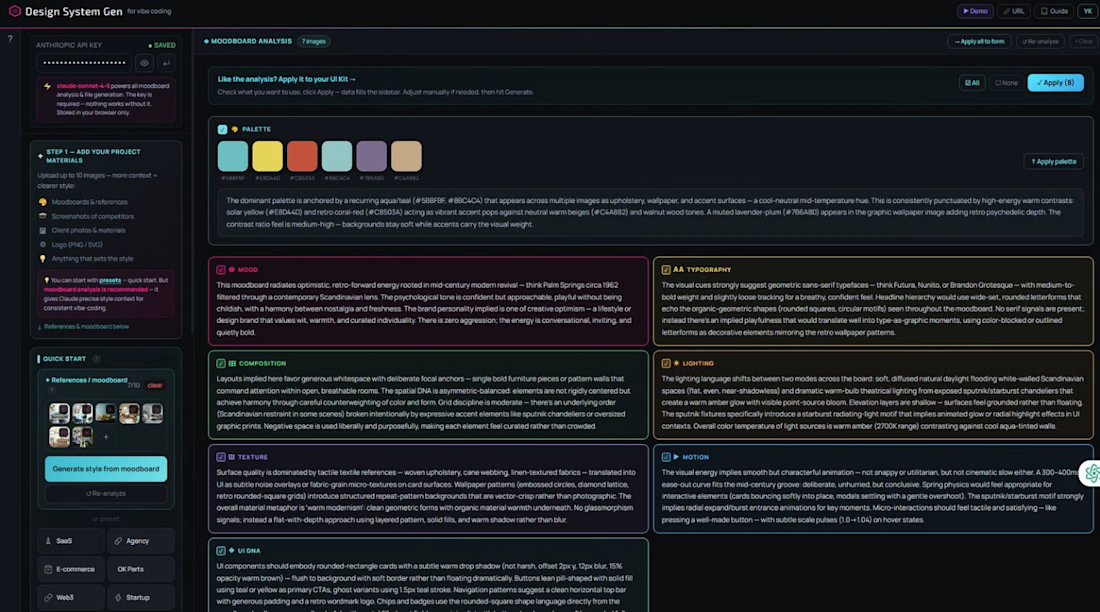
Upload the client's references → the tool analyzes them across 8 dimensions:
Palette / Mood/ Typography/ Composition/ Lighting/ Texture/ Motion/ UI DNA
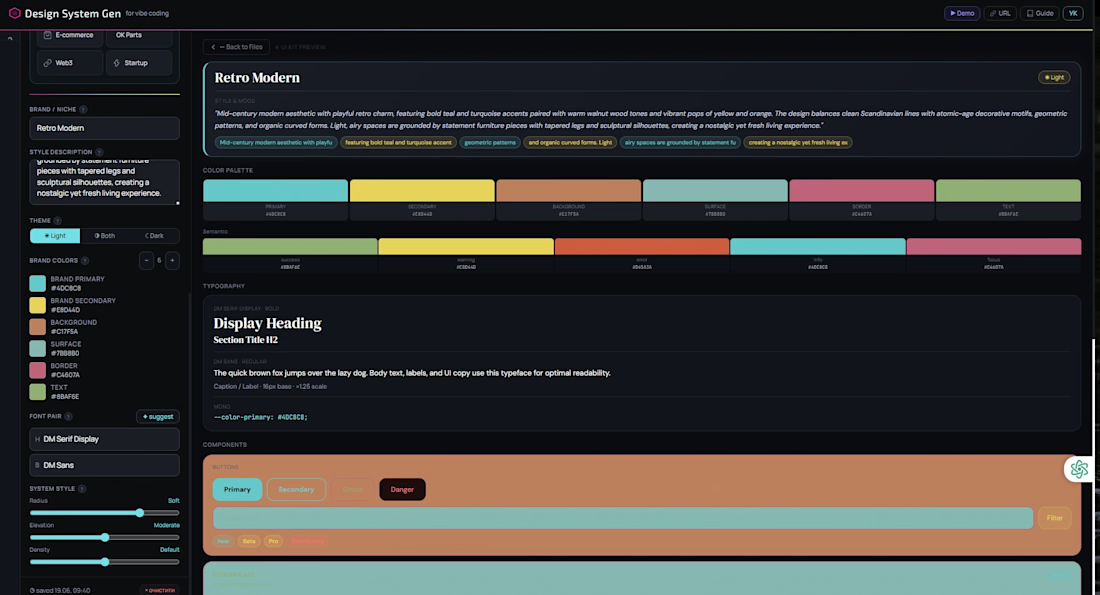
Hit "Apply all to form" — the entire design system form fills automatically.
Then generate. You get 11 files, each tailored to a specific AI tool:
File:
figma-make.md For Figma Make Full design system context — paste once, build everything in Make
design-system.css Any project All tokens as CSS custom properties, ready to import
tokens.json Figma Variables W3C Design Tokens — import directly to Figma Variables
starter.tsx React / Next.js React component starter with all tokens already bound
cursorrules Cursor Cursor AI rules — drop in root, it knows your design system
Claude.md Claude Projects Claude reads it automatically every session
DESIGN.md Documentation Human-readable design decisions and rationale
llms.txt Any LLM Machine-readable brand context, like robots.txt but for AI
components-api.md Dev reference Component props, variants, and usage documentation
prompts.md All AI tools Ready-made prompts for every AI tool in your stack
web-skills.md Component library in vanilla HTML/CSS — buttons, cards, modals, nav
Every tool gets its own customized kit — tokens, rules, prompts — all consistent with each other. Not one generic output. A separate file per tool.
Figma Make Integration
In Figma Make: add two files at the start of a session and you're ready to build immediately.
Because the design system context is already loaded — Figma Make knows your colors, tokens, spacing, component rules — your prompts stay minimal. No need to re-explain the design system every time. You spend a fraction of the tokens you normally would.
A full landing page — generated in a single run, with remarkably few tokens spent per prompt.
No back and forth. No prompt engineering from scratch. The context file already did that.
How It Was Built
Built entirely in Figma Make + Claude.
Published as a live web app via Figma Make publish → vibecodingdsgen.figma.site
Powered by Claude API.
Claude processes the uploaded moodboard and returns structured output — design parameters, tokens, and prompt sets — all formatted specifically for each target tool.
Output connects directly to Figma Variables.
W3C Design Token format and can be imported into Figma Variables in three ways: via Tokens Studio plugin, through a Figma Make prompt, or using a custom Figma plugin — for teams who want full control over the import flow or one special file
The entire tool — UI, logic, API integration, file generation — was built and shipped inside Figma Make. No external hosting. No separate codebase.
Why I Built This
Speed — rapid kickstart for every new project, starting from the client's own references, not templates.
Consistency — every AI tool in your stack speaks the same design language from day one.
Predictable output — a base that only needs refinement, not rebuilding.
Token efficiency — a full landing page was generated in a single run.
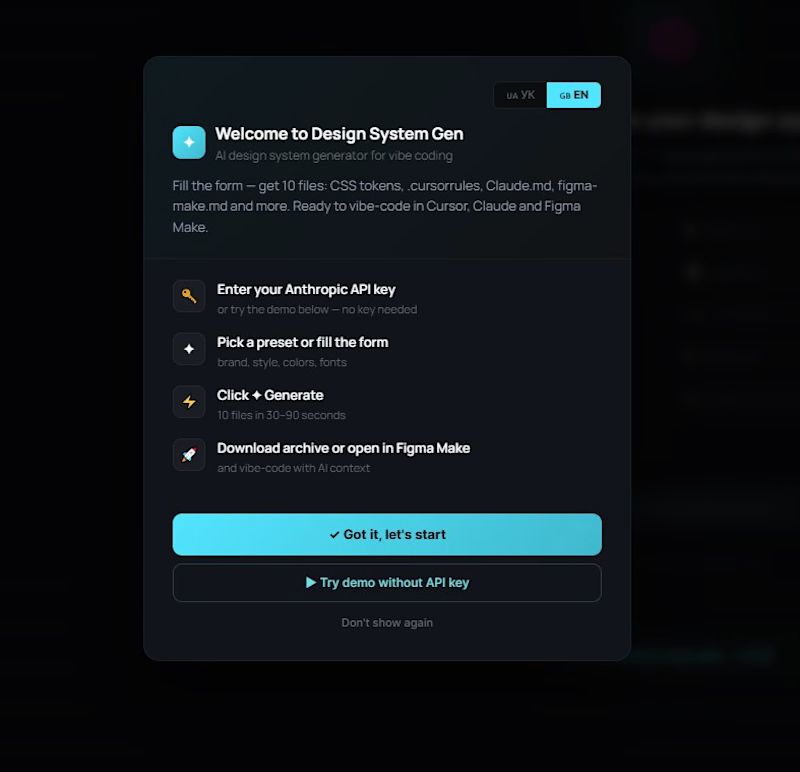
The tool is fully live — you can explore the demo without any setup.
Want to generate your own design system? Add your Claude API key directly in the tool and try it with your own moodboard. The full generation takes 3–4 minutes and produces all 11 files ready to use.
Linkedin
https://www.linkedin.com/posts/nataliatrusova_config-figma-share-7473584710724808704-YUVK/?utm_source=share&utm_medium=member_android&rcm=ACoAAAvbQN8B6uwRcvk-lCjSLHX3BLh7LL2LS0Y
#ConfigMakeathon #FigmaMake #DesignSystem #VibeCoding #ClaudeAPI


🔥🔥🔥🔥

thanks a lot

❣️❣️❣️

Love this! "One moodboard → a ready-to-use design system in one click" is exactly the kind of friction-killer the whole industry needs. The separate-file-per-tool approach is genius. 🔥
Yes, I like this idea too

😍😍😍
thanks a lot!!

wow! incredible tool!!
I think this approach is productive for a designer who keeps up with the times

Fantastic work! 👏 This is a very thoughtful and well-structured solution. I especially appreciate how deeply you've considered consistency and efficiency across the entire design workflow. 🚀
Thanks!
Thanks for the review. I was looking for a solution for myself and realized that this design workflow is highly productive

🚀💥
Thanks!
The network for creativity
Join 1.25M professional creatives like you
Connect with clients, get discovered, and run your business 100% commission-free
Creatives on Contra have earned over $150M and we are just getting started
Related posts

Did you know your home reflects how much you read?
Not a metaphor. A literal one.
Add a book. Set a timer. Watch your apartment slowly come alive as you read. Dust clears in real time. Rooms bloom from neglect to warmth. Stop reading and watch it all fade back.
The Problem
Most reading trackers are lists. Cold. Forgettable. They record what you have not done without making you feel anything about it. You open the app, see a number, close the app. Nothing changes inside you.
Shelf Life is built around a different belief. Your habits should live somewhere. They should breathe. They should have consequences you can see.
Your bedroom holds the book you read before sleep. Your kitchen holds the article you meant to finish over coffee. Your study holds the essay you keep putting off. Read consistently and each space blooms back to life through an organic dust clearing animation driven by your actual reading time. Neglect your reading and the dust returns. Your home becomes a mirror of your habits. Honest and quiet and impossible to ignore.
I deliberately chose not to let users upload or read books inside the app. The moment you can read inside a tracker it stops being a tracker and starts competing with the experience of actually holding a book. Shelf Life honours the ritual of reading without replacing it.
How It Was Built
I started with a design philosophy before I started with a prompt. Warmth. Craft. Human first. Every decision was made to make the user feel something not just complete a task.
The isometric apartment and all ten room images including the neglected and bloomed states for each of the five rooms were generated entirely using Figma Weave. I used Figma for rapid design ideation and layout exploration before moving into Figma Make.
In Figma Make I built the full app in React and TypeScript. The core technical challenge was the dust clearing animation. It uses an SVG mask system with organic circular spots growing via requestAnimationFrame running in parallel with the reading timer. Each spot has its own delay and duration so the reveal feels natural and alive rather than mechanical. The same spots reverse in mirror order when the room returns to neglected. The animation runs both ways. Forward when you read. Backward when you stop.
Room specific ambient music plays in each space. The bedroom has soft rain and piano. The kitchen has morning acoustic warmth. The living room has fireplace crackle. The study is near silence. Each room sounds like it feels.
Tools Used
Figma Weave for AI image generation across all ten room backgrounds
Figma for design ideation and layout
Figma Make for the full app built in React and TypeScript
The Moment That Matters
Start a reading timer. Watch your room slowly clean itself in real time. Organic dust spots grow across the image revealing the bloomed version beneath. It is not a progress bar. It is not a percentage. It is your home breathing back to life because you chose to read.
When the timer ends the room holds its bloomed state then gradually returns to neglect. The direction of the animation tells you everything about your relationship with reading that week.
Most people go quiet when they watch it happen for the first time.

Excellent presentation 👏

SPOT THE BOT, a gallery game about telling human creativity from a machine's
The problem. AI can now create almost anything, and for designers that's not abstract. The fear is that taste, judgment, the human "tell" in a piece of work no longer counts for anything. So instead of arguing about it, we made a game out of it.
The idea. Everyone gets the same prompt ("give beige a personality," "what keeps you up at 3am"), the same fixed kit of pieces, and 30 seconds. So does an AI. Every tile lands on a gallery wall, and players vote: which one is the bot? Then comes the reveal: who fooled you, and who you fooled. The constraint is the whole point. When everyone has identical pieces, the only thing separating the tiles is taste, wit, and choice, the human stuff. Right now the bot fools 72% of players, and every round feeds that number: a live, accumulating measure of where human judgment still holds the line.
The build & workflow. Designed and built end to end in the Figma ecosystem: the editor, the real-time multiplayer rounds (MAKE, VOTE, REVEAL), and the MUSEUM of every player-made tile. The asset kits (risograph, torn paper, duct tape, liquid metal, and more) were generated with Weavy.ai.
It's recursive by design: a game about spotting machine-made art, built with the machine's own creative tools. The medium is the argument.
Try it Live: Spot The Bot
Figma Community file: Community File
No sign-up. 30 seconds. Learn to see the human.


Good work!

For the #ConfigMakeathon, I built Rollroom 🎲
A desktop-only backgammon web app where you can create a room, share one link, play live 1v1, chat in real time, use voice commands, or play against a bot.
I built it with Figma Make, using Figma’s AI workflow to move from interface design to a working interactive prototype.
The idea: make a classic board game instantly playable online, without accounts, setup, or friction.
Live project:
https://poise-nest-20913441.figma.site
Good work!
Trending

Claude
Claude has entered the design space. How are you using Claude Design?

Contra University
Learn from expert creatives how to earn more using next-gen AI tools.

MagicPath
The canvas is infinite, and exploration is becoming the workflow. How are you using MagicPath?
creativeaiflow
Creative AI workflows are evolving. What tools do you use, and what are their strengths and weaknesses?
freelancerlife
Freelancer life is wins, pivots, and everything in between. What’s yours right now?