The network for creativity
Join 1.25M professional creatives like you
Connect with clients, get discovered, and run your business 100% commission-free
Creatives on Contra have earned over $150M and we are just getting started
Back to feedPost

📘 Project Title
AI Voice Assistant using Speech-to-Text, LLM API, and Text-to-Speech
🧩 Project Domain / Category
Artificial Intelligence / Natural Language Processing / Speech Processing / Web Application
📄 Abstract / Introduction
With the rapid advancement in Artificial Intelligence, voice-based systems have become an essential part of modern applications such as virtual assistants, customer support systems, and smart devices. These systems rely on a combination of Speech-to-Text (STT), Natural Language Processing (NLP), and Text-to-Speech (TTS) technologies to interact with users in a natural and efficient manner.
This project focuses on developing an AI-powered voice assistant that can listen to user input through speech, convert it into text, process the input using a Large Language Model (LLM) via API, and generate a meaningful response. The response is then converted back into speech to provide a complete conversational experience.
The proposed system eliminates the need for manual text input and demonstrates how modern AI services can be integrated to build intelligent, real-time applications. This project will help students understand API integration, speech processing, and modular system design.
🎯 Objectives
To build a voice-based AI assistant
To integrate Speech-to-Text for voice input processing
To use an LLM API for generating intelligent responses
To convert generated text into speech using TTS
To develop a user-friendly interface for interaction
⚙️ Functional Requirements
🔹 1. Audio Input (Speech Capture)
Capture user voice input using microphone
Record audio in a suitable format (WAV recommended)
🔹 2. Speech-to-Text (STT)
Convert recorded audio into text
Ensure reasonable accuracy for short sentences
Handle basic noise and pauses
🔹 3. LLM API Integration
Send user text input to an LLM via API
Receive and process the response
Ensure proper API handling (authentication, request/response)
🔹 4. Text Processing
Clean and format the text before sending to API
Optionally include system prompts for better responses
🔹 5. Text-to-Speech (TTS)
Convert AI-generated text into speech
Play the response audio to the user
Ensure clarity and proper pronunciation
🔹 6. Conversation Flow
Maintain a loop for continuous interaction
Allow user to exit using a command (e.g., “exit”, “stop”)
🔹 7. User Interface
Provide a simple interface (CLI or Web-based)
Show:
User input (text)
AI response (text)
Audio playback
🔹 8. Error Handling
Handle cases where:
Audio is unclear
API fails
No input is detected
🧠 Non-Functional Requirements
System should respond within a reasonable time (2–5 seconds)
Code should be modular and well-structured
API keys must be securely stored (e.g., environment variables)
Application should be easy to run and test
🔬 Project Workflow
Capture voice input
Convert speech → text (STT)
Send text → LLM API
Receive response
Convert response → speech (TTS)
Output audio + display text
🧪 Tasks / Implementation Steps
✅ Phase 1: Research & Setup
Understand STT, LLM APIs, and TTS
Set up development environment
✅ Phase 2: Audio Processing
Implement audio recording functionality
Store and manage audio files
✅ Phase 3: STT Integration
Convert audio input into text
Test accuracy with different inputs
✅ Phase 4: LLM API Integration
Register and obtain API key
Send requests and handle responses
Optimize prompts for better output
✅ Phase 5: TTS Integration
Convert generated text into speech
Ensure smooth playback
✅ Phase 6: System Integration
Connect all modules (STT + API + TTS)
Implement continuous interaction loop
✅ Phase 7: UI Development
Develop a simple user interface
Display input/output clearly
✅ Phase 8: Testing & Evaluation
Test with multiple voice inputs
Evaluate response accuracy and speed
📊 Evaluation Criteria
Accuracy of speech recognition
Quality of AI-generated responses
Smoothness of speech output
System response time
Code structure and modularity
User interface usability
📚 Prerequisites
Basic knowledge of Python
Understanding of APIs and HTTP requests
Basic understanding of AI/NLP concepts
Familiarity with audio processing (optional)
🛠️ Tools & Technologies
Language: Python
Environment: Jupyter Notebook / VS Code / PyCharm / Google Colab
Libraries:
Speech Processing (STT)
API handling (requests/OpenAI SDK)
Text-to-Speech (TTS)
Audio processing (OpenCV optional for UI integration)
🚀 Optional Enhancements (Bonus)
Add wake word detection (e.g., “Hey Assistant”)
Implement real-time streaming (reduce delay)
Add memory for conversation context
Develop a web app using Streamlit or Flask
Integrate with external services (e.g., weather API, WhatsApp bot)


The network for creativity
Join 1.25M professional creatives like you
Connect with clients, get discovered, and run your business 100% commission-free
Creatives on Contra have earned over $150M and we are just getting started
Trending
retrofuturism
Share your favorite designs from the past exploring the distant future. Or your own take on the aesthetic 🚀
halftone
Dots. Texture. Grain. Let's see your designs using the halftone technique.

Midjourney
Creatives are showing off what they're making with Midjourney.
colorgrade
Video editors sound off: How do you enhance the mood of your video in color grading?
Related posts

My X feed filled up with people shipping little games with the new Astra model.
When I finally got access, I started one of my own.
I made three concept images in ChatGPT first. Neon arena. Industrial pit. The kind of Smash TV energy I grew up on. Then I handed those to an agent and let it build.
What came back was playable faster than I expected. Twin-stick arena shooter. Short runs. Waves. A boss. Browser, mobile and desktop.
The first prototype took about 30 minutes and everything after has been fine tuning the gameplay and polish.
The first iterations were too easy, so I cranked up the difficulty which helped a lot.
Bolt Pit is public now if you want to try a run:
I'm working on porting it to Unity now also as I want to take advantage of the unity engine.


this is amazing
it blows my mind what you can achieve now with AI

Cookies, Craft & New Possibilities. 🍪
Exploring new concepts, visual languages, and possibilities with AI — without the typical generative look.
Direction, craft and attention to every frame.






The macro shots of the cookie texture almost don't read as AI at all, which I'm guessing was the whole point. What's your process for avoiding that generic AI sheen everyone's gotten tired of?

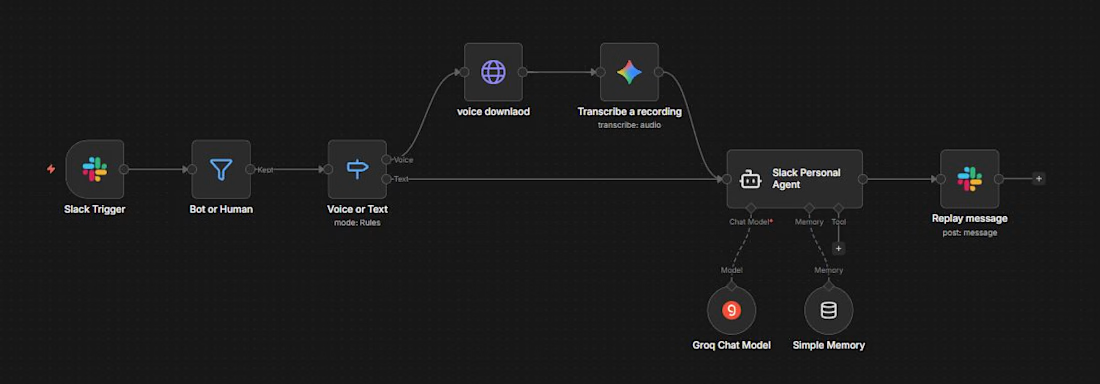
Project title: AI Voice & Text Personal Assistant for Slack
Project description:
Built a conversational AI assistant in n8n that lives inside Slack and handles both voice and text messages, giving users a personal assistant they can talk to naturally, without switching apps or typing long commands.
The problem: The client wanted a way for their team to quickly get answers or delegate tasks through Slack, including by voice, without building a separate app or bot from scratch, and needed the assistant to hold context across a conversation rather than treating every message as a one-off.
What I built:
Message filtering: Every incoming Slack message is automatically checked to filter out bot-generated messages, so the assistant only responds to real human input.
Voice and text handling: The system detects whether the incoming message is a voice note or plain text. Voice messages are automatically downloaded and transcribed into text using an audio transcription model, while text messages pass straight through, so both input types end up in the same format for processing.
Conversational AI agent with memory: The transcribed or typed message is sent to a personal AI agent (built on Groq) that generates a response. The agent uses a memory module to retain context across the conversation, so it can handle follow-up questions naturally rather than starting fresh every time.
Instant reply in Slack: Once the agent generates a response, it's posted straight back into the Slack channel, so the interaction feels like a live conversation.
Outcome: The client's team now has a Slack-native assistant that understands both typed and spoken messages, remembers conversation context, and responds instantly, no separate app, no manual transcription, no lost context between messages.



This is good