The network for creativity
Join 1.25M professional creatives like you
Connect with clients, get discovered, and run your business 100% commission-free
Creatives on Contra have earned over $150M and we are just getting started
Back to feedPost

YardRoute Pro — when the route decides the appointment
A farrier doesn’t have a normal appointment calendar.
One yard can mean several horses, each needing different work and different amounts of time. A “free” hour may be unusable if the drive to that yard breaks the rest of the day.
YardRoute turns that into a self-service booking flow.
Customers add their yard, horses and services. YardRoute calculates the visit duration and only offers windows that fit the existing route, travel time and buffers.
Routine trims and shoeing confirm automatically.
Custom or remedial work does not. The slot is held and sent to the farrier for professional judgement, pricing and approval.
Cancellations can be recovered through the waitlist, and six-week rebooking keeps the next cycle moving without routine diary admin.
Routine bookings run without the owner managing the calendar.
Professional judgement is requested only where it is genuinely needed.
Live demo:
https://yardroute-pro.lovable.app
90-second judge proof:
https://yardroute-pro.lovable.app/judge
Farrier dashboard demo passcode:
forge
Fictional challenge demo built in Lovable using Staffordshire / Cheshire sample data.
#LovableChallenge #Lovable
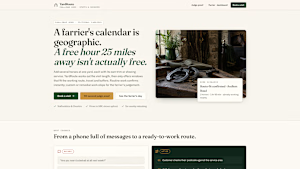
yardroute-pro.lovable.app
YardRoute Farriery — fictional demo of route-aware farrier booking
Challenge demo of a fictional Staffordshire farriery: confirmed appointments planned around the working route. Demo data only — not a real business.
The network for creativity
Join 1.25M professional creatives like you
Connect with clients, get discovered, and run your business 100% commission-free
Creatives on Contra have earned over $150M and we are just getting started



Related posts

Free Framer template alert, and this one's for the videographers 👀
Your reel shouldn't hide behind one lonely play button. So I set Footage up like a camera report.
On the home page, the reel panel GROWS as you scroll. The work page holds twelve films that play the moment you hover, and every one opens into a full CMS page with player, credits and stills.
The contact page skips the guessing game: the booking form asks for date, place and budget. Every page has a phone layout too. 🎬
Live demo: swift-flows-592376.framer.app
Get the template: https://www.framer.com/marketplace/templates/footage-videographer/
Case study: https://www.behance.net/gallery/258274211/Footage-Videographer-Portfolio-Website


Your website could be generating enquiries every day, but how many potential customers are slipping through because nobody is following up quickly or qualifying them properly?
A business owner reached out to me with exactly this problem.
Their website was collecting enquiries, but there was no consistent process for reviewing them, identifying serious prospects and responding.
So I built a system to handle that entire process.
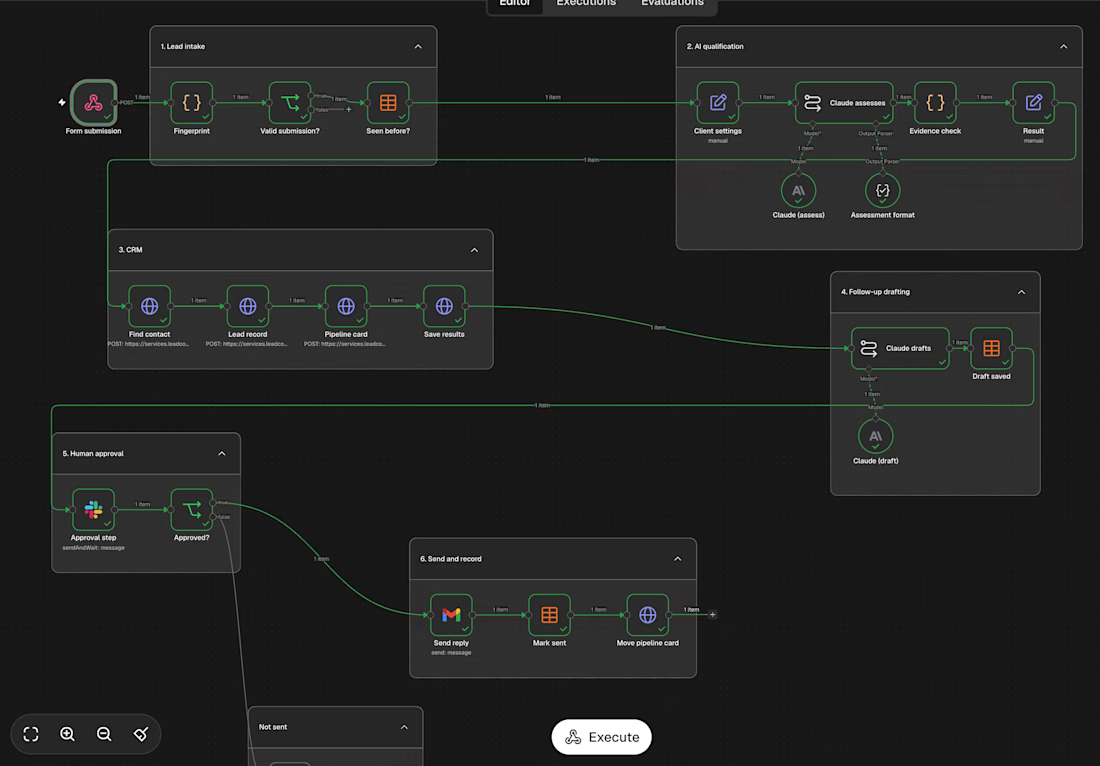
Here's what happens when someone submits an enquiry:
→ The system picks it up immediately, whether it's 2 PM or 2 AM.
→ Invalid submissions and duplicate enquiries are filtered out.
→ Each enquiry is assessed against the business's own qualification rules and classified as qualified, needing more information, or not a fit.
→ Every assessment must be supported by exact quotes from the original enquiry. Those quotes are independently verified, so unsupported claims are marked as unknown.
→ Each lead is added to the CRM with its assessment, notes and pipeline card.
→ A personalised reply is drafted based on the information provided, asking only for what's missing.
→ The draft goes to Slack for human review. A team member can approve it, edit it or reject it.
→ Once approved, the email is sent and the lead moves forward in the pipeline.
I built the entire system using n8n and Claude, with the client's existing tools and accounts.
One important detail: AI makes only two decisions throughout the entire workflow. Everything else is designed to validate those decisions and keep the process controlled, traceable and reliable.
The goal isn't simply to automate emails. It's to make sure incoming enquiries are properly handled, qualified and followed up without relying on someone to manually manage every step.
If you're a business owner, founder or agency owner looking to improve how your business handles incoming leads, send me a DM.
Let's build something around your business.


Nice project👍

Landing Page Design Concept for a Live Touring Platform
Tourline is a landing page design concept for a booking platform that turns an agent's inbox into one live record per show: holds, offers, routing, contracts and settlement.
How it's built:
Hero is a real-time 3D concert stage in Three.js. Scroll moves the show through its lifecycle: hold, offer, advance, show night, settle.
Custom volumetric light beams written as a GLSL shader, with real spotlights lighting the stage and crowd, bloom, lens glare and dust caught in the beams.
The LED wall, side screens and LED floor are live canvas textures. The headline renders on the wall, then breaks into LED dots as you scroll.
Beam choreography runs at 124 BPM with four lighting modes, and the camera responds to the cursor.
ScrollTrigger and smooth scroll drive the section reveals, route drawing and the interactive inbox.
If you book tours for a living, what is the one thing you would change here? Or tell me what you would build next.


Breaking the headline into LED dots as you scroll is a lovely way to tie the copy to the stage. With that much going on in the hero, how did you keep it light on mid-range laptops? Did you cap the pixel ratio or turn some of the bloom and glare off?