The network for creativity
Join 1.25M professional creatives like you
Connect with clients, get discovered, and run your business 100% commission-free
Creatives on Contra have earned over $150M and we are just getting started
Back to feedPost

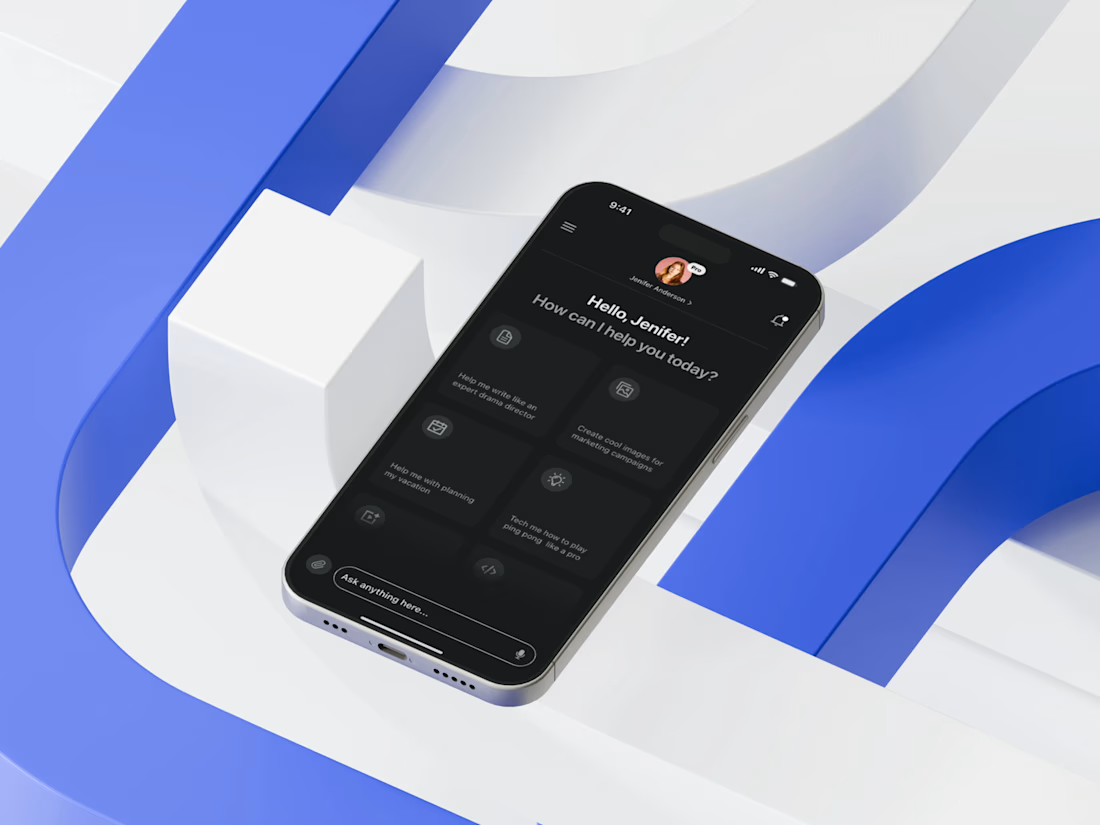
Today I’m excited to share the home screen of an AI Tool Mobile App I recently designed — a space where clarity meets intelligent user flow. My core focus was to simplify decision-making by placing the most frequently used actions upfront, reducing cognitive load and ensuring the user never feels overwhelmed by the depth of AI capabilities.
I approached the layout by first mapping real user intentions: quick prompts, saved actions, and high-impact shortcuts. Then I crafted a modular card structure that adapts visually without breaking hierarchy. The dark theme wasn’t just aesthetic — it enhances visual comfort, especially since AI interactions often involve prolonged reading. I prioritized accessibility through high contrast, consistent spacing, and thumb-friendly tap zones to support seamless single-hand use.

The network for creativity
Join 1.25M professional creatives like you
Connect with clients, get discovered, and run your business 100% commission-free
Creatives on Contra have earned over $150M and we are just getting started





Related posts

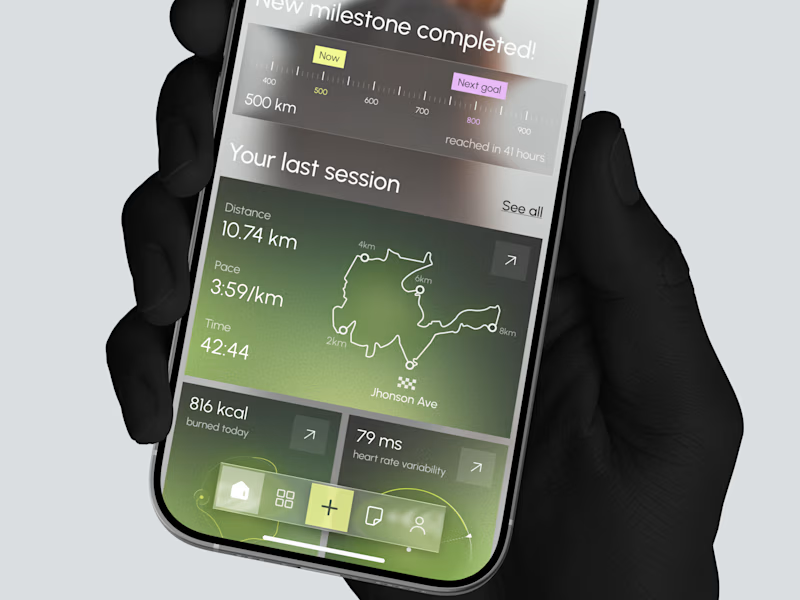
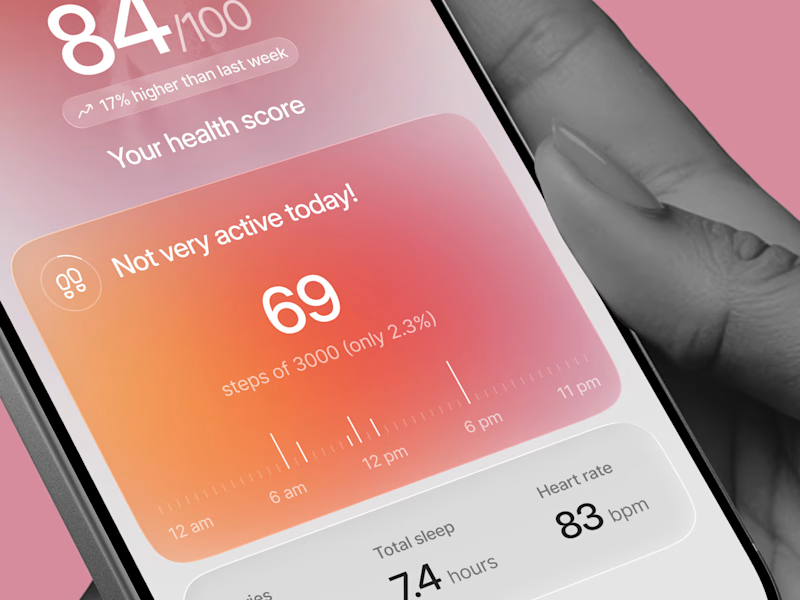
Designed two directions for a health tracking app
Same data, but two very different feelings
One is dark and focused, built for athletes. The other is warm and friendly, built for everyday people
What do you think?
Which one would you open every day, A or B?
21 voted
39%
33 voted
61%
54 votes
Closed

Option 1 gave me a very fin-tech feel and option 2 feels like my health is in danger, sorry 😂

A self-initiated product: a booking and ordering system for a billiard club in Tbilisi. I designed it in Figma from scratch and built all of it, from the interface to the database.
Guests call the club and nobody answers. They arrive and every table is taken. They want food and wait at the bar. Side Pocket moves all of that to the website.
Key decisions
No guest accounts. A booking needs a name and a phone number. The guest gets a private link to move, extend or cancel. The link is the account.
A 15-minute hold. Guests check in with "I'm at the table." A table nobody claims goes to the waitlist, and the next person gets the same 15 minutes.
Ordering tied to the table. Guests order from their phone during the game, add time themselves and see the bill as it grows.
One screen for staff. Every table's state for the night, late arrivals and orders to serve pinned to the top, bookings and orders boards, alerts in Telegram.
A Telegram bot. It understands "table for 4 tonight at 8" in English or Russian and finishes the booking with buttons.
Scope
Guest site with live availability, single and group booking, waitlist, private booking page, table page with menu, cart and bill, email confirmations and reminders, staff dashboard, Telegram bot.
Stack
React 19, TanStack Start, TanStack Router and Query, Tailwind 4, Radix UI, Supabase Postgres with row-level security, pg_cron, Brevo and Resend, Telegram Bot API, Vitest.
Business rules sit in plain functions, separate from the UI and the database, with 73 tests. Only server functions touch the database.
My role
Product design, UI design, front-end, back-end, database, integrations.
Live demo: side-pocket.lovable.app
Built for the #LovableChallenge by @Contra and @Lovable. #BuiltWithLovable😊


nicety accomplished.. great work

Paws & Pour: 3D Interactive Booking for Experiential Cafés 🐾
Business Name: Paws & Pour Cat Café
Location: Kemang, South Jakarta
Archetype: Appointment-based Experiential Café
Realistic Problems:
The solo owner is drowning in WhatsApp DMs and playing "table tetris" every single day. Customers don't just want any table; they want to sit near specific resident cats (like Mochi or Pepper). Additionally, due to high demand, the café strictly caps visits at 30, 60, or 90-minute sessions. This causes endless back-and-forth messaging, manual double-booking errors, and frustrated walk-ins.
I transformed a chaotic, manual DM-based reservation process into a self-serve, mobile-optimized 3D map, allowing guests to independently secure their exact table, time slot, and preferred cat companion instantly.
Fixing the Front Door :
To turn an inbound inquiry into a confirmed booking with zero effort from the owner, I completely redesigned the customer-facing booking flow. Instead of a boring, standard form, I built an immersive 3D seating map where customers can:
- Pick Their Vibe: Visually explore the café layout and select a specific cozy corner. See where their favorite resident cats are currently hanging out on the map.
- Lock in the Rules: Select precise session lengths (30, 60, or 90 minutes) during the booking process, automatically setting expectations.
- Book Anywhere: Experience a flawless, fully mobile-optimized booking journey directly from their phone.
The Impact:
The owner’s manual work goes from hours of coordinating schedules, answering DMs, and managing table assignments to zero. The real-time admin portal automatically handles availability, updates the seating chart, and tracks guest sessions. The owner can finally focus on running the café and taking care of the cats instead of staring at a screen.
Lovable Public Link: https://paws-and-pour-cafe.lovable.app/
Social Post: Check on twitter!
#lovable #catcafe #cat #webdesign

3D interaction while booking looks great!