The network for creativity
Join 1.25M professional creatives like you
Connect with clients, get discovered, and run your business 100% commission-free
Creatives on Contra have earned over $150M and we are just getting started
Back to feedPost

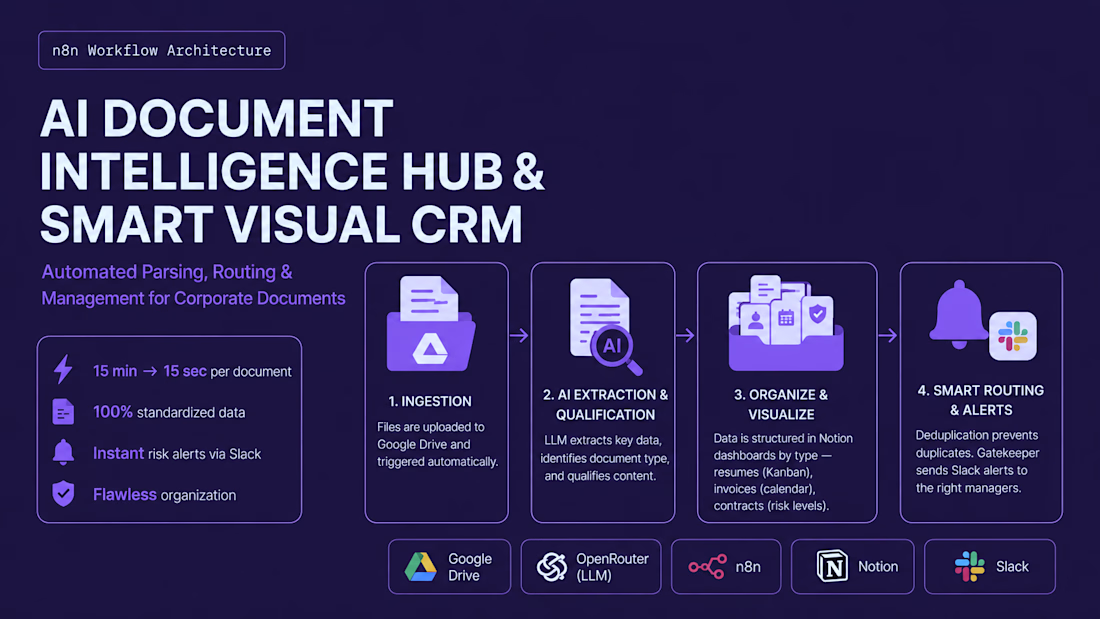
AI Document Intelligence Hub & Smart Visual CRM
Problem: Client lost 15 mins/file manually entering data, causing messy Google Drives, lost candidates, and missed legal risks.
Solution: Built an automated n8n + LLM pipeline that:
• Extracts Data: AI reads PDFs (CVs, invoices, contracts) to pull key metrics.
• Organizes Files: Auto-renames Drive files (e.g., [CV]-Name.pdf).
• Notion CRM: Syncs data to visual Kanban boards with risk tags.
• Slack Alerts: Pings teams about top candidates or high-risk terms.
Impact: Slashed processing to 15 seconds/file with 100% automated risk detection.


The network for creativity
Join 1.25M professional creatives like you
Connect with clients, get discovered, and run your business 100% commission-free
Creatives on Contra have earned over $150M and we are just getting started

Challenges
View all


Related posts

🚀 Automated Lead Management System
I built an automated lead management workflow using n8n that captures incoming leads, stores them in Google Sheets, and instantly notifies the sales team on Telegram.
Capture → Enrich → Score → Save → Notify
Built to reduce manual work, improve response time, and prevent missed leads.
#AI #Automation #n8n #CRM #LeadManagement

Nice work sir,
Sir we can Build this normally with App script. I just Built yesterday.
Where Google sheet will received the leads from any channel + store and distribute as per described assignment rules and notify with lead details to respected person.

What if your PC could actually listen, understand, and do the work for you?
I’m building that idea into something real.
Meet AURA — my personal AI voice assistant for Windows.
Instead of building another chatbot that only answers questions, I’m experimenting with an AI agent that can actually interact with my computer and help with everyday work.
So far, AURA can:
• Have live voice conversations
• Convert speech to text and respond with voice
• Open applications like Excel, Power BI, Chrome, and Windows Settings
• Search the web and YouTube through voice
• Perform basic PC and file operations
• Understand requests through Gemini
• Execute actions through a safety-controlled automation layer
• Continue listening after completing a task
But this is only the beginning.
My long-term goal is to make AURA understand my actual workspace — including what’s happening on my screen and inside applications — so I can simply say:
“Open my Excel file, check the sales data, clean the date column, and add a formula for total revenue.”
And let AURA handle the workflow.
I also want it to become useful for my own Data Analytics work — from Excel and Power BI workflows to repetitive desktop tasks, research, and automation.
I’m building AURA with Python, AI, voice technologies, desktop automation, Excel, Power BI, and LLMs, while keeping safety and human control at the core.
It’s still far from the final vision.
But that’s exactly what makes the project interesting.
I’m not just learning how AI agents work.
I’m trying to build one that I can actually use every day.
Building in public. Learning by building. 🚀
#AI #AIAgents #Python #AIAssistant #VoiceAI #DesktopAutomation #DataAnalytics #PowerBI #Excel #Automation #BuildInPublic


The screen-reading step is where I would put the guardrail. Once AURA can read what is in the window, everything on that screen is input - and a page it opened from a voice search can hold a sentence written to be read as an instruction. I spent a while trying to rob my own...

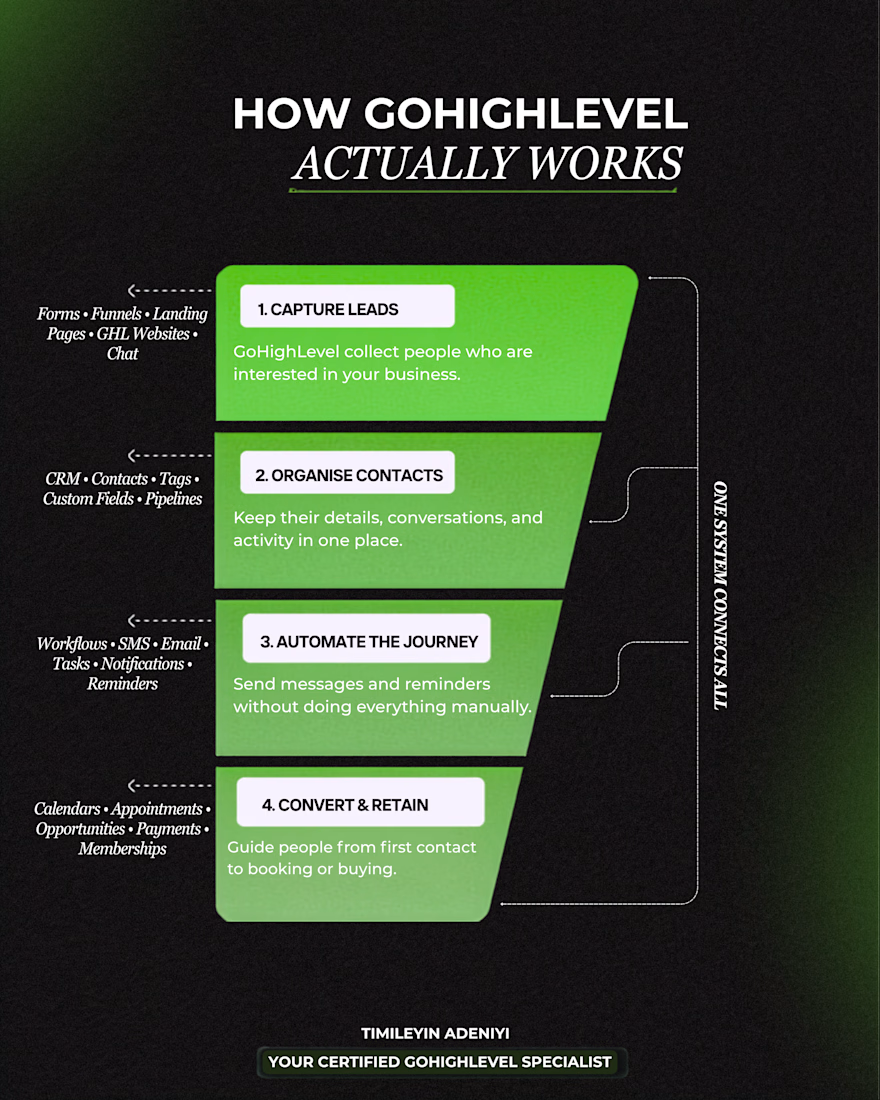
Here’s how the system actually works.
A stranger sees your offer.
They click.
They become a lead.
But getting the lead is only the beginning.
The system now needs to know:
Who are they?
Where did they come from?
What are they interested in?
What have they done so far?
Then things start to branch.
If they respond → someone follows up.
If they book → the conversation changes.
If they don't respond → they enter another follow-up.
If they show buying intent → sales gets involved.
If they buy → they leave the sales journey and enter another one.
And all of this can happen without someone manually checking every lead.
That's the part of automation I find interesting.
It's not really about sending emails or SMS.
It's about building a system that reacts to what people do.
Traffic comes in.
Data gets collected.
Behaviour creates signals.
Signals trigger decisions.
Decisions create actions.
That's the dynamic behind a well-built CRM and automation system.

Hey, I built the entire application end to end. The real challenge inside the CRM automation is the perfect stages tagging along each stage if & else coordinations.
I built the entire wireframe. I can share with you.