The network for creativity
Join 1.25M professional creatives like you
Connect with clients, get discovered, and run your business 100% commission-free
Creatives on Contra have earned over $150M and we are just getting started
Back to feedPost
There's a specific moment every freelancer knows: blank editor, client deadline, no template to start from.
Stripo covers the full path from an empty canvas to an exported, tested, client-ready email. 26 steps sounds like a lot. In practice, most of them take under a minute once you know where they are.
Here's the short version of the workflow:
Set your General Styles first (fonts, colors, spacing, button styles). Everything you add after this inherits those rules automatically. No more fixing inconsistencies stripe by stripe.
Build your structure. Header with logo and menu, content stripes for your body, footer with socials and unsubscribe. Drag-n-drop or code, your choice.
Fill it in. Text, images, banners, buttons, product cards, countdown timers, video. Each one is a block you drag into place.
Personalize. Merge tags, Display Conditions for showing different content to different segments, all inside the same template.
Test before you send. Preview on desktop and mobile, run accessibility checks, verify dark mode rendering. This is where most freelancers skip steps and most client complaints come from.
Collaborate. Share a review link with the client, collect comments inside the editor, get approval without a single screenshot or email chain.
Export. One click to 90+ ESPs. Mailchimp, HubSpot, Klaviyo, Gmail, Outlook, whatever the client uses.
Save what you built. Headers, footers, product cards, entire sections. Save them as modules, reuse across every future project.
The full walkthrough with screenshots for every step: https://stripo.email/blog/how-to-build-an-email-with-stripo-manual-a-to-z/
What part of the email production process eats the most of your time?

stripo.email
How to build an email with Stripo. Manual from A to Z — Stripo.email
Learn about the main Stripo features from A to Z to create your emails from the ground up.📈

I feel confident having my editable template base designed in Stripo ready to export. It was an exciting experience.
I do have one reservation or rather an fear that has prevented me from proceeding with the export.
When designs are exported to platforms with more rigid design...


Good question. Two things to separate here:
If you're exporting a finished email and sending it as-is, the design should come through intact. Especially if you're using one of Stripo's direct integrations (Mailchimp, HubSpot, Klaviyo, etc.), the API connection adjusts the code...
This clears all my doubt, Oleksii, I'd go ahead and give it a trial and would be sure to give you a feedback of my experience
The network for creativity
Join 1.25M professional creatives like you
Connect with clients, get discovered, and run your business 100% commission-free
Creatives on Contra have earned over $150M and we are just getting started











Related posts

A welcome email is more than a quick “thanks for subscribing.”
It's your first opportunity to start building a relationship with a new subscriber.
When planning a welcome email, I focus on four things:
→ A warm introduction: Let subscribers know who you are.
→ Clear expectations: Tell them what kind of emails they'll receive.
→ Something valuable: Give them a useful tip, resource, or helpful next step.
→ One clear CTA: Guide them on what to do next.
You don't need to say everything in one email.
Start the relationship, deliver value, and make the next step clear.
A good welcome email doesn't just greet subscribers. It gives them a reason to stay.
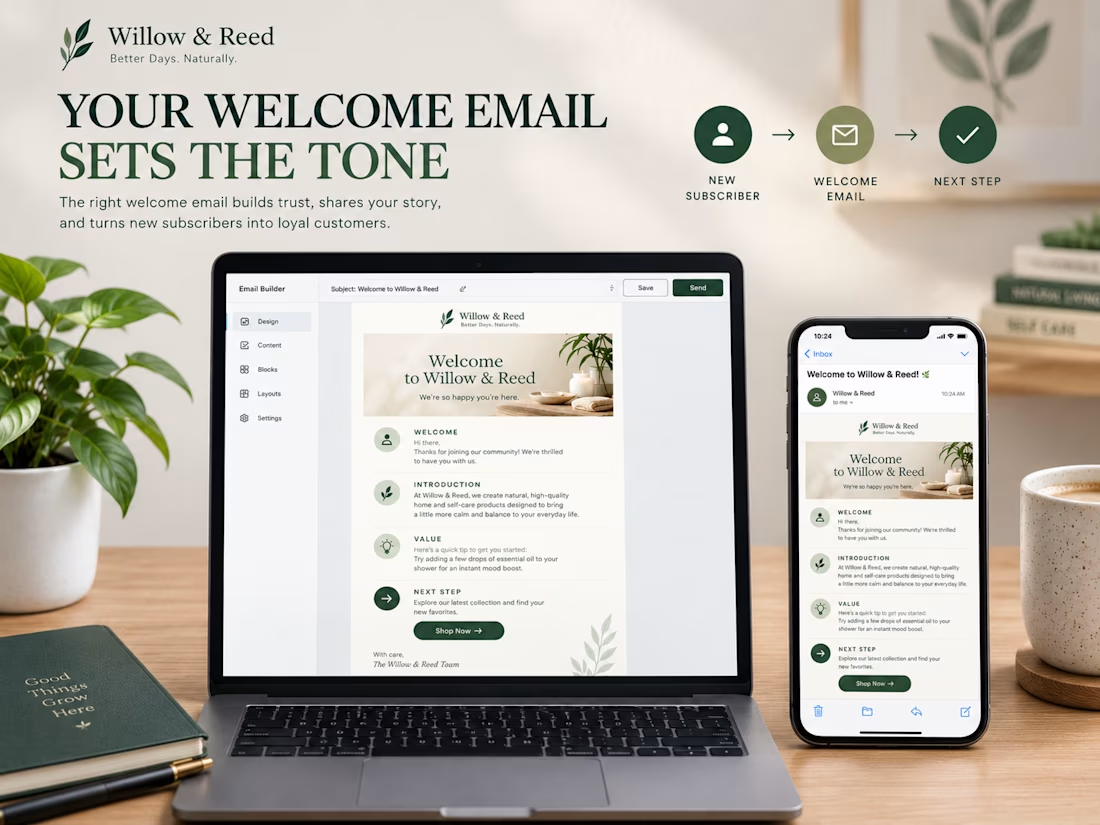

That’s a great point! A welcome email should build trust and give subscribers a reason to stay, not just say hello. 🙌

Hi Contra Family,
🚀 Just launched: Scalient on Webstudio!
Clean design. Bold vibes. Smooth experience. ✨
I built this website individually using Webstudio, focusing on a modern layout, clear content structure, and a responsive design.
💻 Platform: Webstudio
🎨 Focus: Website Design & Development
⚡ Goal: Create a professional digital presence that stands out.
Got a website idea? Let’s make it happen! 🚀
#Webstudio #WebDesign #WebDevelopment #UIDesign #Contra #Freelancer

Congrats on the Scalient launch, Rohit. Was Webstudio easy to build this in?

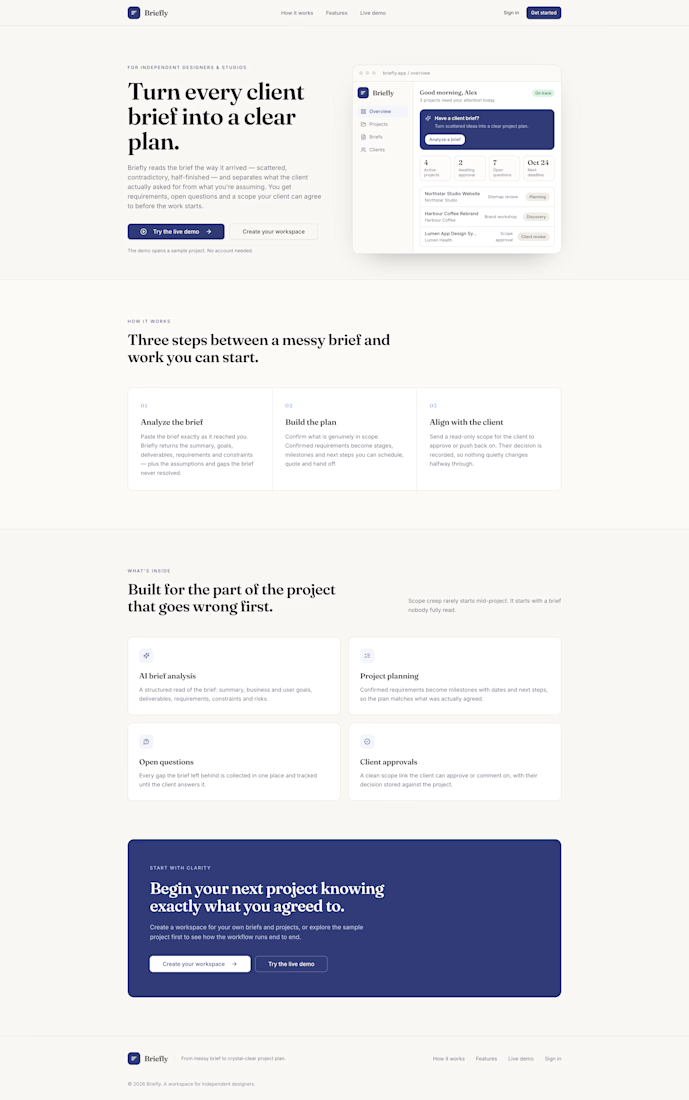
Briefly From Messy Brief to Crystal-Clear Project Plan
An AI-powered project-planning and client-alignment workspace for designers, developers, freelancers, and agencies.
The problem
Great projects don't always start with great briefs.
A client sends a few messages, shares a rough idea, or explains their requirements across emails and calls. Important details are missing. Deliverables are unclear. Deadlines and expectations haven't been confirmed.
Designers, developers, freelancers, and agencies end up spending valuable time chasing information, organising requirements, defining scope, and trying to get everyone on the same page before the actual work can begin.
When these early conversations aren't structured, misunderstandings can turn into scope creep, delayed timelines, and difficult client conversations.
The solution
Briefly helps turn an unstructured client brief into a clear, actionable project plan.
Instead of starting from a blank document, users can bring their client's initial requirements into one workspace, use AI to analyse the brief, identify missing information, and organise the project into a structured plan.
Briefly also supports client review and approval, helping teams create a clearer starting point before moving into delivery.
Who is Briefly for?
Briefly is designed for:
Freelance designers and product designers who need to turn client requests into clear scopes, milestones, and deliverables.
Developers and independent consultants who need to clarify requirements and expectations before building.
Small and mid-sized agencies that want a more consistent way to structure project intake and align teams with clients.
Creative studios and cross-functional teams working on websites, digital products, branding, and other client projects.
Whether you're working alone or coordinating a small team, the goal is the same: reduce ambiguity before the work begins.
How it works
1. Start with the brief
Bring in the client's initial project description, even when it is incomplete or loosely structured.
2. Analyse with AI
Briefly helps organise the requirements, identify project goals and deliverables, and surface unanswered questions that need clarification.
3. Create a project plan
Turn the analysis into a structured plan with milestones and relevant project details. Review and edit the plan before saving it.
4. Save and organise the project
Keep the project plan and its key information in a dedicated workspace, where you can return to it and continue refining the work.
5. Share for client review
Generate a private review link so the client can review the proposed plan and submit an approval. The goal is to establish clearer expectations before delivery begins.
What makes Briefly different?
Briefly focuses on the often-overlooked moment between receiving a client's idea and starting the actual work.
It's not just about generating text with AI. It's about creating a practical bridge between an unclear request and an agreed project direction.
The experience brings brief analysis, project planning, editing, saved project information, and client review into one workflow.
Built with Base44
Briefly was built as a responsive web application using Base44. The product includes a public landing page, an authenticated workspace, project and brief workflows, AI-powered brief analysis, saved project plans, and private client review links.
During testing, I verified the core journey: authentication, brief analysis, editing and saving a project plan, persistence after refresh, client review and approval, and protected workspace access. I also addressed a navigation issue and refreshed the editor's mobile preview to verify the responsive layout.
Product vision
I want Briefly to become a practical starting point for better client projects helping independent professionals and agencies spend less time chasing clarity and more time delivering great work.
The bigger vision is simple:
Every project deserves a clear beginning.
Briefly turns messy briefs into clearer plans, better questions, and more confident project kickoffs.
Live application: https://briefly-plan-pro.base44.app


This is such a needed tool Irshad! "Great projects don't always start with great briefs" - so relatable! Every freelancer knows the pain of rough client messages turning into scope creep. AI-powered alignment workspace for designers/devs/agencies is a brilliant solve for Base44...