The network for creativity
Join 1.25M professional creatives like you
Connect with clients, get discovered, and run your business 100% commission-free
Creatives on Contra have earned over $150M and we are just getting started
Back to feedPost
It started with a simple request. A client told us their team was still typing invoices into a spreadsheet by hand, one by one, and asked if there was a better way.
At DZ Labs we like that kind of problem: small, real, and something people deal with every single day. So I built Invoice Register.
You give it a PDF invoice, and a few seconds later the data is sitting in a Google Sheet: supplier, dates, totals, and every line item in its own row. It works with digital invoices and with scanned ones too.
In the video you can see the whole trip: I upload a PDF, the API answers with the structured data, the rows show up in the spreadsheet, and the service is running live in the cloud.
Here is what I used to build it:
Python 3.12 and uv to manage the project and its dependencies
FastAPI and Uvicorn for the API
Pydantic to define and validate what an invoice looks like
pdfplumber to read text from digital PDFs
pdf2image, Poppler and Tesseract to read scanned invoices with OCR
LangChain and Claude to turn raw text into structured data
gspread and google-auth to write into Google Sheets
LangSmith to trace every run and see what the model did
pytest for the test suite And here is what I used to deploy it:
Docker to package the app with its system dependencies
Cloud Build and Artifact Registry to build and store the image
Google Cloud Run to run it, scaling down to zero when nobody is using it
Secret Manager to keep the API keys out of the code I will be honest: writing the code was the comfortable part. Getting it to production is where I learned the most. When the data belongs to someone else, security stops being optional. The service runs without any key files, the API is private, and every secret lives outside the code. What I enjoyed most was not the technology. It was knowing that someone will get back hours of their week. Next steps: a simple frontend for uploads, background processing, and automated deployments. If your team is still doing something by hand that a computer should be doing, I would love to hear about it.
#Python #FastAPI #LangChain #GoogleCloud #CloudRun #AI #DZLabs


Since you're tracing runs in LangSmith, I'd separate debugging metadata from invoice contents. Can you follow a failed extraction using a document ID and error details without recording supplier or line-item data in the trace?

Yes. I’d keep the trace focused on what’s needed to debug, not on the invoice itself. Each run is tagged with an internal document ID (a hash, not the file name), the pipeline stage, the model and prompt version, latency, tokens and the error type. For validation failures, I log...
The network for creativity
Join 1.25M professional creatives like you
Connect with clients, get discovered, and run your business 100% commission-free
Creatives on Contra have earned over $150M and we are just getting started








Related posts

Built SpeedPulse AI — an automated website performance teardown and local client acquisition engine.
Most local businesses lose over 35% of their mobile conversions due to slow load times and missing Google SEO schema. Auditing each client manually took hours, so I automated the entire process on Base44:
⚡ Real-time Core Web Vitals, Local SEO & UX friction score dials
🔄 Dynamic Before/After sprint projections (gliding scores from 45 to 91+)
📄 Automated Executive PDF brief generation
🤖 Built-in Agency CRM that captures incoming leads, tracks stages, and auto-drafts client proposals with one-click copy
Live App: https://speedpulse-flow.base44.app


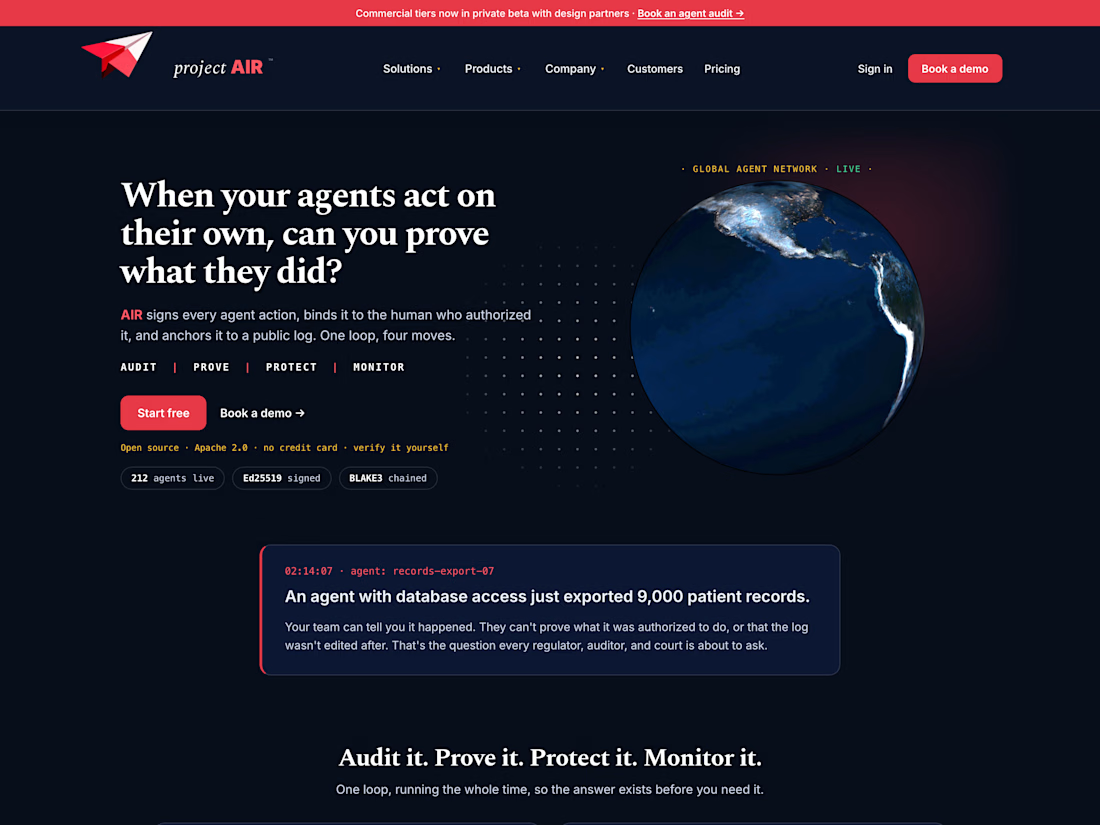
Project AIR is an open-source toolkit that keeps a tamper-proof record of what AI agents do. Every action an agent takes gets signed, chained to the step before it, and tied to the person who authorized it. The chain is anchored to Sigstore Rekor, a public transparency log, so anyone can check later that nothing was changed or deleted. When something goes wrong, you can show exactly what happened and who approved it, instead of just saying it happened.
It also runs 16 detectors over every record, covering all ten risks on the OWASP Top 10 for Agentic Applications, three from the OWASP list for LLM apps, and three of its own. It can stop an agent mid-action until a person signs off. It plugs into LangChain, LlamaIndex, and the OpenAI, Anthropic and Gemini SDKs with a line or two of code.
I built the Python library and command-line tool, published on PyPI as projectair (now at version 1.3.1) under the Apache 2.0 license, plus the website and dashboard in SvelteKit. We run it on our own infrastructure too: every request to vindicara.io is recorded and anchored to Rekor every minute.



Impressive work! 👏 Excellent approach to AI agent security, tamper-proof audit trails, and human oversight for more trustworthy AI systems.

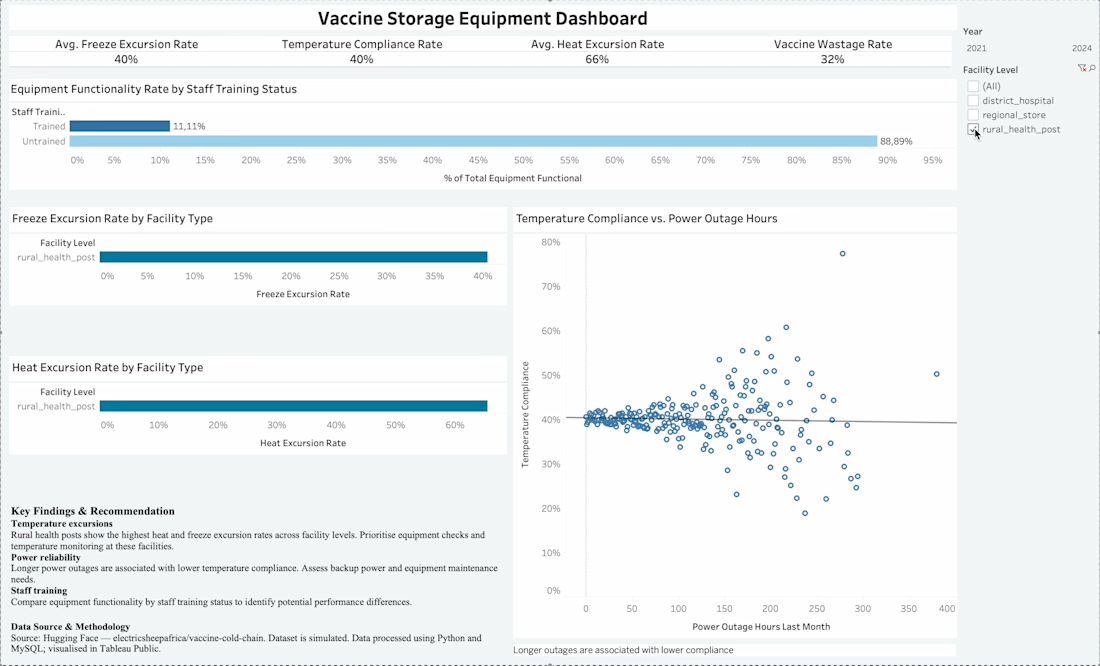
Understanding Vaccine Cold-Chain Performance
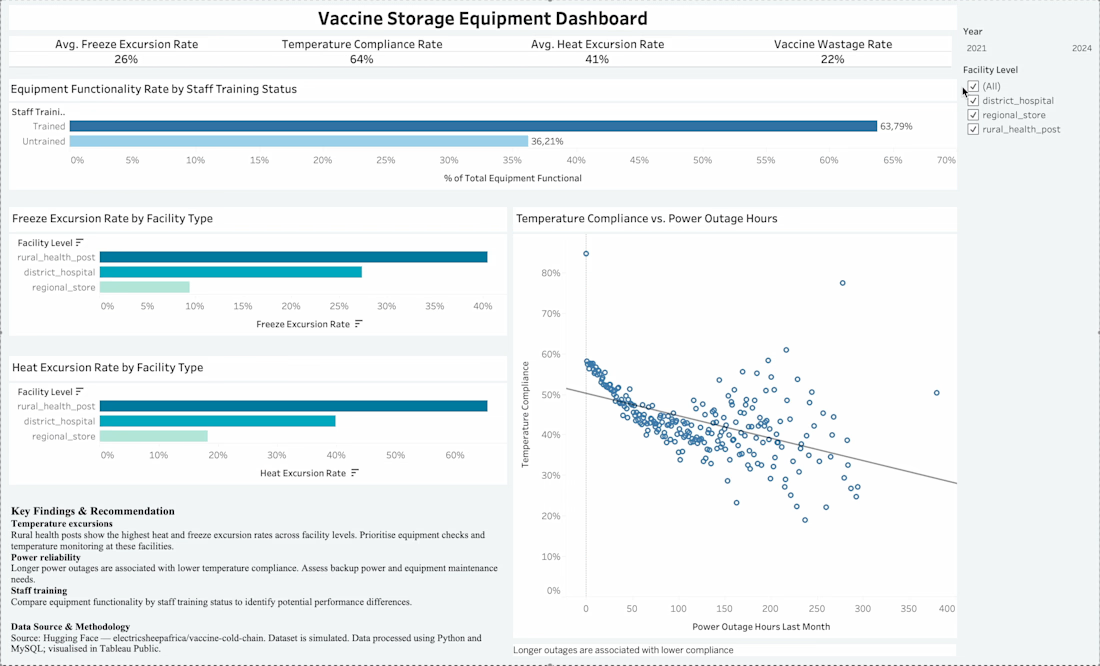
I used stimulated data to examine the effect of storage equipment and associated variables on vaccine excursion.
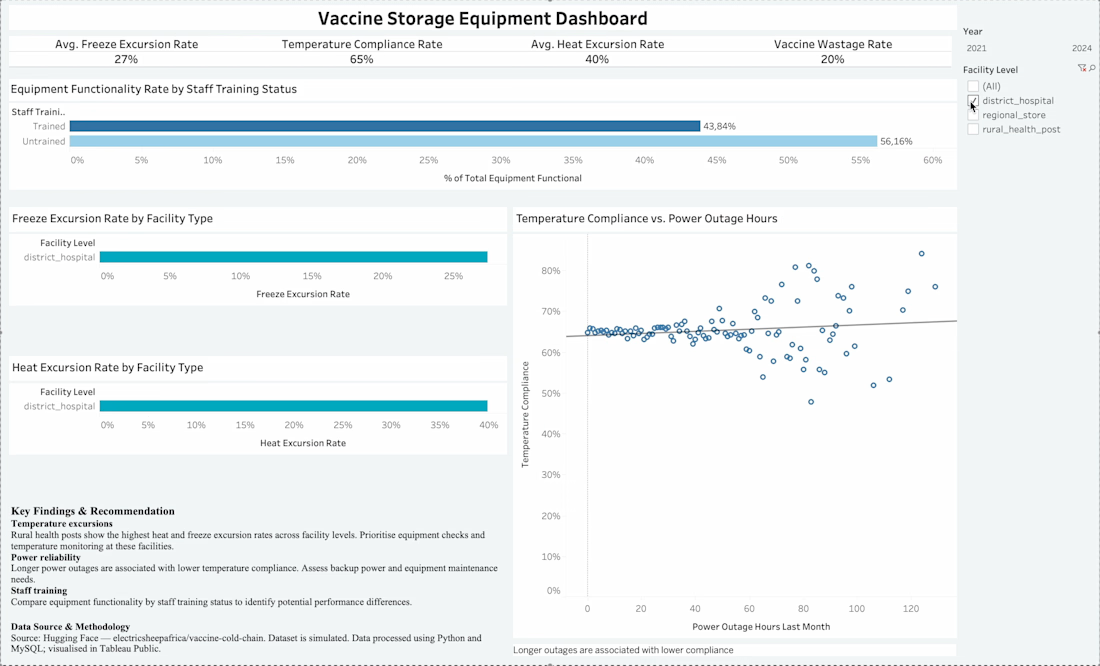
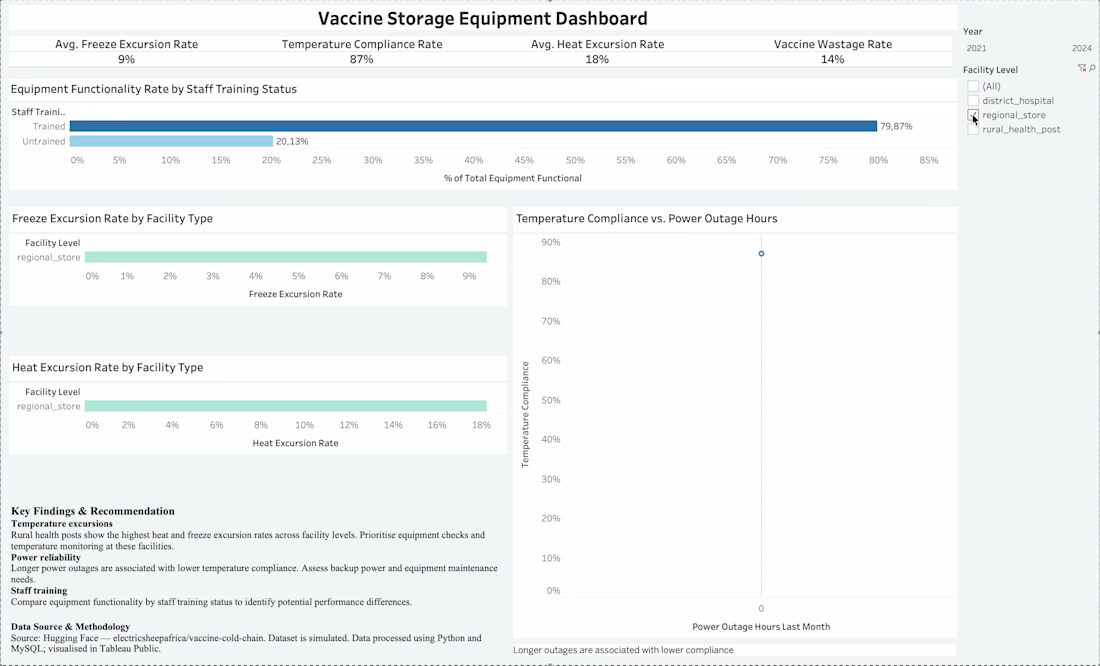
I downloaded the Vaccine Cold Chain Management dataset from Hugging Face using Python. I organized and combined the data from regional vaccine stores, district hospitals, and rural health posts using MySQL, then used Tableau Public to build an interactive dashboard exploring equipment functionality, staff training, temperature compliance, vaccine wastage, and power outages.
Three key insights were uncovered.
Rural health posts recorded the highest heat and freeze excursion rates.
Longer power outages were associated with lower temperature compliance.
Reliable equipment alone isn't enough. Staff training and proper maintenance matter too.



Very interesting 👌