The network for creativity
Join 1.25M professional creatives like you
Connect with clients, get discovered, and run your business 100% commission-free
Creatives on Contra have earned over $150M and we are just getting started
Back to feedPost

The viral flash-cut edit is usually a video you can't touch.
Generate a clip. Speed it up 400%. Hope it looks right. If one flash is off, you generate again.
So I rebuilt it as an effect instead.
Here's what I built, and why.
It's a live effect, not a generated clip.
I directed an AI agent to write a custom shader inside invideo Editor. It runs on your own footage, on the timeline. Nothing gets regenerated. You change it and it updates.
It explodes the cuts, not the whole video.
The flashes fire only in the first and last split second of each clip. So every cut becomes a burst, and the middle of each shot plays clean. Your story stays readable. The cuts hit hard.
Twelve looks, shuffled 24 times a second.
High-contrast black and white. Negative. X-ray. Red halftone. Chromatic split. Clone echo. Slit scan. Pixel mosaic. A fake error readout. White and black strobe frames. Punch zoom. Grain and dust.
Every few frames it picks a new one at random. That's the chaos people screenshot.
Every piece has a slider.
Cuts per second. Burst length. One slider per look. Accent color. A shuffle button for a new random mix. Want it calmer? Drag two sliders. No re-render, no new prompt.
I tested it on a 30-second football spec ad I made. Cut it into 21 shots, dropped the effect on, and every cut flashed.
What didn't work, because you should know:
The AI video didn't land every cut exactly where I scripted it, so a few bursts fire a few frames early. The red halftone look reads dim on some footage and needs tuning. And it's all built and checked from still frames so far. Motion is the real test.
Why build it at all?
Because the effect people keep asking "how did you make that" about shouldn't take hours of manual keyframes. It should take one effect and a few sliders.
invideo Editor is free to try.
The network for creativity
Join 1.25M professional creatives like you
Connect with clients, get discovered, and run your business 100% commission-free
Creatives on Contra have earned over $150M and we are just getting started

Challenges
View all


Related posts

BEYOND THE VEIL ✨
What started as two simple fantasy scenes became a completely different world.
For this challenge, I wanted to create a cinematic transition where reality itself feels like it’s breaking apart before revealing another world.
Instead of manually building every layer, mask, distortion, and reveal, I directed invideo Editor’s AI agent to build the effect directly on my timeline. I could describe the look I wanted, let the agent handle the heavy lifting, then refine the result myself until it felt right.
That made the process way easier — I could focus more on the creative direction and less on the repetitive technical work.
From original forest → reality fracture → celestial world.
Built with invideo Editor. 🎬✨
invideo Editor is free to try
@Invideo @invideo.creators #invideoeditor


Wow🫨

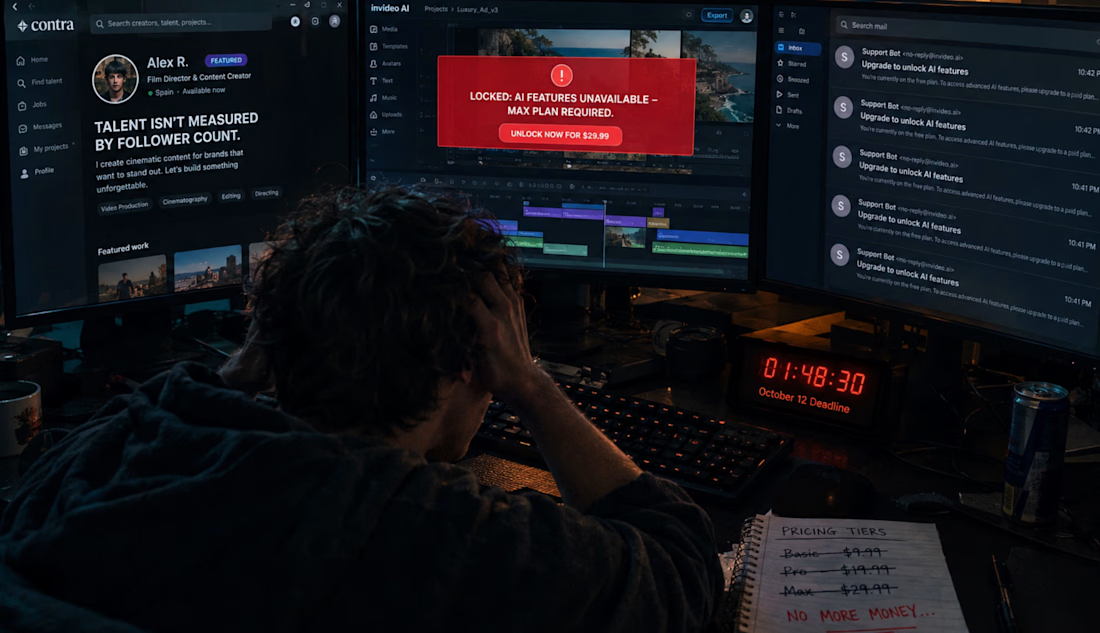
Hey @invideoio and @contra, stop using small creators to farm free marketing data while running what looks like a total engagement scam.
Your #invideocontrachallenge promises an $11K prize pool and explicit access to a Max plan upgrade. I did my part. I submitted my workspace ID days ago. Contra even went ahead and featured my post publicly on the platform to boost their own metrics.
But behind the scenes? Total fraud.
You locked me out of the AI editing tools. You ghosted every single support ticket. And when the October 12 deadline is hours away, your garbage AI chatbot "Eva" sends me multiple automated emails telling me to go to the subscription page and PAY out of pocket for the tools you explicitly promised for free.
Are you seriously using a community challenge to bait-and-switch new users into forced paid upgrades?
This is disgraceful behavior. You are deliberately freezing out starter profiles and technical talent because you only care about corporate optics and ultra-well-known creators with big follower counts. Talent isn't measured by a follower count 🪵✨.
I am not filling out another useless form. I am not talking to another broken AI bot. A HUMAN community manager needs to wake up, check your support inbox, and manually unlock my Workspace ID right now. Stop hiding and fix my account.

Thank you for the info. I was just starting and now I will reconsider.
