The network for creativity
Join 1.25M professional creatives like you
Connect with clients, get discovered, and run your business 100% commission-free
Creatives on Contra have earned over $150M and we are just getting started
Back to feedPost

Project title:
Le Gatte Nails & Beauty — Give It A Glow
Business:
Le Gatte Nails & Beauty, Piazza Tito Minniti 6, Isola, Milano — family-run nail & beauty salon operating since 2006, owned by Federica Barazzetti.
The problem:
Le Gatte has a loyal, engaged following on Instagram (1,900+ followers) but no unified way to actually book — customers were bouncing between Treatwell, Fresha, Uala, or just calling, with no lead capture and a dated standalone website.
What I built:
A fully redesigned, mobile-first live site on Base44 — hero, services with pricing, gallery, reviews, and a direct booking flow — replacing the fragmented multi-platform setup with one home base built around how customers actually search for the salon.
Live product:
https://gatte-isola-nails.base44.app
The automation:
Booking form submissions are saved to a Bookings database with timestamp, then automatically open a pre-filled WhatsApp message straight to the salon's real number — giving the owner instant notification and a persistent dashboard of every request, instead of digging through chat history across four different platforms.
#GiveItAGlow @Base44
Outreach:
Sent directly to the business owner via WhatsApp with the live link, offered free of charge.


The network for creativity
Join 1.25M professional creatives like you
Connect with clients, get discovered, and run your business 100% commission-free
Creatives on Contra have earned over $150M and we are just getting started




Related posts


Cards or sections? How should you showcase courses on a Kajabi website?
It depends on what you want visitors to see first.
Course cards are great when you want to show the full picture at a glance – “Here are all the programs we offer.” They make the product range clear before visitors start scrolling.
Separate sections work better when each course needs more attention – its story, audience, benefits, and outcomes.
When we design Kajabi websites, we don’t use one layout for every course.
We choose the structure that makes the offer easier to understand – and easier to explore.

28 voted
65%
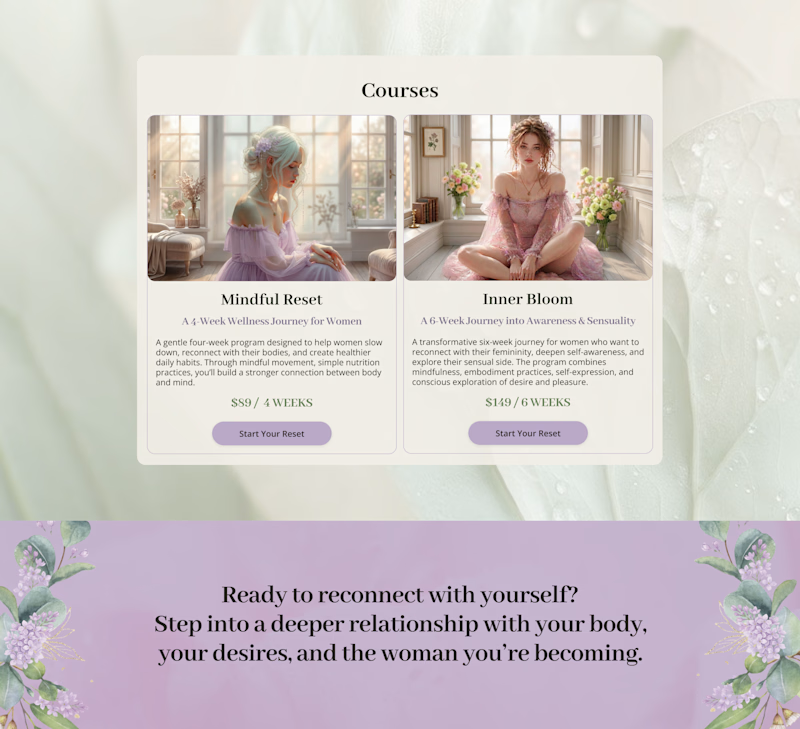
15 voted
35%
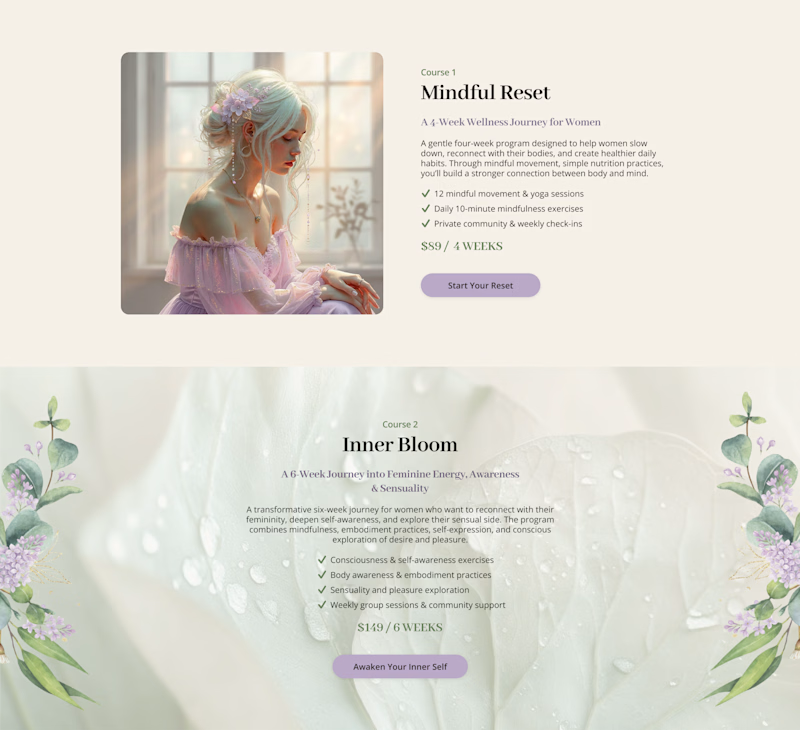
43 votes
Closed

Cards

Claude + After effects (Here’s the exact 5 prompts, copy them) 🧵
Prompt 0: Setup
Approach: Computer Use - from now, henceforth.
Setup: After Effects is open on Screen 2.
Goal: Configure the project and create 4 working comps, named Scene 1 through Scene 4, before anything is built. All 4 comps use the settings below.
Project settings:
Color depth: 16 bpc
Linear blending on Comp settings:
Resolution: 2880x1620, square pixels
Frame rate: 30fps
Background: warm Don't ask any questions. Build.
Prompt 1: Plan the radial scene
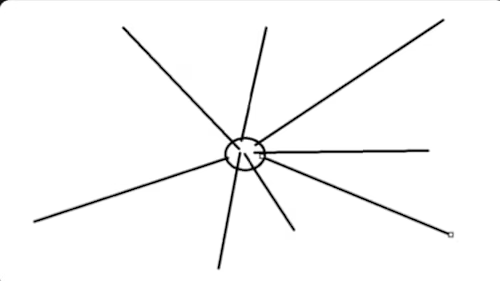
Setup: Same project and comp. Plexus installed. Reference: Sketch
(see first comment for the sketch btw).
Goal: A radial plexus matching the sketch. All vertices start at a single centre point and spread outward in 3D. Lines grow from the centre to each endpoint. Each endpoint carries a different image. Camera with depth of field.
Reading the sketch:
The circle is the origin. Every line starts there, none connect to each other.
Line lengths and angles vary on purpose. Keep that irregularity, don't make it a perfect starburst.
The sketch is 2D, but the build is 3D. Some lines should push toward and away from camera, not just across the frame. Current state: Nothing built for this scene yet. Constraints:
Do not touch the project. Planning only, no computer use. Approach: Consider the best possible way of achieving this. It should be able to be edited realtime as well. Prioritize using plexus Output: A recommended approach with reasons. I'll approve before you build.
CONTINUES IN COMMENT

(Attached is Prompt 1's reference image btw)
Prompt 2: Animate Scene 1 line connections
(i went back to creating the first scene)
Setup: Switch to the Scene 1 comp. Park the Scene 2 plan, we'll return to it.
Goal: Lines animate their connections, drawing from one vertex to the...

Sonder One: product site for a repairable headphone
Sonder One is a headphone built to be taken apart, so this site shows it that way. As you scroll, the headphone comes apart piece by piece, from the finished pair down to its six parts, with each part labelled as it separates.
The site responds to the mouse throughout. The custom cursor holds a small sound wave that grows as you move faster. Headlines are made of soap bubbles that float up under the cursor. Guide boxes with live coordinates follow the pointer, and product photos tilt and catch the light as you pass over them.
There are three pages: Object, Anatomy and Specifications, with smooth transitions between them and a reserve form on the last page. A light and dark mode lets you view the product in chalk white or graphite.
Built with React, GSAP ScrollTrigger, Lenis, Three.js and Vite.

Good work!