The network for creativity
Join 1.25M professional creatives like you
Connect with clients, get discovered, and run your business 100% commission-free
Creatives on Contra have earned over $150M and we are just getting started
Back to feedPost

Al-Mashawi — Restaurant Operations Management System
Overview
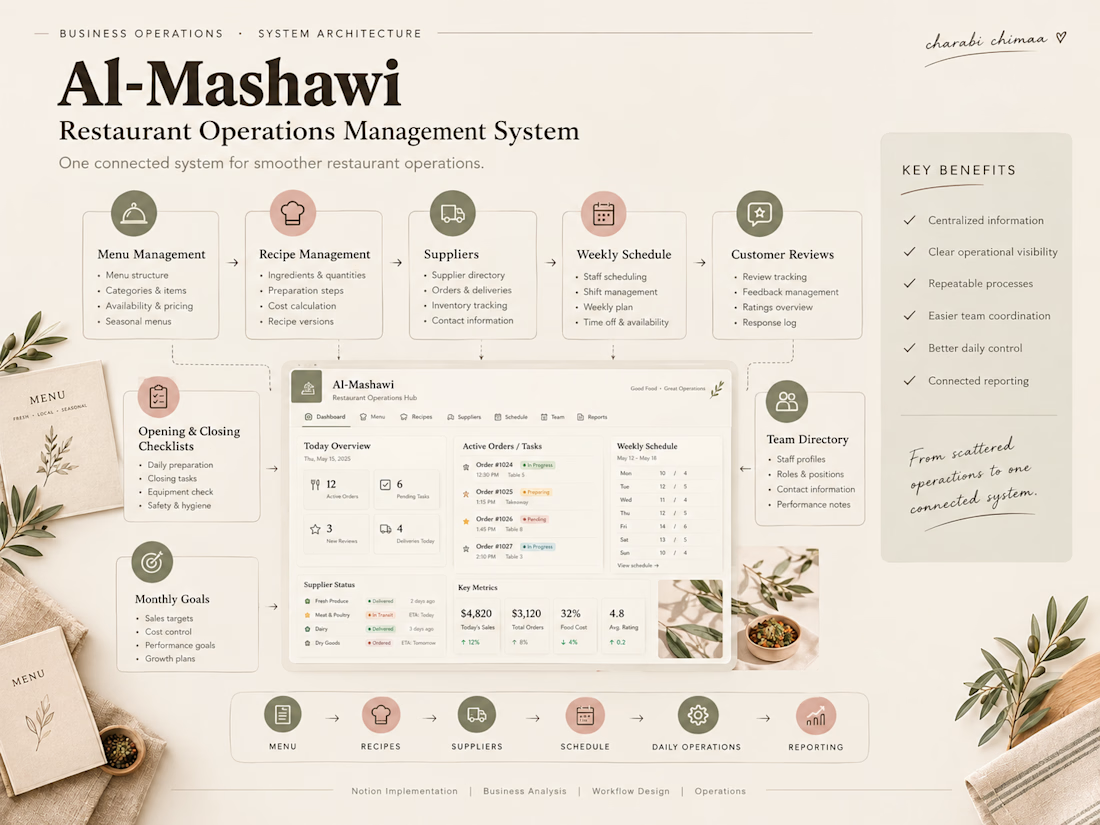
Al-Mashawi is a portfolio project demonstrating how a restaurant's operational information can be organized into one connected Notion system.
The goal was to create a centralized workspace for managing recurring operational information while improving visibility across different areas of the business.
Business Context
A restaurant manages many interconnected areas at the same time — from menus and recipes to suppliers, schedules, team information, checklists, goals, and reporting.
The system was designed to bring these areas together into a more structured operational workspace.
System Areas
The workspace includes:
Operations Dashboard
Menu Management
Chef Directory
Recipe Management
Supplier Management
Weekly Scheduling
Customer Reviews
Opening & Closing Checklists
Monthly Goals
Weekly P&L Reporting
Team Directory
Workspace Documentation
Approach
The system was structured around the relationship between operational information rather than treating each area as an isolated page.
The goal was to create a practical operating hub where recurring information could be easier to access, maintain, and manage.
Outcome
The result is a centralized restaurant management workspace that connects day-to-day operational information into one organized system.
Project Type
Portfolio / Demonstration Project
Created to demonstrate Business Operations, Workflow Design, Database Architecture, and Notion system-building capabilities.

The network for creativity
Join 1.25M professional creatives like you
Connect with clients, get discovered, and run your business 100% commission-free
Creatives on Contra have earned over $150M and we are just getting started











Related posts

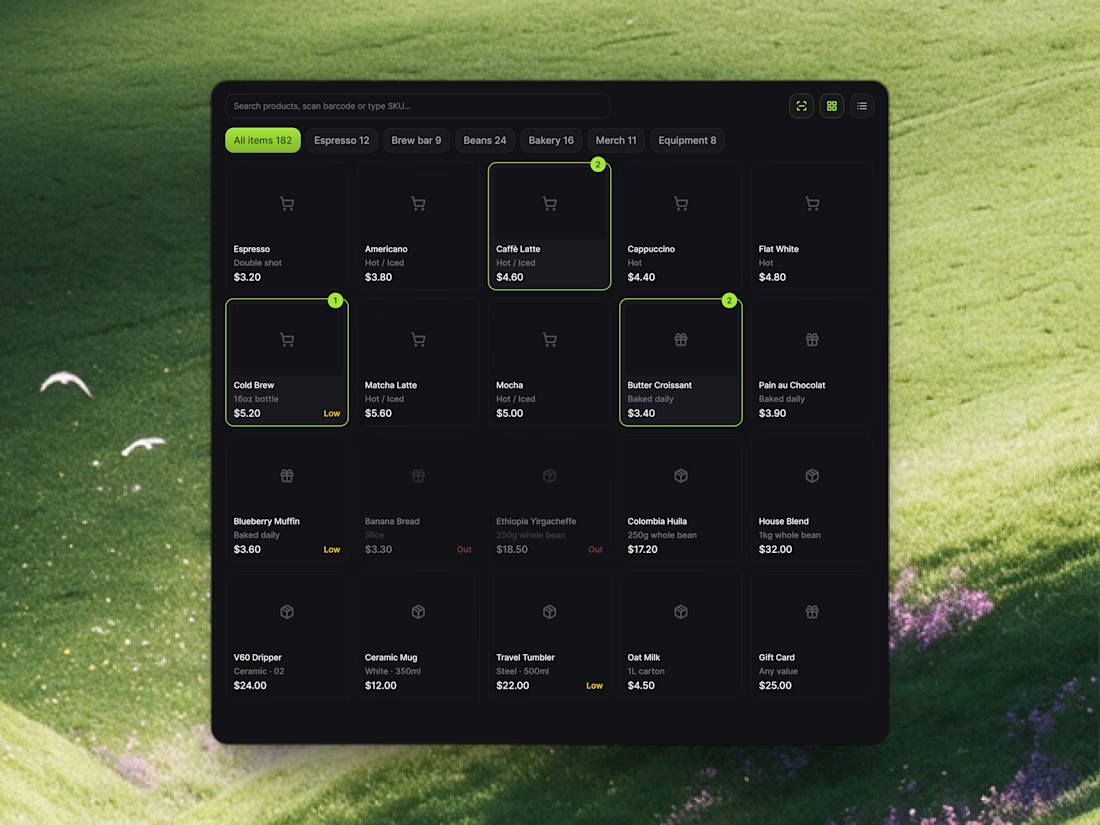
Streamlining Store Operations with Relivo ⚡️☕️
Managing a busy cafe or retail store shouldn't mean drowning in chaotic order tickets or guessing daily profit margins. With Relivo, we engineered modular UI cards that turn sales analytics, checkout confirmation, and inventory tracking into a seamless visual experience.
Highlights of the UI snippet components:
• POS Item Grid: Categorized menu tabs (Espresso, Brew Bar, Bakery) with active item badges and real-time stock alerts.
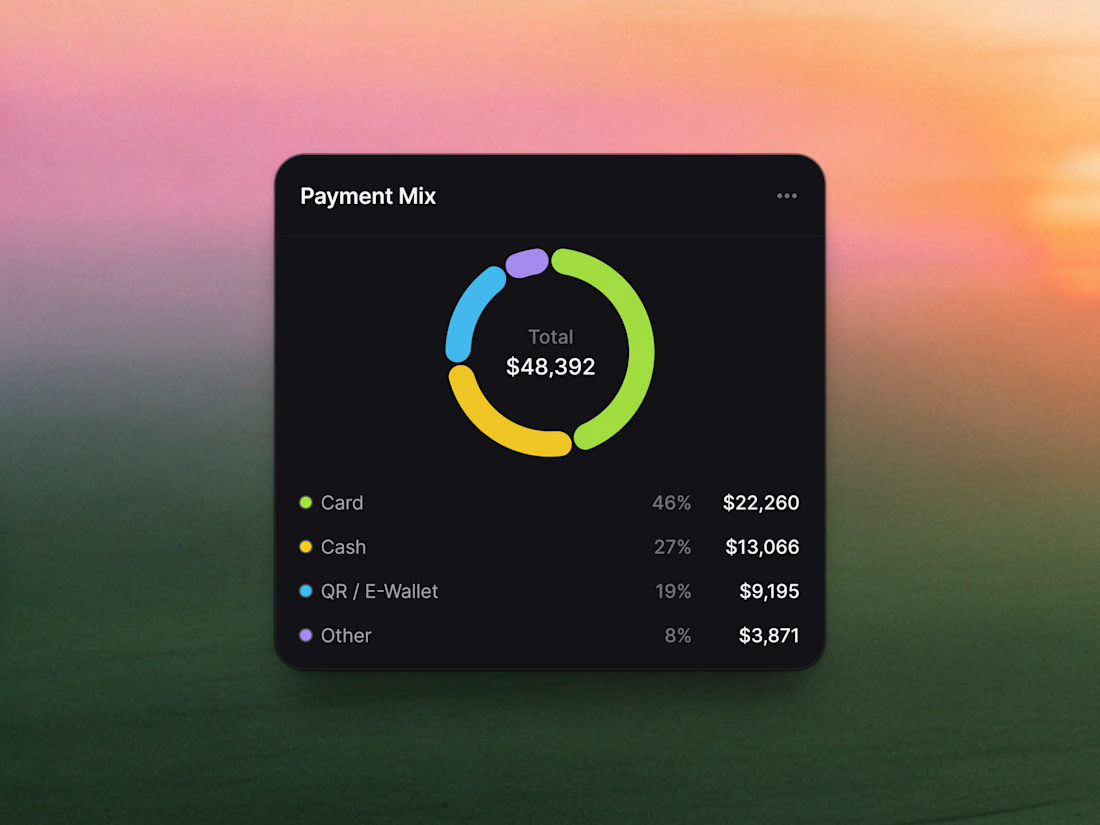
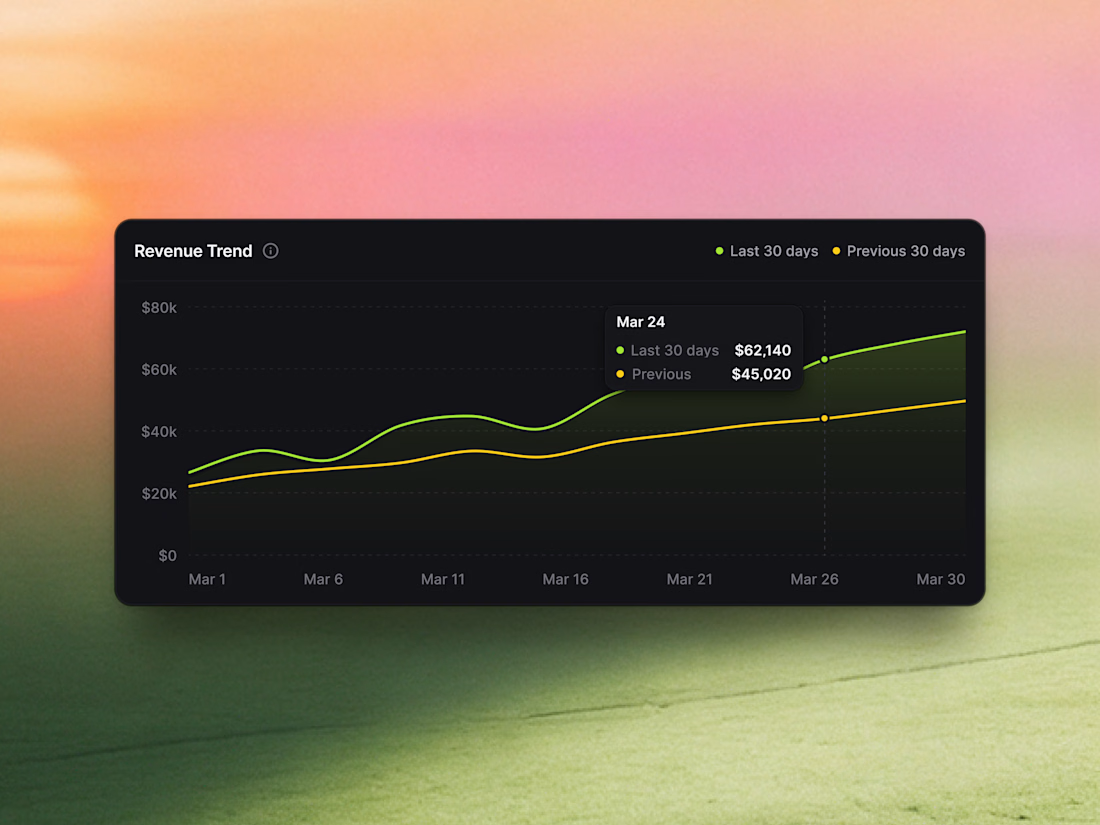
• Sales Analytics: Segmented payment mix distribution and 30-day comparative revenue trendlines.
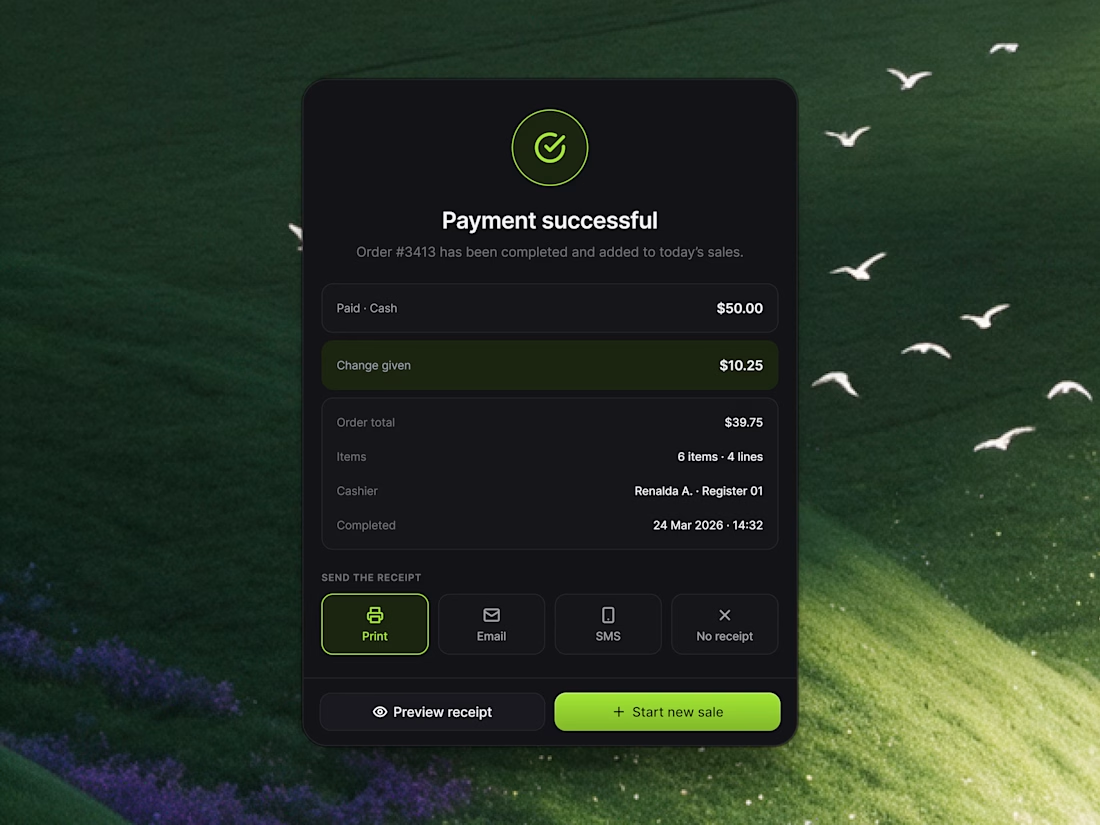
• Payment Successful Modal: Instant receipt options (Print, Email, SMS) and one-click "Start new sale" action buttons.
Take a look at the attached 4 snippet cards to explore the layout and typography details!
Would love to hear your thoughts in the comments! 👇


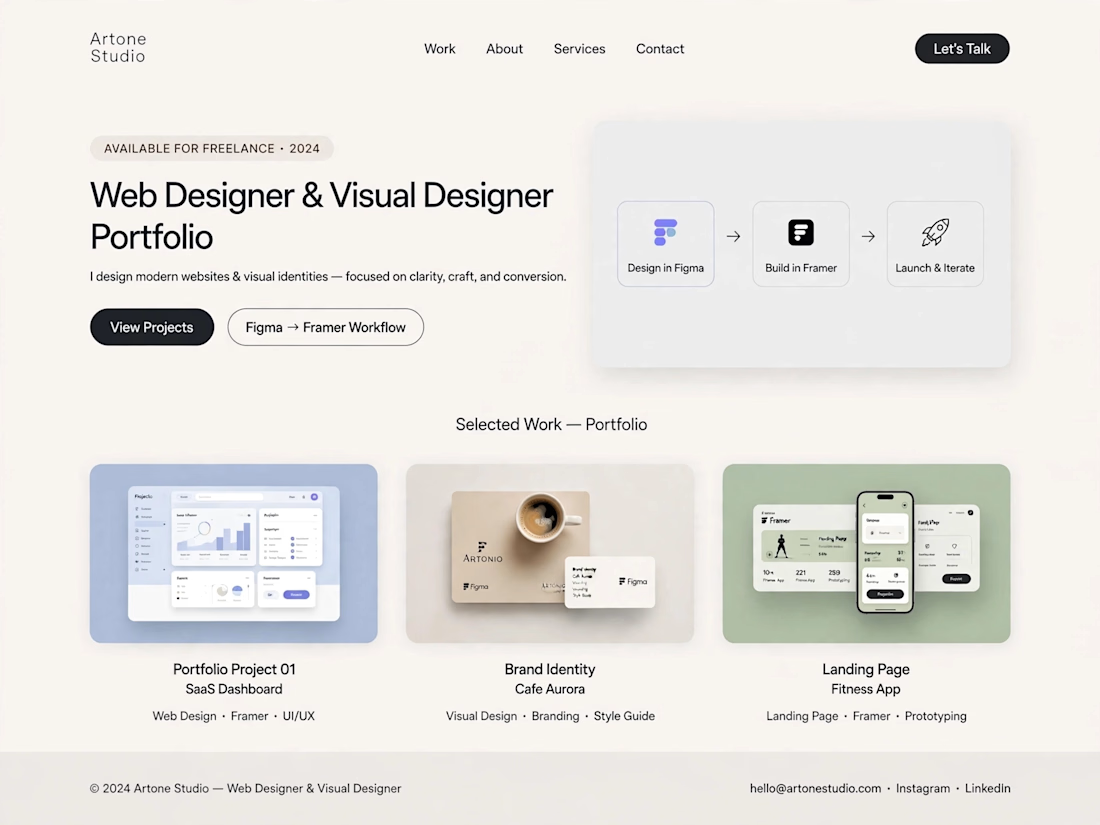
Title: Modern Website Portfolio | Clean UI & Visual Design
About this work:
I designed a modern, light-themed portfolio concept with a focus on simplicity, visual consistency, and a smooth user experience. The layout presents a structured design workflow, from initial ideas and interface design to website presentation.
The portfolio includes sample concepts for SaaS dashboards, brand identity, and landing pages, demonstrating how thoughtful layouts and consistent visual styling can help businesses present their services effectively.
Skills: Web Design, Visual Design, UI Design, Landing Page Design
Tools: ChatGPT, Figma, Framer


Not bad but need more improvement

Building a Modern Restaurant Management Dashboard with Lovable (Light ☀️ vs. Dark 🌙)
I’ve been working on the dashboard interface for ReserveTable (Eat Pro Japan), focusing on giving restaurant managers and users a clean, modern, and intuitive interface to manage bookings, tables, and analytics.
Using Lovable, I was able to rapidly prototype and construct a modern UI system complete with smooth component transitions and native theme switching.
✨ Key Design & Tech Highlights:
⚡ Built with Lovable: Leveraged AI-powered design-to-code workflows to assemble clean component hierarchies, responsive search/filter bars, and sleek cards rapidly.
🌗 Seamless Light & Dark Mode: Designed a flexible color system using modern CSS variables / Tailwind tokens so the entire interface gracefully shifts between an elegant light aesthetic and a moody, dark dining ambience.
🎯 Contextual UI Elements: Styled input controls, select menus, and primary CTA buttons to maintain legibility and contrast across both light and dark themes.


For reservation and table states, the same semantic color tokens need to stay clear in light and dark mode. Did you define status tokens once and map both themes to them, or tune those colors per component?