The network for creativity
Join 1.25M professional creatives like you
Connect with clients, get discovered, and run your business 100% commission-free
Creatives on Contra have earned over $150M and we are just getting started
Back to feedPost

Documentary Editing Tips
Episode 1 - Immersive Scenes
For constructing Immersive Scenes. Have these elements in mine
- The Subject
- The Foreground
- The Background
- The Floor!
To achieve that feel, get an image (Write “top down view” in the prompts when generating, so you’re sure it’s a floor)
Bring it to your comp and rotate it on the x-axis by 90 degrees.

Make the y-position the value of your composition height
In this case, it’s a 1080 x 1920 composition, so that’s 1920

Set the anchor points of every of your element in your scene to the bottommost part of the element, e.g
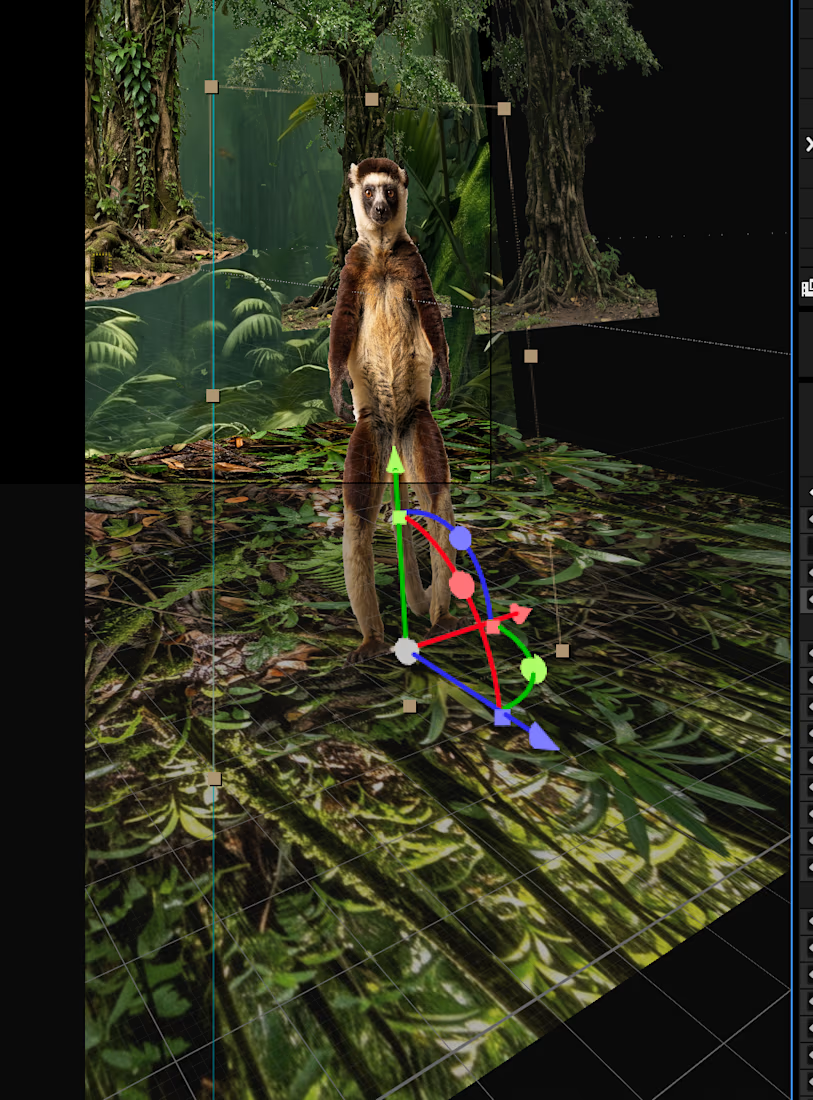
Then set the position to y-position the same value (in this case, 1920)
Then thats’s it!
You can scale, move in the x-axis, move in the y-axis, and it stays and sticks to the floor
The network for creativity
Join 1.25M professional creatives like you
Connect with clients, get discovered, and run your business 100% commission-free
Creatives on Contra have earned over $150M and we are just getting started
Trending
retrofuturism
Share your favorite designs from the past exploring the distant future. Or your own take on the aesthetic 🚀
halftone
Dots. Texture. Grain. Let's see your designs using the halftone technique.

Midjourney
Creatives are showing off what they're making with Midjourney.
colorgrade
Video editors sound off: How do you enhance the mood of your video in color grading?
Related posts


An immersive, scroll-driven 3D website concept created around the Tesla Cybertruck.
The Cybertruck was built and prepared in Blender before being brought into XrollY, where I created the main scroll-controlled 3D sequence, including camera movements, product transitions, rotations, and visual reveals.
Rive was used for additional interactive motion elements, while the complete experience was embedded into Framer to create the final website.
The result combines real-time 3D storytelling with interactive interface animation, while keeping the 3D experience independent and embeddable.
Stack: Blender · XrollY · Rive · Framer · Web 3D · Scroll-based Animation
Part of my ongoing exploration with XrollY — a platform I'm building for creating, animating, and embedding scroll-driven 3D experiences across the modern web.
Live Link: tesla-3d.framer.website
Full Case Study: Check it out


Best rive usage

From raw footage to a clear customer onboarding experience.
I created this onboarding video as an example of how businesses can turn existing footage into polished, easy-to-follow customer guidance.
The goal was not just to edit a video, but to create a smooth visual journey that helps the viewer understand the space and the next steps without unnecessary explanation.
For this project, I focused on:
• structuring the footage into a clear onboarding flow
• professional editing and pacing
• smooth transitions and visual continuity
• text and instructional elements
• sound design and finishing
• creating a clean, premium visual experience
This format can be adapted for hotels, serviced apartments, Airbnb properties, SaaS products, customer onboarding, employee training, product tutorials and internal company processes.
Businesses often already have the footage and information they need — the challenge is turning it into content that is clear, professional and actually useful.
That’s the part I can take care of.
Available for one-off onboarding videos, complete video series and recurring production.
AI-assisted production · Video Editing · Customer Onboarding · Explainer Videos · Training Content


I’ve been experimenting with turning a familiar magical world into an immersive 3D web experience — focusing on depth, cinematic motion, atmosphere, and visual storytelling.
For this concept, I wanted every layer to contribute to the feeling of actually entering the scene:
✦ 3D-inspired depth & perspective
✦ Cinematic camera motion
✦ Layered environmental movement
✦ Atmospheric details & particles
✦ Smooth, intentional transitions
✦ An experience designed to feel alive rather than static
The goal wasn’t simply to redesign a Hogwarts-inspired interface.
It was to explore how motion + depth can transform a website into an experience.
This is the kind of work I love building: creative development, interactive experiences, 3D and motion for the web.
Would you explore Hogwarts like this? 🪄
Available for freelance collaborations & immersive web projects.
#CreativeDeveloper #CreativeCoding #3DWeb #WebGL #ThreeJS #MotionDesign #InteractiveDesign #WebDesign #CreativeDevelopment #ImmersiveWeb


