The network for creativity
Join 1.25M professional creatives like you
Connect with clients, get discovered, and run your business 100% commission-free
Creatives on Contra have earned over $150M and we are just getting started
Back to feedPost

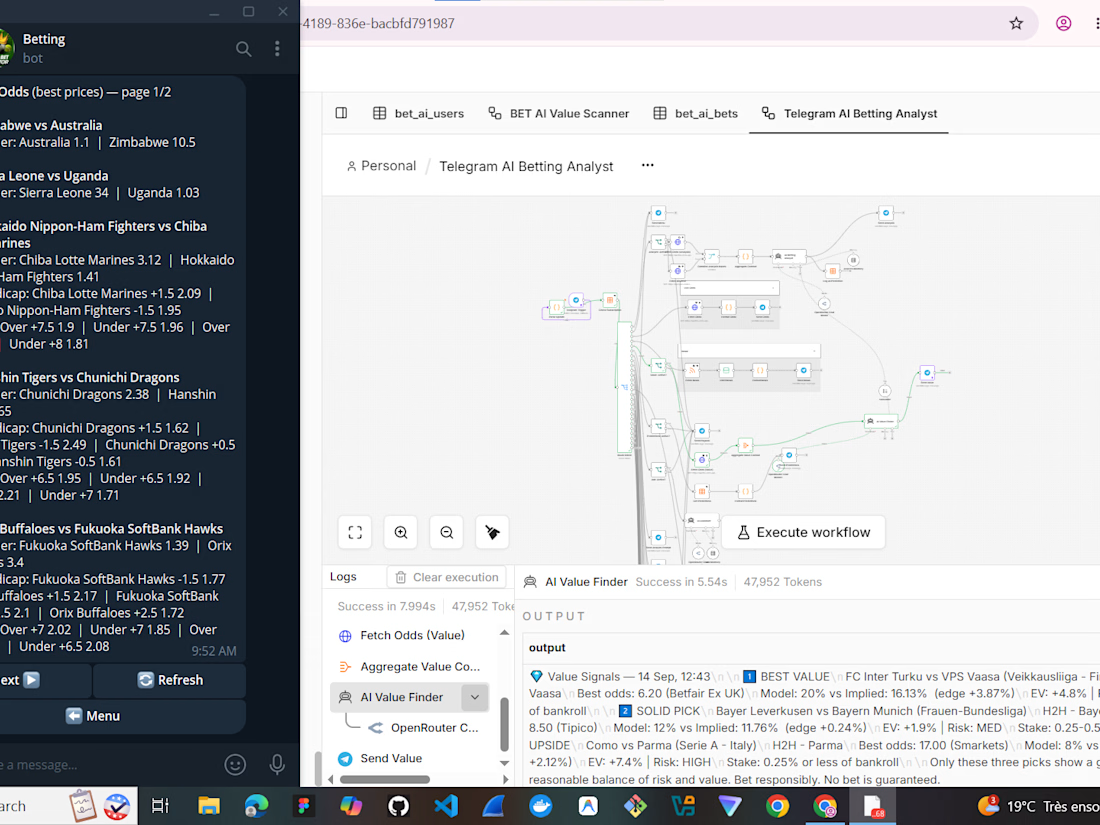
I built a fully automated Telegram AI Betting Analyst to process live sports data and find market edges. ⚡️
Instead of manually checking odds, this system centralizes the whole process:
→ Fetches and aggregates live odds via API
→ Routes data through an AI Value Finder to spot +EV (Expected Value) opportunities
→ Pushes real-time alerts and analysis directly to a Telegram bot UI
I handled the entire architecture in n8n, turning raw market data into an interactive, actionable dashboard right in the user's pocket.
#automatedworkflow #n8n #TelegramBot #AIAutomation #API
AI Agent DesignerAI Agent EngineerBusiness Workflow AutomationDockerN8NautomatedworkflowTelegram API


The network for creativity
Join 1.25M professional creatives like you
Connect with clients, get discovered, and run your business 100% commission-free
Creatives on Contra have earned over $150M and we are just getting started



Related posts

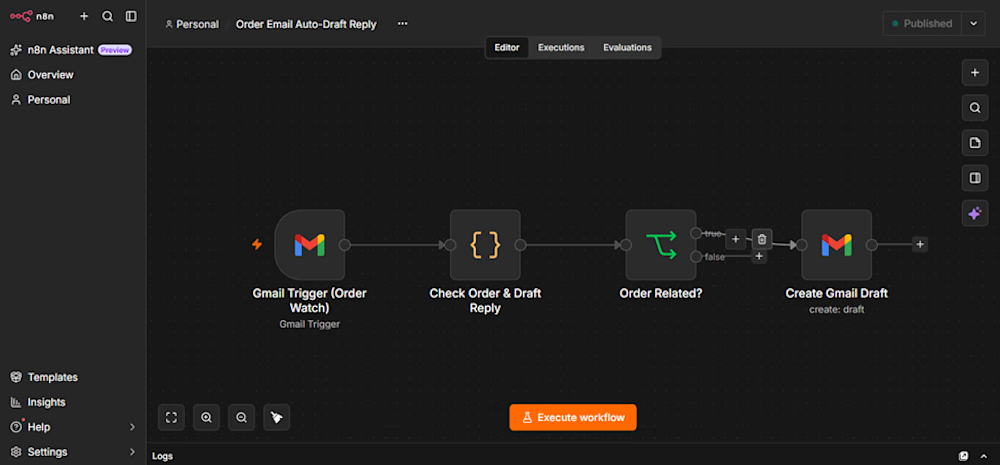
An n8n-powered Gmail automation that detects order-related emails and automatically creates reply drafts for human review before sending.
This human-in-the-loop workflow saves time, reduces repetitive tasks, and keeps customer communication under control.
Need custom n8n automation for your business? Feel free to contact me!



I also create the invoice automation but in higher level this is pretty simple and good!!🔥

I built Tests Wise: paste a URL, get a test plan and watch AI run the tests live.
Most small teams ship without a written test plan. Not because they don't care because writing one takes a day nobody has. And running it takes another.
Tests Wise does both:
Paste your site's URL (works with sites behind a login).
AI agents explore up to 8 pages in a real browser and figure out what each one does.
You get prioritized test scenarios steps, expected results, priority as an Excel your QA team or client can use right away. In English or Spanish.
Then an AI agent executes those scenarios live in a real browser, driven through Playwright MCP, and reports what passed, what failed and why, with a screenshot of each step.
Everything is automated software: no scripts, no selectors, no CI to wire up.
Under the hood: FastAPI + PostgreSQL, Redis/RQ workers, Playwright for the crawl, Claude for scenario design and for driving the browser via Playwright MCP, LangGraph for the pipeline. Deterministic exploration, LLM only where it adds value — a full run on an 8-page site costs a few cents.
It's free to try, no card needed: https://app.tests-wise.com/
Demo below 👇 I'd love to hear which site you'd throw at it first.


A screenshot per step is a smart touch, makes failures easy to show a client. How long does a full run take for 8 pages?

CRM Setup, Automation & Lead Generation Systems
Stop losing leads. Turn your website into a system that captures, follows up and converts them for you.
Most businesses don't have a lead problem. They have a follow-up problem. Enquiries sit in DMs and inboxes, replies come too late, and warm leads go cold. I build the system that fixes that.
I'm Emmanuel Ayomide, the web designer and developer behind Shepherd Creatives. I connect your website, your forms and your sales process into one organised flow, so every lead is captured, tracked and followed up without extra manual work.
WHAT I SET UP
• CRM setup: pipeline stages, contact fields, tags and views built around how you actually sell
• Lead capture: landing pages, forms and WhatsApp or email enquiry buttons that feed straight into your CRM
• Automated follow-up: instant confirmation messages, reminders and follow-up sequences
• Workflow automation: your tools talk to each other, so a new enquiry becomes a contact, a notification and a task on its own
• Lead tracking: a simple view of where your leads come from and where they drop off
• Handover: clear documentation and a short walkthrough so you can run it yourself
HOW IT WORKS
Discovery: we talk through your goals, your current process and the tools you already use
Plan: I map the journey from first enquiry to paying customer
Build: I set up the CRM, the lead capture and the automations
Test: I run every step from start to finish before you see it
Handover: you get a walkthrough and a short support period
BEST FOR
Service businesses, agencies, coaches, online stores, schools and non-profits that want more of their enquiries to turn into customers.
WHAT I NEED FROM YOU
Access to your website and current tools, a list of your services, and a short description of how leads reach you today.
TOOLS
HubSpot, Google Sheets, Make
TIMELINE: 3–21 days, depending on the package.
PRICE: Starting from $250.
Message me with a quick description of your business and how leads reach you today, and I'll suggest the simplest setup to start with.


For the reminder sequences, I'd re-check the CRM immediately before each send, even if the message was queued earlier. How do you stop a queued follow-up when the lead replies on WhatsApp or a salesperson takes over?