The network for creativity
Join 1.25M professional creatives like you
Connect with clients, get discovered, and run your business 100% commission-free
Creatives on Contra have earned over $150M and we are just getting started
Back to feedPost
SaaS Runway & Burn Dashboard for Founders
An interactive dashboard that shows founders how long their cash will last. Change hiring, revenue growth or expenses and see runway, burn and cash-out date update instantly. Built as a demo of the financial dashboards I create for early-stage startups.
financialmodelingfinancialforecastingstartupfinanceData VisualizationFinancial PlanningFinancial AnalysisGoogle SheetsMicrosoft ExcelPython


Letting founders drag a hiring slider and watch the cash-out date move is what makes runway real. A spreadsheet gives them a number; this shows the cost of each decision before they make it.

Thanks! That’s exactly the idea: seeing what a hire costs before you make it
The network for creativity
Join 1.25M professional creatives like you
Connect with clients, get discovered, and run your business 100% commission-free
Creatives on Contra have earned over $150M and we are just getting started








Related posts

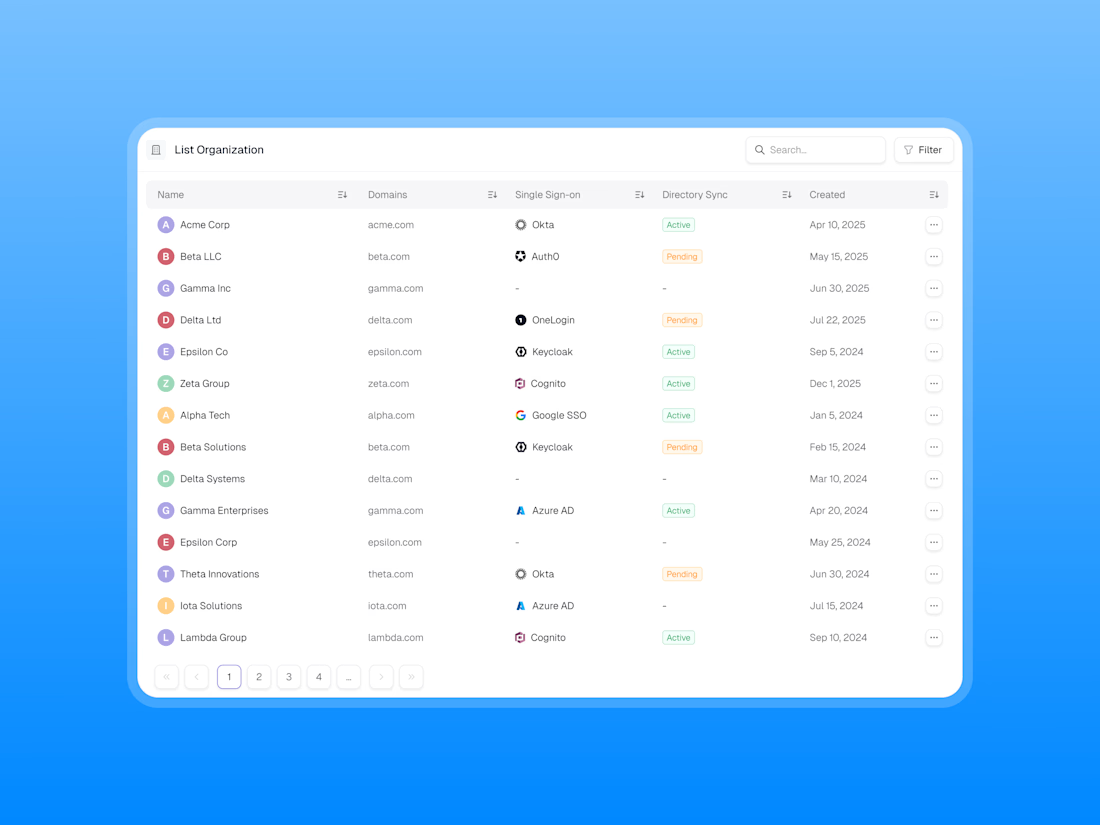
Designing a clean, scalable table component for modern SaaS dashboards.
Focused on information hierarchy, readability, and efficient data management, this table UI brings organisation data, SSO providers, directory sync statuses, and creation dates into one structured view.
✨ Clean data presentation
🔍 Search and filter functionality
🏷️ Clear status indicators
↕️ Sortable columns
📄 Intuitive pagination
🎯 Consistent spacing and visual hierarchy
Great dashboard design isn’t just about displaying data — it’s about making complex information easier to scan, understand, and manage.
What do you think of this table component?


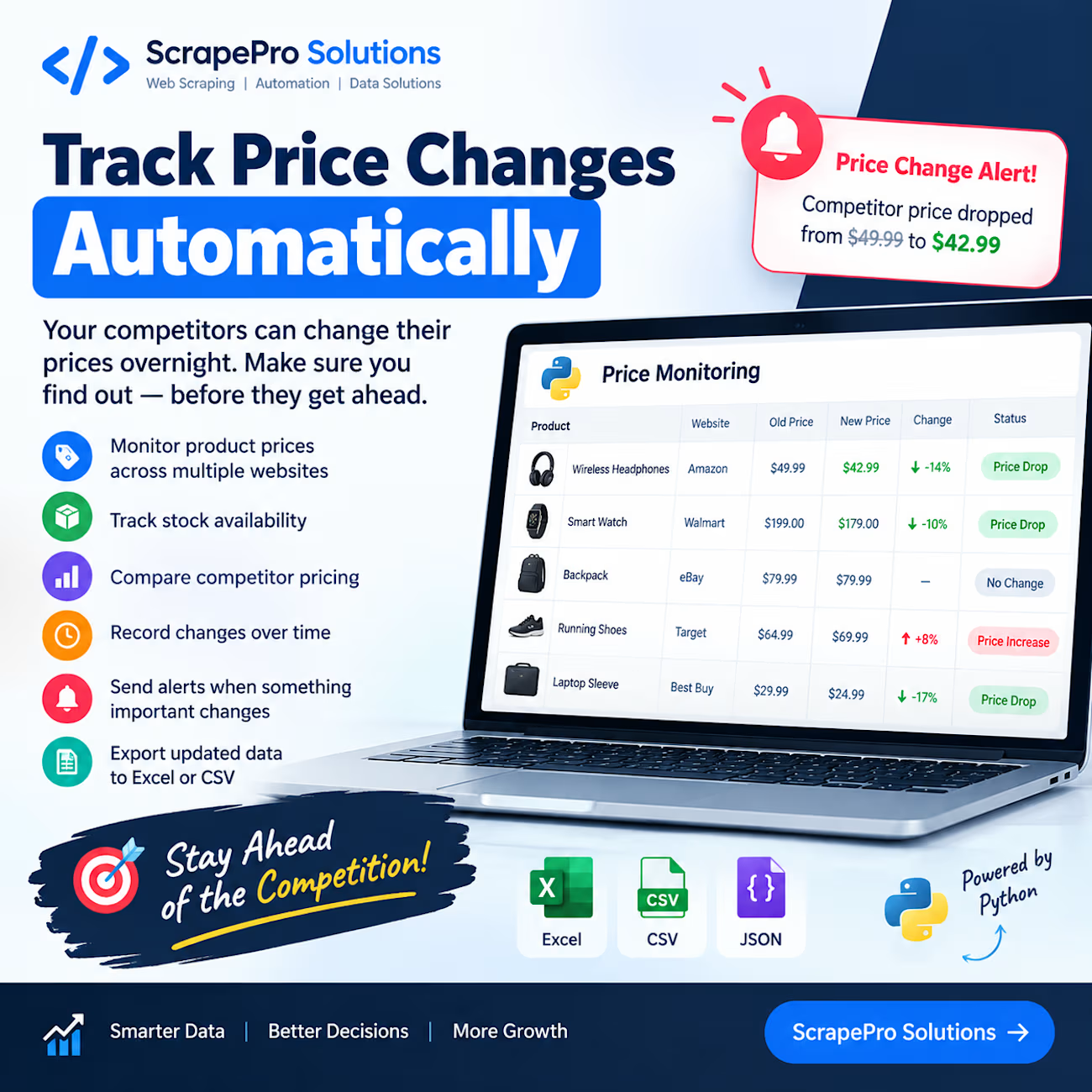
Your competitors can change their prices overnight. Your data collection system shouldn't miss it. 📊
Imagine checking 50 product pages every morning just to find out which prices have changed.
Now imagine getting that information automatically.
With Python web scraping and automation, businesses can build systems that:
→ Monitor product prices across multiple websites
→ Track stock availability
→ Compare competitor pricing
→ Record changes over time
→ Send alerts when something important changes
→ Export updated data to Excel or CSV
Instead of repeatedly checking websites, you get organized information that helps you make better business decisions.
This can be especially useful for e-commerce businesses, online retailers, and teams that regularly research competitors.
At ScrapePro Solutions, I build custom Python scraping and automation solutions tailored to specific business needs.
A quick question for e-commerce business owners:
If a competitor changed their product price today, how would you find out — manual checking or automatic alerts?
💬 Share your answer in the comments.


Two things bit me while building a price tracker. A page can come back "successful" but empty (in my case, compressed content the client couldn't decode), and saving that blindly overwrites good data. So I refuse any page with no title and no price, and only record a change when...

🚨 Your business might not need more software. It might need one better dashboard.
📊 Here's something I actually built.

I created the Local Business Operations Dashboard (Spec Build) to demonstrate how a home-service business can organize its daily operations in one place.
Imagine being able to follow the work:
📩 Customer inquiry → Organized lead
✅ Follow-up → Review and approval
📅 Appointment → Scheduling oversight
🛠️ Estimate → Job tracking
💰 Invoice → Outstanding payment visibility
📈 Dashboard → Know what needs attention
Instead of juggling disconnected spreadsheets, the goal is to make the next step clear.
💜 Here's how I can help your business get started.
Custom Google Sheets Dashboard — Starting at $249
Your starter dashboard includes:
✓ One customized Google Sheets dashboard
✓ Customer, job, and appointment tracking
✓ Estimate and payment status tracking
✓ Outstanding balance calculations
✓ Organized views and basic reporting
✓ Setup instructions and one in-scope revision
No complicated software required.
✨ Want more automation?
My interactive portfolio demonstration also showcases advanced concepts such as approval workflows, simulated alerts, conflict detection, and workflow monitoring.
These are examples of what can be developed in a separately scoped premium solution—not features included in the $249 starter package.
Advanced Google Apps Script automation, Gmail, Slack, CRM integrations, and live Calendar synchronization are quoted separately.
🔎 See my actual dashboard case study:
📩 Need a dashboard built around your business?
Send me the spreadsheet or workflow you're currently using and tell me what's frustrating you.
I'll help identify the right next step.
Explore my $249 dashboard service:
Independent portfolio demonstration using synthetic data. The interactive browser demo is separate from the customized Google Sheets starter service. No live third-party integrations are demonstrated.
#GoogleSheets #DashboardDesign #HomeServices #WorkflowAutomation #GoogleAppsScript

the inquiry to invoice flow is a really clear way to show what it does. are you finding home service owners on here, or reaching out to them directly?