The network for creativity
Join 1.25M professional creatives like you
Connect with clients, get discovered, and run your business 100% commission-free
Creatives on Contra have earned over $150M and we are just getting started
Back to feedPost

What’s Your Data Quality Red Flag?
We just build the MVP of an AI Data Quality Auditor:
→ Upload CRM CSV → 5-point audit → 0-100 score
→ <85% accuracy = “AI Integration Blocked”
→ Auto-calculates estimated AI waste + generates BI PDF
But before we lock the scoring weights, we need your war stories.
🔥 DROP YOUR STORY:
What’s one data quality issue that tanked your AI/ML project?
Duplicate records skewing predictions?
Inconsistent staging/formatting?
Missing critical fields?
Outliers breaking models?
The network for creativity
Join 1.25M professional creatives like you
Connect with clients, get discovered, and run your business 100% commission-free
Creatives on Contra have earned over $150M and we are just getting started





Related posts

Most inbound bottlenecks aren't caused by low lead volume—they happen during triage.
When inquiries roll into a Google Sheet or CRM, operations teams often waste 10–15 minutes per submission reading through messy paragraphs, deciphering budget mismatch, and manually deciding who gets an immediate call vs. a standard rate sheet.
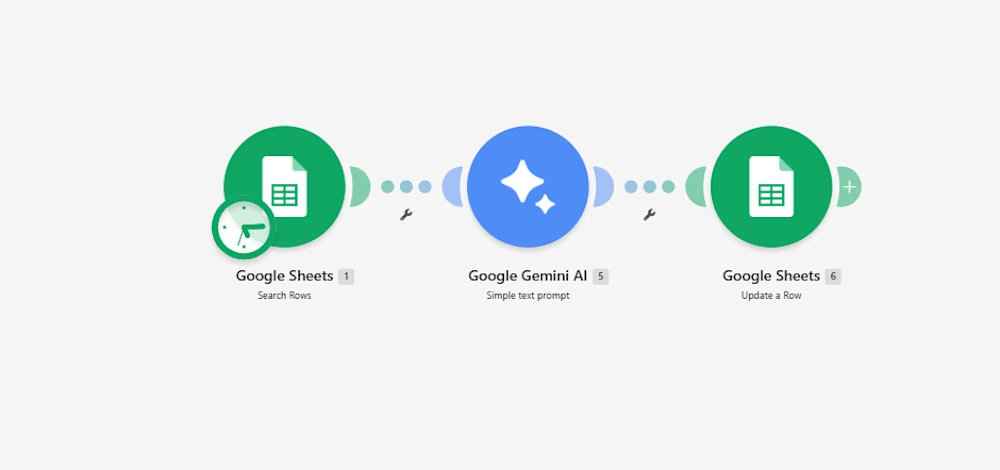
Instead of adding a bulky CRM add-on, I documented a lightweight 3-step automation pipeline built inside Make:
Intake & Extraction: An active listener triggers immediately upon a new submission, extracting core variables: client scope, target deliverables, timeline, and stated budget.
Context-Aware Evaluation (Gemini 2.5 Flash): The payload passes through an AI evaluation node with strict guardrails:
Evaluates budget against minimum agency criteria.
Assigns a triage score: Hot (immediate priority), Warm (nurture), or Cold (disqualified/template reply).
Generates a strict 15-word operational summary—no long paragraphs.
Determines an automated next step (e.g., routing to an account lead or flagging for asynchronous follow-up).
Data Return & Clean Pipeline: Appends the structured classification directly back to the master operational tracker, keeping the sheet filterable and clean.
The outcome: The sales and operations team can filter the entire board by priority status in two clicks, cutting first-touch response time to minutes without manually reading every single submission.
I’ve documented the full scenario map, execution logic, and data schemas below.
Curious how other agency operators and automation leads here handle their lead enrichment layer—are you doing AI scoring at the form level, or later in the CRM pipeline?:


For the budget gate, I'd keep an unstated budget separate from one explicitly below your minimum. Does the Make route ask for clarification when the amount or currency is missing, so a potentially suitable lead doesn't fall into Cold by default?

A file named “FINAL_v3.pdf” is not proof that it supersedes “FINAL_v2.pdf”.
For a small contractor sorting project records, keep three decisions separate:
Are the files identical? Compare a measured file hash. Matching hashes identify identical content; they do not establish approval.
Do they describe the same document? Record document ID, title, discipline, revision and source path in a register. Flag missing fields instead of guessing.
Which revision is authorized? Ask the project’s responsible person to confirm that. Preserve both originals and record the decision. A newer upload date alone is not enough.
That separation avoids silently deleting something the project still needs.
Commercial disclosure: this is Built by Circuit’s AI-assisted document-control approach. We offer a conditional USD 750 pilot for one project with up to 200 supplied, English-language digital documents and up to 15 agreed register fields.
The scoped handoff includes an editable register, measured file hashes, buyer-confirmed revision records, an exception queue, a source-linked chronology and a runbook, plus one correction round for internal company use. It excludes scanned-document OCR, engineering/legal approval and live Procore integrations. This is an offered service, not a claim of prior client results.
Have a project folder that needs this? Reply here or message through Contra with approximate file count, file types and desired handoff date. Please don’t post confidential project files. We’ll confirm fit, scope, delivery and payment terms before booking.

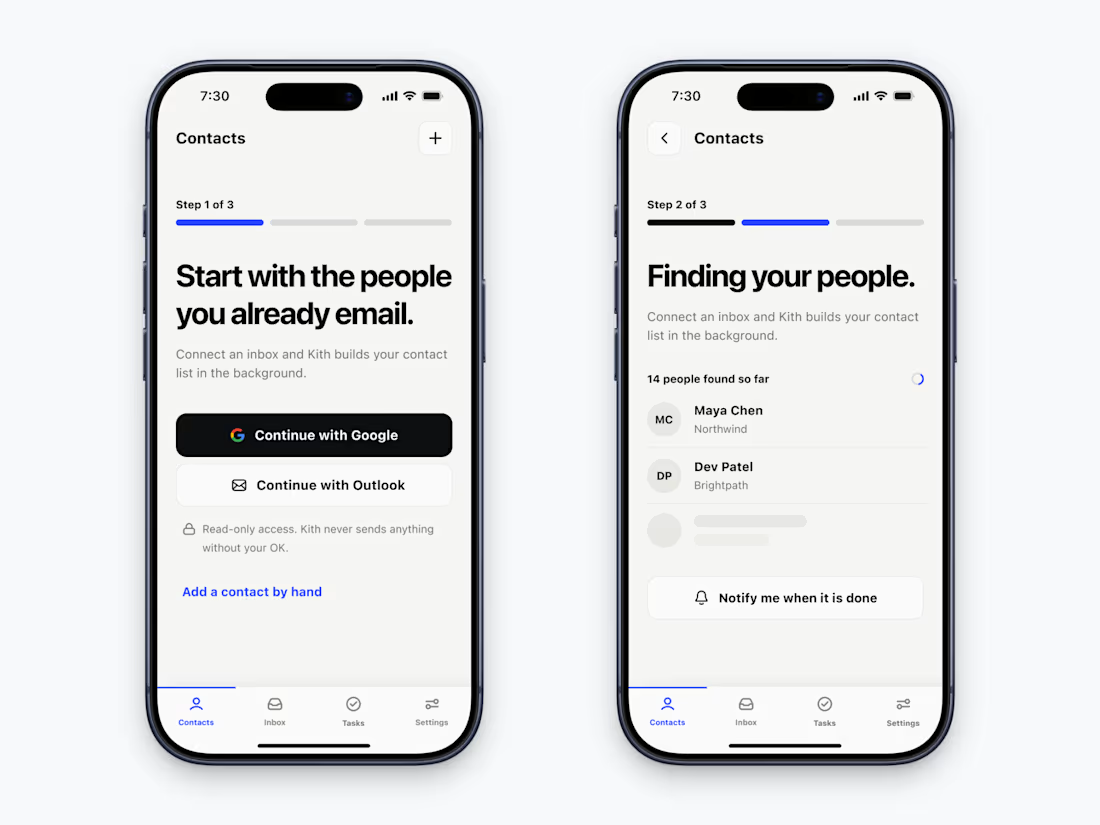
Zero data.
Zero context.
The empty state is the only screen where your app has nothing to show & everything to prove.
I designed the first 3 screens of an AI CRM app around one idea.
Good onboarding doesn't just show off features.
It anticipates anxiety and eliminates it, step by step.
Each screen answers the one question the user is asking at that very moment.