The network for creativity
Join 1.25M professional creatives like you
Connect with clients, get discovered, and run your business 100% commission-free
Creatives on Contra have earned over $150M and we are just getting started
Back to feedPost
Most inbound bottlenecks aren't caused by low lead volume—they happen during triage.
When inquiries roll into a Google Sheet or CRM, operations teams often waste 10–15 minutes per submission reading through messy paragraphs, deciphering budget mismatch, and manually deciding who gets an immediate call vs. a standard rate sheet.
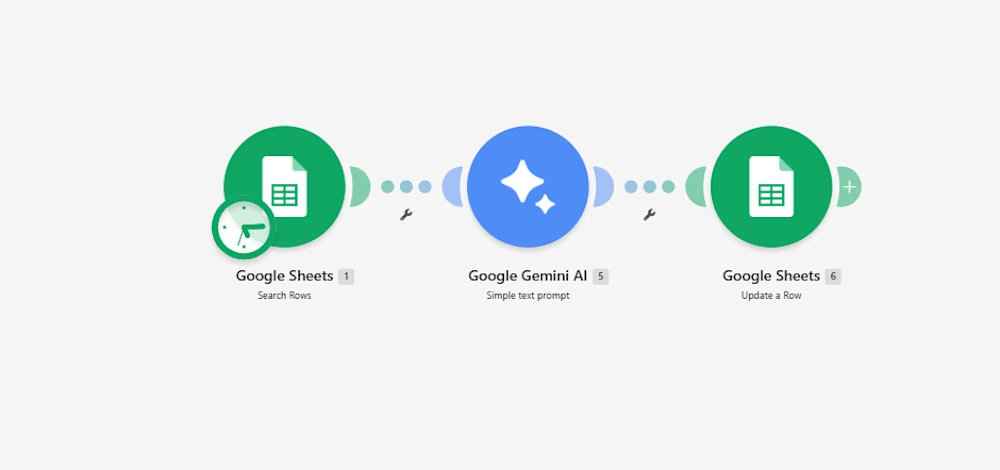
Instead of adding a bulky CRM add-on, I documented a lightweight 3-step automation pipeline built inside Make:
Intake & Extraction: An active listener triggers immediately upon a new submission, extracting core variables: client scope, target deliverables, timeline, and stated budget.
Context-Aware Evaluation (Gemini 2.5 Flash): The payload passes through an AI evaluation node with strict guardrails:
Evaluates budget against minimum agency criteria.
Assigns a triage score: Hot (immediate priority), Warm (nurture), or Cold (disqualified/template reply).
Generates a strict 15-word operational summary—no long paragraphs.
Determines an automated next step (e.g., routing to an account lead or flagging for asynchronous follow-up).
Data Return & Clean Pipeline: Appends the structured classification directly back to the master operational tracker, keeping the sheet filterable and clean.
The outcome: The sales and operations team can filter the entire board by priority status in two clicks, cutting first-touch response time to minutes without manually reading every single submission.
I’ve documented the full scenario map, execution logic, and data schemas below.
Curious how other agency operators and automation leads here handle their lead enrichment layer—are you doing AI scoring at the form level, or later in the CRM pipeline?:



10 to 15 min per inquiry adds up stupid fast. does it flag the urgent ones too?

It absolutely does! The engine automatically assigns a 'Hot' score to urgent, high-value inquiries, so your sales team knows exactly who to call first and never misses a priority lead.

For the budget gate, I'd keep an unstated budget separate from one explicitly below your minimum. Does the Make route ask for clarification when the amount or currency is missing, so a potentially suitable lead doesn't fall into Cold by default?
That's a fantastic point! Right now, the logic strictly categorizes based on the provided data fields, but routing "unstated" budgets into a separate "Needs Clarification" category is a great way to ensure we don't accidentally disqualify potential high-value leads. I'll...
That keeps missing information separate from a poor-fit lead. When the budget comes back, I'd rerun qualification on the same lead record so the clarification doesn't create a duplicate or trigger two follow-ups.
The network for creativity
Join 1.25M professional creatives like you
Connect with clients, get discovered, and run your business 100% commission-free
Creatives on Contra have earned over $150M and we are just getting started





Related posts

I noticed Creative freelancers, video editors, and social agencies running monthly retainers lose hours of margin every week chasing scattered feedback across WhatsApp/Slack, manually updating credit spreadsheets, and absorbing unbilled "just one more quick edit" scope creep.
AI Brief-to-Production Engine (Brief Studio): Clients paste a messy voice-note transcript or raw campaign idea. SlateOS automatically structures the deliverable, selects the aspect ratio (9:16, 4:5), generates 3 high-retention opening hooks + full platform captions, estimates credit cost, and pushes the asset directly into the pipeline.
Automated Scope-Creep Guard (Approval Studio): Every deliverable tracks revision rounds against the client's retainer allowance (e.g., 2 of 2 Free Used). When a client attempts to submit an out-of-scope revision, SlateOS intercepts the request and presents a 1-click $75 Extra Revision Add-On, turning lost production hours into protected revenue.
1-Click Greenlight & Credit Deduction: Clicking Approve & Auto-Schedule automatically deducts the asset's credit cost from the client's monthly retainer burn-rate bar, locks in the next publishing slot on the Content Calendar, and logs the event in the live Automation Activity feed.
Dual-Persona Experience: Features an instant top-bar switcher between Agency Command and Client Portal (which dynamically adapts navigation and permissions), alongside a 1-click Reset Demo Data button for seamless testing.
I bring solution to our pain, What do you guys think?


Brilliant concept thank you!
Make sure to make this live and the application downloadable.

Signal Growth Lab — AI-Powered Website Growth Platform
Signal Growth Lab is a digital platform designed to help businesses understand their website performance, identify opportunities for improvement, and make better decisions about growing their online presence.
Built with Base44, the project brings together a modern user interface and a practical approach to website growth. It focuses on helping businesses recognize potential barriers affecting their visitors' experience and discover opportunities to improve website clarity, usability, and conversion potential.
The platform is designed around a simple idea: businesses should be able to move beyond guessing what is wrong with their websites and focus on identifying meaningful opportunities for improvement.
Through its design and functionality, Signal Growth Lab explores how AI-powered tools and automation can make website optimization more accessible, actionable, and easier to understand.
The goal is to create a useful experience that connects technology, thoughtful design, and business growth in one platform.

Amazing Design

Northbound🚀: Studio Autopilot
An AI-powered client pipeline for creative studios, wrapped in a hand-built 3D world. A brief comes in, gets scored and routed, becomes a priced proposal, is accepted online and turns into a running project, with no one chasing emails.
Every studio knows the feeling: a new brief lands and the clock starts. Then come hours of reading, qualifying, writing proposals, chasing replies and setting up the project. Northbound turns that whole journey into one automated flow, so a small studio can respond like a big one.
The problem: Creative studios lose their best hours to admin. Strong leads wait days for a proposal, weak ones eat the same time as good ones, and follow-ups slip through the cracks. The work that wins clients is the work nobody has time for.
The solution:
- AI brief scoring and routing. Every brief is read for budget, timeline, goals and fit, then routed one of three ways: fast track, a quick human review, or an honest, helpful decline with pointers.
- Tailored proposals in about a minute. Strong fits get a scoped proposal with workstreams, a realistic timeline and three priced packages.
- Online acceptance and kickoff booking. Clients pick a package, accept online and book their kickoff call on the spot.
- A project that runs itself. Milestones are planned on acceptance, and follow-ups and reminders go out automatically.
- A morning digest. Every day at 08:00 the studio owner gets a summary of new briefs, proposals awaiting review, clients who haven’t replied, and what’s due.
- An owner dashboard showing pipeline, win rate and hours saved, plus a review queue to approve held proposals in one click.
- A live demo console where anyone can send a sample brief through the real pipeline and watch each step happen.

The morning digest is my favorite part here. When inquiries, proposals and deadlines are all in one place, you don't have to start the day searching through conversations. I'd just put the items that need an owner's decision today at the top.