The network for creativity
Join 1.25M professional creatives like you
Connect with clients, get discovered, and run your business 100% commission-free
Creatives on Contra have earned over $150M and we are just getting started
Back to feedPost
Python Automation Project: Media Collection & Instagram Reels Generator
Project Overview
I built a personal Python automation project as a practical learning exercise to explore web scraping, browser automation, file management, and automated video production.
The project combines several Python scripts into a workflow for collecting media, organizing files, creating short-form videos, adding background music, and preparing content for Instagram Reels.
What I Built
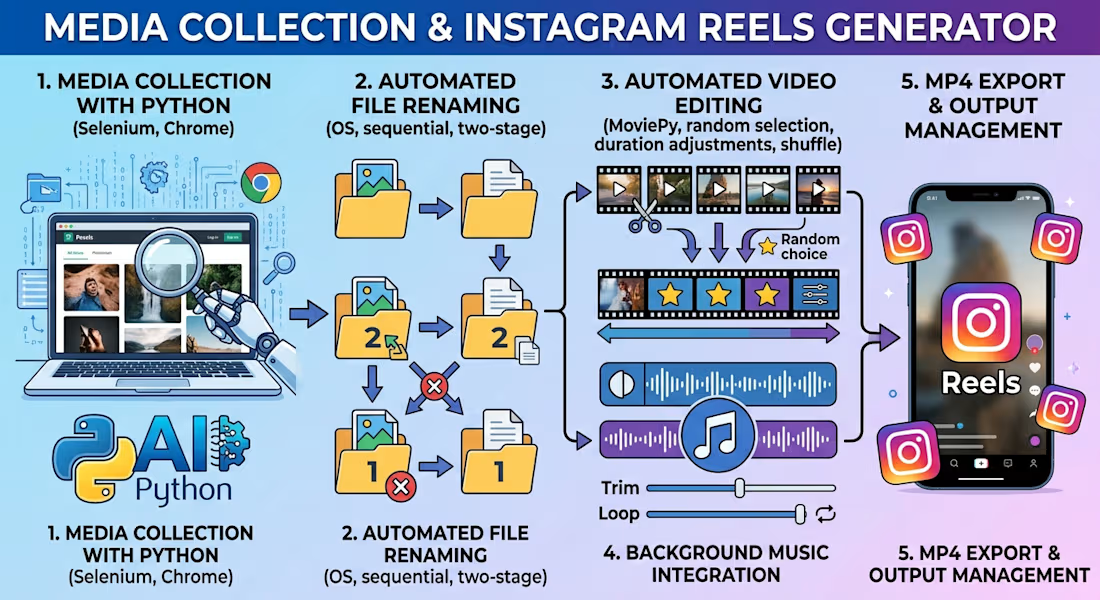
1. Media Collection with Python
Developed a Python script to collect photo-page URLs from Pexels using Selenium and Chrome automation, then retrieve and save image files using Requests. The script includes scrolling, duplicate-link filtering, manual CAPTCHA handling when required, and progress logging.
2. Automated File Renaming
Created a file-management script that scans an image directory, identifies supported image formats, sorts filenames, and renames files sequentially. A two-stage renaming process helps avoid filename conflicts when existing files already use numeric names.
3. Automated Video Editing
Developed a Python script using MoviePy to combine multiple source videos into a single short-form video. The workflow selects random sections from source clips, shuffles their order, adjusts clip durations to fit a target runtime, and combines the clips into a continuous video.
4. Background Music Integration
Implemented audio processing to add background music, trim longer audio tracks, and repeat shorter tracks when necessary to match the target video duration.
5. MP4 Export and Output Management
Configured the output resolution, frame rate, video codec, audio codec, and bitrate. The generated videos are saved automatically to a designated output folder.
Technologies Used
Python
Selenium
Undetected ChromeDriver
Requests
MoviePy
OS and file-system operations
Randomization and timing logic
MP4 video and audio processing
What I Learned
This project helped me practise browser automation, extracting links from web pages, downloading files, handling errors, organizing large collections of media, and building reusable automation workflows with Python.
The project was developed for personal learning and experimentation with short-form social media content. It demonstrates my interest in applying Python to practical automation tasks and developing more advanced web-scraping and data-processing solutions.
I am continuing to expand my Python skills through hands-on projects and experiments.



The two stage renaming process is a smart addition. It prevents the common script failure where a collision with existing numeric filenames causes the entire batch to stop or overwrite critical assets.

agree on it ,
The network for creativity
Join 1.25M professional creatives like you
Connect with clients, get discovered, and run your business 100% commission-free
Creatives on Contra have earned over $150M and we are just getting started

Challenges
View all


Related posts

This week, I have been working on automating my boss's inbox management, delegating email triage to AI while I handle reviews and approvals that require sound judgment. Because one wrong response to a client can cost a business revenue, I wanted to build a system that saves time without handing over critical decisions to AI.
How I built it:
I created two connected automation scenarios in Make.com.
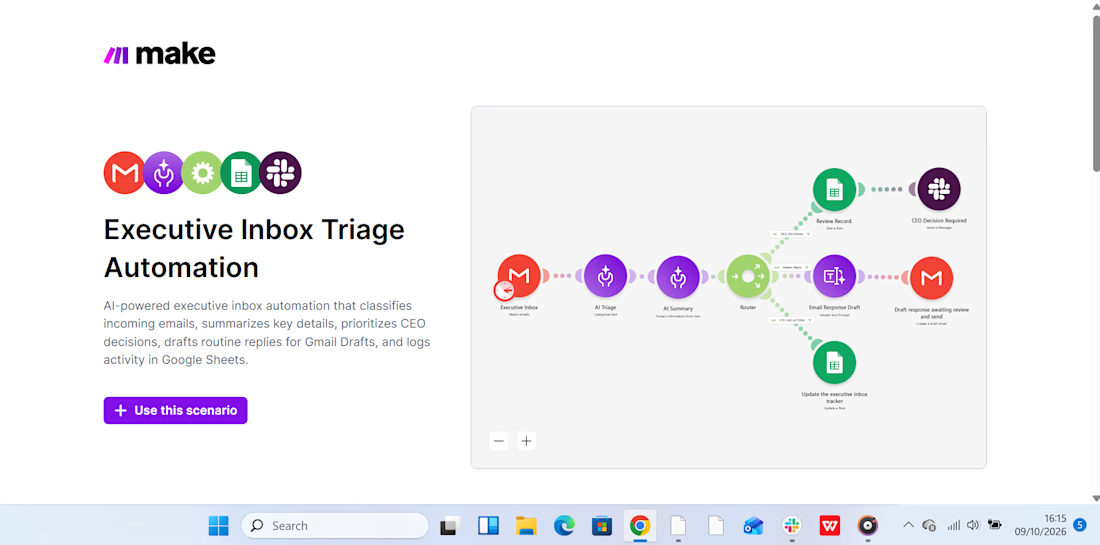
Scenario 1: Intelligent Inbox Triage:
AI analyzes incoming emails, categorizes them by priority, summarizes their content, and recommends the next action. This makes it easier to identify urgent messages and decide what needs attention first.
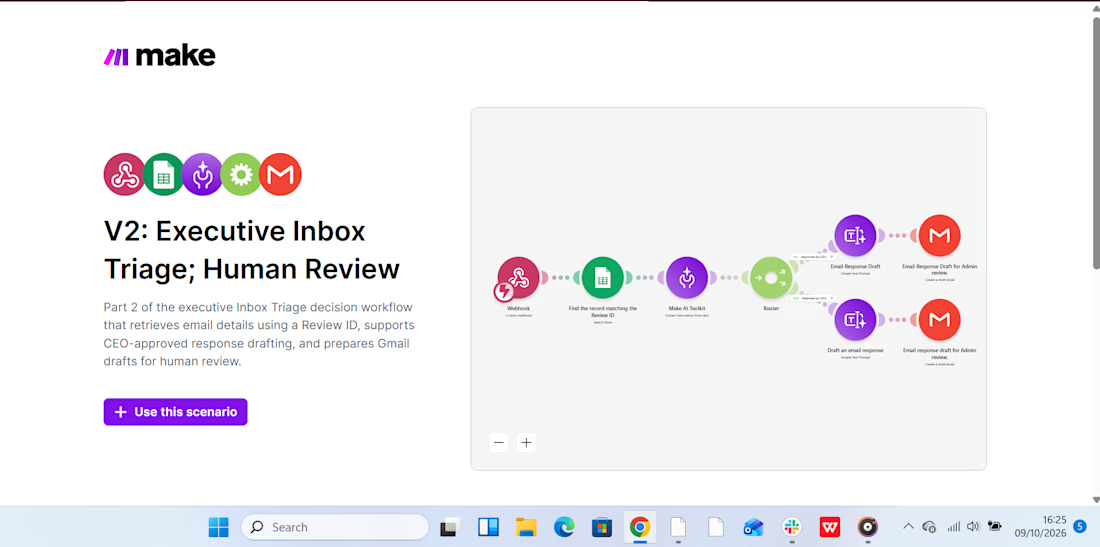
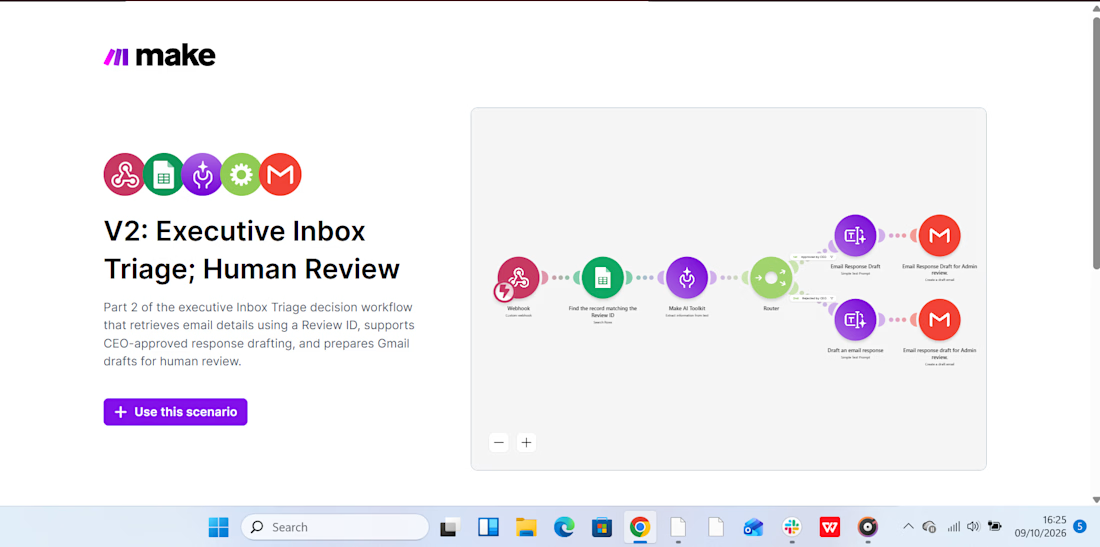
Scenario 2: Human Review & Approval:
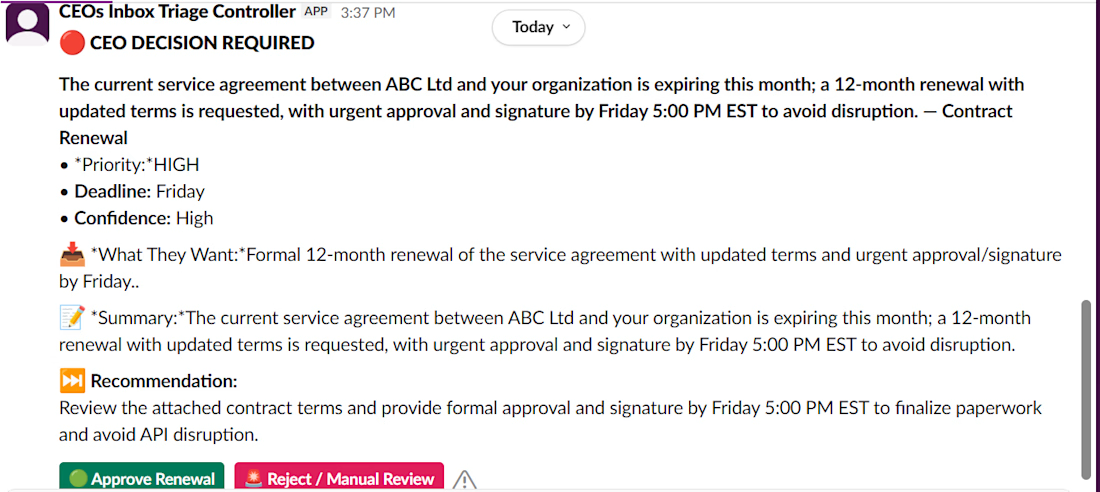
The workflow supports the review and approval process before an email is sent. Slack notifications help bring relevant updates to my attention, so I can review the proposed action and approve the response before it goes out.
Below are snippets of the two scenarios, including a Slack notification, showing how the workflow operates.
My takeaway? AI can help manage the inbox, but when a response could affect revenue or a client relationship, the final decision should remain human.



I'd test the triage with urgent emails that sound casual, such as 'I still can't access the account.' Do you review a sample of low-priority messages to catch urgent ones the AI missed?

👋 I am new to Contra and I did my first post without realizing I hadn't even introduced myself!
Hey! I am Abuzar.
I build AI agents, automations and full web apps for small businesses and freelancers:
🤖 Agents that reply to new leads and follow up so nobody goes cold
💬 Chatbots that answer customers using your own documents
🔗 Connections between your apps, so data moves on its own instead of through copy-paste
💻 Custom web apps and dashboards, from idea to launch, when off-the-shelf tools just dont fit
✦ ✦ ✦✦ ✦ ✦✦ ✦ ✦✦ ✦ ✦✦ ✦ ✦✦ ✦ ✦
For 3.5 years I built payment systems at a fintech company, where my whole job was making sure money never disappeared.
Now I make busywork disappear instead 😄
Off the keyboard, you will find me watching cricket or on a long motorcycle ride somewhere outside Lahore 🏏🏍️
I've noticed this community is full of amazing designers, editors and creatives, and I'm the guy who loves the techy plumbing behind the scenes. So I'm curious 👇
What's the most annoying non-creative part of your freelance week? Invoicing, client onboarding, chasing feedback, organising files?
Tell me in the comments. I'll reply to each one with an idea for how to automate it 🤝

Social Media Content & Campaign Graphics
A coordinated set of social media graphics developed to maintain visual consistency and communicate messages effectively. Suitable for Instagram, Facebook, and other digital marketing channels.




Combining manual design tools like Photoshop with AI for consistent social graphics is a smart move. It helps you maintain a unified look across channels without the high cost of hiring a full creative team for every single post.