
Muhammad Danish
Python, Web Scraping, Automation
- 4
- Followers


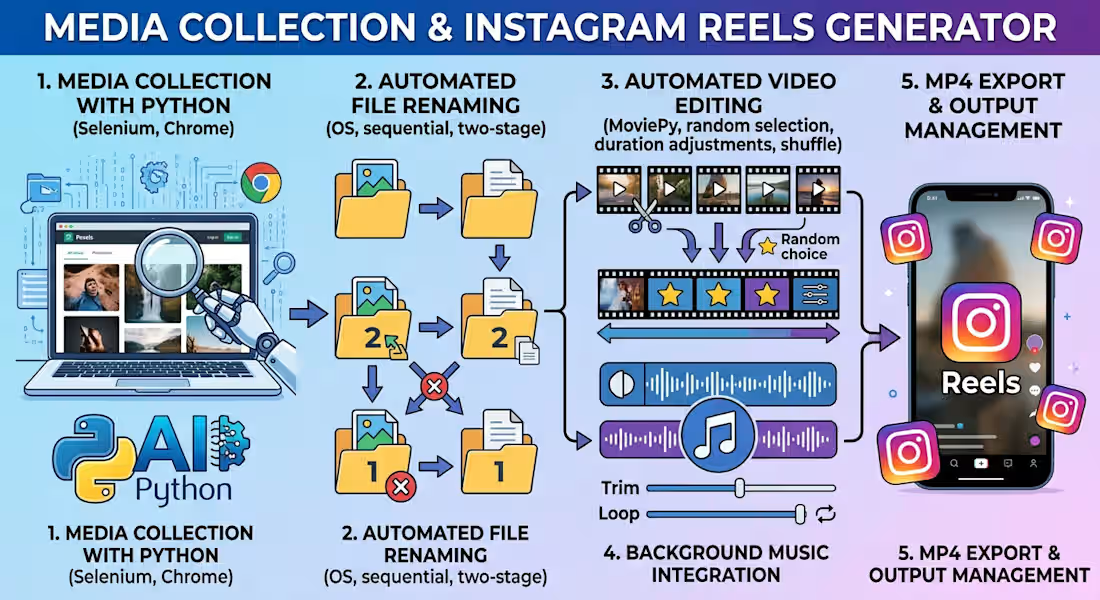
Python Automation Project: Media Collection & Instagram Reels Generator
Project Overview
I built a personal Python automation project as a practical learning exercise to explore web scraping, browser automation, file management, and automated video production.
The project combines several Python scripts into a workflow for collecting media, organizing files, creating short-form videos, adding background music, and preparing content for Instagram Reels.
What I Built
1. Media Collection with Python
Developed a Python script to collect photo-page URLs from Pexels using Selenium and Chrome automation, then retrieve and save image files using Requests. The script includes scrolling, duplicate-link filtering, manual CAPTCHA handling when required, and progress logging.
2. Automated File Renaming
Created a file-management script that scans an image directory, identifies supported image formats, sorts filenames, and renames files sequentially. A two-stage renaming process helps avoid filename conflicts when existing files already use numeric names.
3. Automated Video Editing
Developed a Python script using MoviePy to combine multiple source videos into a single short-form video. The workflow selects random sections from source clips, shuffles their order, adjusts clip durations to fit a target runtime, and combines the clips into a continuous video.
4. Background Music Integration
Implemented audio processing to add background music, trim longer audio tracks, and repeat shorter tracks when necessary to match the target video duration.
5. MP4 Export and Output Management
Configured the output resolution, frame rate, video codec, audio codec, and bitrate. The generated videos are saved automatically to a designated output folder.
Technologies Used
Python
Selenium
Undetected ChromeDriver
Requests
MoviePy
OS and file-system operations
Randomization and timing logic
MP4 video and audio processing
What I Learned
This project helped me practise browser automation, extracting links from web pages, downloading files, handling errors, organizing large collections of media, and building reusable automation workflows with Python.
The project was developed for personal learning and experimentation with short-form social media content. It demonstrates my interest in applying Python to practical automation tasks and developing more advanced web-scraping and data-processing solutions.
I am continuing to expand my Python skills through hands-on projects and experiments.
2
0
54

🐍 Python Web Scraping & Automation
I build Python scripts to scrape website data, automate repetitive tasks, and deliver clean Excel or CSV files.
Tools: BeautifulSoup, Requests, Selenium & Pandas.
Fast, accurate, and reliable data automation solutions.
0
56

Real Estate Agent Data Scraping & Lead Generation Automation
I developed a powerful automated web scraping solution for collecting real estate agent data from Compass and other similar websites across multiple cities and pages.
Using Python, Selenium, BeautifulSoup, and Pandas, the scraper automatically visits listing pages, collects agent profile URLs, opens each profile, and extracts valuable information including agent names, job titles, emails, phone numbers, LinkedIn, Facebook, Instagram, and other available profile links.
The system supports multi-page and multi-city scraping and automatically exports all collected data into a clean, organized Excel file. This type of automation is ideal for lead generation, market research, real estate databases, and business outreach.
I can build custom web scraping and data extraction solutions for many different websites based on client requirements.
0
63

I developed a Python web scraping automation script using Selenium, Undetected ChromeDriver, Pandas, WebDriverWait, and Excel. The script automatically opens car parts product URLs from an Excel file, loads each page, handles pop-ups, waits for dynamic content, and extracts product details such as title, OE number, and interchange part number. It includes error handling, fallback methods, random delays, and browser automation to make the scraping process more reliable. Finally, it stores all collected data in a structured Excel file using Pandas.
#Web_scraping #Automation #Python
2
0
166