The network for creativity
Join 1.25M professional creatives like you
Connect with clients, get discovered, and run your business 100% commission-free
Creatives on Contra have earned over $150M and we are just getting started
Back to feedPost

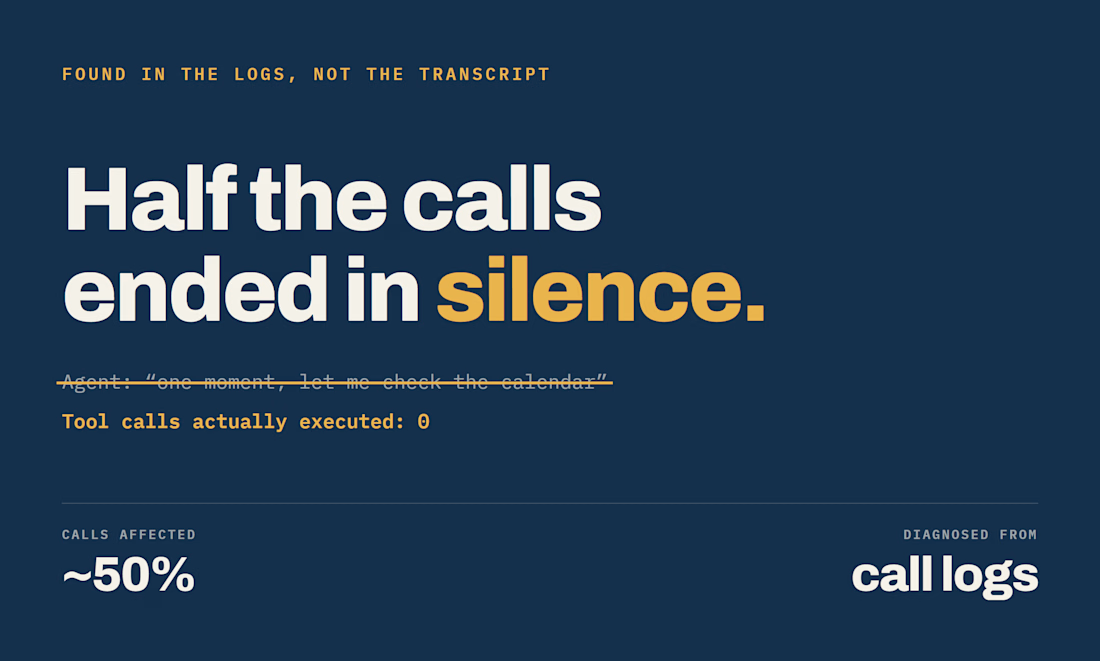
Half the calls ended in silence.
The agent said its line - "one moment, let me check the calendar" — and then did nothing. No error, no exception. The transcript looked perfect, which is exactly why it survived for weeks.
I found it by ignoring what the agent said and counting what it actually did: tool invocations in the call artifacts. On roughly half of all calls: zero.
The model was narrating the action instead of performing it. Two changes fixed it - a larger model, and moving the filler line to the platform's request-start hook, so speech and execution stopped sharing a path.
The lesson I keep re-learning with voice agents: transcripts lie. They show you what was said, not what happened. If you are debugging a live agent, count the tool calls.



Yes yes. You are on point
The network for creativity
Join 1.25M professional creatives like you
Connect with clients, get discovered, and run your business 100% commission-free
Creatives on Contra have earned over $150M and we are just getting started



Related posts

Did a motion for the Cockpit concept ⁕ 🔈 ON
Design & Creative Direction: Me
Motion & Sound: Claude Code
Cockpit is an AI agent management platform concept that helps teams:
- Set boundaries
- Monitor activity
- Manage approvals
- Track knowledge sources
- Measure performance and costs
It brings together five key AI UX challenges:
👉 Autonomy
👉 Observability
👉 Human Approvals
👉 Context
👉 Analytics
The idea is simple:
As AI agents become more capable, the experiences we design around them need to make their actions more transparent, predictable, and manageable.
Thanks!


Human approvals is the part most agent UIs skip. Good call making it one of the five challenges.

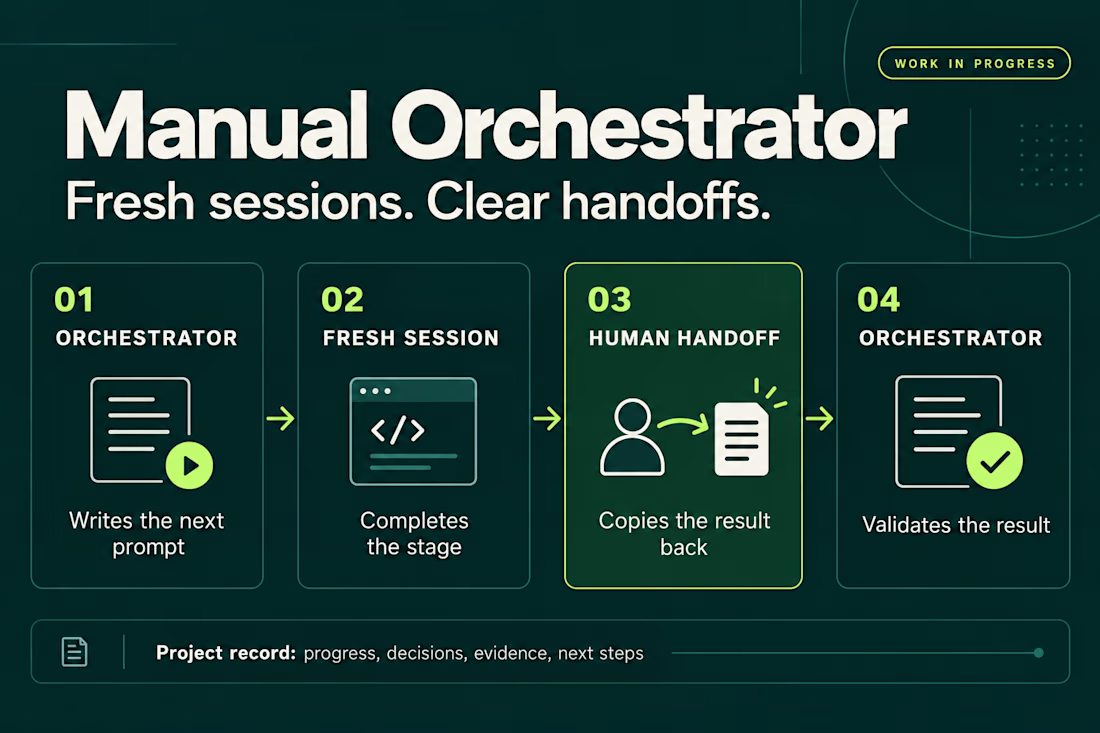
I’ve been working on a small skill called Manual Orchestrator to make longer projects with AI agents easier to manage.
The problem started with a familiar situation: one chat would accumulate plans, implementation details, corrections, and test results. By the time I was ready for the next phase, I wanted a fresh conversation without losing the decisions we’d already made.
Manual Orchestrator gives that process some structure. One chat acts as the orchestrator: it breaks the work into stages and writes a prompt for the next one. I run that prompt in a new session, then bring the result back. The orchestrator reviews it against the stage’s criteria before preparing the next prompt. If something needs fixing, I go back to the same worker session.
The skill also keeps a record in the project with the current stage, decisions, evidence, and next steps. That makes it easier to pause, resume, or hand the work to another session.
The handoff is manual. I choose when to open a session and carry the result back. The orchestrator and worker sessions can also use different agent CLIs, with the prompt adapted to the capabilities available.
It’s open source and still a work in progress. I’m using it to learn what helps in practice and where the workflow needs to improve. Installation has been checked for Codex, Claude Code, and Gemini CLI, but the full workflow hasn’t been tested across every CLI or version.
If you try it, I’d be interested in hearing what works and where it gets in your way.


Weekend fun 😺. The new MacBook Pro has a Dynamic Island, and I kept wondering: what if that little pill was where your AI agent lived?
Try it live: https://lab.behzad.me/agent-mew/
So I spent the weekend prototyping Agent Mew. You drop a file on the notch, give it a task, and it quietly works up there while you keep doing your thing. It shows progress in the wings, asks a quick question when it needs one, and always waits for your OK before doing anything that leaves your Mac, like sending an email.
A few things I explored:
- Progress that stays out of the way, readable at a glance
- Questions as one tap, not a chat window
- Approval cards for anything with real consequences
- Paused and stuck states that tell you what to do next
- A small animated cat, because agents should have some personality


Approval cards for anything that leaves the Mac is the right line to draw. Does the card show the full email before you tap OK, or a short summary? I'd lean toward full text for anything going to another person.