The network for creativity
Join 1.25M professional creatives like you
Connect with clients, get discovered, and run your business 100% commission-free
Creatives on Contra have earned over $150M and we are just getting started
Back to feedPost

I built FlowLancer — My End-to-End Autonomous Freelance AI Agent
As a freelancer, I was spending way too many hours on admin work — managing clients, proposals, time tracking, invoicing, and follow-ups.
So I created FlowLancer, my custom AI agent in Notion that handles almost all backend operations automatically.
Here’s what it does for me:
• Processes new client emails and turns them into proper projects + proposals
• Creates my daily plan every morning with prioritized tasks
• Logs time automatically when I tell it
• Tracks project progress and creates next tasks
• Prepares invoice drafts when milestones are complete
• Sends polite payment reminders
• Gives me a full weekly summary every Sunday
Now I spend 90% of my time on actual client delivery work instead of operations.
🔗 Agent: FlowLancer


The network for creativity
Join 1.25M professional creatives like you
Connect with clients, get discovered, and run your business 100% commission-free
Creatives on Contra have earned over $150M and we are just getting started





Related posts

Built this AI agent to find, organize, and manage leads through Gmail, helping automate lead handling and outreach.

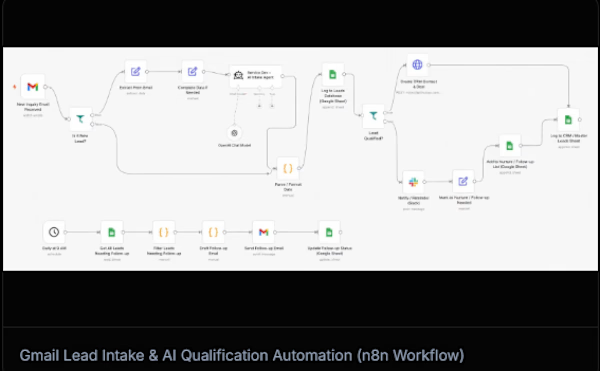

n8n is absolute gold for orchestrating lead pipelines like this! Connecting Gmail parsing with LLM qualification saves teams dozens of hours weekly. As someone who builds custom agentic lead automation workflows, seeing clean visual architectures like this is super satisfying. Top-tier build, Talha!.

I built Apex Connect—an autonomous AI operations hub for a busy solo roofing contractor in New York.
As a solopreneur, the owner is constantly on-site climbing ladders. This operational bottleneck causes him to miss inbound customer leads, wrestle with text-back-and-forth calendar scheduling, and face a high client no-show rate for property quotes.
This app fixes his business in two massive ways:
Fixes the Front Door: A Customer Portal that automatically triages roof damage. If a user selects "Emergency Storm Damage," the app intelligently unlocks priority, same-day booking slots automatically.
Fixes the Follow-Through: An Owner Dashboard featuring an automated "Follow-Through Queue." It runs background SMS No-Show Guards, tracks quote email follow-ups, and manages a clean lead pipeline completely hands-free.
The application successfully saved the hypothetical small business client 11.4 manual administrative hours in its first week alone.:

Amazing idea Maha! Love how you solved the solo contractor problem. Super clean UI! Best of luck with the challenge 🚀 - from a fellow builder (BizTool Finder)

📸 Haramaya Lens — From “Can I book?” to “You’re booked.”
I built Haramaya Lens, a booking system for a fictional photography and videography studio in Haramaya, Ethiopia, as part of the Lovable Challenge.
🔴 The Problem
For a busy solo photographer, booking customers can take a lot of time.
Customers often ask:
“Are you available?”
“What time can I come?”
“Can I change my appointment?”
“Did you confirm my booking?”
The owner may have to manually:
• Check availability
• Reply to messages
• Find a suitable time
• Confirm the appointment
• Update the calendar
• Send reminders
• Handle rescheduling and cancellations
• Follow up with customers who did not complete their booking
This creates back-and-forth communication, missed opportunities, scheduling conflicts, and unnecessary owner workload.
🟢 The Solution
Haramaya Lens turns the booking conversation into a simple self-service experience.
A customer can:
📸 Choose a service
📅 Select a date
⏰ See available time slots
📝 Enter their information
✅ Confirm the appointment
🎟️ Receive a booking reference
🔄 Reschedule or cancel when needed
At the same time, the owner gets:
📊 A clear dashboard
📆 Automatic booking/calendar updates
⏰ Availability management
🔔 Reminder tracking
🔄 Rescheduling management
📋 Customer and booking information
💬 Follow-up management
🚀 Key Advantages
1. Saves owner time
Less manual messaging and fewer repetitive questions.
2. Reduces double bookings
The system checks availability and prevents conflicting appointments.
3. Makes booking easier for customers
Customers can book without waiting for the owner to reply.
4. Reduces missed appointments
Reminder workflows help customers remember their bookings.
5. Makes rescheduling easier
Customers can manage changes without unnecessary back-and-forth.
6. Gives the owner a clear overview
Upcoming appointments, customers, availability, and follow-ups are organized in one place.
7. Works across devices
The experience is designed for desktop, tablet, and mobile users.
🎯 The Main Idea
Instead of:
Customer message → Owner checks → Back-and-forth → Confirmation → Manual update
Haramaya Lens creates:
Choose service → Choose time → Confirm → You’re booked. ✅
I built this project to focus on one question:
How can we remove as much unnecessary work as possible between a customer saying “Can I book with you?” and the owner saying “You’re booked”?
🔎 Please check the project
and leave a comment.
I’d especially like feedback on the problem, solution, user experience, design, and features.
What would you improve or add?
Built with Lovable.
@Lovable #lovablechallenge


haramayalens.lovable.app
Haramaya Lens — Beautiful moments. Simple booking.
Book your photography session in Haramaya without the back-and-forth. Live availability, instant confirmation.