The network for creativity
Join 1.25M professional creatives like you
Connect with clients, get discovered, and run your business 100% commission-free
Creatives on Contra have earned over $150M and we are just getting started
Back to feedPost

For the Make It Real challenge, I’m submitting a Squarespace landing page for Design Forward, a four‑week live bootcamp for web designers exploring how AI can streamline the tedious parts of their process. This site is built entirely with Squarespace’s native design tools, with NO custom CSS, JavaScript, or extensions.
The landing page invites interested designers to join our waitlist for the September launch, built on a visual identity I’ve been crafting with my talented friend Edinah of Wildlogic.
My goal for the experience is to guide the user’s attention while reinforcing the brand’s message. Design Forward is catered to multilayered creatives who are ready to push boundaries, so I wanted those unexpected layers to reveal themselves as you scroll. The overall feeling is optimism and artful play; brought to life with Squarespace’s new Finish Layers feature.
How I used Squarespace’s Finish Layers
🩶 Font uploads
The Design Forward type system pairs vivacious 1960s letterforms with fashion‑forward contemporary typefaces. Using the Font Upload feature, I applied four custom fonts across the site without any added code. The Scale Text feature helps achieve both visual coherence and proper heading hierarchy, supporting both SEO and accessibility.
🩶 Block Transforms and Animations
I combined block animations, transforms, and the pin block feature not only to introduce movement, but also to transition smoothly from one color theme to another — blurring the boundaries. The animations are carefully sequenced based on scroll progress so the story unfolds one scene at a time.
For the horizontal scroll section and scrolling banners, I layered scale and offset animations to move the composition across the screen and add visual interest.
🩶 Stacks
Stacks are the backbone of the layered editorial cards and complex yet responsive layouts. I nested stacks within stacks to achieve the editorial composition and animated each stack. Because stacks can include any element, I used video blocks inside these cards for accessibility and flexibility—perfecting one card and then duplicating it for consistent motion and layout.
🩶 Mobile overrides
Independent mobile settings let me adjust transform values, timing, and layout specifically for smaller screens, creating a streamlined mobile flow without compromising the desktop experience.
Live site: https://designforward.live
Social Posts
🩶 Post on Youtube
Additional walkthroughs
Platform: Squarespace
Approach: 100% no‑code. Purely using Squarespace's native tools. No custom CSS, JavaScript, or third‑party extensions
Image and video assets from DTS and AI generation.


Incredible!



This is an A+ submission vid! Participants take note. Bravo

Bravo! Beautiful work as always 😍
The network for creativity
Join 1.25M professional creatives like you
Connect with clients, get discovered, and run your business 100% commission-free
Creatives on Contra have earned over $150M and we are just getting started
Related posts

Built Atelier Real for the #SquarespaceChallenge — a brand studio site that makes ideas real with Finish Layer (fonts, transforms, animations, stacks). No custom code.
@squarespace
Site: https://onion-guitar-k9n2.squarespace.com (password: 12345678)
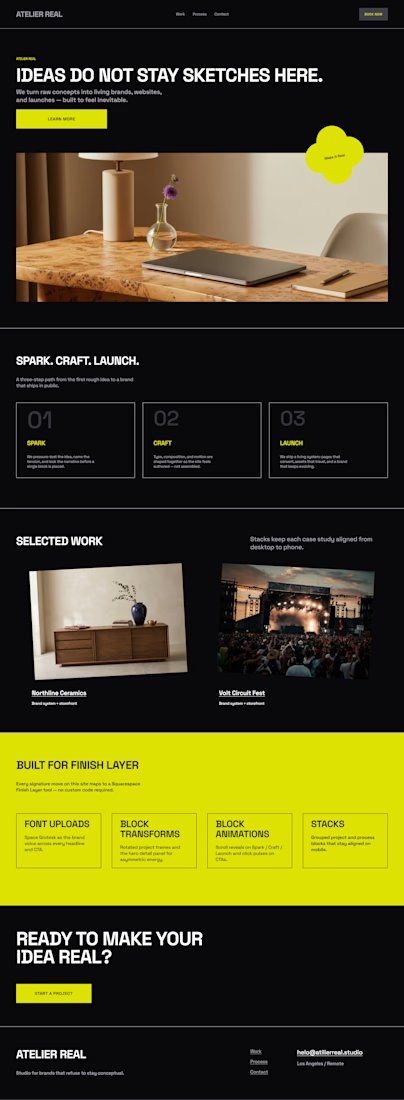


I love the black and this color of yelloe with minimalist design and great font choices along with thin lines. My onlu auggestion is to implement the color yellow at details and especially on the hero section a little bit more. Great design!

I'd had this idea in mind for a while, a series of compact, portable modern cabins that could be customizable in different ways to suit different needs. When I came across the Squarespace challenge, it felt like the perfect opportunity to bring the concept to life and build the entire website in Squarespace.
I also wanted to prove that you don't always need custom code to create a premium looking website. The goal was to keep the design clean and minimal, letting the product take center stage. Using Squarespace's latest Fluid Engine features for stacking and animations, I introduced subtle motion and interactive details that make the experience feel more dynamic and engaging.
Welcome MODO Cabins - Visit Live Website

love how interactive this page is, really makes the cabin feel real

The Gate London City - https://www.thegate-london.com
We designed and built the site in Squarespace to deliver a premium, considered experience from the first scroll, matching the quality of the property itself.
We used the full Finish Layer suite to create a beautiful, smooth bespoke feel.
Block Animations - Cards slide into view as you enter the page, and reveal their copy on hover with a click-through link, creating an interactive, editorial feel.
Block Transforms - Used to build an overlapping card layout, giving the page depth and a dynamic, asymmetrical rhythm.
Stacks - Grouped and aligned blocks to control how the layouts hold together across screen sizes.
Font Uploads - A custom brand font uploaded to carry The Gate's personality throughout.
squarespacedesignsquarespacewebsitesSquarespace Website DesignSquarespace DevelopmentSquarespacesquarespacechallenge
Really good work! That photo gallery section good qualiry hero video blended with great font choices and text placements.. looks and feels insane overall!










Trending

Claude
Claude has entered the design space. How are you using Claude Design?

Contra University
Learn from expert creatives how to earn more using next-gen AI tools.
creativeaiflow
Creative AI workflows are evolving. What tools do you use, and what are their strengths and weaknesses?
freelancerlife
Freelancer life is wins, pivots, and everything in between. What’s yours right now?