The network for creativity
Join 1.25M professional creatives like you
Connect with clients, get discovered, and run your business 100% commission-free
Creatives on Contra have earned over $150M and we are just getting started
Back to feedPost

Client Onboarding Workflow
In this video, you can see how the data from your form is automatically added to a Notion database. Then, a Slack channel is created under the client’s company name, and after that, you receive a notification that you have a new client.
The point of automation is not to replace you, but to make your work easier so you can focus on the things you want and enjoy doing.


The network for creativity
Join 1.25M professional creatives like you
Connect with clients, get discovered, and run your business 100% commission-free
Creatives on Contra have earned over $150M and we are just getting started











Related posts

React Bits & Lovable. Just try this cool stuff! 👍
#prototyping #uiux #nocode


Love this stack Alona! React Bits + Lovable is such a powerful combo for rapid prototyping. No-code/low-code but still keeping that custom UIX feel - that's the sweet spot! Have to try this cool stuff indeed. Great share! 👍

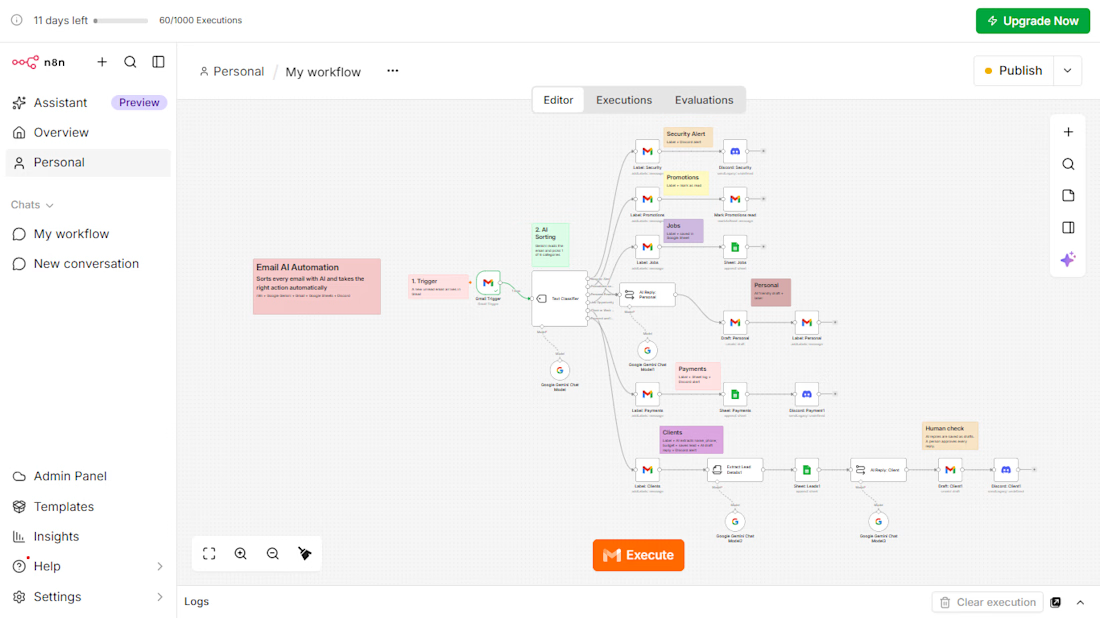
AI Email Automation with n8n and Google Gemini
An AI workflow that reads every incoming email, sorts it into 6 categories, and takes the right action automatically.
The problem: businesses lose time and leads because customer emails are mixed with promotions, job alerts, and security emails.
What I built:
Gmail Trigger that picks up each new email
AI Text Classifier (Google Gemini) with 6 categories: Security Alert, Promotions, Jobs, Personal, Payments, and Client Inquiries
Automatic Gmail labels for every category
Google Sheets log for jobs, leads, and payments
AI information extraction for client emails (name, phone, service, budget)
AI-written reply drafts for client emails, saved as drafts so a person approves every reply
Instant Discord alerts for security, payment, and client emails
Tools: n8n, Google Gemini, Gmail, Google Sheets, Discord
This project is a working demo built on my own inbox. The same system can be adapted to any business email, such as travel agencies, event venues, stores, recruiters, and consultants.


Impressive workflow! I especially like the human approval step for AI-written replies. Automation with the right oversight makes a real difference. 🙌

3 mistakes I see every GoHighLevel user making that creates 100s of duplicate leads:
No deduplication logic between Facebook Lead Ads → GHL
No AI check for same phone/email with different name
No Google Sheets backup before pushing to GHL
I fixed this last week for a client with a simple n8n + AI workflow:
→ Facebook Lead → AI checks duplicate → If clean → GHL + Sheets → Telegram alert
Result: 0 duplicates in 7 days, 6 hours/week saved.
Want the n8n template? Comment "TEMPLATE" and I'll DM you.
#gohighlevel #n8n #leadmanagement #automation

Clean flow. The part I'd watch is the "maybe" pile: couples often share one email or one phone, so a strict duplicate check can silently drop a real second lead. I'd send those to a review tab in the Sheet instead of skipping them. What does yours do with a likely-but-not-certain match?