The network for creativity
Join 1.25M professional creatives like you
Connect with clients, get discovered, and run your business 100% commission-free
Creatives on Contra have earned over $150M and we are just getting started
Back to feedPost

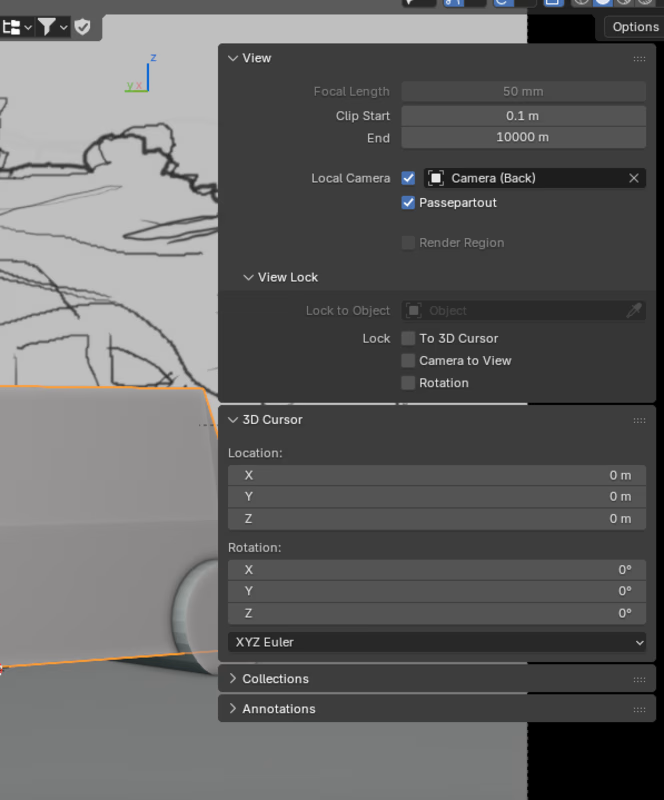
So it turns out Blender can set multiple 'active'/locked viewport cameras simultaneously! Pretty useful for composing the scene while ensuring multiple viewpoints (possibly camera keyframes) look okay.
To set this up:
- Tick "Local Camera" in the viewport's sidebar to the right, in the 'View' tab
- With local camera active, choose a different camera from the options beside the local camera checkbox. This camera will only be specific to this viewport when you switch to camera view
- Repeat for as many viewports as you wish!
Just discovered it today! My life will never be the same 🥹

The network for creativity
Join 1.25M professional creatives like you
Connect with clients, get discovered, and run your business 100% commission-free
Creatives on Contra have earned over $150M and we are just getting started



Related posts

☀️ The glass is blank. The wall isn't.
Hold it up to a window and there's nothing on it.
No print. No paint.
Then the sun comes through,
and a face lands on the wall.
That's a caustic lens.
Clear acrylic, its surface shaped so precisely that sunlight draws a picture.
They're beautiful, and almost nobody sells them.
Every single one needs its own optics solve.
🔆 HELIODOR
A studio that writes a name, or a face, in sunlight.
Type a name, or drop in a photo.
Your browser solves the lens. No server, no AI credits.
A ray-traced proof shows the light before anything is cut.
Then it checks the glass.
The portrait in the video: 3.3° slope, 3.6 mm deep, match 0.80.
Ready to cut.
From your city and your window, it finds every day the light is sharp
and adds them to your calendar.
Photos were the hard part.
A full-contrast face came out 7.1 mm deep, over the 6 mm cut line.
So every photo now keeps a soft base glow.
Behind it runs a real workshop.
Orders move through each stage on the Workshop board.
Today's lenses nest onto one acrylic sheet.
Approved pieces hang on the public Light Wall.
One photo.
One beam of sun.
Zero AI credits.
So whose face goes on your wall?
The sun does the rest. ✨
🛠️ Built in Base44: the app, the data, the sign-in and the hosting.
Make yours 👇
HELIODOR


This is such a creative concept! Turning natural sunlight into a medium for portrait creation is a genuinely unique idea. I especially like how you've connected the creative side with a practical workflow, from checking light conditions to production and order tracking. The zero-AI-credits aspect makes it even more interesting!

MEMENTO: one roll, one night
What it is
MEMENTO is a shared disposable camera for parties and events. Everyone at the event shoots on the same roll, nobody sees a single photo until the end, and then the room votes, watches a live awards ceremony and gets the whole night as one memory mosaic. After the event, the recap and photos are sent out to guests automatically.
The idea
Every photo app today is about taking the perfect picture: retake, filter, delete, repeat. MEMENTO does the opposite. You can’t preview, retake or delete anything, so the photos come out real, silly and unplanned, like an old disposable camera. Then it adds what those cameras never had: anonymous voting, a live awards ceremony on the big screen, a mascot who roasts your photos, and automation that runs the night so the host can enjoy it. The party ends with a show, not a folder of pictures nobody opens.
The problem it solves
Photos from one party end up scattered across ten phones and group chats.
People retake and delete until everything looks fake and staged.
Nobody ever sees the whole night in one place.
Hosts end up working the party instead of enjoying it.
How it works, step by step
Create: The host creates an event, names it, and gets a join code and a shareable link.
Join: Guests open the link on their phones. No app to install and no long sign-up.
Shoot: Everyone shoots on one shared roll. No previews, no retakes, no deleting.
Vote: Guests vote on the photos. Votes are anonymous.
Develop: The host “develops” the roll, and everyone sees the photos for the first time.
Ceremony: Eight awards land one at a time on the big screen, with a trophy and a WINNER stamp.
Mosaic and recap: All the photos come together in one memory mosaic and a shareable recap poster.
Send: The recap, mosaic and photos go out to guests automatically by email.
Every feature in detail
Guest experience
Join by link or code: works on any phone browser, with nothing to install.
Guest tabs: a simple bottom or top navigation so guests can move between shooting, the wall, voting and results.
Snap screen: a camera view built to feel like a disposable camera, one tap to shoot with no preview.
Photo wall: where guests see the roll after it’s been developed.
Anonymous voting: guests vote on shots without anyone seeing who voted for what.
Live reveal: guests follow the ceremony on their own phones as it plays on the big screen.
Recap and photos in your inbox: every guest gets the night to keep.
My Rolls: all your past events in one place, so you can go back to them.
Host tools (Host HQ)
Event setup: create an event, name it and share the code and link.
Host HQ tabs: one control room for guests, photos, voting, awards and results.
Autopilot: moves the night through each step on its own (shooting, voting, developing, ceremony), so the host doesn’t have to run it.
Manual control: the host can also start, pause or skip steps whenever they want.
Develop the roll: the host triggers the big moment when everyone sees the photos.
Guest and photo overview: see who has joined and how the roll is filling up.
The show
Big Screen mode: a clean full-screen view for a TV, projector or laptop, so the whole room watches together.
Awards ceremony: eight awards, revealed one by one with a drumroll feel, a trophy and a rubber-stamp WINNER slam.
Play the teaser: a short preview to hype the room before the ceremony.
Show the board: the full results at a glance after the awards.
Dispo the mascot: a smug little camera character who cheers, teases and roasts the photos. The roasts are written by AI, but the AI never picks the winners. The room does.
The keepsake
Memory mosaic: every photo from the night combined into one picture.
Recap poster: a shareable card that sums up the party, so every party becomes one poster.
Automatic emails: guests receive the recap and photos with no host work.
Image sending: the mosaic and the winning photos are delivered as images, ready to save and share.
Demo and polish
Demo party: try the full flow in one tap with no setup and no login, from the first photo to the ceremony and mosaic.
Mobile-first design: responsive from small phones to a big screen, with large tap targets and no horizontal scrolling.
Accessible and fast: readable contrast, visible focus states and reduced-motion support.
Branded look: a bold screenprint style built around Dispo, with a favicon set and app icons so it feels like a real product.
Who it’s for
Birthdays, weddings, reunions, college fests, office parties, trips and house parties. It works for any group that takes photos and then never looks at them again.
Built with
Built on Base44, with AI used only for Dispo’s roasts. Winners are always chosen by people.
Try it
https://my-momento.base44.app
Open the link and tap the demo party to see the whole thing in about a minute.

Cool idea and really fun interface , will give it a try

A cinematic 3D product scene for a mobile app, from Blender blockout to a polished final render in 1 day.


Wow, making 3D product scene look clean and readable while also on a mobile app UI is so creative