The network for creativity
Join 1.25M professional creatives like you
Connect with clients, get discovered, and run your business 100% commission-free
Creatives on Contra have earned over $150M and we are just getting started
Back to feedPost

PROJECT
Analyzed a telecom customer churn dataset of 7,043 customers and built five Excel deliverables: a churn count chart, a monthly charges histogram, a gender-based churn comparison, a tenure vs monthly charges heatmap, and sorted and filtered dataset views.
PROBLEMS SOLVED
• Identified that saving the raw file as .csv was causing data loss, then moved all work to an .xlsx workbook to protect multi-sheet analysis
• Investigated blank Total Charges values and traced them to new customers with 0 months of tenure who had not yet been billed
• Turned hundreds of unique tenure and charge values into readable bands (12-month tenure groups, 20-unit charge groups) so a heatmap could be built
• Used pivot tables to compare churn counts across categories instead of counting manually
RESULTS
• Overall churn: 1,869 of 7,043 customers (about 26.5%)
• Gender: churn was nearly equal, 26.9% for female and 26.2% for male customers
• Tenure: 999 of the 1,869 churned customers (about 53%) left within their first 12 months
• Heatmap: churn was most concentrated among short-tenure customers paying mid-to-high monthly charges
• Delivered formatted charts with titles, axis labels, data labels and distinct colors, plus a video walkthrough
SKILLS: Excel, Pivot Tables, Conditional Formatting, Data Cleaning, Data Visualization, Data Interpretation, Churn Analysis

The network for creativity
Join 1.25M professional creatives like you
Connect with clients, get discovered, and run your business 100% commission-free
Creatives on Contra have earned over $150M and we are just getting started







Related posts

One business problem. Three analytical routes. One data-driven story. ☕📊
I turned raw business data into actionable decisions—not just another Power BI dashboard.
For the Onyx Data October 2026 Challenge, I worked on the Sunrise Coffee Chain analytics project, analyzing store performance, profitability, customer loyalty, revenue mix, and trading patterns across 60 UK stores (2023–2024).
🔹 My Analytical Approach
1️⃣ Python — Data Preparation
Cleaned and prepared the source datasets to establish a reliable foundation for analysis.
2️⃣ SQL — Business Analysis
Investigated store-level profitability, cost pressure, customer loyalty, revenue contribution, and trading patterns.
3️⃣ Power BI — Interactive Dashboards
Built a 3-page interactive report featuring advanced DAX measures, KPI cards, YoY comparisons, profitability analysis, and business-focused visualizations.
📊 Key Findings
• £89.7M Revenue | £16.9M Net Profit
The business recorded an aggregate net profit margin of 18.8% across the analysis period.
• Store Location Matters
Transport-Hub stores achieved a 25.1% aggregate net profit margin, compared with 18.6% for High-Street stores.
• An Area Requiring Attention
South London Corner recorded a £50.5K net loss over 24 months.
• Product Revenue Contribution
Espresso contributed 45.7% of daily revenue, while food contributed 26.1%.
• Trading Patterns
Average daily revenue was approximately 24% lower on weekends and 33% lower on UK bank holidays than on regular trading days.
💡 My Biggest Takeaway
Revenue alone does not tell the whole story. Understanding profitability, cost pressure, product contribution, and trading patterns helps businesses identify where to improve performance and make better decisions.
🔗 Explore the Complete Project
GitHub: https://github.com/SajeebTheAnalyst/sunrise-coffee-chain-analytics
If you were advising the management team, which finding would you investigate first—and why?
#DataAnalytics #SQL #PowerBI #Python #DAX #BusinessIntelligence #DataVisualization #OnyxData


I would investigate South London Corner first. Break the 24-month loss into store-month revenue, direct costs and allocated costs, then compare it with similar stores over matched trading periods. Reconcile at store-month grain before joining product or loyalty tables so a...

Hi, I am Priyash, your expert Virtual Assistant specializing in B2B lead generation, accurate data entry, and web research.
I help founders, startups, and growing teams save time with zero-error administrative support and fast turnaround.
Send a message to get started!

Hey Priyash! Dropped you a DM regarding a potential partnership for our B2B agency, but wanted to leave a quick note here too. Let's connect!

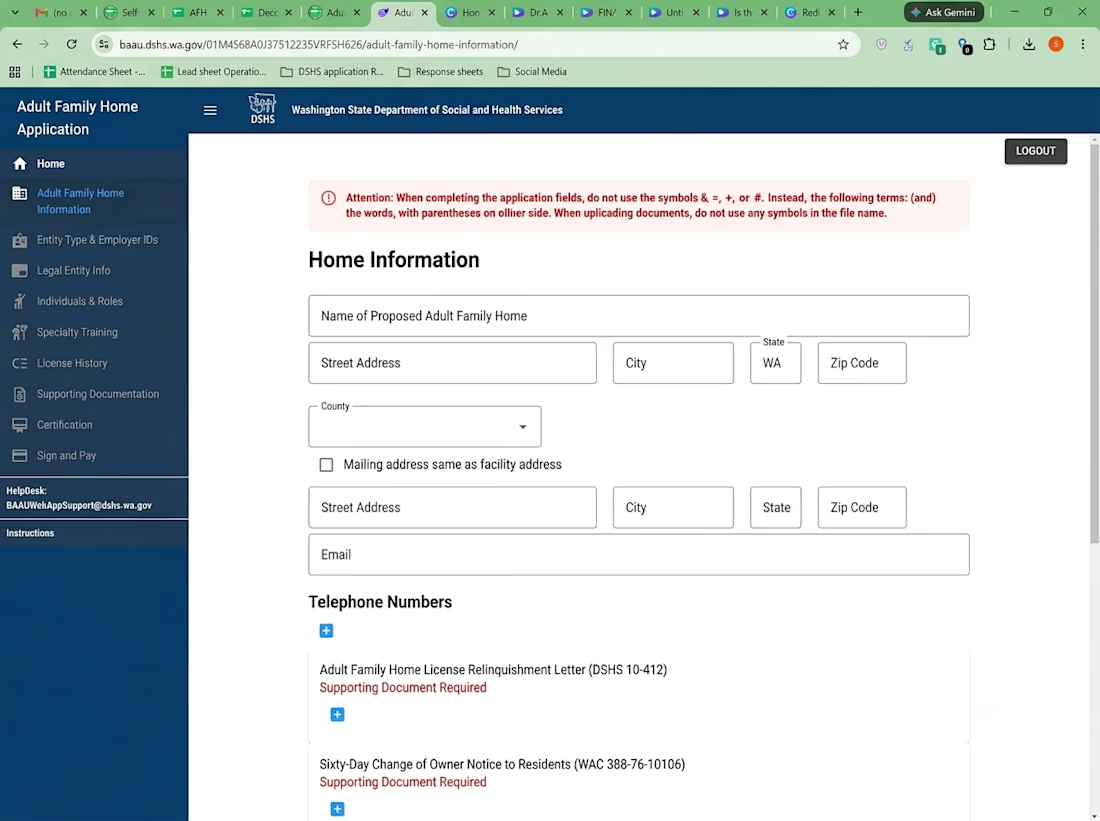
Project: Adult Family Home Application Management
This project showcases my experience in managing online application forms and documentation using the Washington State Department of Social and Health Services (DSHS) portal. My work involves entering facility information, maintaining contact details, completing application fields, and organizing required supporting documents.
Key Responsibilities:
Accurate data entry and online form management.
Organizing facility details, addresses, email addresses, and telephone numbers.
Managing required supporting documents and application records.
Reviewing information for completeness and accuracy.
Following application guidelines and maintaining organized digital records.