The network for creativity
Join 1.25M professional creatives like you
Connect with clients, get discovered, and run your business 100% commission-free
Creatives on Contra have earned over $150M and we are just getting started
Back to feedPost

You know exactly what to type into your own search box.
A new user doesn't.
They open it and see a blinking cursor.
Then they have to guess what your app can do.
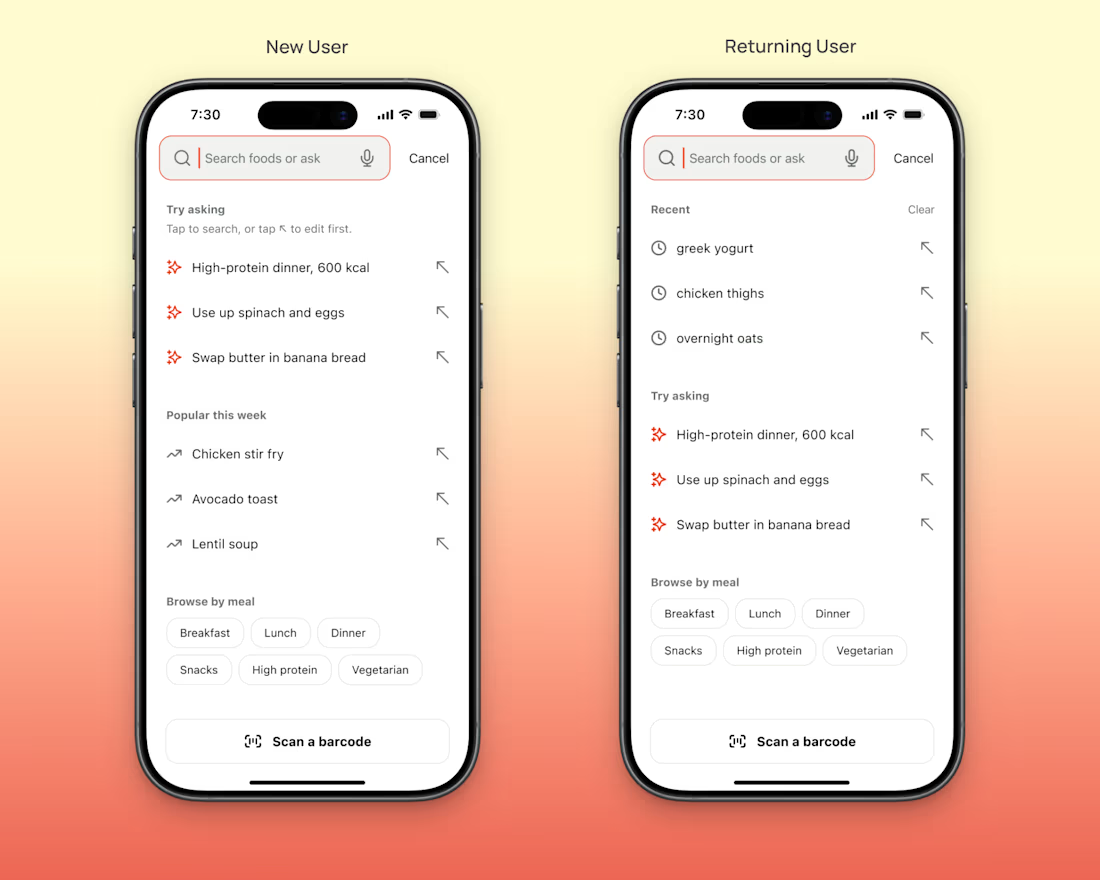
I designed an empty search screen for an AI food tracker concept here's what I put in it (if you want to steal it).
Example questions at the top, like "High-protein dinner, 600 kcal".
Those 4 words tell a new user more than a blinking cursor does.
Recent searches, but only once there's history.
A new user has none.
A few big buttons for people who'd rather tap than type, like Breakfast and Dinner.
Barcode scan pinned to the bottom, where a thumb can reach it.
Clear your history, log out of your own app & open search.
If you wouldn't know what to type, neither will they.


This is such a sharp breakdown of empty states. The example question trick is the real insight, "High-protein dinner, 600 kcal" teaches the whole search grammar in one line. And hiding recents until there is history is exactly right, most apps show an empty box and call it done....
just from from studying different apps

Nice work
thank you :)

Example prompts in an empty state is a great call.
sure is :)
The network for creativity
Join 1.25M professional creatives like you
Connect with clients, get discovered, and run your business 100% commission-free
Creatives on Contra have earned over $150M and we are just getting started











Related posts

AI can build the UI in minutes.
Bringing it up to a good standard, still needs a designer. Agree or disagree?

I see some of your work and honestly your work is really premium 🎉🎉
Great job Alex🎉🎉🔥🔥


✈️ What if booking a flight was actually fun?
I wanted to make the whole experience feel less like filling out a form and more like playing with an interface.
Turn your sound ON and give it a watch 🎧🔊.

THIS IS GREAT

Traditional corporate training often feels disconnected from everyday work. Skillio helps bridge that gap with personalized five-minute sessions, job-specific AI simulations, and instant feedback.
The mobile experience supports role-based learning across professions, with interactive chat and voice exercises that recreate realistic workplace situations. A lime-green, lavender, and deep-green palette, bold typography, and a flower-shaped performance chart make progress easy to understand and engaging to explore.
Explore the project on Dribbble:
https://dribbble.com/shots/27808131-Mobile-App-Powered-Employee-Training

Sweeet