The network for creativity
Join 1.25M professional creatives like you
Connect with clients, get discovered, and run your business 100% commission-free
Creatives on Contra have earned over $150M and we are just getting started
Back to feedPost

#1 Software solution for - Real Estate Agencies
🚀 Manage your real estate agency, from creating detailed property listings to booking visits, handling customer relationships, and closing the sale.
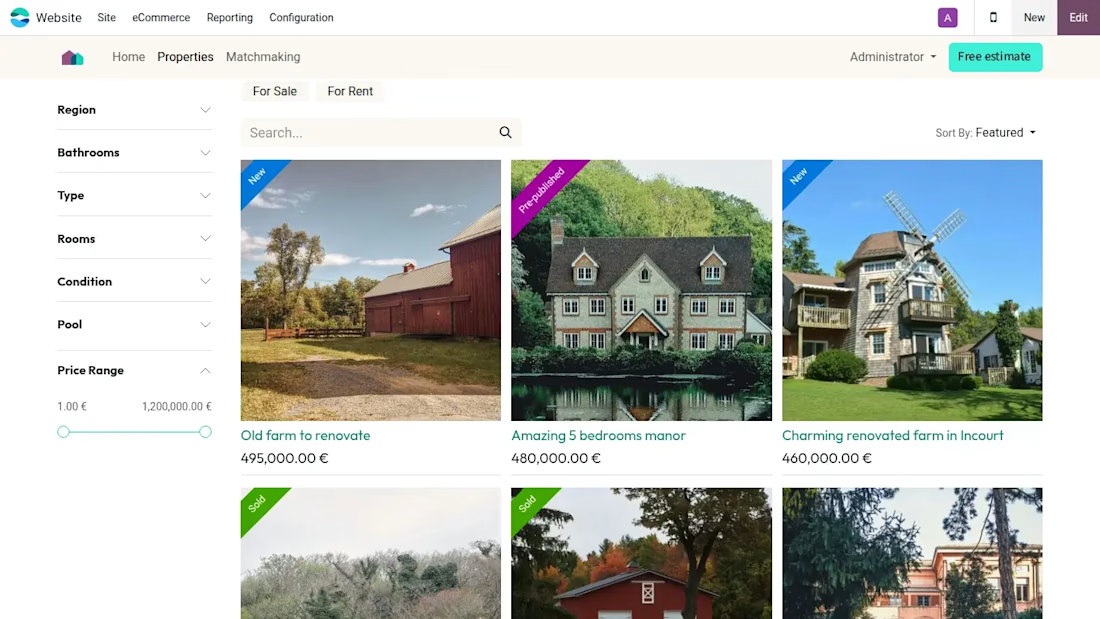
- Create property listings. List houses and apartments, along with detailed information about their layout, surface, number of rooms, energy rating, and more.
- Custom searches let users filter by specific requirements, and be notified when a property that matches their criteria becomes available.
🚀 Nourish relationships
- Centralize leads. Odoo's CRM allows you to capture and nurture every lead, whether it comes from your website, email, WhatsApp, or else.
- Schedule appointments. Clients can book directly from the website, and your calendar is synchronized so you never double book.
- Keep track of activities such as uploading and signing documents, meetings, and calls.
🚀 Manage documents, collect signatures
- Odoo's document workspace supports various file formats and allows you to organize all the necessary files for closing a sale, including property plans, contracts, and legal documents.
- Collect signatures in seconds. Your clients can access and review documents on any device and sign them electronically with just a few clicks.
🚀 Integrated finance management
- Enjoy the flexible invoicing: Invoice clients in one click, using their preferred method. Choose from email, snail mail, e-invoicing, or a QR code.
- Set up a commission plan to reward salespersons and property sellers. Odoo calculates the commission automatically as soon as the deal is closed! 💯


The network for creativity
Join 1.25M professional creatives like you
Connect with clients, get discovered, and run your business 100% commission-free
Creatives on Contra have earned over $150M and we are just getting started
Related posts

I migrated Pi-lit's site from WordPress to a custom-coded, AI-native website with its own hosting. The result:
-A scalable design system that also supports their ecommerce
-30+ pages with consistent branding throughout
-Animated illustrations of their scenes and products that bring the roadway safety story to life
See Full Case Study


Lovely work


We’re testing two filtering layouts for a template library.
Top Filters
The filters are placed above the content. This option feels lighter, leaves more space for the cards, and works well when there are only a few main categories.
Sidebar Filters
The categories remain visible in the sidebar. This makes the available options easier to scan and works better for more complex filtering, but takes up some of the content space.
Which layout would help you find the right template faster?

24 voted
39%
37 voted
61%
61 votes
Closed

Such a clean presentation. You can tell a lot of thought went into this.