The network for creativity
Join 1.25M professional creatives like you
Connect with clients, get discovered, and run your business 100% commission-free
Creatives on Contra have earned over $150M and we are just getting started
Back to feedPost
I built an automated lead generation system using Make.com that finds businesses on Google Maps and extracts their emails, completely automatically.
Here's exactly how it works:
🗺️ Connects to Google Maps API and searches any industry in any location
📊 Creates a Google Sheet automatically and populates it with business names and websites
📧 Makes HTTP requests to each website and extracts email addresses using AI
✅ Ignores errors automatically and moves to the next lead
⏰ Can be scheduled to run every 15 minutes on autopilot
I ran it live and it found 50 marketing agencies in Bangkok with their emails, automatically.
Any industry. Any location. Anywhere in the world.
As long as the business is on Google Maps, this finds them.
Check out my Linkedln to learn more: https://www.linkedin.com/in/daniel-oluwafikayomi-famuyiwa-268a2a3a6/
Video below 👇
#AIAutomation #LeadGeneration #MakeCom #NoCode #EmailMarketing #BusinessAutomation #WorkflowAutomation #SalesAutomation #AITools #DigitalMarketing


If you were building a lead list today, what information would be most valuable besides email addresses? Website? Social profiles? Phone numbers? Industry data?
I'm currently exploring ways to enrich the leads further with additional business information before they even enter the CRM.
The real value isn't just finding businesses, it's creating a repeatable system that consistently generates opportunities without manual effort.
Most businesses spend hours searching for prospects manually. Automating the research phase frees up more time for outreach and closing deals.
This can also be adapted for real estate agencies, recruitment firms, local businesses, consultants, and virtually any industry with a Google Maps presence.
One thing I like about this workflow is that it doesn't require manual prospecting. Once configured, it continuously builds lead lists in the background.

This is a nice build. Wonderful seeing automation guys here
Thanks for the compliment. Are you also into Ai automation?
Yes purely voice AI chatbot development
I am even about to make a post regarding Voice Ai, kindly check it out

Great!
Thanks for the compliment

Wonderful! Did you ever think of building a SaaS out of it?
Yes, i have had the thought


What a beautiful automation
Thank you

Great execution. Everything feels baanced.
Thanks

its should be good for us who do cold emailing to clients
You get the idea 💡

Great thinking!
Thank you

Simple, functional and straight to the point🔥
Thanks for the feedback

awesome!
Thank you

That's great, keep up the good work!
Thank you

Perfect
Thank you

Impressive build. Do you verify the extracted emails before exporting them, or is that handled in a separate workflow?
Also have you compared this approach with commercial lead-generation tools in terms of accuracy and cost?
Thanks, Ashish!
In this version of the workflow, I focused on extracting and organizing the lead data. Email verification can absolutely be added as the next step by integrating a verification service before exporting the results.
Compared to commercial lead-generation tools, the...
Thanks for the clarification! The customization aspect is what stands out to me as well. Looking forward to seeing how you expand the workflow with verification and enrichment.

That's a great solution and it's really helpful. However, it relies on the Google Maps API. I built a tool that doesn't require the Google Maps API, and it runs perfectly on my laptop. It can generate up to 200 leads in a single run.
Thanks for sharing! That's an interesting approach.
There are definitely multiple ways to solve the same problem. I chose the Google Maps API for this workflow because it provides structured business data and integrates well with the rest of the automation pipeline.
A local...
I built it for my own use. It doesn't follow Google's policies, but since it doesn't require a server, it's difficult to detect and gets the job done.
Thanks for the clarification.
I can see why that approach works for personal use. For client projects, though, I generally prefer solutions that align with platform policies and are reliable enough to maintain over the long term.
My goal is to build automations that businesses can...
The network for creativity
Join 1.25M professional creatives like you
Connect with clients, get discovered, and run your business 100% commission-free
Creatives on Contra have earned over $150M and we are just getting started



Related posts

Shopify Abandoned Cart Recovery Automation 🛒
Ever wondered how many potential orders an online store could miss when customers add products to their cart but leave without completing checkout?
I built an abandoned cart automation workflow using Activepieces, Shopify, Google Gemini, Gmail, and WhatsApp Business.
⚙️ How It Works
🛒 Cart Trigger: Detects an abandoned checkout event from Shopify.
🔀 Conditional Routing: Routes the workflow based on configured conditions.
🤖 AI-Powered Messaging: Gemini generates a personalized reminder message.
💬 WhatsApp Reminder: Sends a cart reminder through WhatsApp Business.
📧 Email Reminder: Sends a follow-up email to encourage the customer to complete checkout.
💡 How It Can Help E-commerce Businesses
Remind customers about products left in their carts.
Reduce repetitive manual follow-up work.
Make customer communication more consistent.
Create an opportunity to recover potentially lost sales.
Tools Used: Activepieces | Shopify | Google Gemini | Gmail | WhatsApp Business
Project Type: Personal Automation Project
I built this workflow to demonstrate how automation can support abandoned cart recovery for Shopify and D2C businesses.
Interested in automating your store's customer follow-ups? Let's connect.


The 30–60 minute delay then 24-hour follow-up is a sensible cadence. The part I would harden next is the stop conditions: once the cart converts or the customer replies, every channel should cancel, and WhatsApp especially needs a clear opt-in trail before the first send....

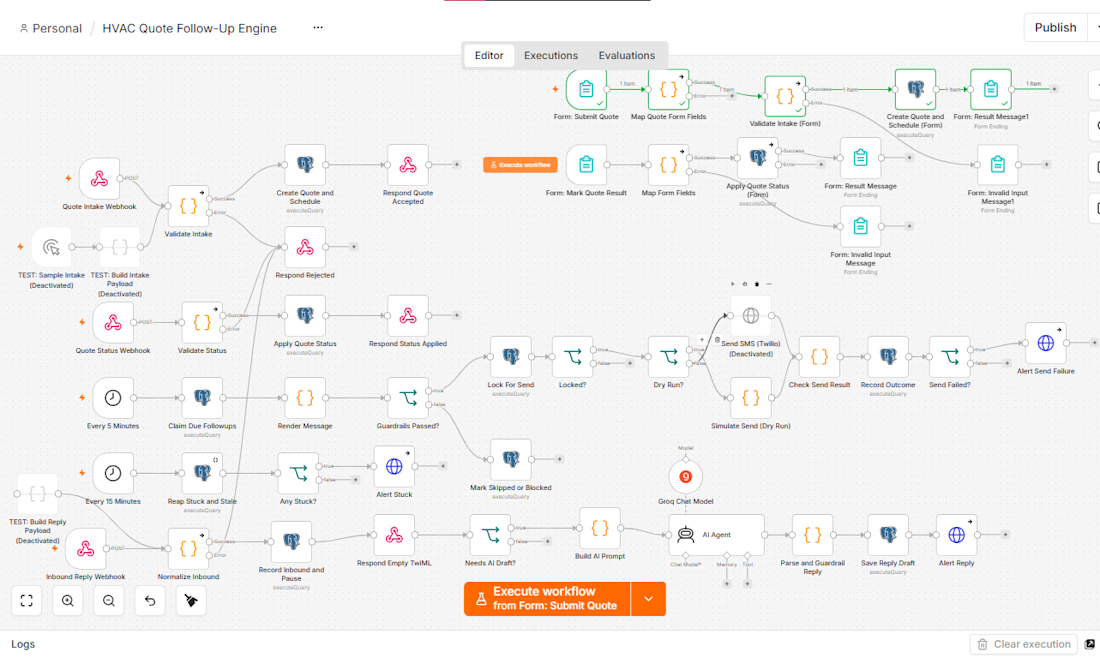
Quote Follow-Up Automation for HVAC & Plumbing
Most home-service quotes don’t get rejected, they just go quiet. I built a system that follows up on them automatically.
What it does
Takes each quote through a simple form
Schedules up to 8 timed texts over 30 days
Stops instantly on a reply, a STOP, or a booked/lost update
Uses AI to draft replies to objections, with a human approving every one
Built with safety first
No duplicate texts, even when processes overlap
Only contractor-approved wording is sent
Texts go out only during local business hours
Opt-outs are honored immediately
Stack: n8n, Postgres, Groq, Docker, Twilio
Status: built and tested end to end, ready to pilot.
I build automation systems like this for service businesses. Message me if you’d like one for yours😊 .



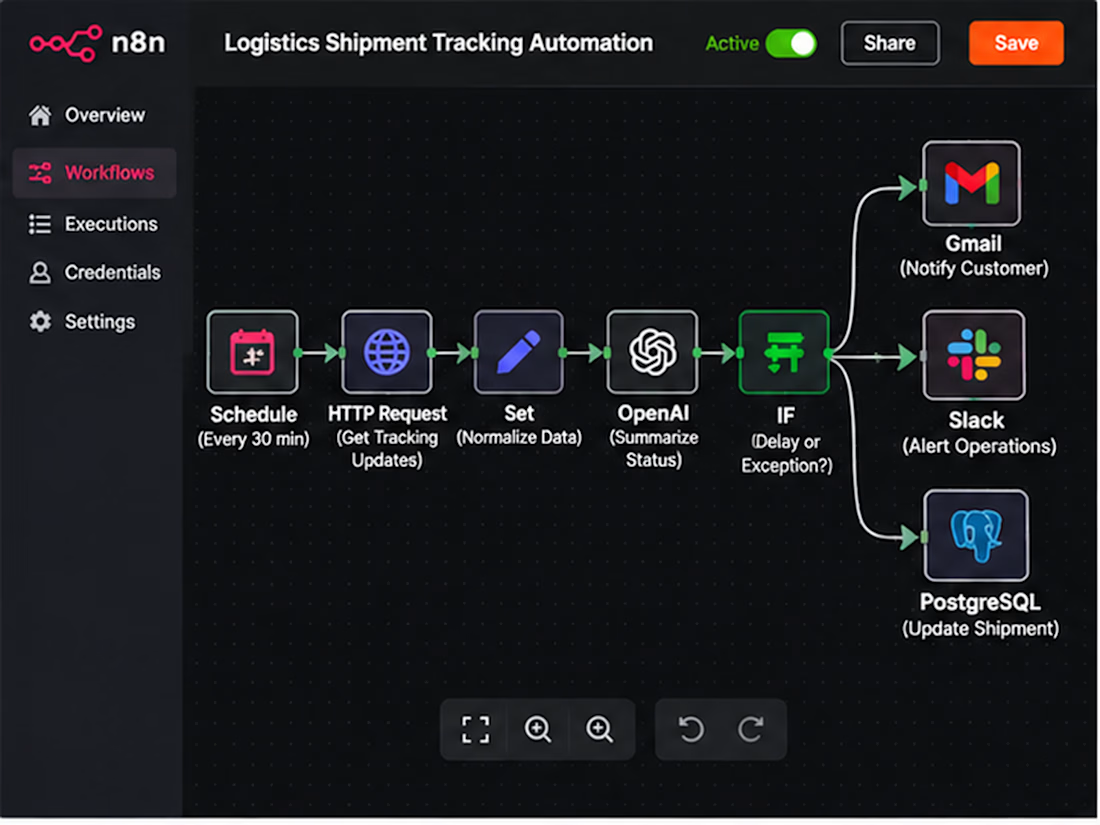
Your Logistics Team Shouldn't Have to Chase Every Shipment Manually. 🚢
A shipment is delayed. Your customer wants an update. Your operations team is checking carrier portals, copying tracking numbers into spreadsheets, and sending the same status emails repeatedly.
By the time everyone has the right information, the next shipment needs attention.
The problem isn't a lack of effort. It's disconnected logistics operations.
Common challenges:
Shipment updates scattered across multiple carrier systems.
Delayed shipments discovered too late.
Manual customer status emails.
Tracking spreadsheets that quickly become outdated.
Repetitive follow-ups between operations and customer service.
Limited visibility into shipment exceptions.
The solution: An automated logistics operations workflow built with n8n.
I can design an automation that connects carrier tracking APIs, your shipment database, and customer communication channels.
Instead of manually checking every shipment, your team receives structured updates when something actually needs attention.
What the automation handles:
📦 Shipment Tracking — Retrieve updates from supported carrier APIs.
🚨 Exception Detection — Identify delays, customs holds, and missed milestones.
🤖 AI-Assisted Updates — Convert complex tracking events into clear, customer-friendly messages.
📧 Customer Notifications — Send relevant shipment updates automatically.
📊 Operations Visibility — Maintain synchronized shipment records and exception histories.
🔁 Escalation Management — Notify the responsible team when an exception requires action.
The goal: Less repetitive tracking work, faster exception awareness, and more consistent customer communication.
Two ways we can work together:
Option 1: Already have carrier APIs, a TMS, or a defined tracking workflow? Share your requirements, and I'll help design the integration.
Option 2: Not sure which logistics tasks should be automated? We can map your shipment lifecycle and identify the highest-value starting point.
Make your logistics operations easier to manage as shipment volume grows.
Workflow architecture
Scheduled Trigger → Carrier API Request → Normalize Tracking Events → Match Shipment Records → Detect Status Changes → Route Exceptions → AI Summary → Customer Email / Operations Alert → Database Update
Implementation: Authenticate carrier integrations, normalize differing event codes, compare timestamps and event IDs, prevent duplicate alerts, route exceptions by severity, and log delivery failures for retry.
Benefits: Reduced manual tracking, clearer exception ownership, more timely customer updates, and an auditable shipment history.
Result: A centralized shipment monitoring workflow that allows operations teams to focus on resolving exceptions instead of repeatedly checking tracking portals.
SEO Keywords
n8n logistics automation • freight forwarding automation • shipment tracking automation • AI logistics workflow • 3PL automation • logistics API integration • freight tracking software • supply chain automation • carrier tracking API • automated shipment notifications • freight forwarder software • logistics operations automation • shipment exception management • customs clearance alerts • AI shipment updates • freight status monitoring • transportation workflow automation • logistics email automation • carrier integration services • shipment delay alerts • freight operations workflow • logistics customer communication • n8n freight automation • logistics data synchronization • TMS integration • transportation management integration • shipment event processing • automated logistics reporting • shipping status API • logistics workflow developer • freight technology consultant • 3PL workflow integration • automated delivery updates • shipment milestone tracking • freight customer portal integration • logistics exception alerts • carrier API developer • logistics process optimization • AI supply chain automation • logistics database automation • freight forwarding API • shipment tracking dashboard • logistics business automation • automated freight communication • shipment lifecycle automation • n8n API workflows • logistics SaaS integration • freight management automation • shipping notification workflow • custom logistics automation • shipment reconciliation • freight exception escalation
Hashtags
#n8n #n8nAutomation #LogisticsAutomation #FreightForwarding #FreightTech #SupplyChainAutomation #ShipmentTracking #3PL #LogisticsTechnology #WorkflowAutomation #AIAutomation #CarrierIntegration #APIAutomation #FreightManagement #ShipmentVisibility #SupplyChainTech #LogisticsSoftware #BusinessAutomation #CustomAutomation #LogisticsOperations #ShipmentAlerts #FreightSoftware #TransportationManagement #SupplyChainVisibility #AIWorkflow #AutomationEngineer #B2BAutomation #SystemIntegration #OperationsAutomation #FreightOperations #ShippingAutomation #CustomSoftware

The customs-hold exception is the one I'd find hardest to route, since it needs a different owner than a plain delay. Do you map each exception type to its own team in the escalation step, or is it one shared alert queue?