The network for creativity
Join 1.25M professional creatives like you
Connect with clients, get discovered, and run your business 100% commission-free
Creatives on Contra have earned over $150M and we are just getting started
Back to feedPost

📧 Your inbox is drowning. Your patients are waiting.
Doctors get hundreds of emails a day:
Lab result inquiries
Referral requests
Prescription refills
Appointment changes
Insurance questions
You can't ignore them. But you can't answer them all manually either.
Enter: AI-Powered Email Automation for Medical Practices
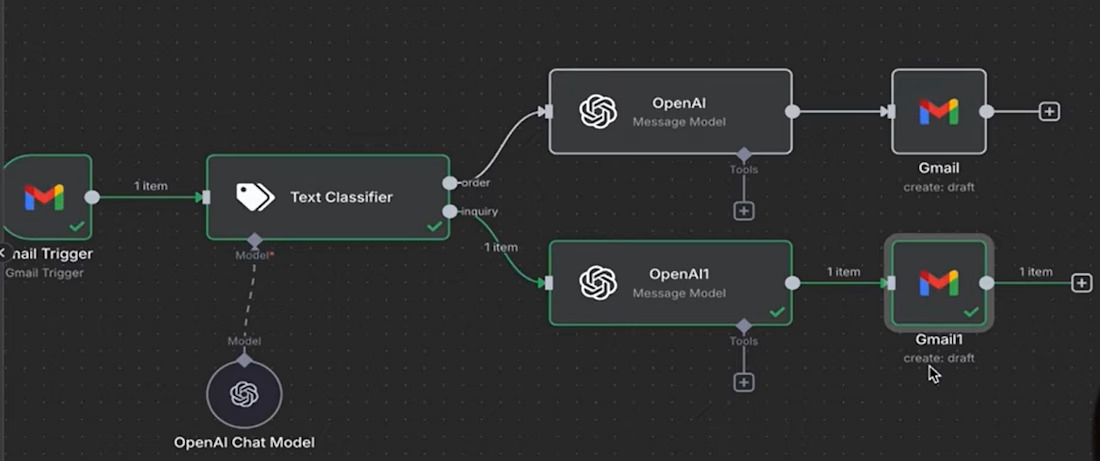
How it works (see workflow image):
📨 Incoming email (Gmail trigger)
↓
🧠 AI text classifier (routes by intent)
↓
🤖 OpenAI message model (drafts smart reply)
↓
📝 Gmail draft created (ready for your review)
Real example:
Patient email:
"My cough isn't getting better. Should I come in?"
AI classifies as: Inquiry → Symptom follow up
Auto-drafts:
"Thank you for reaching out. Since your cough has persisted, I recommend scheduling an appointment. Would Tuesday or Thursday work for you? Please call the front desk at (555) 123-4567. — Dr. [Name]"
You review → edit → send in 10 seconds instead of 3 minutes.
What this saves you:
⏱️ 2+ hours per week on email
😌 Less cognitive load between patients
⚡ Faster responses = better patient satisfaction
📋 Consistent clinical communication (no typos, no missed steps)

The network for creativity
Join 1.25M professional creatives like you
Connect with clients, get discovered, and run your business 100% commission-free
Creatives on Contra have earned over $150M and we are just getting started

Challenges
View all


Related posts

Most people don’t avoid automation because they lack ideas.
They avoid it because turning “when this happens, do that” into a working system can swallow an afternoon.
n8n has just introduced an assistant that can take a plain-English request, build the workflow, run it, and help fix what breaks.
That makes the first step easier. But there’s still one thing the tool can’t decide for you: what should happen when reality doesn’t follow the happy path.
Before automating a task, write down:
What starts it?
What should happen?
When should a person step in?
If you could automate one annoying task this week, what would it be?

Experimented a bit today with Krea and image generation for a case study I’m putting together around AI EarPods connected to OpenAI.
The focus has been on creating fashion-forward product imagery and art directing a world that feels specific to the identity, rather than just generating nice-looking AI images.
The trickiest part has been product consistency. Especially getting the EarPods to actually sit snug in the ear. If you’ve worked through this process, you probably know the struggle 😅
Simply telling AI to “make it fit more snug or in the ear” doesn’t always work. It loves to reinterpret the product every time.
Still experimenting, but getting closer. If anyone has found a good workflow for keeping products consistent across AI-generated shoots, I’d love to hear it!


TOP!

Your product can look great inside the app and still lose trust in the inbox.
A lot of teams treat email as “just a template.”
But transactional emails are part of the product experience too.
Think about the moments when users receive an email:
🔹 Their payment was successful
🔹 Their order is ready
🔹 Their account needs attention
🔹 Their device has been unlocked
🔹 They need to take the next step
These are important moments. If the email is cluttered, confusing, or poorly structured, it creates friction exactly when the user needs clarity.
Good email UI should:
🔸 Make the most important information obvious
🔸 Guide users to the next action
🔸 Reduce unnecessary text
🔸 Keep the brand experience consistent
🔸 Work smoothly across different screen sizes
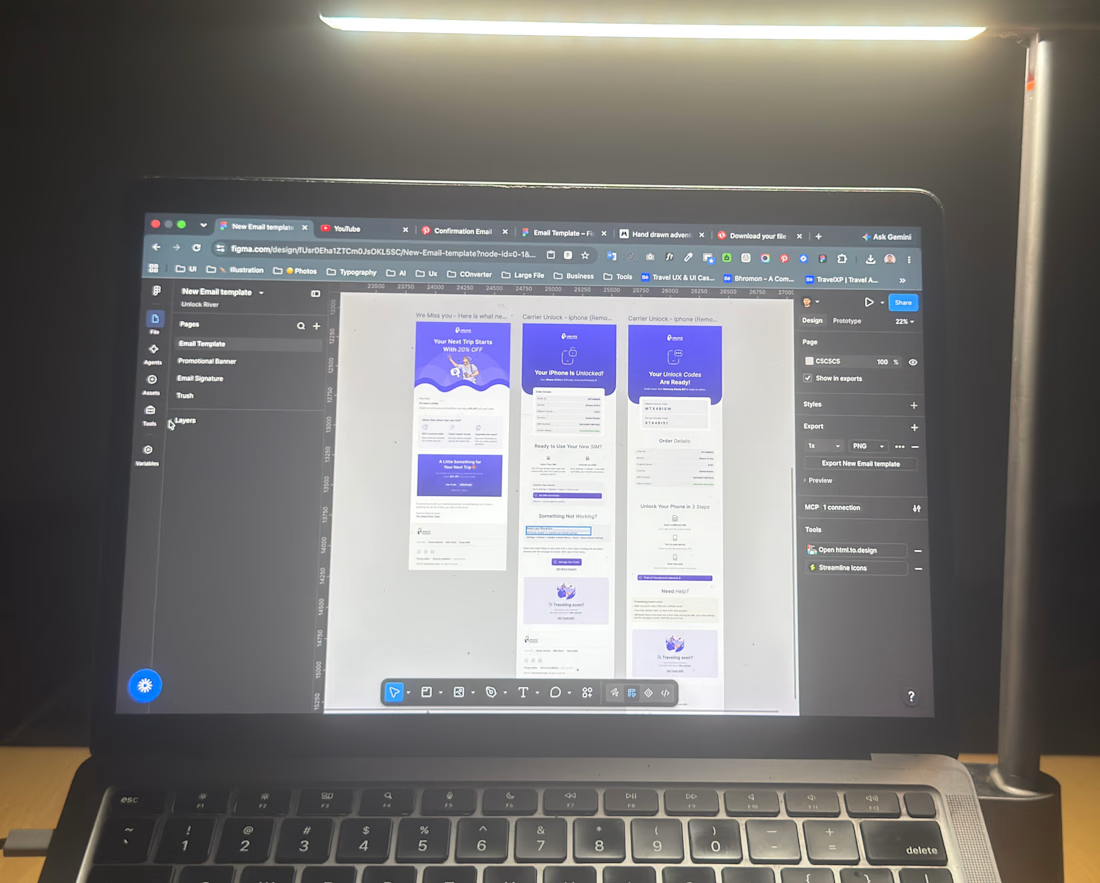
I’ve recently been designing a set of transactional + marketing email templates with this in mind, treating the inbox as another product touchpoint, not an afterthought.
Your product experience doesn’t end when the user closes the app. It continues in their inbox.
Do your current emails feel like part of your product or just automated messages?
#ProductDesign #UXDesign #UIDesign #EmailDesign #SaaS #B2BDesign #DesignSystems


The five moments listed are all state changes, not marketing content - that's the real argument for treating them as product surface rather than handing the templates to whoever owns the newsletter.