Tool #3 is live. Here's what I built and why.
Most SEO tools have the same problem: they tell you a hundred things are wrong and leave you guessing which ones actually matter.
I started building focused tools instead — one job, one clear answer, no noise. Tool #3 shipped this week, which means the suite is complete. Here's what's in it.
🔍 Schema Markup Audit & Generator
bree-sharp.com/tools/schema-generator/ (http://bree-sharp.com/tools/schema-generator/)
The gap I kept running into in audits: clients had no structured data, knew they should, and had no idea how to fix it without hiring someone. Existing tools would confirm the markup was missing. Great. Now what?
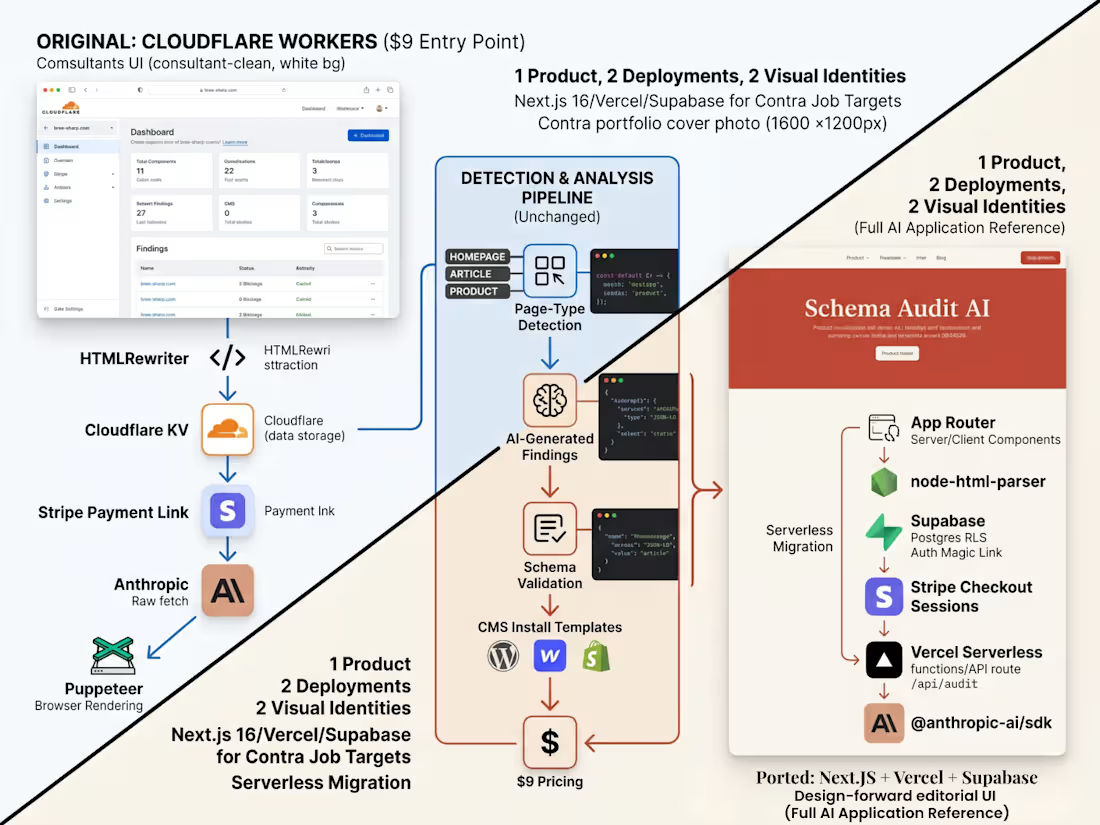
This tool goes further. Paste a URL, choose your CMS, and it audits what schema is present, explains what's missing and why it matters, and generates ready-to-paste JSON-LD with CMS-specific implementation steps. The recommendation layer runs on the Claude API, which means the output is actually reasoned rather than template-dumped.
There's a usage ladder — anonymous, email-gated, and a small paid tier via Stripe for heavy use. The free version is genuinely useful. The paid version covers API costs.
Stack: Astro, Cloudflare Workers, Claude API, Stripe.
🤖 Robots.txt Checker & URL Tester
bree-sharp.com/tools/robots-txt-checker/ (http://bree-sharp.com/tools/robots-txt-checker/)
The single most frustrating thing to explain in a client call: "Your robots.txt is blocking Googlebot from that page." "Which rule?" "...I have to go check."
This tool answers that question in about five seconds. Enter a URL and a crawler (Googlebot, Bingbot, image crawlers, or wildcard). It fetches the robots.txt, parses the user-agent groups, applies actual allow/disallow matching logic, and tells you exactly which line is responsible for the result — in plain English.
It also extracts sitemap declarations from the file, which is useful context that most checker tools skip.
Stack: Astro, Cloudflare Workers.
🗺️ Sitemap Validator
bree-sharp.com/tools/sitemap-validator/ (http://bree-sharp.com/tools/sitemap-validator/)
A sitemap can be perfectly valid XML and still be bad SEO. Redirect chains listed as current URLs. Noindex pages submitted for crawling. Paths blocked by robots.txt. None of that shows up if you only check whether the XML parses.
This validator checks discovery and quality. It detects whether you're dealing with a URL set or a sitemap index, counts entries, validates key fields, and samples listed URLs for HTTP status, redirects, noindex tags, canonical mismatches, and robots.txt conflicts.
It's built for migrations, post-launch reviews, and cleanup projects — situations where you actually need to know what's in the sitemap, not just that it exists.
Stack: Astro, Cloudflare Workers, XML parsing.
The suite as a whole
Robots.txt + sitemap validator together answer a question I hit constantly in technical audits: what is the site asking crawlers to find, what are crawlers actually allowed to request, and where do those two signals disagree?
Each tool is free at bree-sharp.com/tools/ (http://bree-sharp.com/tools/) — no account required to start.
Case studies with build details and product decisions behind each one are at bree-sharp.com/case-studies/ (http://bree-sharp.com/case-studies/) if you want to see the engineering rationale.
Across a portfolio of WordPress sites with restrictive admin policies — read-only WPCode, KSES filtering on inline scripts, role-capped Custom Code, Cloudflare WAF rules blocking admin script POSTs — the solution was to stop fighting the CMS and solve the problem at the edge instead.
GTM injection via Cloudflare Snippets:
When WordPress refuses tracking scripts through (KSES strips them, WPCode is read-only, Custom Code blocks <script> tags), edge-injecting GTM via HTMLRewriter on the Snippets free tier bypasses the CMS entirely. Tracking lives at the edge, gets purged at the edge, never touches the database.
HTTP Link preload via Transform Rules:
When the theme or WPCode path is blocked but LCP depends on a preloaded font or hero image, a Cloudflare Response Header Transform Rule injects the Link: </font.woff2>; rel=preload; as=font header at the edge — no plugin, no theme edit.
Targeted WAF skip rules:
Narrow /wp-admin/* skip rules that allow legitimate script-tag POSTs through without disabling the WAF site-wide.
Stack at a glance:
Edge: Cloudflare Snippets · Transform Rules · WAF · Cache Rules
API: HTMLRewriter
Target: WordPress (locked-down installs)
Overhead: Zero plugins · zero CMS modifications · fully reversible
Skills: Cloudflare · Edge Computing · WordPress · Performance Optimization · Web Development
1
67
A regional professional services firm needed their WordPress marketing site brought to WCAG 2.2 AA compliance ahead of a procurement requirement. Initial audit surfaced six remediation areas spanning keyboard navigation, focus management, color contrast, link naming, and motion/auto-play behavior on the homepage hero carousel.
Approach:
All six findings scoped into discrete subtasks and implemented entirely within the child theme — no plugin sprawl, no parent theme edits. Every fix namespaced and documented for future maintainers.
Key fixes:
The hero carousel required a pause-on-hover interaction plus a visible pause control to satisfy WCAG 2.2.2 (Pause, Stop, Hide). Contrast and link naming findings resolved via targeted CSS overrides. Keyboard navigation and focus management required JS event handlers and PHP filter hooks.
Stack at a glance:
CMS: WordPress
Implementation: Child theme (CSS / JS / PHP filters)
Standard: WCAG 2.2 AA
Testing: axe DevTools + manual keyboard testing
Scope: 6 findings · ~5 billable hours
Skills: WordPress · Accessibility · WCAG 2.2 · ADA Compliance · PHP · JavaScript · CSS · Child Theme Development · a11y Audit
0
49
A subsidiary site of a global agribusiness brand was running on Drupal 9 / Pantheon with 188 legacy URLs containing a deprecated subsection prefix bleeding into Google Search Console as duplicate content. The same site needed hreflang implementation for its international language variants and a hover-preview regression that was exposing legacy URLs at the database level.
URL cleanup:
Scoped and shipped across four phases via Dev → Test → Live on Pantheon. Sitemap regeneration was blocked by a stale alltech_plugins hook bug — unblocked by dropping a url_generators config override. 188 legacy URL patterns removed and validated in GSC.
Hreflang implementation:
Implemented across all language variants with proper x-default fallback. Validated across GSC and submitted for re-crawl.
Database remediation:
The hover-preview regression required surgical multi-table DB rewrites — legacy URLs were embedded in serialized link field data across field_button_link, field_learn_more_link, and field_link, each with different column conventions (_value vs _uri). Resolved via direct DB migration scripts over SSH.
Stack at a glance:
CMS: Drupal 9
Hosting: Pantheon
Deploy: Multi-environment SSH + Drush
SEO: Hreflang + x-default, GSC validation
DB: Direct migration scripts across 3 serialized link field tables
Auth: RSA SSH key
Skills: Drupal · Technical SEO · Hreflang · International SEO · SSH · Drush · Database Migration · URL Migration · Pantheon · Multi-language SEO · Enterprise SEO
1
125
A North American animal nutrition brand needed a dealer locator that could scale from 9 Canadian provinces to all 50 US states without bolting on a third-party SaaS map plugin. The existing implementation was a static page with broken pin rendering and no geographic structure underneath it.
Architecture:
Custom dealer post type backed by a hierarchical dealer_cat taxonomy, structured so future region-level grouping (Northeast US, Mountain West, etc.) wouldn't require schema changes down the line. CMB2 fields handle all dealer metadata. Front-end finder UI integrated directly into the existing custom theme — no plugin UI layer.
Deploy pipeline:
Full Pantheon Dev → Test → Live SFTP workflow across all environments before production push.
Stack at a glance:
- CMS: WordPress on Pantheon
- Custom: Post type + hierarchical taxonomy (CMB2)
- Theme: Custom theme integration
- Deploy: Pantheon multi-environment SFTP
Skills: WordPress · Custom Post Types · Taxonomies · CMB2 · Pantheon · PHP · Custom Theme Development · Geographic Data Structure · WordPress Development
2
81
A regional behavioral health nonprofit's main site was failing CrUX field data on LCP — homepage built on Elementor Pro with a Hello Elementor child theme, lab LCP swinging 14–26 seconds depending on the run, TBT over 600ms. The client needed real-world field performance fixed without a full rebuild.
Phase 1 — Caching & asset loading:
Enabled Elementor's Optimized Markup Performance, tuned LiteSpeed and Cloudflare cache rules, and audited Rocket Loader for inline-script breakage.
Phase 2 — Targeted patches:
Seven discrete fixes including Typekit inline + font-display swap + preload, removal of a 329KB Vimeo widget that wasn't earning its keep, and 1.27MB of image savings via WebP conversion with Cloudflare-aware purge handling.
Stack at a glance:
CMS: WordPress + Elementor Pro 4.x
Theme: Hello Elementor child theme
Edge / Cache: Cloudflare (Transform Rules, Snippets, WAF)
Server cache: LiteSpeed Cache
Custom: PHP hooks for asset dequeue
Skills: WordPress · Elementor · Core Web Vitals · LCP Optimization · TBT Reduction · LiteSpeed · Cloudflare · WebP · Performance Optimization · CrUX · Lighthouse