
pro
April Fletcher
Creative Systems Partner | AI Product Builder
- 1
- Followers


Maybe it was the "love" in Lovable that made me think of wedding bands the second I saw the challenge. The music, not the rings. 😂
I played a few weddings as a musician in Los Angeles, and I've been a music director and bandleader from time to time. I never ran several event bands at once - that’s really a whole thing. The people who do usually have an assistant, because the job may include most of the logistics: gigs coming in from managers, coordinators and websites, venue and load-in details for everyone, rehearsal space, new music when a client requests a song outside the standard set, travel, and finding a substitute when a regular player is booked.
Honestly, that would have been too much bandwidth for me, though being the key player in a couple of bands of different genres is a lot of fun. Leading one’s own bands can be one of the annoying consequences of just wanting to play music you like at a professional level.
The client-facing side (website, availability, booking, payment) is already well covered. The hidden work after the booking is the painful part, so I built for that.
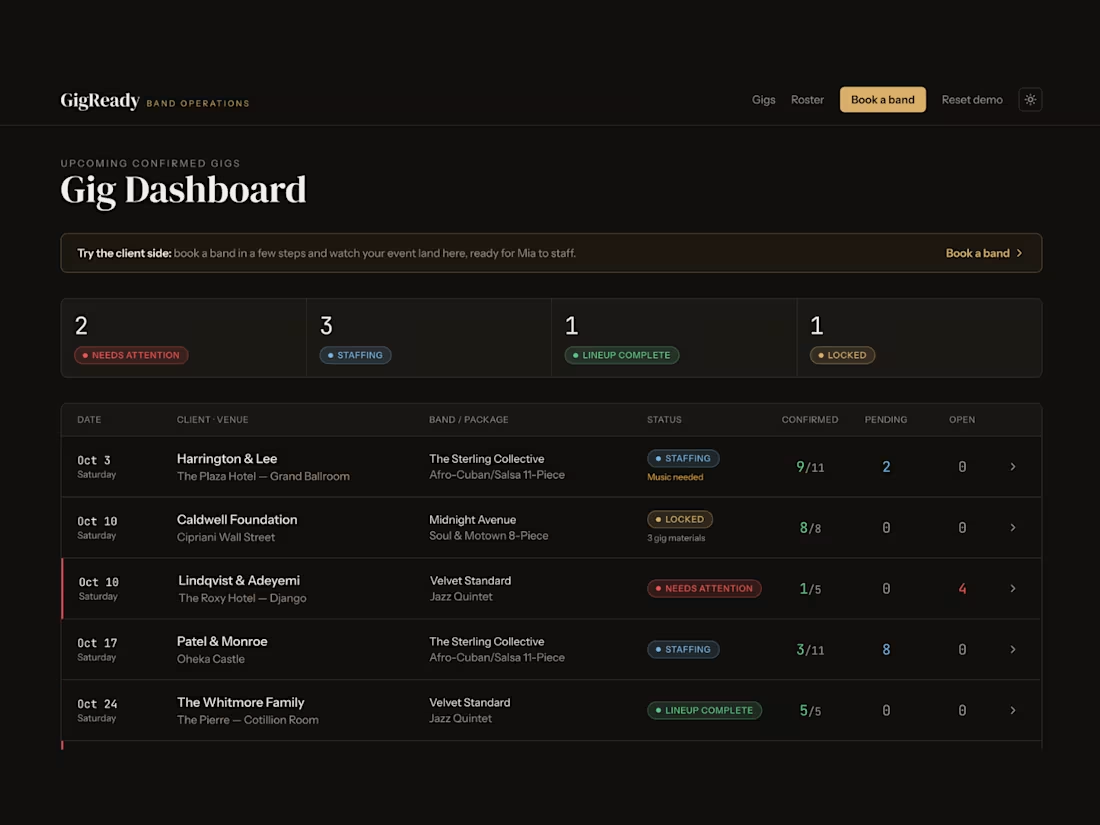
For the challenge, I created a bandleader named Mia Smith. She runs three premium event bands: Jazz, Afro-Cuban/Salsa and Soul/R&B. Each band has first-call musicians, but musicians take gigs when they come up. When a first-call player is out, Mia moves to her substitute list, waits for answers and tracks which chairs are filled. Substitutes and special requests also need charts and recordings. Then everyone needs the venue, call time, dress code, parking and load-in notes.
That's GigReady. It answers one question: what happens after the event is booked but before the band is ready to play?
Mia sees which gigs are staffed, who has confirmed and which positions still need attention. If a first-call player is unavailable, she goes straight to a substitute for that instrument. Once every chair is covered, she locks the lineup. GigReady builds the Call Sheet with what the musicians need and sends it to the band.
What surprised me was my own reaction to the first working version. I'm not gigging or managing musicians right now, and I still felt immediate relief. The gig was all in one place: who answered, which chair was open, and the logistics message already written.
That's when I knew GigReady was a real tool. It could have changed what kind of gigs I was willing to take.
1
1
359
GigReady
0
4
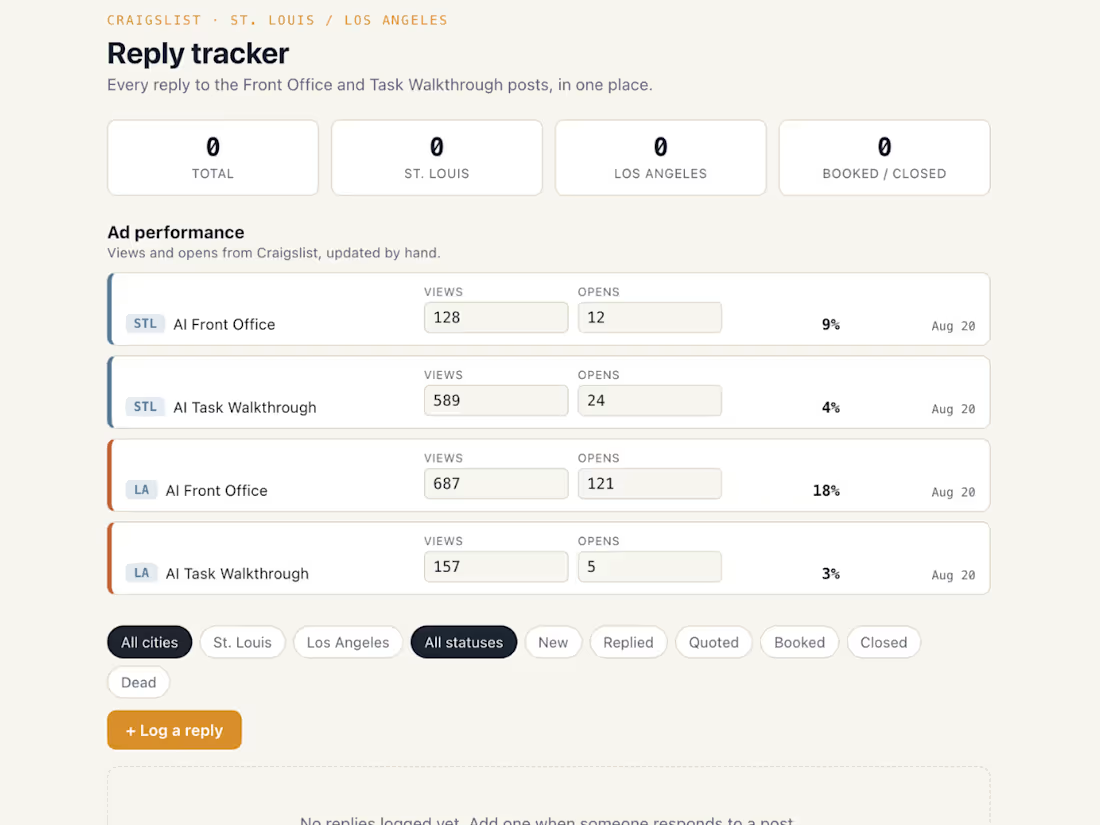
I built this after realizing I needed to track two ad types across two cities entirely in my head. Four live Craigslist posts, different pricing per city, no way to see reply status or quoted price without scrolling back through memory. And my memory is not all that reliable.
The tool splits into two parts. Ad performance holds the numbers Craigslist already reports: views and opens per ad, entered by hand since Craigslist doesn't expose that data any other way. Reply tracking holds what only I know: what someone asked for, what I quoted and where that conversation stands.
Keeping those separate was deliberate. One section is Craigslist's data, the other is mine, and mixing them would have buried the thing I actually needed: which conversations to follow up on. I still wanted the Craigslist numbers close at hand though, and since it's just views and opens, a simple visual section next to the replies does the job.
It runs as a single file in the browser, no login or server. Status updates from a dropdown right on the card. Color coding by city and status means I can scan the whole list without reading every line.
It's a small tool that answers three questions I keep asking myself: which city and ad combination is actually converting, whether a price point is landing and whether a weak ad is a reach problem or a conversion problem. Craigslist has been a low-key experiment for me, one I've tried once before without really tracking what happened. This is what makes the results actually visible this time.
1
456
I have a friend who’s a business broker and has been in real estate for many years. Over the years, I’ve worked with him on an off with several of his projects. Additionally, a while back, I tipped my toe into the real estate investing area, so I have a good idea of some of the things the need to know.
The Commission Pricing Calculator was designed to help someone answer a more useful question than simply, “What is my commission?”
It helps them determine:
What will I actually take home from this deal after splits, fees, and deductions — and what needs to change if that number is too low?
The calculator supports both forward and reverse decision-making.
In forward mode, the user can model a deal and immediately see how changes in sale price, commission percentage, brokerage or partner splits, and fees affect the final net amount.
In reverse mode, the user can start with a target take-home amount and work backward to determine the deal size or pricing required to reach that goal.
The goal was to turn commission math from a static calculation into a practical scenario-planning tool.
Input/output structure
The calculator was structured around the pieces of information that materially change the outcome of a commission-based deal.
Inputs
Users can enter:
Sale or deal amount
Commission as either a percentage or flat amount
Multiple labeled fees or deductions
Fees as either percentages or fixed amounts
Multiple commission split participants
Splits as either percentages or fixed amounts
A target net commission when using reverse calculation
The inputs were designed to accommodate real-world deal structures rather than assume a single simple percentage calculation.
Outputs
The calculator returns:
Gross commission
Itemized fees and deductions
Itemized commission splits
Net commission / estimated take-home amount
Required sale or deal amount when reverse calculation is used
Saved scenario data for later comparison
A shareable or exportable calculation summary
The net result was intentionally given the strongest visual emphasis because it is the number the user is ultimately making the decision around.
The system also included validation so invalid percentages, negative values, or impossible split structures would not silently produce misleading results.
Everything recalculates in real time as inputs change, so the agent sees net commission move as they adjust the split or add a fee, rather than running the numbers once and reading a static result.
0
328