


Half Light: book a photographer by the sunset, not by DM
Solo photographers lose hours to the same nine messages. Price? Is Saturday free? What should we wear? Can the corgi come? Bank details? Half Light is a concept booking site and studio desk for Mira Lin, a portrait, family and couples photographer in Da'an, Taipei. It turns that thread into about sixty seconds.
What it does
Every date shows Taipei's real sunset, the golden-hour window around it, and the rain risk. You pick the light first, then the time.
Four steps: pick your light, hold the slot for 10 minutes, pay a 30% deposit, done. The whole DM thread becomes one short form.
Fixed, public prices: Portrait NT$6,800, Family NT$9,800, Couples golden hour NT$8,800, Weekday morning mini NT$2,800.
When the forecast passes 60% rain, outdoor sessions get flagged and each client is offered three dry golden-hour slots automatically.
A 13-photo gallery with filters, where each photo expands out of its own grid cell.
The studio side
Click Studio in the top bar (or "Studio dashboard" in the footer) to open Mira's desk. Username: admin · Password: admin
Today: the day's sessions, tonight's sunset, the next golden hour, and running totals such as DM threads avoided and deposits collected.
Bookings: every held, confirmed and rescheduled session in one list, with its deposit status.
Calendar: seven days laid over the golden-hour band, so open and held slots sit where the light is.
Automations: press "Simulate rain on Saturday" and watch the forecast flip. The outdoor sessions get flagged, each client is offered three dry golden-hour slots, and it all lands in the live feed without Mira touching her phone.
Settings: three switches (reminders, rain auto-reschedule, waitlist auto-fill) and three thresholds (rain at 60%, deposit at 30%, a 10-minute hold).
The design thinking
I started from the DM thread, not from a page layout. Every section answers one of those nine messages before anyone has to send it. The price is on the session card, every date comes with its sunset, and the dog question is a toggle in the booking form.
Light is the product, so the calendar is built around golden hour instead of office hours. Rain is part of the booking from the start, so a bad forecast becomes three new options instead of an apology.
One warm palette, one serif voice and a single orange accent keep the photos the loudest thing on the page. Motion is only used to confirm that something happened: a slot being held, a photo opening from the spot you tapped, and a camera viewfinder you hold to book. Then I tested every flow and fixed what broke.
Explaining the work will be post below this post
Try it
https://perfect-snapshot-gen.lovable.app Pick a sunset, open the gallery, hold the "Can I book?" button at the bottom, then open Studio and make it rain.
All 200 credits are burned out 😆.
1
2
264
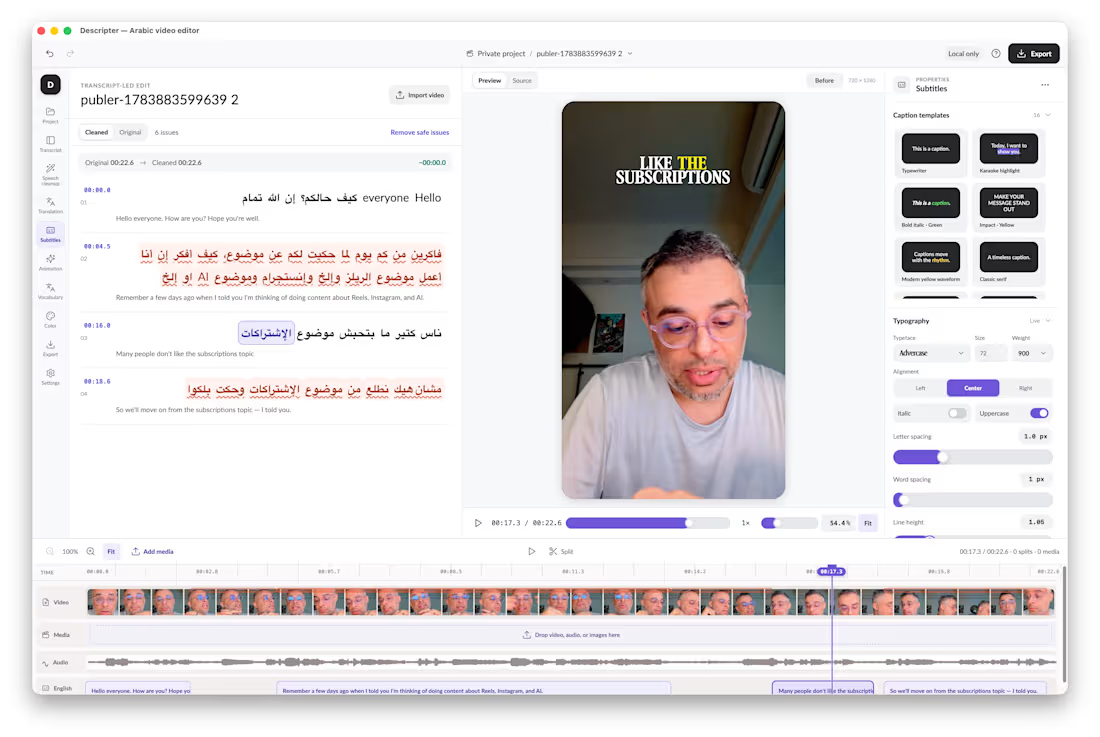
I fixed a problem that had frustrated me for years in just two days.
As an Arabic creator who naturally mixes Arabic and English, I could never find a video editor that truly understood my workflow.
So I built Descriptor an editor with AI in its DNA.
AI isn’t a feature added on top. It’s the operating layer of the entire experience.
I import my footage, and the app helps handle the work:
• Transcribes Arabic and mixed English speech
• Synchronizes every subtitle with my voice
• Detects mistakes, false starts, and long pauses
• Lets me edit the video simply by editing words
• Updates repeated transcript mistakes across the project
• Translates and prepares English subtitles
• Keeps captions synchronized after cuts and edits
• Suggests cleanup while keeping me in control
• Handles trimming, splitting, clip movement, and deletion
• Applies subtitle templates without changing the words or timing
• Supports color grading, detailed adjustments, and custom LUTs
• Prepares the final video for export at its original resolution
Instead of manually controlling every technical detail, I focus on the story and tell the app what I want.
The AI handles the repetitive work while every change remains editable, reversible, and private on my Mac.
What makes this meaningful isn’t only that I built an app.
It’s that a problem I had accepted as “just part of the process” for years became solvable in a weekend.
Two focused days. One persistent frustration. A working, AI-native product built around the way I actually create.
We’re entering a time when you don’t have to wait for someone else to build the tool you need.
You can build it yourself with AI.
#BuildInPublic (https://www.linkedin.com/search/results/all/?keywords=%23buildinpublic&origin=HASH_TAG_FROM_FEED) #AI (https://www.linkedin.com/search/results/all/?keywords=%23ai&origin=HASH_TAG_FROM_FEED) #AIFirst (https://www.linkedin.com/search/results/all/?keywords=%23aifirst&origin=HASH_TAG_FROM_FEED) #VideoEditing (https://www.linkedin.com/search/results/all/?keywords=%23videoediting&origin=HASH_TAG_FROM_FEED) #ColorGrading (https://www.linkedin.com/search/results/all/?keywords=%23colorgrading&origin=HASH_TAG_FROM_FEED) #ArabicCreators (https://www.linkedin.com/search/results/all/?keywords=%23arabiccreators&origin=HASH_TAG_FROM_FEED) #IndieHacker (https://www.linkedin.com/search/results/all/?keywords=%23indiehacker&origin=HASH_TAG_FROM_FEED) #MacApp (https://www.linkedin.com/search/results/all/?keywords=%23macapp&origin=HASH_TAG_FROM_FEED)
2
158
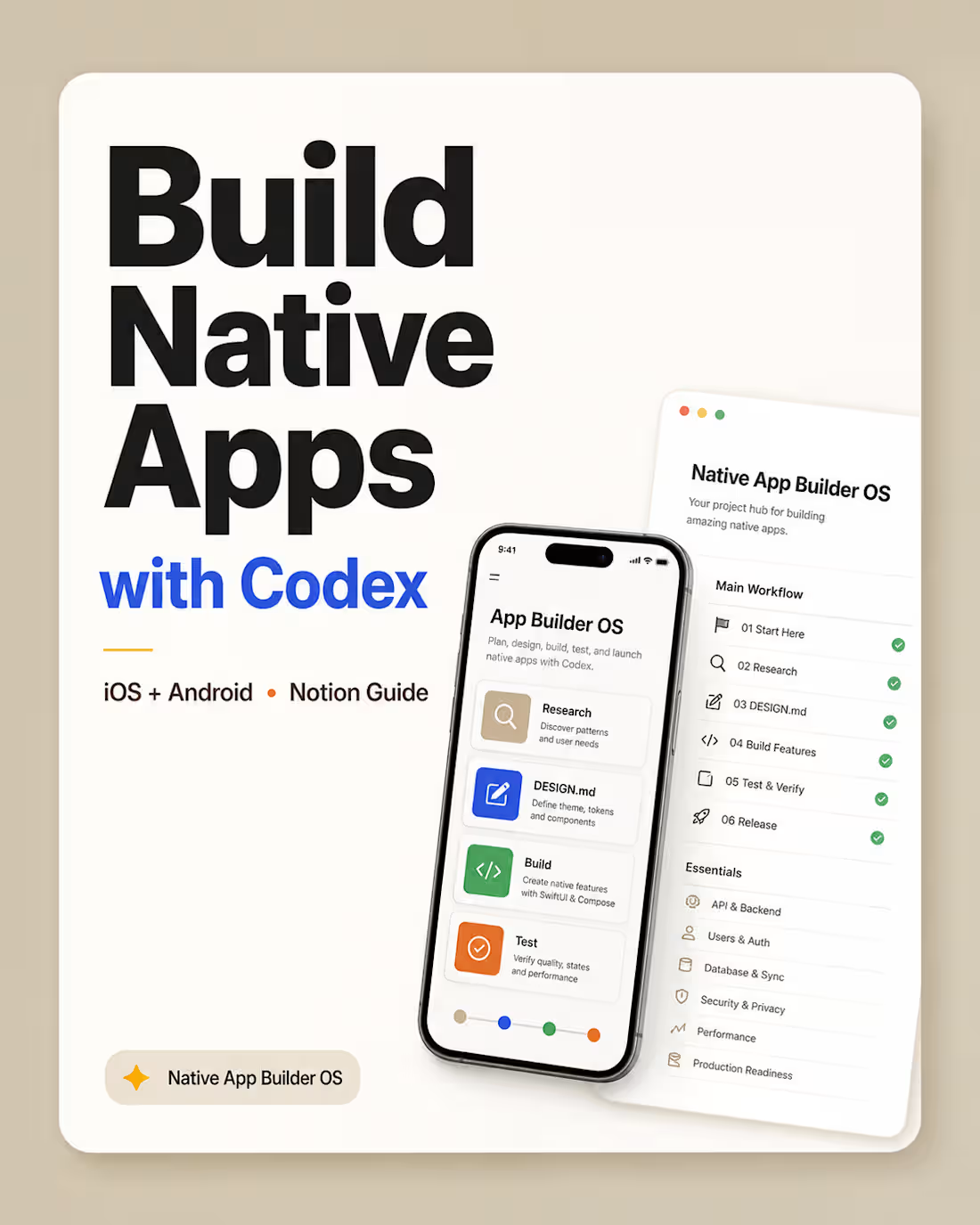
I built Native App Builder OS for Codex, a complete Notion-based system for using Codex Desktop to build native iOS and Android apps from idea to launch.
Most people use AI coding tools with random prompts.
This template gives you a structured workflow instead.
It helps you use Codex Desktop as your main app-building workspace while keeping Xcode and Android Studio for builds, previews, simulators, emulators, logs, and release workflows.
Inside the guide, you’ll find:
App idea to product plan workflow
UX research and Mobbin design-memory process
SwiftUI and Jetpack Compose guidance
DESIGN.md (http://DESIGN.md) rules for app themes, components, and UI consistency
iPad and Android tablet compatibility rules
GitHub, Xcode, Android Studio, Apple Developer, and Google Play setup
API, auth, database, security, privacy, and sync planning
Testing, performance, production readiness, and release safety workflows
App icon, store screenshot, landing page, and privacy policy guidance
Beginner-friendly Codex prompts for every major step
This is made for founders, indie hackers, designers, students, and beginner developers who want to build real native mobile apps with more structure, less guesswork, and better product thinking.
The goal is simple:
Turn Codex from “a coding chatbot” into a practical mobile app-building operator.
Available now: https://lnkd.in/gWPHBJn4
0
84
FrameOrbit — Config Makeathon Submission 📸🌀
Sharing second project for the Config Makeathon: FrameOrbit.
https://cedar-thaw-04755246.figma.site/
Project published to the community.
FrameOrbit is a playful camera canvas experience where taking photos feels more spatial, visual, and alive.
The idea started from a simple question:
What if captured photos didn’t disappear into a hidden gallery, but stayed around your camera as part of the experience?
In FrameOrbit, the camera view sits in the center of a soft canvas. Every time the user captures a photo, it instantly appears as a framed image around the camera. As more photos are taken, the canvas starts to build a visual orbit of moments around the live camera view.
Users can:
Capture photos directly from the center camera frame
See each image appear instantly around the canvas
Apply different photo styles like Normal, Noir, Warm, Cool, Vivid, Fade, Retro, and Neon
Drag photos around the canvas
Tap any photo to open it in a cinematic full-screen viewer
Move between images using previous/next navigation
Save all captured images or reset the canvas
The goal was to make photo capturing feel less like a utility and more like a small creative ritual, a live memory board that grows with every shot.
Built with Figma Make, I focused on creating a polished interactive prototype with a soft visual system, floating photo cards, smooth viewer experience, and a simple flow that can be understood in seconds:
Capture → frame appears → build your orbit → explore your moments.
FrameOrbit turns the camera into a canvas. ✨
#ConfigMakeathon #FigmaMake #FrameOrbit #ProductDesign #UXDesign #UIDesign #CreativeTools #CameraApp #Prototype #Makeathon
14
14
506