
Ahmad Yakubu Ahmad
AI-Powered Web Apps Engineer | React, Next.js, Node.js & AI
- 5.00
- Rating
- 4
- Followers

SlideForge AI
1. Short Explanation
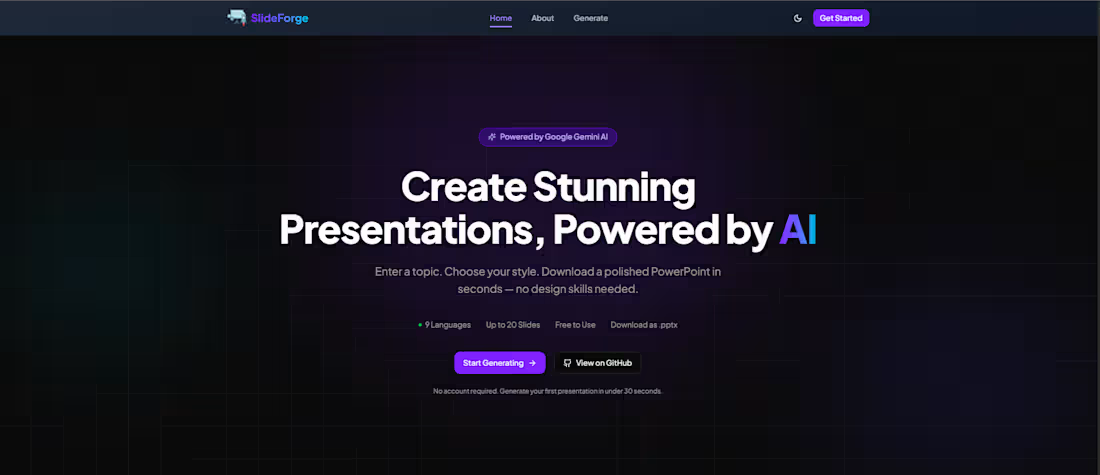
SlideForge (also branded as IntelliSlide-AI) is a full-stack AI-powered presentation generator that transforms any topic into a professionally structured, downloadable PowerPoint presentation in seconds.
Users simply enter a topic, choose slide count, language, theme, and layout preference, and the platform automatically generates a fully editable .pptx presentation using Google Gemini AI and a Python-powered document generation pipeline.
The platform is built for students, educators, professionals, startups, and teams who need polished presentations quickly — without spending hours designing slides manually.
2. Tech Stack
Category Technologies Frontend Next.js 15 (App Router, Turbopack), React 19, TypeScript 5 Backend FastAPI (Python), python-pptx AI / LLMs Google Gemini API Styling / UI Tailwind CSS 4, shadcn/ui, Radix UI, CVA, Lucide React Forms & Validation React Hook Form v7, Zod v3 HTTP Client Axios Notifications Sonner v2 Theming next-themes Fonts Plus Jakarta Sans Tooling ESLint, PostCSS, Turbopack, TypeScript strict mode Deployment Vercel (frontend, inferred), Render (backend API)
3. Problem Solved
Creating professional presentations is slow, repetitive, and often requires both design and content-writing skills.
Most users spend hours:
Structuring slides
Writing presentation content
Designing layouts
Formatting visuals
Exporting and polishing decks manually
Even AI writing tools still require users to manually move content into presentation software.
SlideForge eliminates this entire workflow by automating both:
AI-powered slide content generation
Real PowerPoint file creation
The result is a fully editable .pptx presentation generated in under 30 seconds.
4. Results / Key Features
Sub-30-second presentation generation via async job processing
Multi-language support across 9 languages
Flexible customization:
3 visual themes
3 layout modes
1–20 slide generation
Download-ready .pptx output compatible with:
Microsoft PowerPoint
Google Slides
Apple Keynote
Fully anonymous workflow with zero signup friction
Production-grade async architecture with resilient polling system
Hardened frontend security with CSP, Permissions-Policy, MIME validation, and X-Frame-Options
5. Problem
Professionals, students, founders, and educators frequently need presentation decks for:
Meetings
Reports
Investor pitches
Lectures
Product demos
Internal documentation
Traditional presentation creation is:
Time-consuming
Design-heavy
Expensive when using premium tools
Repetitive across projects
Even with AI writing assistants, users still have to:
Copy/paste content manually
Structure slides themselves
Apply layouts and formatting
Export files manually
There was no streamlined, end-to-end system that could transform a raw topic into a polished, editable PowerPoint presentation instantly.
6. Solution
SlideForge introduces a fully automated AI presentation pipeline.
Workflow
User enters:
Topic
Slide count
Language
Theme
Layout mode
Frontend validates input using Zod schemas
A POST request is sent to the FastAPI backend
Backend generates structured slide content using Google Gemini AI
python-pptx assembles the presentation into a formatted .pptx file
Frontend enters a polling loop, checking job status every 2 seconds
Once complete, the browser downloads the binary PowerPoint file directly
No cloud storage. No email delivery. No account required.
The frontend state flow is managed through a discriminated-union state machine using a custom React hook, ensuring reliable async handling without race conditions or memory leaks.
7. Features
AI Presentation Generation
Google Gemini AI generates:
Slide titles
Bullet points
Structured presentation flow
Topic-aware content hierarchy
Async Job Processing
Background presentation generation
Frontend polling system with AbortController support
Resilient retry and timeout handling
Multi-Language Support
Supports native generation in:
English
Spanish
French
German
Arabic
Chinese
Hindi
Portuguese
Japanese
Theme System
Users can choose between:
Professional
Minimal
Vibrant
Themes are applied consistently across the generated presentation.
Layout Modes
Varied
Text-Heavy
Image-Focused
Each mode changes slide composition and density.
Configurable Slide Counts
Generate between 1–20 slides dynamically.
Direct PowerPoint Export
Real .pptx generation using python-pptx
Binary streaming from backend
MIME-type validation before download
Automatic object URL cleanup for memory safety
Dark / Light Mode
System-aware theme switching
Full support via next-themes
Error Handling
Route-level error.tsx boundaries
loading.tsx fallbacks
Graceful async failure recovery
Toast Notifications
Real-time status updates using Sonner:
Generation started
Success states
Failure states
Download completion
Security Hardening
Configured production-grade headers:
CSP
X-Frame-Options
Referrer-Policy
Permissions-Policy
DNS prefetch control
Form Validation
React Hook Form + Zod enforce:
Character limits
Required fields
Enum constraints
Value ranges
Memory-Safe Polling
All:
intervals
timeouts
AbortControllers
object URLs
are cleaned up correctly during component unmounts.
No Authentication Required
Fully anonymous usage with zero onboarding friction.
8. Stack (Architecture Overview)
Frontend
Next.js 15 App Router
React 19
TypeScript 5
Tailwind CSS 4
shadcn/ui
Radix UI primitives
Backend
FastAPI (Python)
python-pptx
Authentication
None — public access, no accounts required.
AI / LLMs
Google Gemini API
AI-generated slide structuring and content flow
Styling / UI
Tailwind CSS 4
shadcn/ui
Radix UI
CVA
Lucide React
Plus Jakarta Sans
Forms & Validation
React Hook Form v7
Zod v3
Networking
Axios
Request interceptors
Timeout management
MIME validation
Deployment
Frontend: Vercel (inferred)
Backend: Render (onrender.com (http://onrender.com))
Tooling
ESLint
TypeScript strict mode
PostCSS
Turbopack
9. My Role
As the sole Full-Stack Engineer and Architect on SlideForge, responsibilities included:
Designed the complete async presentation generation architecture (submit → poll → download)
Implemented a discriminated-union state machine to eliminate impossible UI states
Built the full Next.js 15 frontend using TypeScript strict mode
Developed custom async polling infrastructure with cleanup-safe lifecycle management
Engineered the API integration layer with Axios interceptors, timeout management, and MIME validation
Built the presentation configuration form using React Hook Form + Zod
Developed responsive UI components using shadcn/ui, Radix UI, and Tailwind CSS
Configured production-grade security headers and frontend hardening policies
Optimized performance using Turbopack and memory-safe download handling
Coordinated frontend/backend contracts for Gemini-powered slide generation and FastAPI job processing
10. Live URL
https://slide-forge123.vercel.app/
11. GitHub
https://github.com/engraya/SlideForge
0
9

CoverFlow AI
1. Short Explanation
CoverFlow (GenLetter AI) is a production-grade AI-powered cover letter generator built with Next.js 15 that helps users instantly create personalized, professional cover letters from structured inputs.
It is designed for job seekers, professionals, and freelancers who want to generate well-written, tailored cover letters in seconds instead of starting from scratch. The system combines form-driven input, AI prompt engineering, and document export into a seamless writing-to-download workflow.
2. Tech Stack
Next.js 15.5 (App Router)
React 19
TypeScript 5.7
Google Gemini 1.5 Flash (@google/generative-ai)
Zod
react-hook-form
shadcn/ui (New York style)
Radix UI (40+ primitives)
Tailwind CSS
Framer Motion
next-themes
docx
file-saver
ReactMarkdown
3. Problem Solved
Writing a strong cover letter is time-consuming, repetitive, and often difficult for users who struggle to translate their experience into professional language.
Most users either:
Copy generic templates that feel impersonal
Spend hours writing and rewriting from scratch
Or fail to structure their experience effectively for recruiters
GenLetter AI removes this friction by turning structured personal input into a fully written, polished cover letter instantly.
4. Results / Key Features
Instant AI-generated cover letters tailored to job role and company
Structured 9-field input system for precise personalization
High-quality formatting output suitable for real job applications
Clean split-screen live preview for immediate feedback
Export-ready DOCX generation for direct submission
Professional prompt engineering enforcing tone, structure, and length constraints
Responsive, modern UI with smooth animations
Dark/light mode support for accessibility and UX comfort
5. Problem
Job applicants often struggle to create cover letters that are:
Personalized enough to stand out
Professionally structured
Fast to generate across multiple applications
Consistent in tone and formatting
Existing solutions are either overly generic templates or manual writing tools with no intelligence layer.
6. Solution
GenLetter AI introduces a structured AI writing pipeline:
User fills a 9-field form (name, role, company, experience, skills, etc.)
Data is validated using Zod and react-hook-form
A structured prompt template is sent server-side to Gemini 1.5 Flash
The AI generates a formatted, multi-paragraph cover letter (strict output rules enforced)
The result is rendered in a live split preview interface
User exports the final document as a professionally formatted DOCX file
This creates a fast, deterministic, and consistent AI writing system instead of unpredictable freeform generation.
7. Features
9-field structured input form (fully validated with Zod)
AI cover letter generation using Google Gemini 1.5 Flash
Strict prompt engineering (tone, structure, paragraph limits, formatting rules)
Live split-panel preview (input + rendered output)
Markdown rendering with ReactMarkdown
DOCX export with A4 formatting, margins, and professional typography
File download handling via file-saver
Responsive UI built with shadcn/ui + Tailwind
Smooth page transitions and Framer Motion animations
Dark/light theme support via next-themes
Landing page with Hero, How It Works, Features, and CTA sections
8. Stack
Frontend
Next.js 15 (App Router)
React 19
TypeScript 5.7
Tailwind CSS
shadcn/ui (Radix-based components)
Framer Motion
ReactMarkdown
Backend / Server Layer
Next.js Server Actions
Google Gemini API integration (@google/generative-ai)
Structured prompt engine (template-driven AI output control)
AI / LLM
Google Gemini 1.5 Flash
Prompt engineering enforcing:
3–4 paragraph structure
<400 word limit
Professional tone
Plain text output formatting
Forms & Validation
react-hook-form
Zod schema validation (9-field structured input model)
Export System
docx (DOCX generation with formatting rules)
file-saver (client-side download handling)
Auth (Scaffolded / Not Active)
next-auth v4 installed
useUser hook present
Not enforced in current app flow
Deployment
Vercel deployment configured (vercel.json present)
Ready for serverless deployment
Other Tools
ESLint
PostCSS
Vite-style modern build optimizations (via Next.js tooling)
9. My Role
As the developer of GenLetter AI, responsibilities included:
Designed full application architecture using Next.js App Router
Built structured AI prompt system for deterministic cover letter generation
Integrated Google Gemini 1.5 Flash via secure server-side execution
Developed 9-field validated form system using Zod + react-hook-form
Built responsive UI using shadcn/ui, Radix primitives, and Tailwind CSS
Implemented live preview system with Markdown rendering
Developed DOCX export engine with professional formatting rules
Designed landing page and user onboarding flow (Hero → Features → CTA)
Implemented theme system with dark/light mode support
Structured application for future scalability (auth + database scaffolding)
10. Live URL
https://cover-flow.vercel.app/
11. GitHub
https://github.com/engraya/CoverFlow
0
19
Delectable AI
1. Short Overview
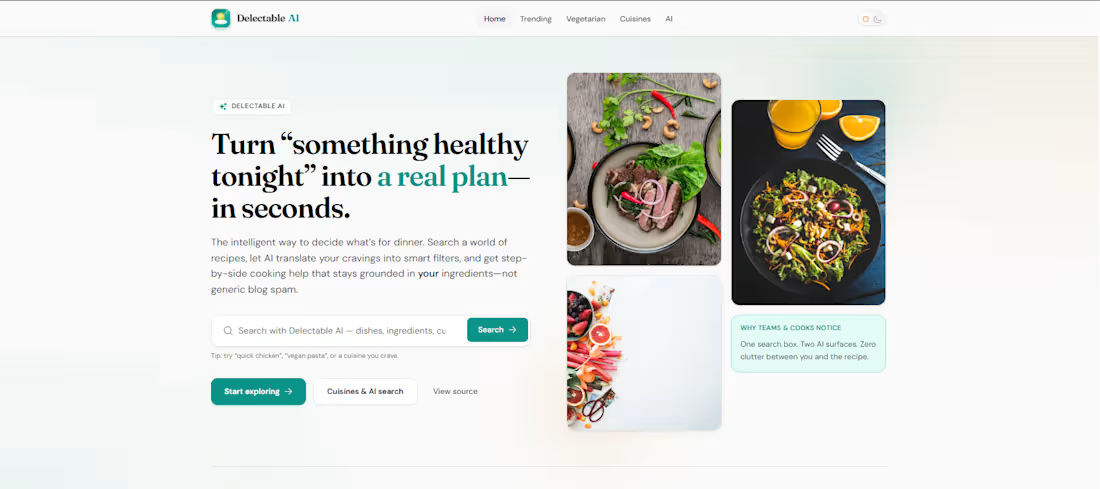
Delectable is a full-stack, AI-powered recipe discovery web application that helps users find, explore, and interact with recipes using both traditional search and natural language queries.
It enables users to browse trending, vegetarian, and cuisine-specific recipes, get AI-assisted cooking guidance directly on recipe pages, and export recipes to PDF — all within a clean, responsive interface with full dark mode support.
2. Tech Stack
Category Technology Frontend React 18, TypeScript, Vite, TanStack Query v5, React Router v6, Tailwind CSS, Zod, DOMPurify, jsPDF, react-icons, Vitest Backend Node.js, Hono.js, TypeScript, Zod External APIs Spoonacular Recipe API, Google Gemini AI API (@google/generative-ai) Database None — stateless proxy architecture Tooling npm workspaces (monorepo), concurrently, ESLint, tsx, GitHub Actions CI Deployment Static frontend (Vite) + Node.js API server; CI/CD via GitHub Actions
3. Problem Solved
Recipe discovery is fragmented and inefficient.
Users typically have to:
Search across multiple food blogs and platforms
Filter manually through inconsistent UI systems
Deal with irrelevant results that don’t match intent
Leave recipe pages to ask basic cooking questions
Even when filters exist, they rarely support nuanced intent like:
“high-protein meals under 30 minutes with no dairy”
Delectable solves this by unifying recipe search, filtering, and AI cooking assistance into one intelligent interface.
4. Results / Key Features
AI-powered smart search: Natural language queries (e.g., “high-protein meals under 30 minutes”) are converted by Gemini into structured Spoonacular filters
In-page recipe copilot: AI assistant on every recipe page for substitutions, scaling, allergies, and cooking guidance
Cuisine-first discovery: Trending, vegetarian, and cuisine-specific browsing powered by real-time Spoonacular data
PDF export: Download any recipe as a formatted PDF for offline use
Secure API proxy: All external API keys are server-side only (no client exposure)
Rate limiting: In-memory token bucket system (30 req/60s & 20 req/60s per IP) for AI endpoints
Production-grade type safety: Full TypeScript + Zod validation at all API boundaries
Dark mode + responsive UI: Fully custom Tailwind-based design system with mobile-first layout
5. Problem (Expanded Context)
Traditional recipe platforms are rigid and keyword-dependent.
They:
Require exact search terms
Fail to understand user intent
Lack contextual cooking assistance
Force users to leave the page for clarifications (substitutions, allergies, scaling, etc.)
There is no unified layer between intent → recipe data → cooking guidance.
6. Solution
Delectable introduces an AI layer at two key touchpoints:
1. AI Search Layer
Natural language queries are processed server-side by Google Gemini, which extracts structured filters such as:
diet
cuisine
intolerances
max cooking time
These are then passed to Spoonacular’s API as precise parameters.
2. AI Recipe Copilot
Each recipe page includes a Gemini-powered assistant that receives full recipe context (title, ingredients, instructions) and enables grounded, context-aware conversations about:
substitutions
dietary adjustments
scaling recipes
simplified explanations
The backend is a lightweight Hono.js proxy API that:
Validates all requests with Zod
Enforces CORS policies
Applies IP-based rate limiting
Separates data fetching (Spoonacular) from intelligence (Gemini)
7. Features
Landing page with featured content and category entry points
Trending recipes feed (Spoonacular random endpoint)
Vegetarian recipe category page
Cuisine-based browsing via dynamic routes
Keyword-based search (Spoonacular API)
AI natural language search (Gemini-powered intent parsing)
Advanced filters: cuisine, diet, intolerances, max ready time
Full recipe detail pages (ingredients, instructions, metadata)
HTML sanitization using DOMPurify for all external recipe content
PDF export via jsPDF
AI Recipe Copilot chat interface (substitutions, scaling, allergy queries)
Dark mode toggle with CSS variable theming
Loading skeletons and empty states across all async views
Error boundaries with retry support
Legacy route redirection for /searched/:term
404 Not Found page
API health check endpoint (GET /health)
Corporate HTTPS proxy support (HTTPS_PROXY, NO_PROXY)
CI pipeline (lint → typecheck → test → build on every PR/push)
8. Stack (Full Architecture)
Frontend
React 18.3.1
TypeScript (strict mode)
Vite (build tool + dev server)
React Router v6 (lazy-loaded routing)
TanStack React Query v5 (server state management)
Zod (runtime validation)
DOMPurify (HTML sanitization)
jsPDF (PDF generation)
react-icons (HeroIcons 2)
Backend
Node.js 20+
Hono.js (routing, middleware, logging)
TypeScript (strict, NodeNext modules)
tsx (dev runtime)
Zod (request/response validation)
undici (HTTP client with proxy support)
Custom in-memory rate limiter (token bucket per IP)
Database
None — fully stateless architecture with real-time API fetching from Spoonacular.
Authentication
None — public-facing application with no user accounts.
AI / LLMs
Google Gemini API (@google/generative-ai)
Model: gemini-3-flash-preview
Structured JSON mode for deterministic filtering
Conversational mode for recipe copilot
Styling / UI
Tailwind CSS v3
Custom CSS variables for theming
Fonts: DM Sans, Fraunces, JetBrains Mono
Fully custom component system (no UI library)
Deployment
Frontend: Static Vite build (deployable to any CDN/static host)
Backend: Node.js server (apps/api/dist/index.js)
CI/CD: GitHub Actions (lint → typecheck → test → build)
Other Tools
npm workspaces (monorepo)
concurrently (parallel dev servers)
Vitest + Testing Library + jsdom
ESLint + typescript-eslint
PostCSS + Autoprefixer
vite-plugin-svgr
9. My Role
As the developer of Delectable, responsibilities included:
Architecture design: Built a monorepo using npm workspaces separating web and api packages with clear deployment boundaries
Backend engineering: Developed a Hono.js API server with typed routes, middleware, Zod-based validation, and in-memory rate limiting
API integration: Integrated Spoonacular API with secure proxy logic and structured response handling
AI integration: Implemented Gemini-powered natural language search + recipe copilot with structured JSON outputs and prompt engineering
Frontend development: Built full React 18 application with feature-based architecture, lazy routes, and TanStack Query for server state
Type safety: Enforced strict TypeScript + Zod validation across frontend and backend
Security: Implemented server-side API proxying, DOMPurify sanitization, and rate limiting for AI endpoints
UI/UX: Designed all UI components from scratch including skeleton loaders, empty states, error handling, and PDF export UX
DevOps: Configured CI pipeline using GitHub Actions for linting, typechecking, testing, and builds
Developer experience: Set up Vite proxying, HMR, and concurrent dev workflows for seamless local development
10. Live URL
https://delectable.vercel.app/
11. GitHub
https://github.com/engraya/Delectable
0
21
DocuPilot AI
1. Short Overview
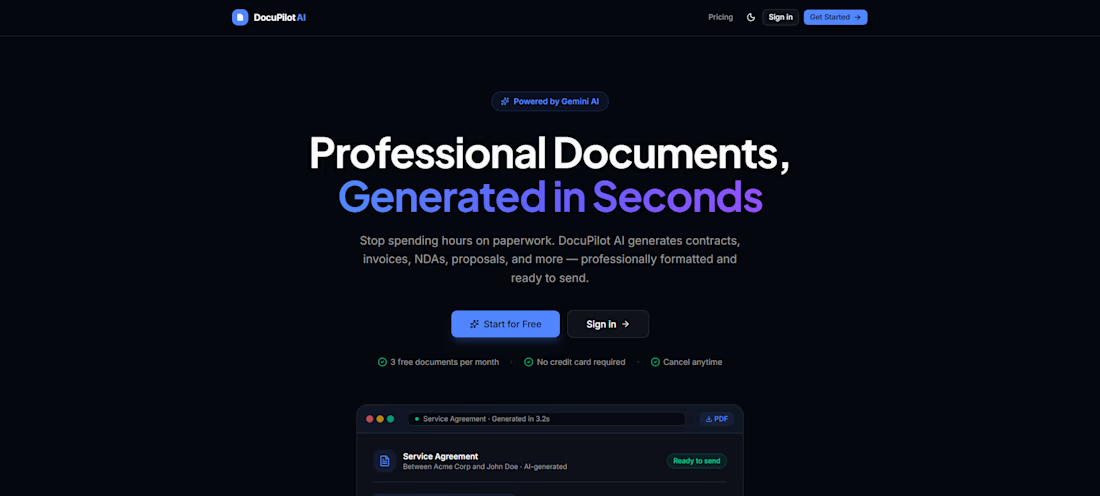
DocuPilot AI is a full-stack SaaS document generation platform powered by Google Gemini AI that instantly converts structured form inputs into professional-grade business and legal documents.
It is built for freelancers, consultants, and small business owners who regularly need documents like invoices, contracts, NDAs, proposals, resumes, and more — without starting from scratch, paying for expensive tools, or hiring legal help.
2. Tech Stack
Category Technology Framework Next.js 16.2.6 (App Router, RSC) Language TypeScript 5 (strict mode) AI Google Gemini (gemini-3-flash-preview) via @google/genai v2 Database Supabase (PostgreSQL) Authentication Supabase Auth (Email/Password + OAuth) Payments Stripe (Checkout, Webhooks, Billing Portal) Styling Tailwind CSS v4 + shadcn/ui + Lucide React PDF Export @react-pdf/renderer v4 DOCX Export docx v9 Forms & Validation react-hook-form v7 + Zod v4 Notifications Sonner v2 Runtime React 19.2.4 Deployment Vercel (SSR-ready architecture)
3. Problem Solved
Creating professional documents is still slow, repetitive, and expensive.
Freelancers and small businesses typically:
Use generic templates that still require heavy editing
Pay for enterprise legal/document tools
Or spend hours formatting documents manually
DocuPilot AI removes this friction by transforming structured input into fully written, professionally formatted documents in seconds using AI.
4. Key Results & Highlights
9 AI-powered document types generated from structured inputs
Dual export system: PDF (free) and DOCX (premium)
In-browser export with zero backend rendering dependency
AI-powered section-level editing (rewrite, simplify, translate, improve tone)
Shareable document links with secure expiring tokens
Template marketplace (save, fork, reuse workflows)
Stripe-powered freemium model with full billing lifecycle
Server-side usage enforcement with monthly quota resets
Production-grade authentication with Supabase SSR + OAuth support
Fully responsive UI with dark/light mode support
5. Problem (Context)
Professionals constantly need documents like:
Contracts before starting work
Invoices after project completion
NDAs before discussions
Proposals to win clients
But existing solutions are either:
Too generic (template-based tools)
Too expensive (enterprise legal platforms)
Or too manual (word processors + formatting effort)
There is no fast, AI-native, affordable system built specifically for independent professionals.
6. Solution
DocuPilot AI solves this with a structured AI pipeline:
User selects a document type
Fills a guided structured form
Data is sent to a domain-specific Gemini prompt engine
AI returns structured JSON sections
The app renders it into an editable document interface
Users can then:
Edit sections with AI (tone, clarity, summarization, translation)
Export as PDF or DOCX
Save as reusable templates
Share via secure public links
All within a single, unified SaaS experience.
7. Core Features
AI Document Generation
Form-to-document pipeline powered by Gemini with custom prompt builders and strict Zod validation per document type.
Supported Document Types
Invoice
Contract
NDA
Business Proposal
Quotation
Scope of Work
Resume
Cover Letter
Employment Letter
AI Section Editor
Inline AI tools per section:
Rewrite
Simplify
Make Professional
Summarize
Translate
Export Engine
PDF export via @react-pdf/renderer
DOCX export via docx (premium tier)
Document Sharing
Secure shareable links
Expiring tokens stored in database
Public read-only route for clients
Template System
Save reusable templates
Fork public templates
Customize workflows per use case
Freemium Billing
Free: 3 documents/month
Premium: $19/month unlimited access
Stripe Checkout + Billing Portal + Webhooks
Usage Enforcement
Server-side quota tracking
Monthly reset via Supabase RPC
Authentication & Security
Supabase Auth (Email + OAuth)
SSR session handling
Middleware route protection
UX Enhancements
Dark/light mode
Responsive dashboard
Usage analytics
Toast notifications
8. Stack (Full Architecture Overview)
Frontend
Next.js 16 App Router, React 19, TypeScript strict mode, Tailwind CSS v4, shadcn/ui
Backend
Next.js API Route Handlers (13 endpoints) + Supabase service role client
Database
Supabase PostgreSQL:
profiles
documents
templates
document_shares
subscriptions
AI Layer
Google Gemini (gemini-3-flash-preview) with:
9 domain-specific prompt builders
structured JSON outputs
configurable temperature control
Payments
Stripe v22:
Checkout sessions
Subscription lifecycle
Billing portal
Webhook handling
Export System
PDF: @react-pdf/renderer
DOCX: docx v9
Client-side download handling
9. My Role
As the sole developer, I handled the entire product lifecycle:
Designed full system architecture (App Router + RSC + API layer separation)
Built AI pipeline with structured prompt registry (9 document-specific engines)
Developed all backend API routes (13 endpoints)
Designed Supabase schema and server-side usage enforcement logic
Implemented authentication with SSR session handling and OAuth flows
Integrated full Stripe billing lifecycle (checkout, webhooks, subscriptions)
Built export engine for both PDF and DOCX formats
Developed full UI using RSC + shadcn/ui + Tailwind
Implemented secure sharing system with expiring tokens
Built dashboard analytics and usage tracking system
10. Live URL
https://docupilot-ai-seven.vercel.app/
11. GitHub Repository
https://github.com/engraya/DocupilotAI
0
27
NutriMind AI
Short Explanation
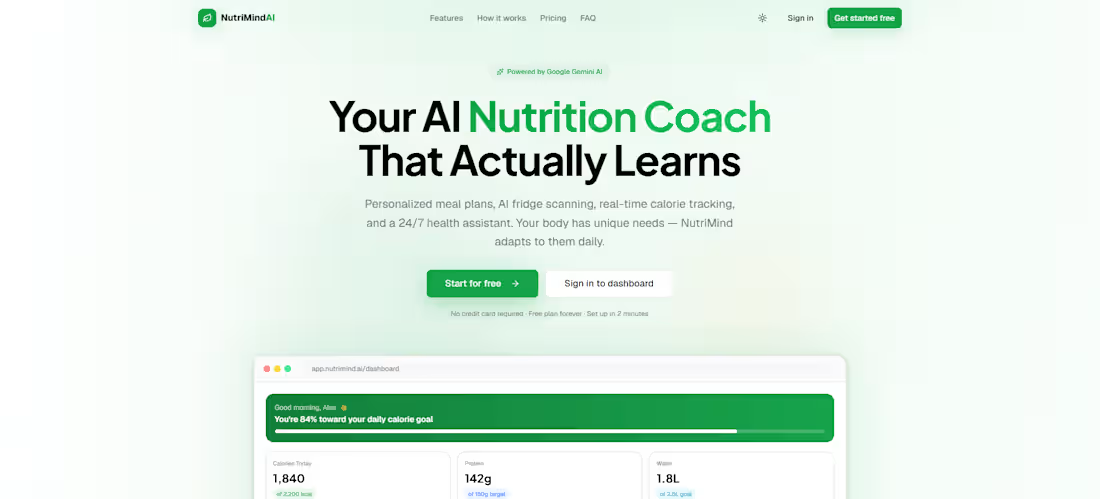
NutriMind AI is a full-stack, AI-powered nutrition and wellness platform built with Next.js 16 and Google Gemini. It enables users to plan personalized weekly meals, scan their fridge with a camera to get instant recipe suggestions, track daily calorie and macro intake, and converse with an intelligent health assistant — all from a single, beautifully designed web application. The platform is designed for health-conscious individuals, fitness enthusiasts, and anyone seeking a smarter, more personalized approach to nutrition management.
Tech Stack
Frontend: Next.js 16.2.6 (App Router), React 19, TypeScript 5
Styling/UI: Tailwind CSS 4, shadcn/ui (Radix UI), Framer Motion 12, Lucide React, Recharts 3
State Management: Zustand 5, TanStack React Query 5
Forms & Validation: React Hook Form 7, Zod 4
Backend: Next.js API Routes (Node.js, server components)
Database: Supabase (PostgreSQL) with Row-Level Security
Authentication: Supabase Auth (email/password + Google OAuth)
AI/LLMs: Google Gemini (gemini-3-flash-preview — chat, vision, structured generation)
Image Management: Cloudinary (upload, storage, CDN)
Recipe Images: Spoonacular API
Deployment: Vercel (inferred — standard Next.js deployment target)
Fonts: Geist Sans/Mono, Plus Jakarta Sans
Other Tools: React Dropzone, Sonner, date-fns, next-themes, class-variance-authority
Problem Solved
Most people struggle with consistent, personalized nutrition because meal planning is time-consuming, recipe discovery is generic, and tracking calorie/macro intake requires manual effort. Existing nutrition apps lack real AI intelligence — they offer static meal templates rather than dynamically personalized plans that adapt to individual health goals, dietary restrictions, and pantry contents. NutriMind AI closes this gap by combining computer vision, conversational AI, and real-time nutrition analytics into one cohesive product.
Results / Key Features
AI Meal Planner: Generates complete, calorie-balanced 7-day meal plans using Google Gemini, tailored to each user's health goals, macros, dietary restrictions, and cuisine preferences.
Fridge Scanner (Vision AI): Analyzes uploaded food images with Gemini Vision to detect ingredients and immediately suggest meals that can be cooked with what's on hand.
Conversational Health Assistant: Streaming AI chat powered by Gemini, with full user context (goals, macros, restrictions) baked into every prompt for deeply personalized advice.
Nutrition Dashboard & Analytics: Real-time calorie and macro tracking with 7-day and 30-day trend charts, adherence scoring, and BMI/BMR/TDEE calculations.
Recipe Discovery Engine: AI-recommended recipes via Gemini + Spoonacular image enrichment, fully integrated with save, nutrition view, and quick-log features.
Grocery List Automation: Automatically derives a consolidated shopping list from the active meal plan.
Workout Plan Generator: Produces AI-generated 7-day exercise programs aligned with the user's fitness goal.
5-Step Onboarding Wizard: Collects user profile, health goals, dietary preferences, and auto-calculates personalized macro targets (Mifflin-St Jeor formula).
Full Dark/Light Mode: System-aware theming with CSS variable design tokens.
Production-Grade Security: Supabase Row-Level Security on all 10 database tables, server-side session enforcement via middleware.
Problem
Before NutriMind AI, health-conscious users faced a fragmented experience: generic meal plan templates with no personalization, no way to leverage existing pantry contents, disconnected macro tracking spreadsheets, and AI health assistants with no knowledge of the user's actual goals or dietary needs. Dietitians and nutritionists are expensive and inaccessible for most people, and no single consumer app combined real AI intelligence, vision-based ingredient detection, personalized planning, and meaningful analytics in one place.
Solution
NutriMind AI solves this end-to-end through four technical pillars:
Personalization Engine: A structured onboarding flow captures health goals, activity level, dietary restrictions, and cuisine preferences. These data points are persisted in Supabase and injected into every AI prompt — making every suggestion genuinely tailored.
Multi-Modal Gemini Integration: Gemini handles text-based chat streaming, structured JSON meal plan generation, computer vision for fridge scanning, and recipe recommendations — all via a unified API layer in src/lib/gemini/.
Full-Stack Next.js Architecture: API routes on the server handle AI calls and database operations; React Server Components + client islands deliver fast initial loads and interactive UIs without architectural compromise.
Persistent Nutrition Intelligence: All logs, plans, scans, and conversations are stored in Supabase with RLS-protected user partitioning, enabling longitudinal analytics and a personalized experience that improves with use.
7. Features
User Authentication: Email/password and Google OAuth via Supabase Auth, with server-side session management in Next.js middleware
5-Step Onboarding: Collects personal stats, fitness goals, activity level, dietary restrictions, allergies, and cuisine preferences; auto-calculates BMR, TDEE, and daily macro targets
AI Meal Planner: Generate, save, and activate weekly meal plans; each plan includes 4 meals/day with individual macro breakdowns and an auto-generated shopping list
Fridge Scanner (Vision AI): Drag-and-drop or camera upload; Gemini Vision detects ingredients and returns 3–5 meal suggestions with estimated nutrition; scan history saved in database
AI Health Chat: Streaming conversational assistant with persistent session history; user context (goals, restrictions, macros) embedded in every system prompt
Recipe Discovery: AI-generated recommendations + Spoonacular image enrichment; filter by meal type and cuisine; save recipes to personal library
Detailed Recipe View: Full ingredient lists, step-by-step instructions, per-serving nutrition breakdown, and one-click meal logging
Grocery List: Auto-generated from active meal plan; editable per-item with check-off capability
Workout Plan Generator: Gemini-generated 7-day exercise routine by fitness goal; includes exercises, sets, reps, rest periods, and duration estimates
Nutrition Dashboard: At-a-glance daily calorie radial chart, macro progress bars, 7-day calorie trend, water intake tracker, recent meals log, quick-action shortcuts
Analytics Dashboard: 7-day and 30-day views; calorie area chart, macro pie chart, actual-vs-target bar chart, average adherence percentage
Profile Management: Edit personal stats, health goals, and activity level; avatar upload; real-time BMI/BMR/TDEE display
Settings: Theme switcher (light/dark/system), account management, account deletion with confirmation dialog
Command Palette: Keyboard-accessible Cmd+K navigation across all sections
Responsive Design: Collapsible sidebar, mobile bottom navigation, adaptive layouts
Toast Notifications: Real-time feedback for all async operations via Sonner
8. Stack (Organized by Category)
Frontend
Next.js 16.2.6 (App Router, Server Components)
React 19.2.4
TypeScript 5 (strict mode)
Framer Motion 12 (page transitions, card animations)
TanStack React Query 5 (server state, caching)
Zustand 5 (client UI state — onboarding, grocery, meal-plan)
React Hook Form 7 + Zod 4 (form validation)
Backend
Next.js API Routes (Node.js runtime)
Supabase SSR (@supabase/ssr) for server-side auth
Cloudinary SDK (server-side upload signing)
Google Generative AI SDK (@google/generative-ai)
Spoonacular REST API (recipe image search)
Database
Supabase (PostgreSQL)
10 tables: profiles, meal_plans, nutrition_logs, water_logs, fridge_scans, recipes, saved_recipes, grocery_lists, chat_sessions, workout_plans
Row-Level Security (RLS) on all tables
Automatic triggers: updated_at, auto-profile creation on signup
8 performance indexes on user_id + timestamp pairs
Authentication
Supabase Auth (email/password + Google OAuth)
Server-side session management via Next.js middleware
Protected routes with onboarding-completion enforcement
AI / LLMs
Google Gemini API (gemini-3-flash-preview)
Text generation: meal plans, recipes, workout plans, chat
Streaming: health chat (Server-Sent Events)
Vision: fridge ingredient detection and meal suggestions
Structured JSON: all non-chat AI outputs use typed schema responses
Styling / UI
Tailwind CSS 4 (@tailwindcss/postcss)
shadcn/ui (16 Radix UI primitives)
Recharts 3.8 (area, radial bar, pie, bar charts)
Lucide React (icons)
next-themes 0.4.6 (dark/light/system)
Geist Sans/Mono + Plus Jakarta Sans (custom fonts)
CSS design tokens: gradients, shadow layers, animation timings, glassmorphism utility classes
Deployment
Vercel (inferred — standard Next.js target, no explicit config file)
Cloudinary CDN for image assets
Supabase hosted PostgreSQL and Auth
Other Tools
React Dropzone 15 (file upload UX)
Sonner 2 (toast notifications)
date-fns 4 (date formatting and arithmetic)
CMDK 1.1 (command palette)
class-variance-authority + tailwind-merge (component variant patterns)
9. Your Role
As the sole developer and architect of NutriMind AI, responsibilities span the full product lifecycle:
System Architecture: Designed the App Router project structure with route groups (auth) and (dashboard), middleware-enforced auth, and a clean separation of server components, client islands, and API routes.
Database Design: Authored the full Supabase PostgreSQL schema (10 tables, RLS policies, auto-triggers, performance indexes) with a security-first data model ensuring users can only access their own records.
AI Integration: Integrated Google Gemini across five distinct use cases (streaming chat, structured meal planning, computer vision fridge scanning, recipe recommendation, workout generation) via a purpose-built abstraction layer in src/lib/gemini/.
Frontend Development: Built 15+ feature component categories with React 19, including multi-step onboarding, AI tool interfaces, data visualization dashboards, and an accessible component system built on shadcn/ui.
Backend API Development: Authored 16+ RESTful API route handlers covering nutrition logging, AI generation, image processing, profile management, and data analytics.
State Management: Architected a hybrid state strategy — Zustand for ephemeral UI/onboarding state, TanStack React Query for server-synchronized data, Supabase real-time for auth context.
UX / Design System: Implemented a custom Tailwind CSS 4 design system with green-branded color tokens, glassmorphism effects, dark/light themes, CSS animation variables, and consistent typography using Geist and Plus Jakarta Sans.
Third-Party Integrations: Integrated Cloudinary for image upload/CDN, Spoonacular for recipe image enrichment, and Supabase Storage for avatar management.
Nutrition Science Logic: Implemented BMR (Mifflin-St Jeor), TDEE (activity multipliers), goal-based calorie adjustment, macro ratio calculations, BMI, and water goal formulas in src/lib/nutrition/calculations.ts.
Performance & Security: Configured Next.js image optimization for external CDN domains, unsigned Cloudinary upload presets for browser-safe uploads, service-role client isolation to server-only routes, and TypeScript strict mode throughout.
10. Live URL
https://nutri-mind-ai-iota.vercel.app/
GitHub GitHub: https://github.com/engraya/NutriMind-AI
0
33