
Usman Javed
Streetwear Technical Designer | Tech Packs & Spec Sheets
- 1
- Followers

6 Essential Adobe Illustrator Shortcuts for Apparel & Vector Designers 🚀
Speed and precision define technical vector development. Here are 6 core Adobe Illustrator shortcuts every vector and apparel designer should master to optimize workflow:
Ctrl + Alt + C: Make with Top Object (Envelope Distort)
Ctrl + Alt + B: Blend Tool for smooth color transitions
Ctrl + Alt + M: Envelope Mesh for custom text warps
Shift + D + Ctrl + V: Draw Inside for instant garment mockup pattern placement
Shift + M: Shape Builder Tool for fast geometric cuts
Shift + X: Instant swap between Fill & Stroke
Working with vector graphics requires both speed and precision. Which shortcut saves you the most time in CAD production?
Looking for factory-ready vector drafting, tech packs, or technical flat sketches? Feel free to check out my profile and let's collaborate!
#AdobeIllustrator #Typography #GraphicDesigner #GraphicDesigner #FashionCAD #DesignTips
1
141
Master these 3 essential Adobe Photoshop shortcuts to speed up your graphic design and blending workflow! ⚡
🔹 Alt + Shift + M — Blend quickly into White Background (Multiply mode)
🔹 Alt + Shift + S — Blend seamlessly into Black Background (Screen mode)
🔹 Ctrl + Alt + G — Create / Release Clipping Mask instantly
Saving seconds on every layer adds up to hours saved on client projects.
What is your most-used Photoshop shortcut? Let me know below! 👇
#Photoshop #GraphicDesign #PhotoshopTutorial #PhotoshopTutorial #DesignWorkflow #CreativeTools
0
98
Photoshop Quick Workflow: Seamless Shape Blending with Clipping Masks 🍃🏙️
When designing streetwear graphics and digital composites, non-destructive layer masking is essential for clean production files.
Here is a 30-second breakdown of fitting complex artwork into organic textures:
Duplicate the base silhouette layer (Ctrl + J)
Place the secondary graphic/cityscape directly above
Right-click the layer → Create Clipping Mask (Shortcut: Alt + Click between layers)
This keeps original assets untouched and ready for factory placement sheets, posters, and print files.
Open for freelance projects in streetwear graphics and tech pack development. Let's build! 🚀
0
204
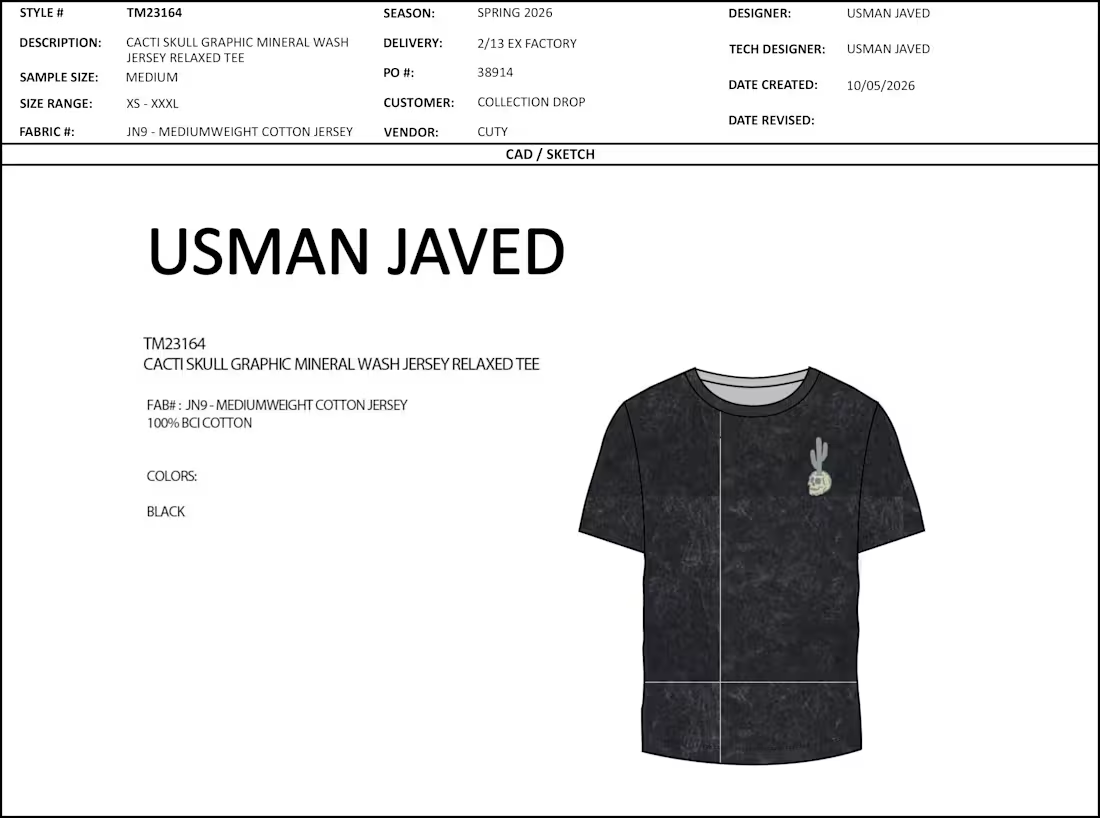
Streetwear Tech Pack & Apparel CAD: Relaxed Mineral Wash Tee
0
4