
obila Anthony
AI Automation Workflow Specialist
New to Contra
obila is building their profile!

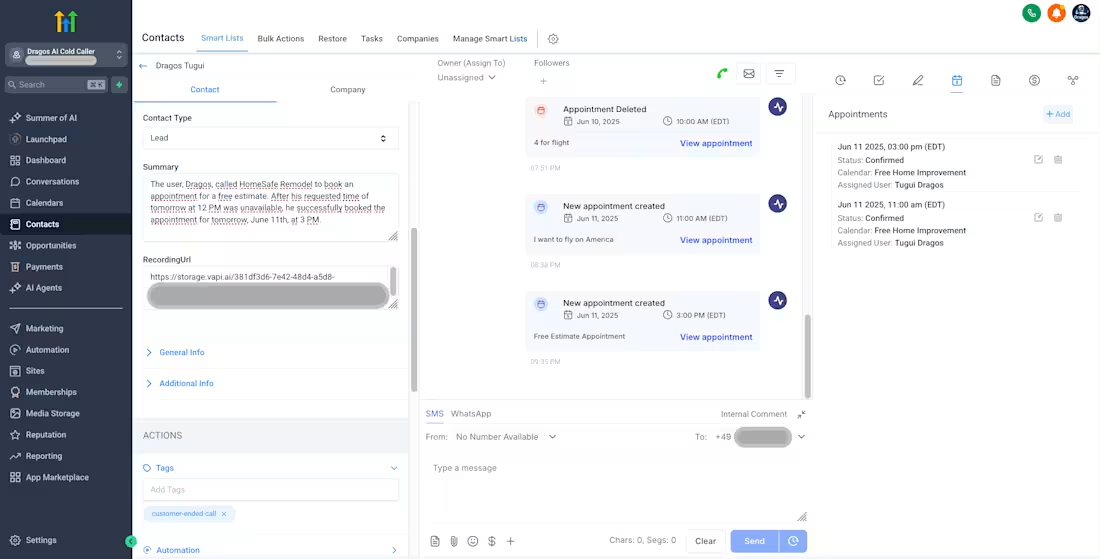
GoHighLevel Conversation AI Agent with Workflow, Pipeline & CRM
1
0
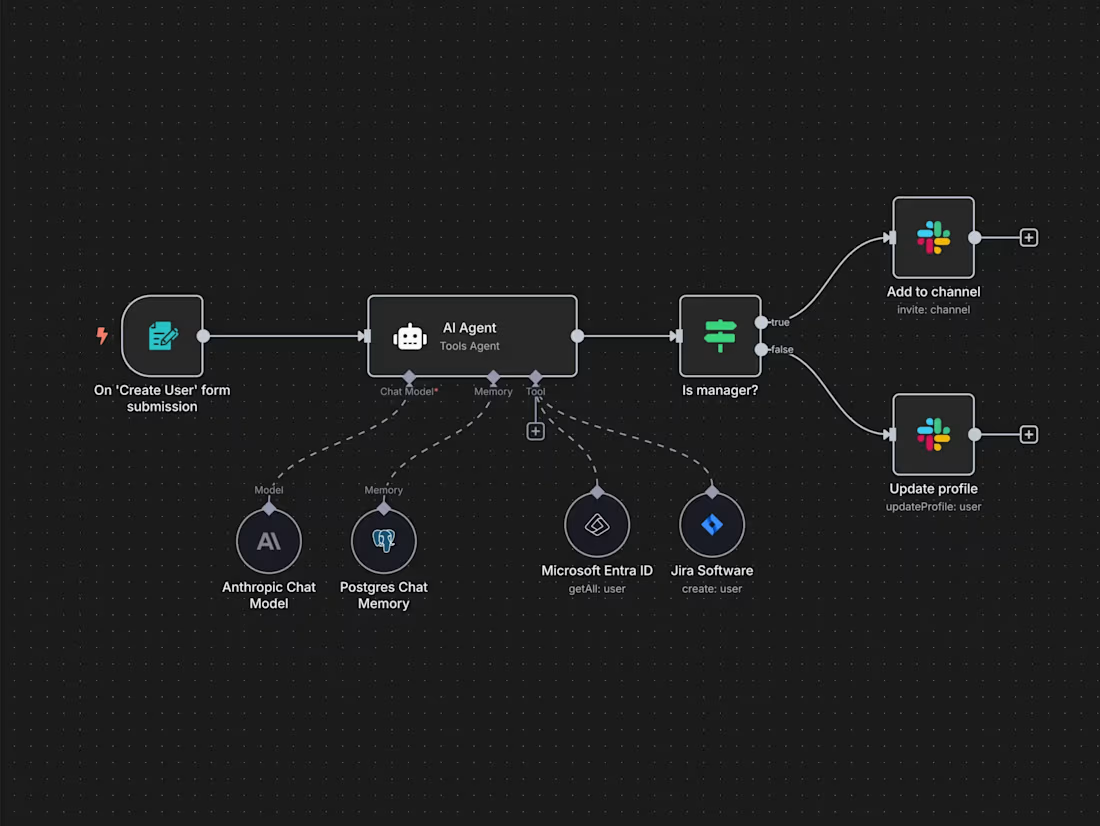
I Built an end-to-end n8n automation system for AI-powered lead magnet generation and CRM automation. Integrated OpenAI and Claude APIs for content creation, automated Google Docs formatting, and designed workflows for lead capture, email automation, and follow-up sequences. Implemented scalable workflow automation, API integrations, and marketing automation pipelines to streamline lead generation and business operations.
0
12
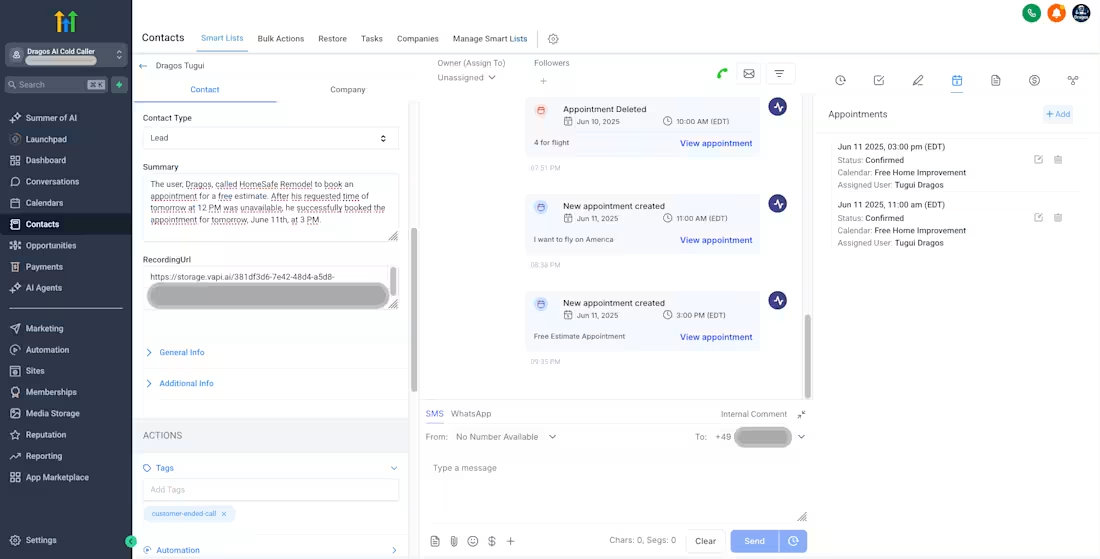
I Built and deployed high-performing GoHighLevel Conversation AI agents integrated with pipelines, workflows, tags, and CRM automation systems. Designed structured knowledge bases, deterministic conversation flows, and state-based logic for accurate responses and lead conversion. Implemented AI automation, sales automation, chatbot workflows, and pipeline automation to improve engagement, automate follow-ups, and increase conversion rates.
0
15
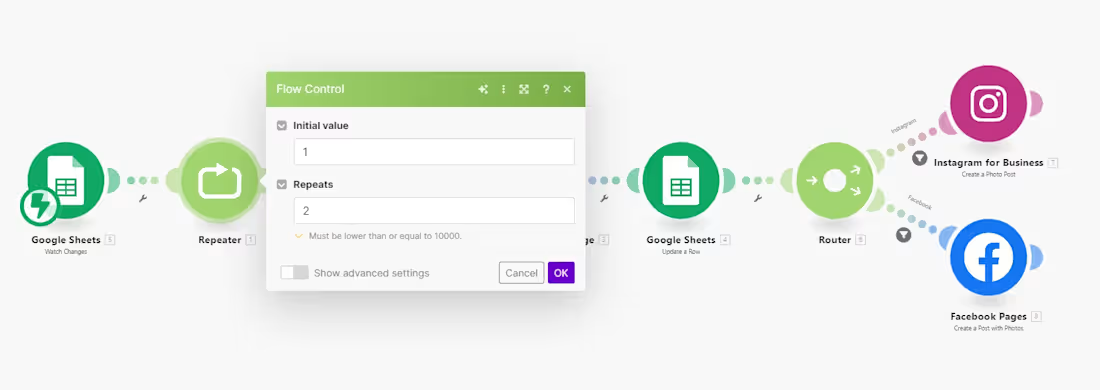
Make.com (http://Make.com) Automation for Google Sheets Data Comparison & Real Estate Change Detection.
My Role is as Make.com (http://Make.com) Automation Engineer | Data Workflow Specialist | Google Sheets Automation Expert | API Integration Consultant
I Built a Make.com (http://Make.com) automation system that compares daily Google Sheets datasets to detect changes in real estate data such as price, status, and DOM. Implemented structured data comparison logic, webhook triggers, and event-based workflows to generate automated snapshots. Designed scalable workflow automation, API integrations, and data processing pipelines to eliminate manual tracking and enable real-time business insights.
Case Study,
Using Make.com (http://Make.com), Google Sheets automation, workflow automation, API integration, webhooks, data processing, dashboard reporting, lead generation automation, AI automation, and business automation, I developed a daily change-detection system that automatically compares datasets, identifies key differences, and triggers real-time workflow actions for real estate tracking.
The client needed an automation that could compare today’s vs yesterday’s property data inside Google Sheets and detect changes in status, price, and days on market (DOM), then generate a structured snapshot output based on a predefined template.
I began by designing a data comparison architecture inside Google Sheets, where both datasets (current and previous) were normalized into structured tabs. I created a system that aligns records using unique identifiers (such as property ID or address), ensuring accurate row-by-row comparison.
Next, I built a Make.com (http://Make.com) automation scenario that runs daily using scheduled triggers. The workflow pulls both datasets, processes them using iterator and aggregator modules, and applies comparison logic to detect:
Price changes
Status updates (active, sold, pending)
DOM variations
New or removed listings
To handle this efficiently, I implemented conditional routing and filtering logic so only records with meaningful changes proceed through the automation. This significantly reduced unnecessary processing and improved performance.
Once changes are detected, the system automatically formats the data into a structured snapshot output, based on the client’s PDF template. I mapped each data field dynamically and ensured consistent formatting for reporting and decision-making.
I also designed the system to write processed “old vs new” data into a separate Google Sheets tab, making it easy to audit changes, debug workflows, and maintain historical tracking.
To enhance reliability, I added:
Error handling and fallback routes
Logging for change tracking
Modular workflow design for scalability
Clean data mapping for future API integrations
Key Results Delivered
Automated daily real estate data comparison
Eliminated manual spreadsheet tracking
Improved accuracy in detecting property changes
Reduced processing noise using filtered workflows
Enabled real-time snapshot generation
Created scalable system for future automation expansion
1
41