
Finish a Critical Workflow in Your AI-Built AppNiko Minadze
Your AI-built app can look convincing in a demo and still leave people stuck when they try to finish a task. I take one important workflow through the interface, backend and saved data so you can put it in front of users with clear evidence that it works.
That might mean completing an onboarding flow, making uploads usable after processing fails, or connecting a customer request to its admin review and final status. We choose the workflow that removes the most immediate obstacle to using your product.
In my Next.js application ReachLog, I built recovery for emails accepted by the mail server when the local history write fails. The app can save that original send without sending it again. That is the kind of partial failure I account for when completing a workflow.
I work hands-on in your existing codebase. I keep the architecture and conventions that work, identify the changes the selected workflow needs, and implement them. The result includes the normal journey, relevant error and permission checks, and a working version on staging for you to review.
We agree the affected screens, backend work, dependencies and completion checks before starting. This is a focused implementation milestone, with a practical handover and seven days of support for bugs introduced by the delivered changes.
What you receive
One complete, agreed user workflow
A written scope describing what someone can do, which screens and records are involved, and how we will confirm completion. The starting package covers one focused workflow using the application's existing sign-in and deployment setup.
Working interface and backend changes
Implementation in your repository, including the validation, database changes or existing-service integration needed for the agreed flow. Loading, empty, success and failure states are handled as part of the feature.
Verification of the behavior that matters
Automated checks appropriate to the change, plus browser verification of the full journey. Where relevant, this includes direct permission checks, duplicate actions, failed requests, retries and records surviving a reload.
A staging version you can use
A working preview and one consolidated review round within the agreed scope. If deploying this change through your existing release process is included in our scope, I also verify the agreed production behavior after release.
Code, handover and next steps
Source changes, release notes, how the feature was checked, and any known limitations. You also receive a short list of dependencies or adjacent issues discovered during this work, so the next milestone starts from observed behavior.
Seven days of related bug support
Correction of reproducible bugs introduced by the delivered changes and reported within seven calendar days of handover. New features and unrelated existing problems are scoped separately.
Process
Choose the workflow. Show me the app and the task that is blocked or unfinished. I review the relevant code and confirm a deliverable that fits the first milestone before we start.
Agree what completion looks like. We define the user actions, affected screens, data changes and failure cases. We also confirm required access and the review environment.
Build in the existing application. I implement the interface and backend changes together, with short written updates and a working preview.
Review and verify. You test the staging version. I apply one consolidated round of feedback within scope and run the agreed checks.
Hand over the feature. You receive the code, verification notes and any agreed release. The seven-day bug-support period begins at handover.
Requirements before starting
A link, recording or brief walkthrough of the app and the workflow you want completed.
Repository access, setup instructions and the current stack.
A working staging environment, or confirmation that establishing a preview is included in the agreed scope.
Test accounts for the affected user roles and safe sample data.
Access to relevant services and their test environments, where the workflow depends on them.
Existing interface patterns or approved designs to follow, plus one person responsible for consolidated feedback.
Relevant work
ReachLog
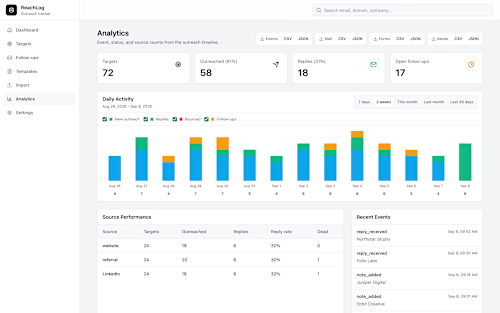
I built ReachLog, a private Next.js/React and TypeScript application documented on my public project page. One recovery flow handles email already accepted by the mail server when the local history write fails: it saves the original send without sending it again and avoids duplicate records when recovery is repeated. This is a concrete example of completing the behavior behind a button, including what happens when only part of an operation succeeds.
Classifieds & Advertising Platform — Go rebuild
My substantial application rebuild includes React/TypeScript advertiser and admin dashboards, a Go backend, background workers, and data and browser comparisons against the existing application before cutover. The rebuild is approaching launch and has not replaced the live original.
FAQs
Example work



Contact for pricing
Duration1 week
Tags
Elixir

Go

Next.js

React

Rust

TypeScript

Backend Engineer
Fullstack Engineer
Web Developer
Service provided by
Niko Minadze Bangkok, Thailand
- 5.00
- Rating
- 18
- Followers
Finish a Critical Workflow in Your AI-Built AppNiko Minadze
Contact for pricing
Duration1 week
Tags
Elixir
Go
Next.js
React
Rust
TypeScript
Backend Engineer
Fullstack Engineer
Web Developer
Your AI-built app can look convincing in a demo and still leave people stuck when they try to finish a task. I take one important workflow through the interface, backend and saved data so you can put it in front of users with clear evidence that it works.
That might mean completing an onboarding flow, making uploads usable after processing fails, or connecting a customer request to its admin review and final status. We choose the workflow that removes the most immediate obstacle to using your product.
In my Next.js application ReachLog, I built recovery for emails accepted by the mail server when the local history write fails. The app can save that original send without sending it again. That is the kind of partial failure I account for when completing a workflow.
I work hands-on in your existing codebase. I keep the architecture and conventions that work, identify the changes the selected workflow needs, and implement them. The result includes the normal journey, relevant error and permission checks, and a working version on staging for you to review.
We agree the affected screens, backend work, dependencies and completion checks before starting. This is a focused implementation milestone, with a practical handover and seven days of support for bugs introduced by the delivered changes.
What you receive
One complete, agreed user workflow
A written scope describing what someone can do, which screens and records are involved, and how we will confirm completion. The starting package covers one focused workflow using the application's existing sign-in and deployment setup.
Working interface and backend changes
Implementation in your repository, including the validation, database changes or existing-service integration needed for the agreed flow. Loading, empty, success and failure states are handled as part of the feature.
Verification of the behavior that matters
Automated checks appropriate to the change, plus browser verification of the full journey. Where relevant, this includes direct permission checks, duplicate actions, failed requests, retries and records surviving a reload.
A staging version you can use
A working preview and one consolidated review round within the agreed scope. If deploying this change through your existing release process is included in our scope, I also verify the agreed production behavior after release.
Code, handover and next steps
Source changes, release notes, how the feature was checked, and any known limitations. You also receive a short list of dependencies or adjacent issues discovered during this work, so the next milestone starts from observed behavior.
Seven days of related bug support
Correction of reproducible bugs introduced by the delivered changes and reported within seven calendar days of handover. New features and unrelated existing problems are scoped separately.
Process
Choose the workflow. Show me the app and the task that is blocked or unfinished. I review the relevant code and confirm a deliverable that fits the first milestone before we start.
Agree what completion looks like. We define the user actions, affected screens, data changes and failure cases. We also confirm required access and the review environment.
Build in the existing application. I implement the interface and backend changes together, with short written updates and a working preview.
Review and verify. You test the staging version. I apply one consolidated round of feedback within scope and run the agreed checks.
Hand over the feature. You receive the code, verification notes and any agreed release. The seven-day bug-support period begins at handover.
Requirements before starting
A link, recording or brief walkthrough of the app and the workflow you want completed.
Repository access, setup instructions and the current stack.
A working staging environment, or confirmation that establishing a preview is included in the agreed scope.
Test accounts for the affected user roles and safe sample data.
Access to relevant services and their test environments, where the workflow depends on them.
Existing interface patterns or approved designs to follow, plus one person responsible for consolidated feedback.
Relevant work
ReachLog
I built ReachLog, a private Next.js/React and TypeScript application documented on my public project page. One recovery flow handles email already accepted by the mail server when the local history write fails: it saves the original send without sending it again and avoids duplicate records when recovery is repeated. This is a concrete example of completing the behavior behind a button, including what happens when only part of an operation succeeds.
Classifieds & Advertising Platform — Go rebuild
My substantial application rebuild includes React/TypeScript advertiser and admin dashboards, a Go backend, background workers, and data and browser comparisons against the existing application before cutover. The rebuild is approaching launch and has not replaced the live original.
FAQs
Example work
Contact for pricing