
Automated Excel ReportingJamie Tran
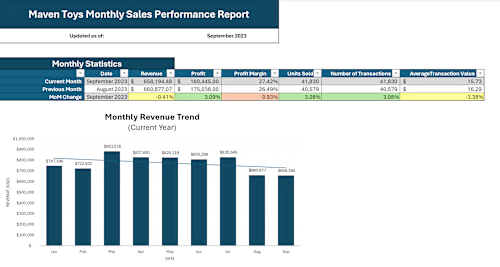
Spending time rebuilding the same Excel report every week, month, or quarter? I'll create a refreshable reporting system that reduces repetitive manual work and makes recurring reporting easier to maintain.
What's included:
One recurring reporting workflow
Custom Excel reporting workbook
Power Query data preparation
Automated importing and consolidation of consistently structured source files where appropriate
Refreshable reporting workflow
Formulas and reporting logic as needed
KPIs, PivotTables, and charts
Trends and period comparisons
Simple refresh instructions
Up to 2 revisions
How updates work: Your reporting system will be configured around an agreed source-file process. For a folder-based setup, you can add new consistently structured files to the designated Source Files folder and use Data → Refresh All to update the report.
Best for: Weekly, monthly, or quarterly reports that are repeatedly updated using consistently structured source files.
Not included: VBA/macros, database development, unrelated reporting workflows, highly fragmented source systems, or ongoing report maintenance. Recurring source files must maintain the agreed structure and required fields. Changes to source systems, file structures, column names, or reporting requirements after delivery may require additional work. Revisions cover adjustments to the agreed deliverables and do not include new reporting workflows, new data sources, additional reports, or expansion of the original project scope.
Not sure whether this package fits your project? Feel free to message me before purchasing. I'm happy to help determine which option best matches your needs.
FAQs
Example work
Jamie's other services
Starting at$650
Duration7 days
Tags
Microsoft Excel

Business Intelligence
Data Analyst
Data Visualizer
Data Automation
Power Query
Service provided by
Jamie Tran Boston, USA
- 3
- Followers
Automated Excel ReportingJamie Tran
Starting at$650
Duration7 days
Tags
Microsoft Excel
Business Intelligence
Data Analyst
Data Visualizer
Data Automation
Power Query
Spending time rebuilding the same Excel report every week, month, or quarter? I'll create a refreshable reporting system that reduces repetitive manual work and makes recurring reporting easier to maintain.
What's included:
One recurring reporting workflow
Custom Excel reporting workbook
Power Query data preparation
Automated importing and consolidation of consistently structured source files where appropriate
Refreshable reporting workflow
Formulas and reporting logic as needed
KPIs, PivotTables, and charts
Trends and period comparisons
Simple refresh instructions
Up to 2 revisions
How updates work: Your reporting system will be configured around an agreed source-file process. For a folder-based setup, you can add new consistently structured files to the designated Source Files folder and use Data → Refresh All to update the report.
Best for: Weekly, monthly, or quarterly reports that are repeatedly updated using consistently structured source files.
Not included: VBA/macros, database development, unrelated reporting workflows, highly fragmented source systems, or ongoing report maintenance. Recurring source files must maintain the agreed structure and required fields. Changes to source systems, file structures, column names, or reporting requirements after delivery may require additional work. Revisions cover adjustments to the agreed deliverables and do not include new reporting workflows, new data sources, additional reports, or expansion of the original project scope.
Not sure whether this package fits your project? Feel free to message me before purchasing. I'm happy to help determine which option best matches your needs.
FAQs
Example work
Jamie's other services
$650