
Web Redesign & Project RevampDang Nguyen
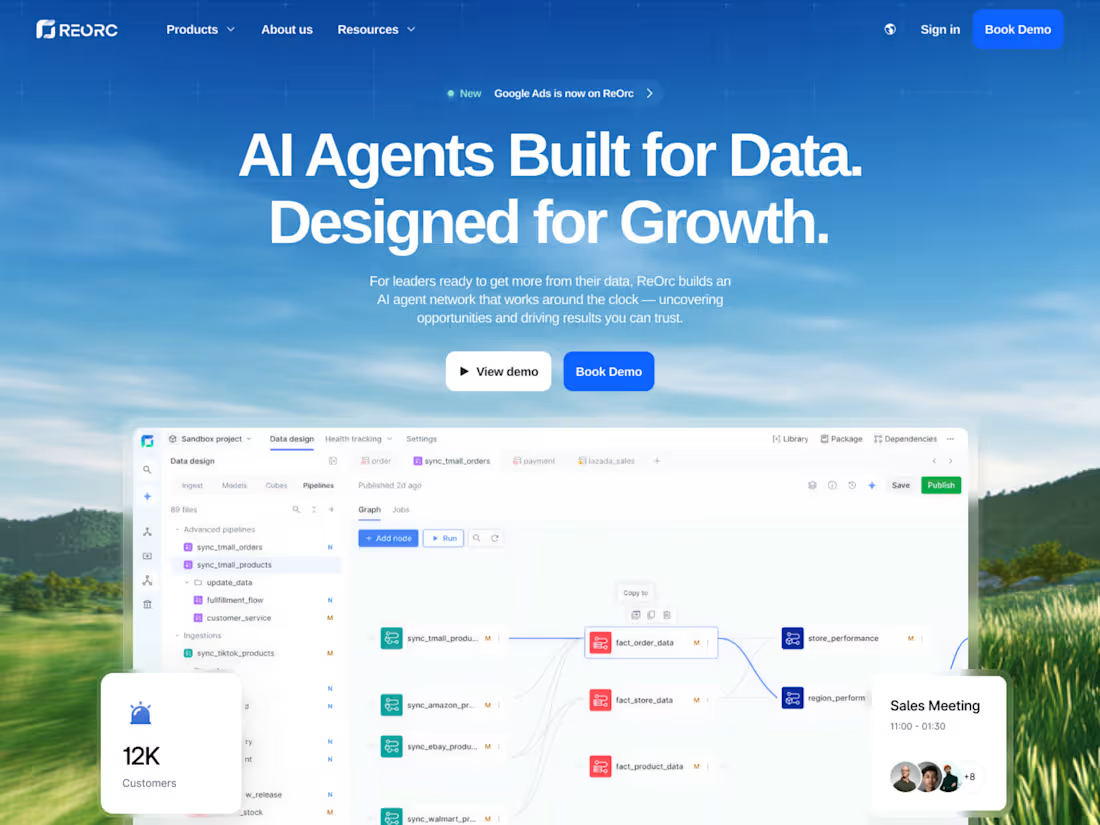
This service is for businesses that already have a website but know it could be working harder - visually, strategically, and in terms of conversions. You get a full redesign and Webflow build led by a studio of award‑winning designers who specialize in creative, story‑driven websites. The goal is to transform your existing site into a sharper, more confident version of your brand that visitors instantly recognize and trust.
Instead of just “making it prettier,” the revamp focuses on clear storytelling, stronger branding, and smoother user journeys that guide people naturally toward key actions like inquiries, sign‑ups, or purchases. You walk away with a modern, conversion‑ready Webflow site that feels uniquely yours, communicates directly with your users, and finally matches the level of your business.
What's included
Discovery & Website Audit
A 60–90 minute kickoff session to understand your business, audience, offers, and goals, plus a structured review of your current website. You’ll get clarity on what’s working, what’s confusing, and what needs to change to support better recognition and conversions.
Updated Site Map & User Journey Plan
A revised site map and user flow plan that reorganizes your pages around clear paths to action. This shows how visitors should move from first impression to key goals like inquiries, demo requests, or purchases, so every page has a clear job.
Bespoke Visual Redesign for Core Pages
Pixel-perfect redesigns of your most important pages (for example: Home, Services/Offer, About, one or two core inner pages, and Contact/Conversion). Each layout is crafted to be visually distinctive, on-brand, and easy to scan, with up to 3 rounds of revisions across the full set.
Web Style Guide & Component System
A practical style guide for the site (colors, typography, spacing, buttons, forms, card styles, basic interaction rules) plus a set of reusable components and sections. This system keeps everything consistent and makes it easier to launch new pages and campaigns later.
Responsive Webflow Development
A clean, responsive Webflow build of all redesigned pages using best practices for structure, accessibility, and maintainability. Classes and components are organized so your team can safely edit and extend the site over time.
CMS & Content Setup
Configuration of Webflow CMS collections (for example: blog posts, case studies, team, services) and population of initial content. This allows your team to update content without touching the layout or underlying structure.
Interactions & Animations
Thoughtful Webflow interactions that add personality and guide attention - such as hover states, scroll reveals, and subtle motion on key elements - while keeping performance and usability in mind.
Performance, SEO & Form Integrations
Core on-page SEO setup (titles, meta descriptions, headings), basic performance optimizations (image handling, structure), and implementation of key forms or integrations (contact, lead capture, newsletter) with your existing tools.
Quality Assurance & Launch Support
Testing across major devices and screen sizes to ensure layouts, interactions, and forms work smoothly, followed by a round of fixes focused on polish and bugs. Support with domain connection, hosting configuration, and launch so the transition from old site to new is as smooth as possible.
Handoff, Training & Post‑Launch Support Window
A 45–60 minute training session or recorded walkthrough showing how to manage content, use the Editor, and safely make small updates. You’ll also have a 1-month support window after launch for minor fixes and questions as you start using the new site in real conditions.
FAQs
Example work
Dang's other services
Starting at$3,500
Duration3 weeks
Tags
Figma

Webflow

Design Engineer
Frontend Engineer
UI Designer
Service provided by
Dang Nguyen proVietnam
- $10k+
- Earned
- 6
- Paid projects
- 5.00
- Rating
- 45
- Followers
Web Redesign & Project RevampDang Nguyen
Starting at$3,500
Duration3 weeks
Tags
Figma
Webflow
Design Engineer
Frontend Engineer
UI Designer
This service is for businesses that already have a website but know it could be working harder - visually, strategically, and in terms of conversions. You get a full redesign and Webflow build led by a studio of award‑winning designers who specialize in creative, story‑driven websites. The goal is to transform your existing site into a sharper, more confident version of your brand that visitors instantly recognize and trust.
Instead of just “making it prettier,” the revamp focuses on clear storytelling, stronger branding, and smoother user journeys that guide people naturally toward key actions like inquiries, sign‑ups, or purchases. You walk away with a modern, conversion‑ready Webflow site that feels uniquely yours, communicates directly with your users, and finally matches the level of your business.
What's included
Discovery & Website Audit
A 60–90 minute kickoff session to understand your business, audience, offers, and goals, plus a structured review of your current website. You’ll get clarity on what’s working, what’s confusing, and what needs to change to support better recognition and conversions.
Updated Site Map & User Journey Plan
A revised site map and user flow plan that reorganizes your pages around clear paths to action. This shows how visitors should move from first impression to key goals like inquiries, demo requests, or purchases, so every page has a clear job.
Bespoke Visual Redesign for Core Pages
Pixel-perfect redesigns of your most important pages (for example: Home, Services/Offer, About, one or two core inner pages, and Contact/Conversion). Each layout is crafted to be visually distinctive, on-brand, and easy to scan, with up to 3 rounds of revisions across the full set.
Web Style Guide & Component System
A practical style guide for the site (colors, typography, spacing, buttons, forms, card styles, basic interaction rules) plus a set of reusable components and sections. This system keeps everything consistent and makes it easier to launch new pages and campaigns later.
Responsive Webflow Development
A clean, responsive Webflow build of all redesigned pages using best practices for structure, accessibility, and maintainability. Classes and components are organized so your team can safely edit and extend the site over time.
CMS & Content Setup
Configuration of Webflow CMS collections (for example: blog posts, case studies, team, services) and population of initial content. This allows your team to update content without touching the layout or underlying structure.
Interactions & Animations
Thoughtful Webflow interactions that add personality and guide attention - such as hover states, scroll reveals, and subtle motion on key elements - while keeping performance and usability in mind.
Performance, SEO & Form Integrations
Core on-page SEO setup (titles, meta descriptions, headings), basic performance optimizations (image handling, structure), and implementation of key forms or integrations (contact, lead capture, newsletter) with your existing tools.
Quality Assurance & Launch Support
Testing across major devices and screen sizes to ensure layouts, interactions, and forms work smoothly, followed by a round of fixes focused on polish and bugs. Support with domain connection, hosting configuration, and launch so the transition from old site to new is as smooth as possible.
Handoff, Training & Post‑Launch Support Window
A 45–60 minute training session or recorded walkthrough showing how to manage content, use the Editor, and safely make small updates. You’ll also have a 1-month support window after launch for minor fixes and questions as you start using the new site in real conditions.
FAQs
Example work
Dang's other services
$3,500