
Mobile DeisngXolani Siletile
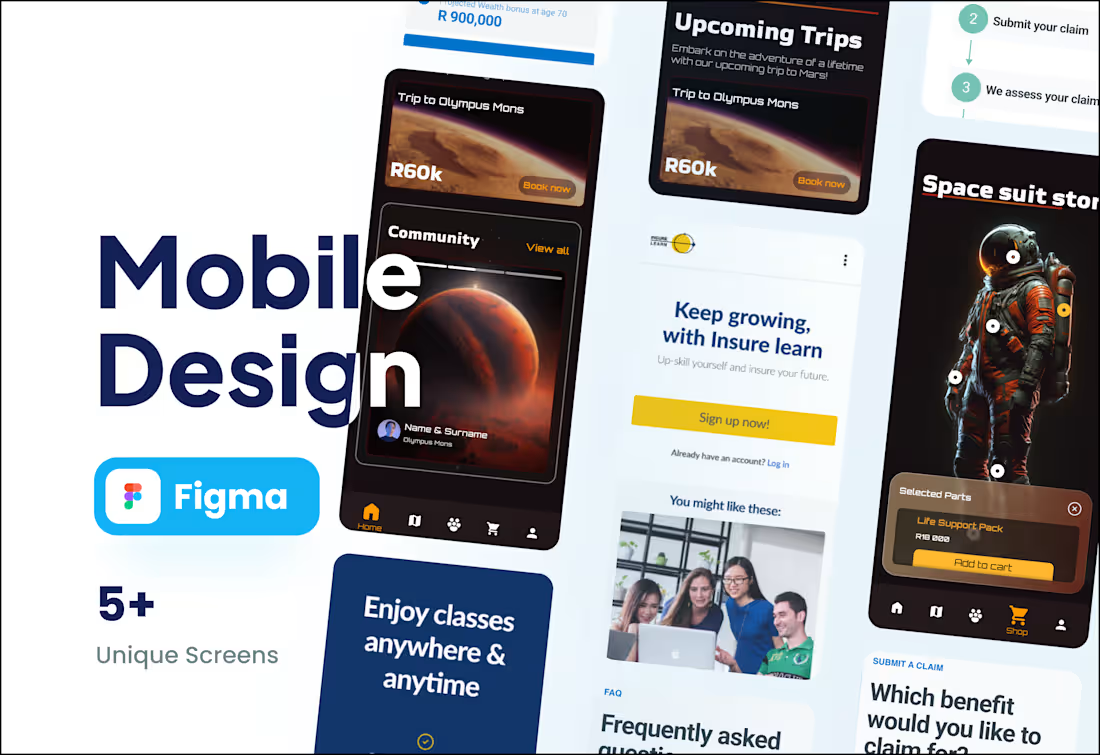
I build strategic web applications that solve real business problems, acting as a design partner rather than just a designer. My unique approach combines your business goals with a deep understanding of user experience to create a product that drives results. Ultimately, you get a thoughtful, high-performing application designed for long-term success.
What's included
Building a Strong Foundation 🏗️
We start by creating a solid plan to ensure your app is intuitive and solves real user problems.
✏️ Wireframes: The essential blueprint of your app's layout. This allows us to agree on the core structure and user experience before we invest time in visual details.
🗺️ User Flow Diagram: A clear map of the user journey, ensuring your customers can navigate the app intuitively and achieve their goals with ease, which leads to higher user satisfaction.
👆 Clickable Wireframe Prototype: An early, interactive version of your app. This lets you click through the main user paths to feel how it works, so we can spot improvements and refine the flow early on.
Bringing Your Vision to Life ✨
This is where your brand and ideas are transformed into a stunning, functional design.
🖼️ High-Fidelity Mockups: Pixel-perfect, full-color designs that show you exactly what your web app will look like. This is where your brand identity comes alive.
🚀 Interactive High-Fidelity Prototype: A stunning, realistic prototype that looks and feels like the final product. It's the perfect tool for demonstrating your vision to stakeholders, investors, or for final user testing.
🎨 Brand Style Guide: A clear, one-page guide to your app's visual identity—colors, fonts, and iconography. This ensures your brand stays strong and consistent as your product grows.
A Seamless Handoff for Development 🤝
You get a complete package that empowers your developers to build efficiently and accurately.
🗂️ An Organized Source File: A meticulously organized Figma file that your developers will love. No guesswork involved.
🧱 A Ready-to-Use UI Kit: A library of all your UI components (buttons, forms, etc.). This saves countless hours in development and makes future updates simple and cost-effective.
📥 All Necessary Assets: Every icon, image, and graphic, perfectly exported and ready for implementation.
📱💻🖥️ Responsive Design Guidelines: Clear instructions on how the design should adapt to different screen sizes, guaranteeing a flawless look on desktop, tablet, and mobile.
FAQs
Contact for pricing
Tags
Adobe Illustrator

Adobe Photoshop

Figma

Sketch

Mobile Designer
Product Designer
UI Designer
Service provided by
Xolani Siletile Betty's Bay, South Africa
- 17
- Followers
Mobile DeisngXolani Siletile
Contact for pricing
Tags
Adobe Illustrator
Adobe Photoshop
Figma
Sketch
Mobile Designer
Product Designer
UI Designer
I build strategic web applications that solve real business problems, acting as a design partner rather than just a designer. My unique approach combines your business goals with a deep understanding of user experience to create a product that drives results. Ultimately, you get a thoughtful, high-performing application designed for long-term success.
What's included
Building a Strong Foundation 🏗️
We start by creating a solid plan to ensure your app is intuitive and solves real user problems.
✏️ Wireframes: The essential blueprint of your app's layout. This allows us to agree on the core structure and user experience before we invest time in visual details.
🗺️ User Flow Diagram: A clear map of the user journey, ensuring your customers can navigate the app intuitively and achieve their goals with ease, which leads to higher user satisfaction.
👆 Clickable Wireframe Prototype: An early, interactive version of your app. This lets you click through the main user paths to feel how it works, so we can spot improvements and refine the flow early on.
Bringing Your Vision to Life ✨
This is where your brand and ideas are transformed into a stunning, functional design.
🖼️ High-Fidelity Mockups: Pixel-perfect, full-color designs that show you exactly what your web app will look like. This is where your brand identity comes alive.
🚀 Interactive High-Fidelity Prototype: A stunning, realistic prototype that looks and feels like the final product. It's the perfect tool for demonstrating your vision to stakeholders, investors, or for final user testing.
🎨 Brand Style Guide: A clear, one-page guide to your app's visual identity—colors, fonts, and iconography. This ensures your brand stays strong and consistent as your product grows.
A Seamless Handoff for Development 🤝
You get a complete package that empowers your developers to build efficiently and accurately.
🗂️ An Organized Source File: A meticulously organized Figma file that your developers will love. No guesswork involved.
🧱 A Ready-to-Use UI Kit: A library of all your UI components (buttons, forms, etc.). This saves countless hours in development and makes future updates simple and cost-effective.
📥 All Necessary Assets: Every icon, image, and graphic, perfectly exported and ready for implementation.
📱💻🖥️ Responsive Design Guidelines: Clear instructions on how the design should adapt to different screen sizes, guaranteeing a flawless look on desktop, tablet, and mobile.
FAQs
Contact for pricing