
Mobile App UI Design (iOS & Android)Olajuwon Oyeyipo
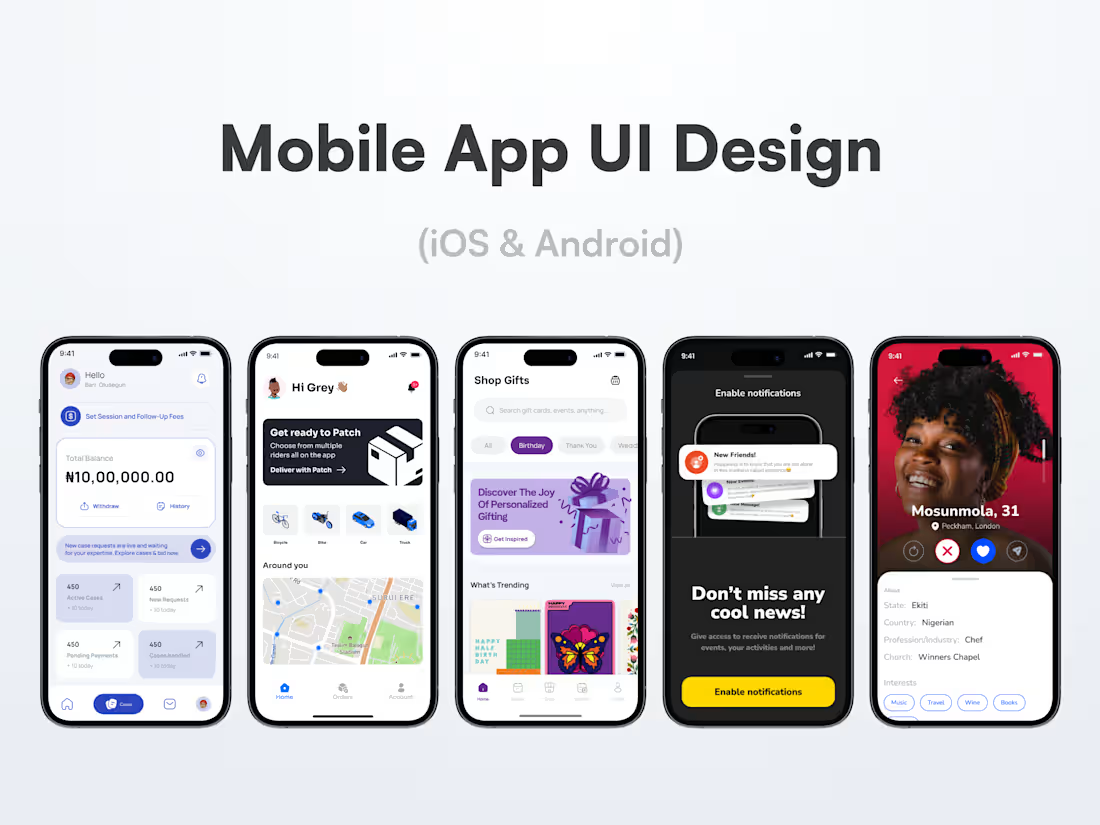
I create awesome, user-friendly interfaces tailored specifically for iOS and Android, blending platform best practices with fresh, modern aesthetics. Using tools like Framer, I deliver interactive prototypes that bring your app vision to life, making design decisions clear and development seamless. My focus is on building intuitive experiences that users love and developers appreciate.
What to Expect:
A collaborative process with regular check-ins, detailed user flows, and high-fidelity prototypes. You’ll receive a complete design system, responsive layouts for multiple devices, and developer-ready files with clear documentation, all designed to ensure a smooth handoff and successful launch.
What's included
User Interface Design (iOS & Android)
Tailored UI layouts for both platforms, respecting their unique design guidelines (Human Interface Guidelines for iOS and Material Design for Android), ensuring a native feel.
High-Fidelity Interactive Prototypes
Clickable, realistic prototypes built in tools like Framer to simulate real user interactions and animations, helping stakeholders experience the app flow before development.
Custom Visual Assets & Iconography
Design and deliver bespoke icons, buttons, and graphics that fit the app’s brand personality and improve usability.
Design System / Style Guide
A comprehensive guide detailing typography, color palette, spacing, components, and UI patterns — promoting consistency and speeding future updates or expansions.
User Flow Diagrams & Wireframes
Early-stage blueprints and flow charts that map how users navigate the app, clarifying functionality and logic before visual design.
Handoff-Ready Files & Documentation
Organized, developer-friendly design files (Figma, Sketch, or Framer), complete with annotations, specs, and asset exports to streamline development.
Post-Design Support & QA
Ongoing support during development to address questions, tweak designs, and ensure the final product matches the vision
FAQs
Yes! I create tailored designs that follow each platform’s best practices to ensure a native and intuitive user experience on both iOS and Android.
I primarily use Figma and Framer for UI design and interactive prototypes, which help visualize animations and flows clearly before development.
Very! We’ll communicate regularly through your preferred platform: Slack, Notion, email, or scheduled video calls, to keep everything aligned. You’ll be included in feedback rounds and key decision points.
You get up to three major revision rounds per design phase (wireframes, visuals, prototypes). Minor tweaks and adjustments are always welcomed during the process to ensure you're satisfied.
Absolutely. I deliver organized, annotated design files along with a comprehensive design system and documentation to make developer handoff seamless.
While my focus is UI/UX design, I can support basic user flow validation and recommend best practices or partner you with specialists for in-depth research.
Timelines vary depending on project scope but typically range from 4 to 8 weeks from discovery to final handoff.
Olajuwon's other services
Starting at$1,000
Duration4 weeks
Tags
Figma


Interaction Designer
Mobile Designer
UI Designer
Service provided by
Olajuwon Oyeyipo Lagos, Nigeria
Mobile App UI Design (iOS & Android)Olajuwon Oyeyipo
Starting at$1,000
Duration4 weeks
Tags
Figma
Interaction Designer
Mobile Designer
UI Designer
I create awesome, user-friendly interfaces tailored specifically for iOS and Android, blending platform best practices with fresh, modern aesthetics. Using tools like Framer, I deliver interactive prototypes that bring your app vision to life, making design decisions clear and development seamless. My focus is on building intuitive experiences that users love and developers appreciate.
What to Expect:
A collaborative process with regular check-ins, detailed user flows, and high-fidelity prototypes. You’ll receive a complete design system, responsive layouts for multiple devices, and developer-ready files with clear documentation, all designed to ensure a smooth handoff and successful launch.
What's included
User Interface Design (iOS & Android)
Tailored UI layouts for both platforms, respecting their unique design guidelines (Human Interface Guidelines for iOS and Material Design for Android), ensuring a native feel.
High-Fidelity Interactive Prototypes
Clickable, realistic prototypes built in tools like Framer to simulate real user interactions and animations, helping stakeholders experience the app flow before development.
Custom Visual Assets & Iconography
Design and deliver bespoke icons, buttons, and graphics that fit the app’s brand personality and improve usability.
Design System / Style Guide
A comprehensive guide detailing typography, color palette, spacing, components, and UI patterns — promoting consistency and speeding future updates or expansions.
User Flow Diagrams & Wireframes
Early-stage blueprints and flow charts that map how users navigate the app, clarifying functionality and logic before visual design.
Handoff-Ready Files & Documentation
Organized, developer-friendly design files (Figma, Sketch, or Framer), complete with annotations, specs, and asset exports to streamline development.
Post-Design Support & QA
Ongoing support during development to address questions, tweak designs, and ensure the final product matches the vision
FAQs
Yes! I create tailored designs that follow each platform’s best practices to ensure a native and intuitive user experience on both iOS and Android.
I primarily use Figma and Framer for UI design and interactive prototypes, which help visualize animations and flows clearly before development.
Very! We’ll communicate regularly through your preferred platform: Slack, Notion, email, or scheduled video calls, to keep everything aligned. You’ll be included in feedback rounds and key decision points.
You get up to three major revision rounds per design phase (wireframes, visuals, prototypes). Minor tweaks and adjustments are always welcomed during the process to ensure you're satisfied.
Absolutely. I deliver organized, annotated design files along with a comprehensive design system and documentation to make developer handoff seamless.
While my focus is UI/UX design, I can support basic user flow validation and recommend best practices or partner you with specialists for in-depth research.
Timelines vary depending on project scope but typically range from 4 to 8 weeks from discovery to final handoff.
Olajuwon's other services
$1,000