
pro
Peeyush Singh
0→1 Product Designer | Design, build, animate, ship.
- 6
- Followers


I built a full mobile onboarding flow in one sitting, and the workflow is the interesting part.
The result: 13 interactive screens inside an iPhone shell, with mesh gradients, a fill-in-the-blank first journal entry, reminders, and a paywall.
How I did it:
1. Reference with Refero
I pulled 41 onboarding screens from a journaling app and broke the flow down. What works: personalization, a first entry before the paywall, a privacy moment. What doesn't: a hidden trial price, no back button, about 30 steps before the paywall. I kept the good, fixed the rest, and cut it to 13 steps.
2. Build with the MagicPath MCP
I connected MagicPath to my coding agent. Instead of one frame per screen, the whole flow is a single component with state-driven steps. That kept the build to about 4 MCP calls on a limited weekly quota. I checked everything locally first, so there were no wasted rebuilds.
3. Illustrate with Codex
A fox reading in an armchair, a glass padlock, a cloud gem. I baked in transparency so they sit cleanly on the gradients.
4. Review and polish
Two rounds of feedback fixed the bottom-sheet animation and the notification alert. Then I recorded the final run with a tap cursor.
Video of the final flow below. Happy to share the breakdown if it's useful.
3
51
Spent the last few days diving deeper into Rive, focusing heavily on character animation and state machines to bring this fictional German learning app to life.
Learning a new language shouldn't feel like staring at a spreadsheet. Here is how I used smooth, reactive animations to make interactive feedback feel natural and engaging:
Rive CLI + Claude is truly a game changer🔥
3
3
68
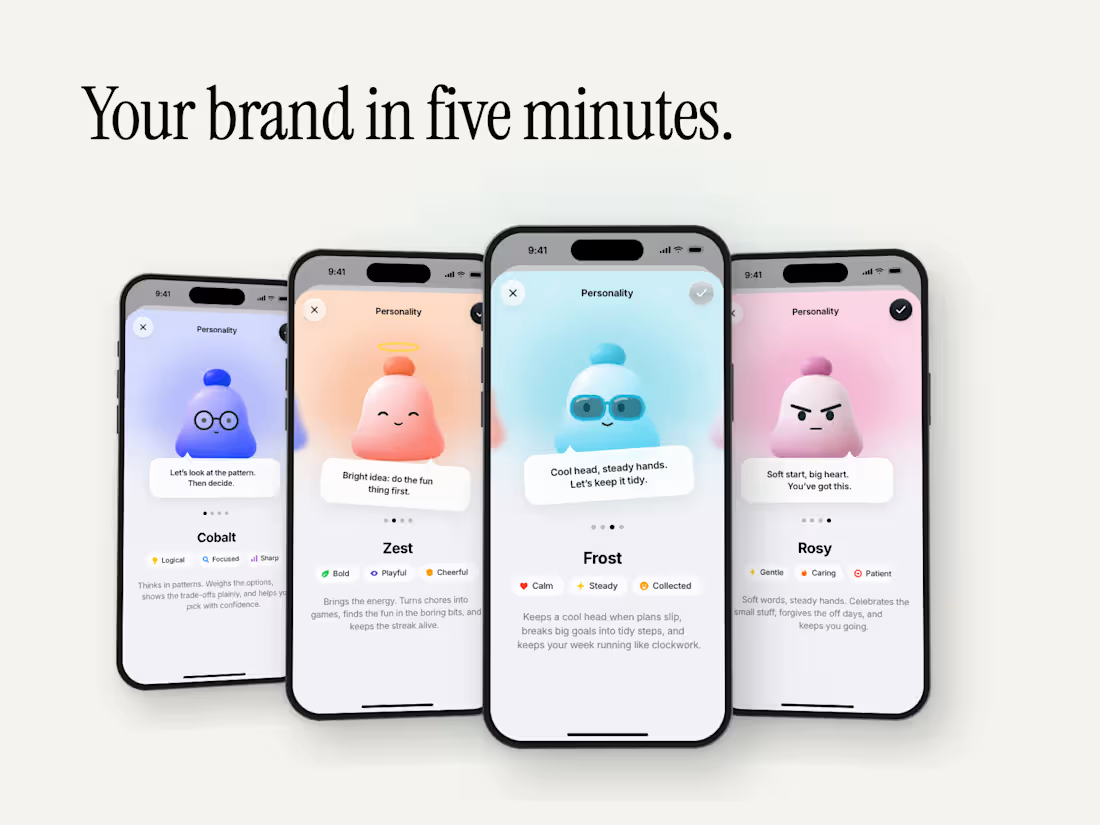
Personality Picker: an iOS assistant-personality template, animated through the SVGator MCP
An iOS "assistant personality" picker, built as a free SVGator template for the #SVGatorChallenge.
What it does
A settings row opens a sheet where you swipe through four assistant personalities. Each one has its own colour wash, speech bubble, three trait chips and a description. The mascot is my own ghost character in four moods: Sunny, Blaze, Halo and Specs.
What you can change in five minutes
• 40 live text layers: names, chips, bubbles, descriptions, the settings card
• 5 square image slots (one per personality plus the settings card): drop in your own character
• 4 wash gradients and 4 glow colours: one paint each
• every layer named (avatar-sunny, sunny-bubble-text, blaze-brows, halo-ring, specs-glasses …)
How it was built
Screens designed in Figma (iPhone 16 Pro, iOS 26 look) and exported as one SVG stage.
Imported into SVGator, then the whole 13-second animation was keyed through the SVGator MCP from Claude Code, one edit per call: sheet rise, four swipes with directional blur, bubble settles, blinks and eye darts, the glasses push.
2
152
I've been learning Rive on the side. Freddy is my second go at it, and the first one that talks.
The video is a 48 second call with him. Still rough in places, and I'm happy to talk about how it's built.
1
46