Є заряд (Ye Zaryad)

Vadym Bilobrovets


Є заряд (Ye Zaryad)
A browser page that reads outage hours, looks at the devices you own, and says what will run out of charge and what to charge by when.
The interface is English. There is no account and no server. After the first load the page opens offline. Preset wattages are typical estimates, not measurements of a real device. Schedules are typed or tapped. Nothing is fetched from a power company.
MIT License. Copyright (c) 2026 Vadym Bilobrovets.
Plan
Built with the Devpost Learn Skill Pack for Build With AI: Basics.
devpost/learner-profile.md is personal learning context and is gitignored.
How it works
Parser (src/domain/parseSchedule.ts). Pasted text becomes outage ranges. It accepts 08:00–12:00, 8-12, з 16:00 до 20:00, a hyphen, an en dash, an em dash, and 24:00. A range that crosses midnight is split. Overlaps merge. A line that cannot be read is marked and the other lines still count. Tapping an hour on the 24-hour bar edits the same ranges.
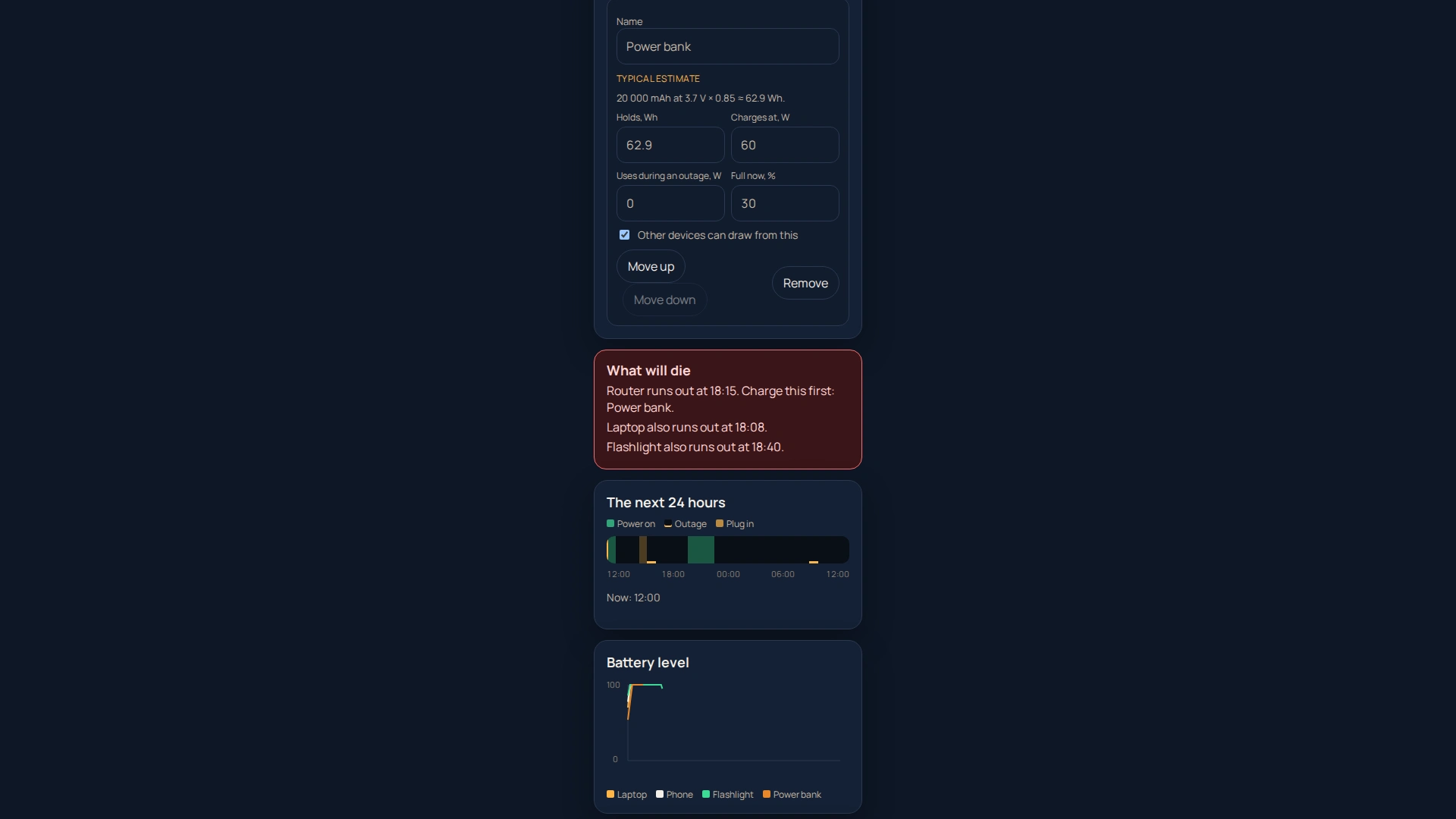
Simulation (src/domain/simulate.ts). The next 24 hours are walked in 15-minute steps from the current local time. On grid power, batteries charge. During an outage, a device uses its own battery first, then a power bank or charging station, higher in the list first. The result is the time a device can no longer be fully powered.
Plan. A red warning names what runs out and what to charge first. A charge list uses the form "Charge power bank by 15:15". That list downloads as a .ics calendar file with a reminder on each event (src/domain/ics.ts).
Times on screen are local. Times inside the calendar file are UTC.
Run locally
Node.js 22.
npm install npm run dev
Open the URL Vite prints. A phone-width column is centered on the dark background.
?now=12:00 fixes the clock. That hook is for tests and the demo recording.
Tests
npm run lint npm test npm run test:e2e npm run build
npm test is Vitest (parser, watt-hour conversion, simulation, calendar file). npm run test:e2e is one Playwright Chromium pass: sample schedule, typical kit, a "runs out" warning, an .ics download, reload, and an offline reload.
Pages
GitHub Actions (.github/workflows/deploy.yml) runs lint, unit tests, the browser test, and the production build on pull requests and on main. A push to main also publishes dist/ to GitHub Pages with Vite base /ye-zaryad/.
Intended site: https://solar-depin-hub.github.io/ye-zaryad/
That URL stays down until GitHub Pages is turned on for this repository with GitHub Actions as the source. On an organization repository that is an organization setting. The app does not need the site to run locally, and the demo video does not depend on it.
Assumptions
Device sizes, charge speeds, and the exact colours are typical choices written down in devpost/prd.md under "Assumptions (to confirm with Vadym)". They are editable in the page. The sample schedule is labelled SAMPLE and is not a utility's text.
Disclosure
No application code was carried over from another project. The repository started as an MIT license file. Dependencies are listed in package.json. The Devpost Learn Skill Pack is installed under .agents/skills, agent/skills, and .claude/skills and is recorded in skills-lock.json.
Demo
scripts/record-demo.mjs records a silent 1920×1080 walkthrough with the page centered. Captions are a separate draft, not burned in. Vadym uploads the video himself.
About
Є заряд: blackout charging planner (Build With AI: Basics, Devpost 2026)
Resources
Readme
MIT license
Stars
0 stars
Watchers
0 watching
Forks
No releases published
Contributors 3 (3)



Languages
Like this project
Posted Oct 18, 2026
Є заряд (Ye Zaryad): a browser blackout charging planner that simulates device drain, warns what will run out, and exports charge schedules as .ics events.
Likes
0
Views
0