CRM Dashboard Development

Facundo Cappella

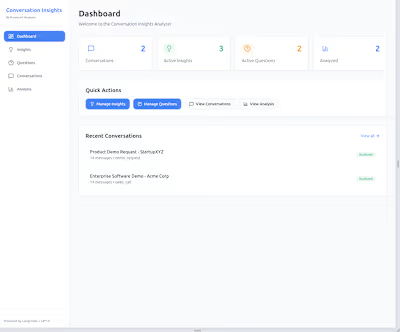
CRM Dashboard
This project was created using Angular 18 and incorporates the latest Angular features, including:
Input signals for optimized reactivity
Standalone components to simplify module dependency management
inject() for efficient dependency injectionArchitecture
Our architecture follows a feature module approach with lazy loading for enhanced modularity and performance. All shared components are standalone, combining the advantages of feature modules and standalone components, which streamline development and reduce dependencies.
This project demonstrates the use of Nx libraries. The shared module is implemented as an Nx library
Additionally, the styling follows a mobile-first approach to ensure optimal responsiveness across devices.
State Management
For state handling, we use NgRx. Although services could handle state management for a project of this size, NgRx was implemented to showcase a single, immutable app state that simplifies component communication. This setup is beneficial for scaling and maintaining a clear, unified state across the app.
Performance
To optimize performance, all components use
ChangeDetectionStrategy.OnPush, minimizing unnecessary change detection cycles and improving rendering efficiency.Api
For the API, I'm using json-server, which serves static data at the URL
crm-dashboard-api.vercel.app.All sorting, pagination, and filtering of data are handled by a mock frontend service for demonstration purposes. A short delay is also added to simulate loading and display a global spinner, giving the user a clear loading experience.
Extra
Please review the section "Pre-commit Hook" to understand the coding standards we follow. Additional rules and best practices are enforced with ESLint, which you can reference in the ESLint configuration file for specific rules used to eliminate code smells.
For continuous integration, we use GitHub Actions to automate unit tests. For further details, see the "GitHub Actions for Unit Tests" section.
There are a few enhancements planned for future releases. For more information, check the "Pending Tasks" section.
Libraries
Run tasks
Install project locally, use:
To start local app, with Angular server and Mock API, use:
To run only the dev server for Angular, use:
To run tests in the entire project, use:
To create a production bundle:
To run lint checks in the entire project
To run prettier format
Pre-commit Hook
This project uses Husky along with lint-staged, ESLint, and Prettier to ensure code quality before committing.
Husky is configured to run on pre-commit, executing checks for linting and formatting.
lint-staged ensures that only the files that have been staged (modified and added to the commit) are checked.
ESLint runs to catch any potential JavaScript/TypeScript code issues.
Prettier ensures consistent code formatting.
How it works:
When you run
git commit, Husky triggers the pre-commit hook.lint-staged runs ESLint and Prettier on all staged files.If any errors are found by ESLint or if files are not formatted according to Prettier's rules, the commit will fail, and you will need to fix the issues before committing.
This ensures that the codebase stays clean and consistent.
GitHub Actions for Unit Tests
This project uses GitHub Actions to run unit tests automatically before merging pull requests.
Workflow Overview
The workflow is located in
.github/workflows/run-tests.yml and runs when you create a pull request to the main branch. Here’s what it does:Checkout Code: Retrieves the code from the repository.
Set up Node.js: Installs the specified version of Node.js.
Install Dependencies: Runs
npm install to set up project dependencies.Run Unit Tests: Executes all unit tests using:
Design
Pending Tasks
Here’s a list of pending tasks and features to implement:
Add 'Angular Testing Library' in the app, and start to create test with this library.
Add test coverage report.
Add real Backend with express using NX monorepo.
Add e2e with Cypress.
Add Icomoon project to handle all the icons.
Like this project
Posted May 1, 2025
Developed a CRM dashboard using Angular 18 with optimized performance and state management.
Likes
0
Views
4