ExpenseVista: AI-Powered Personal Finance App Development

Prit Vekariya

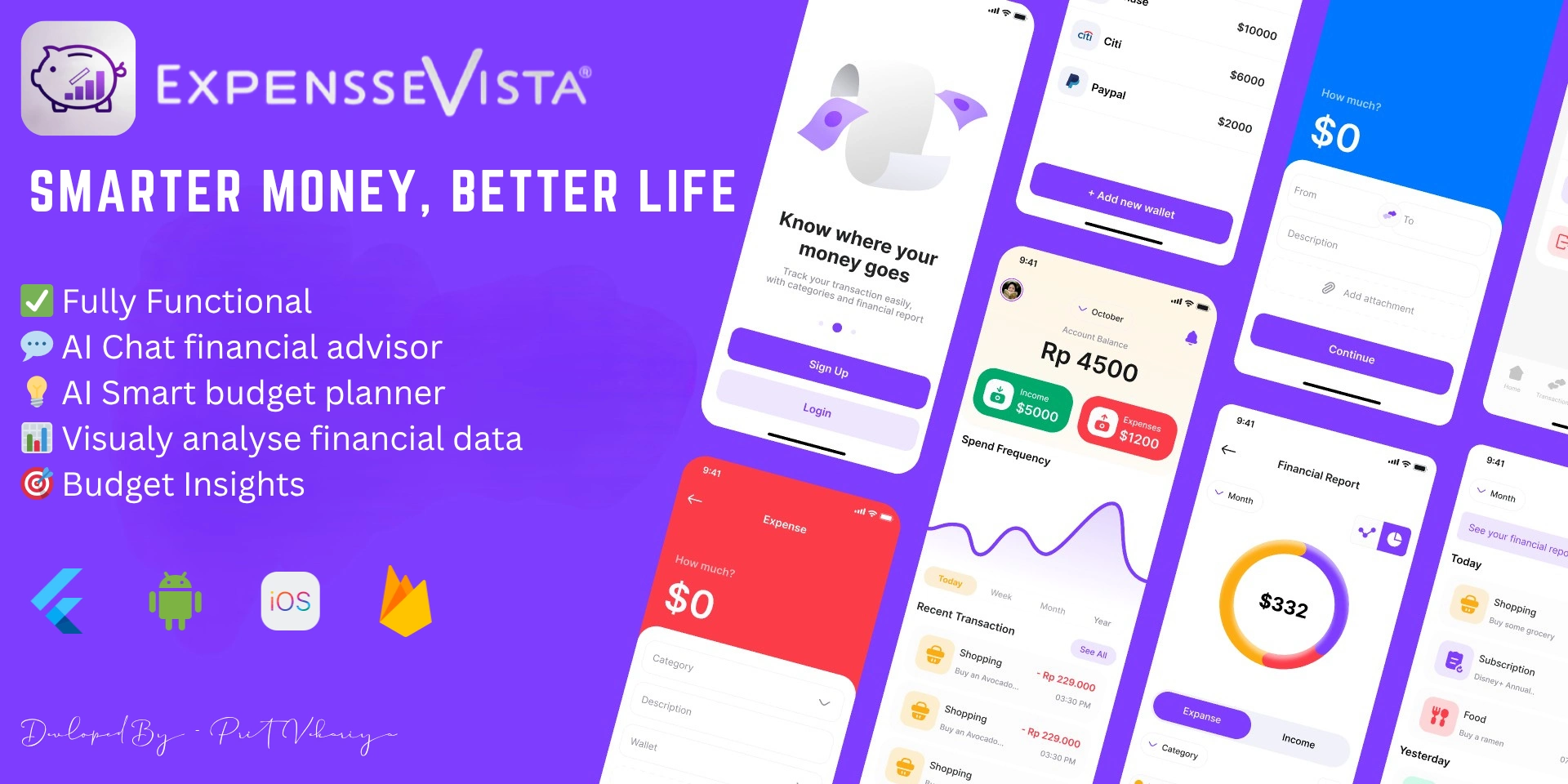
📱 User Interface (UI) Focus
Clean Material 3 Design: Soft shadows, rounded cards, dynamic theming.
Dark & Light Mode: Available in settings for user preference.
Responsive Layouts: Fully adaptive across Android, iOS, and Web.
Subtle Animations: Smooth transitions, interactive charts, and input feedback to enhance UX.
Custom Icons & Color System: For intuitive navigation and branding.🧾✨ ExpenseVista – Smart Personal Finance App with AI Budgeting
Built with Flutter | Firebase | OpenAI | Cross-platform (Android, iOS, Web)
ExpenseVista is an intuitive, AI-powered expense management app designed to help users take full control of their finances—from daily tracking to smart monthly planning. With an elegant and minimal UI, it delivers a frictionless experience across platforms.
This app isn't just a tracker — it's a complete personal finance assistant.
🔍 Key Highlights & Features
🔄 Add & Track Transactions Instantly
Clean, two-click UI to quickly add income or expenses, complete with categories, notes, and image attachments.
📈 Visual Reports That Tell a Story
Beautiful line graphs and pie charts show spending trends, category-wise breakdowns, and income flow — helping users truly see where their money goes.
🤖 Built-in AI Chat Advisor
Seamlessly integrated with OpenAI, users can chat with a smart assistant that offers budgeting tips, overspending alerts, and financial planning advice.
🧾 Digital Receipts
Upload and attach receipts or bills to each transaction, making record-keeping effortless and paperless.
🎯 Smart Budgeting
Users can set custom monthly budgets for each category and receive visual and alert-based warnings when nearing limits.
📤 Export Everything
One-tap export to Excel, PDF, or CSV – filtered by date, category, or wallet – for easy backup or financial reporting.
💼 Multi-Wallet System
Handle multiple accounts, cash wallets, or banks — all in one app. Switch, monitor, and compare easily.
🔍 Deep Search + Filters
Powerful filters help find specific transactions by date, amount, category, or note — lightning fast and accurate.
🧪 Screens in the App (12 Total)
Home – Live balance, chart, recent transactions, and quick add
Add Income/Expense – Clean form with photo, note, category
All Transactions – Filterable, searchable transaction list
Transaction Detail – Full view of each entry
Budget Screen – View & update budgets by category
AI Budget Generator – Get personalized AI budgets
Analytics – Line & pie chart visualizations
Wallet Manager – Create/switch between multiple accounts
Profile – User info, image, and data
Settings – Theme, language
AI Chatbot – Ask finance-related questions in real time
Export – Export your data in Excel, PDF, or CSV
🛠️ Tech Stack
Flutter: Frontend for Android, iOS & Web
Firebase: Authentication, Firestore, Cloud Storage
OpenAI API: AI Budget Assistant + Chat
Provider/Bloc: State management
Custom Widgets & Animations: For modern user experience
Like this project
Posted Jun 18, 2025
Developed ExpenseVista, an AI-powered finance app with cross-platform support.(android and ios)
Likes
1
Views
6
Timeline
Dec 25, 2024 - Feb 28, 2025