
How I keep AI characters consistent across an entire music video
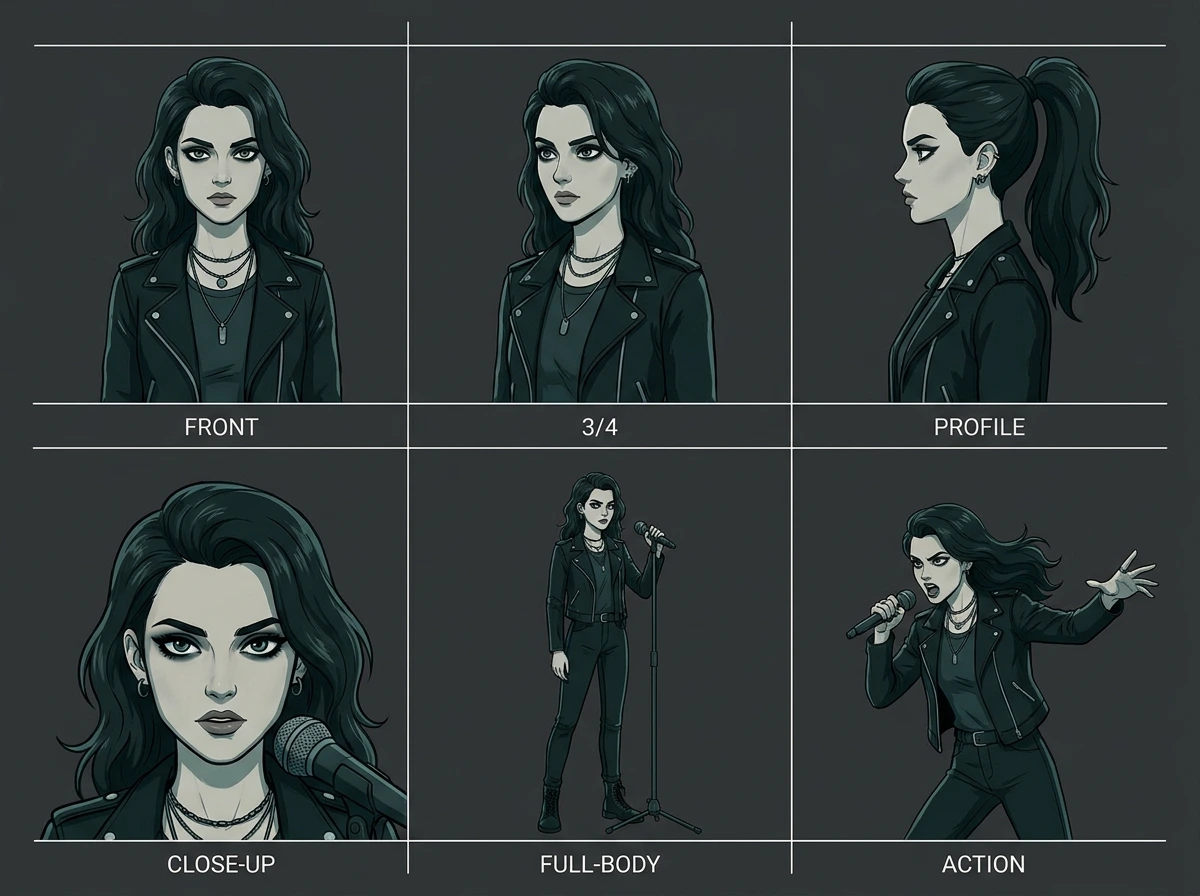
Most AI-generated videos fall apart because the character's face, outfit, or lighting shifts from shot to shot—it instantly reads as "AI slop."
My fix: I build a single reference sheet for every character before generating a single scene, then anchor every new shot back to that same reference. Combined with 8-second scenes cut into 3 beats each and a consistent anamorphic widescreen look, the final video plays like it was shot with one camera and one actor—not stitched together from dozens of unrelated clips.
This is the exact workflow behind my latest piece, a lip-sync performance video for "Bella Ciao." Full video and process breakdown on my profile.
If you're an artist or brand looking for a cinematic AI music video, lyric video, or lip-sync piece — I'd love to hear about your project.piece,
0 likes · 0 views · Sep 25, 2026
How I keep AI characters consistent across an entire music video Most AI-generated videos fall apart because the character's face, outfit, or lighting shifts...
