
Cover Photo
Project Overview
Email marketing is more than sending promotional emails to customers. It is about creating a well-structured communication system that connects a business with its audience at every stage of the customer journey.
Using Klaviyo, I focus on building strategic email marketing flows that help ecommerce businesses attract new subscribers, nurture potential customers, recover abandoned carts, welcome new buyers, encourage repeat purchases, and reconnect with inactive customers.
The goal is to create an automated email marketing system that works behind the scenes, delivering the right message to the right person at the right time based on their actions, interests, and purchasing behavior.
From subscriber acquisition through popup forms to welcome series, abandoned cart recovery, browse abandonment, thank-you emails, post-purchase engagement, and customer winback campaigns, every automation serves a specific purpose in the overall customer journey.
Below is an overview of the key Klaviyo flows and email marketing strategies I work with.
Reference store
Tadpoletrail.com
1. Welcome Series Flow
Turning New Subscribers into First-Time Customers
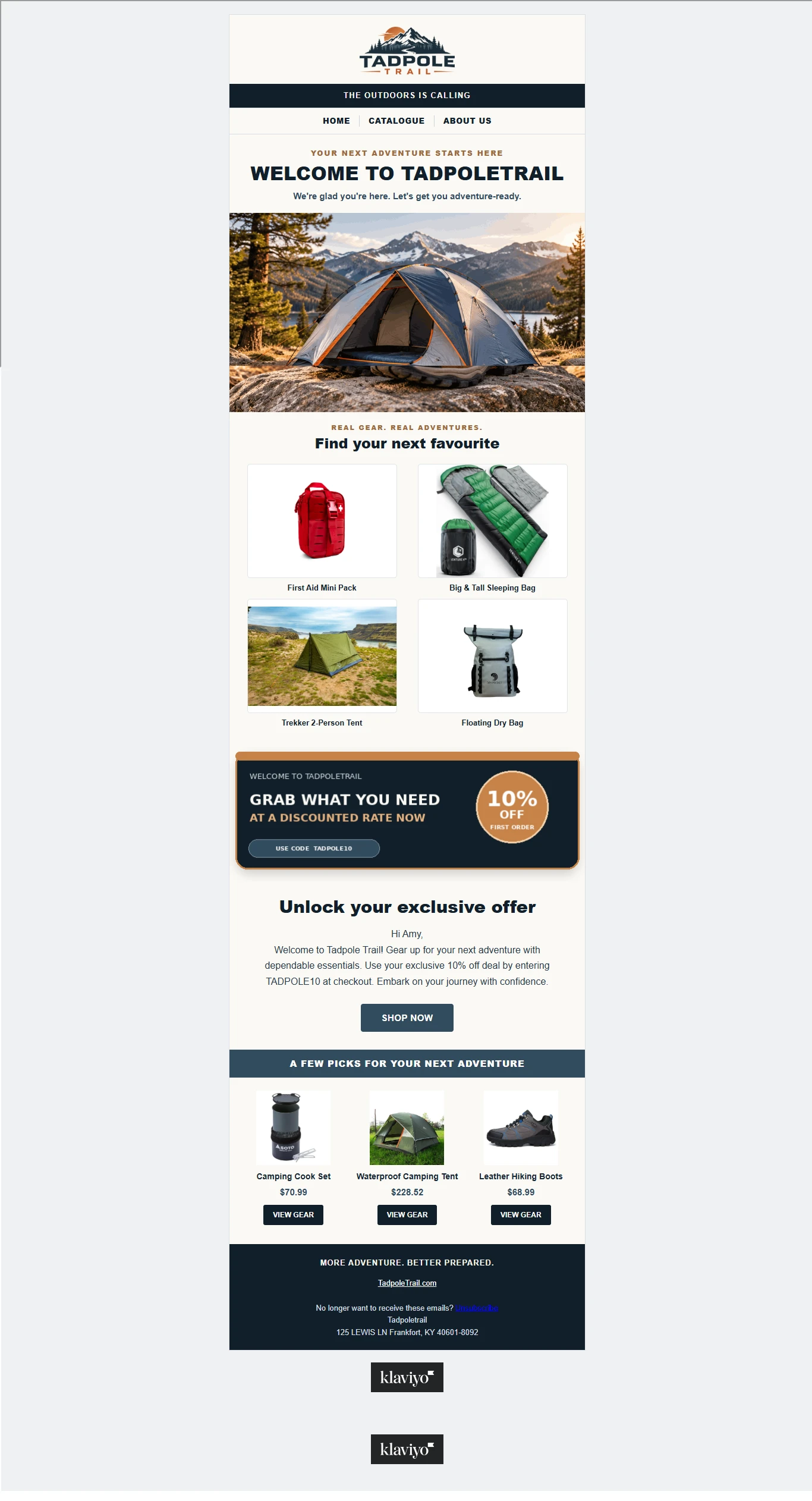
Welcome Flow Klaviyo for the Tadpole Trail store by Eric
The welcome series is one of the most important automations in any e-commerce email marketing strategy. It is the first direct communication a potential customer receives after subscribing to a brand's email list.
When someone joins an email list through a website signup form, popup, or another subscription source, the welcome series automatically introduces them to the business and begins building a relationship.
Rather than immediately pushing products, the welcome series creates an opportunity to introduce the brand, communicate its value, highlight its products, and give subscribers a reason to make their first purchase
How the Welcome Series Works
The automation is triggered when a new subscriber joins the selected email list.
Depending on the brand's strategy, the welcome series can contain multiple emails delivered at carefully planned intervals.
Email 1: Welcome and Brand Introduction
The first email welcomes the subscriber and introduces the brand. It establishes the tone of communication, explains what the business offers, and gives the subscriber a reason to explore the store.
It can also introduce a first-purchase discount when the business offers one
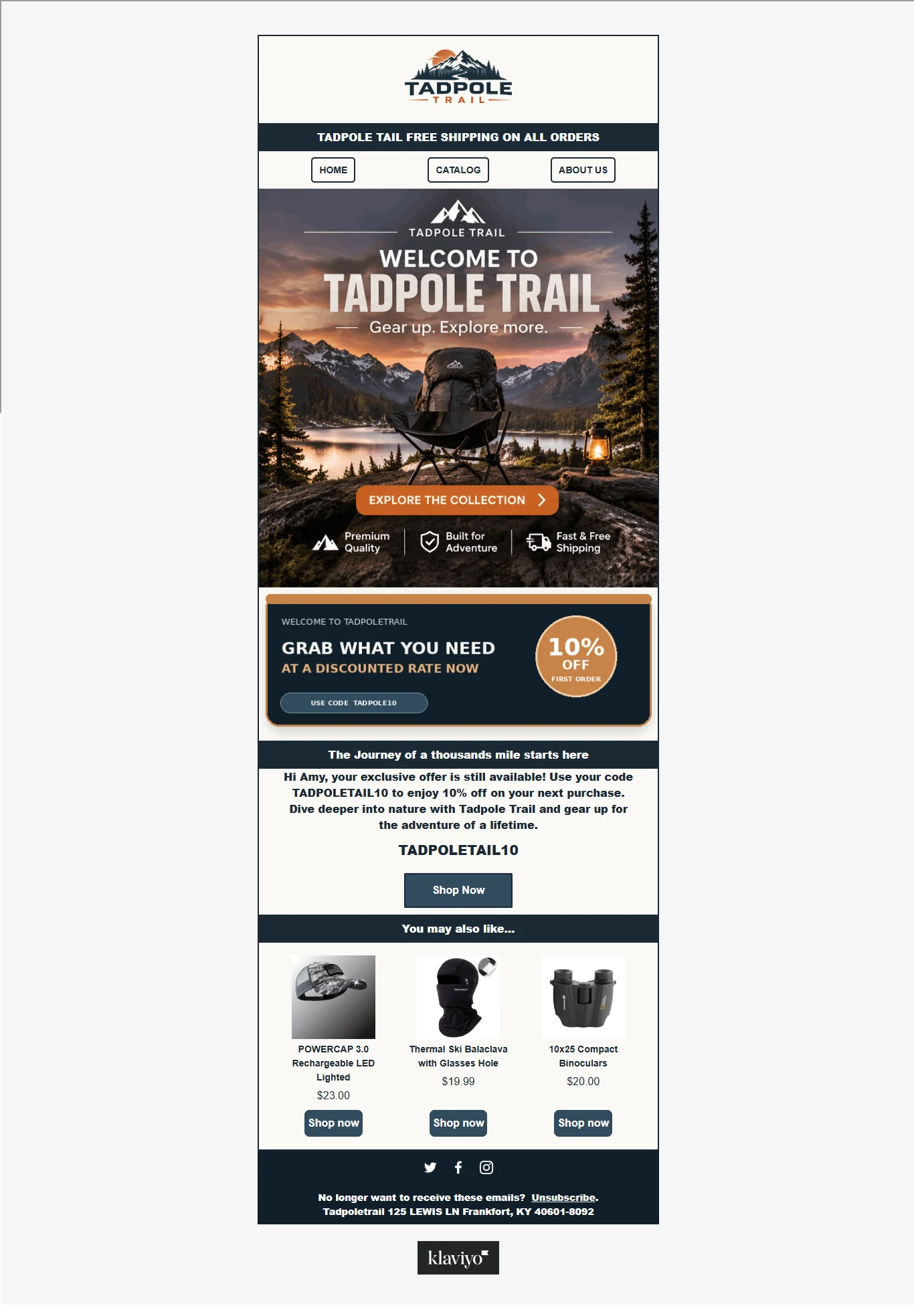
Welcome and Brand Introduction
Email 2: Brand Value and Product Highlights
The second email focuses on what makes the business different. It highlights popular products, important product benefits, unique selling points, and reasons customers should consider purchasing.
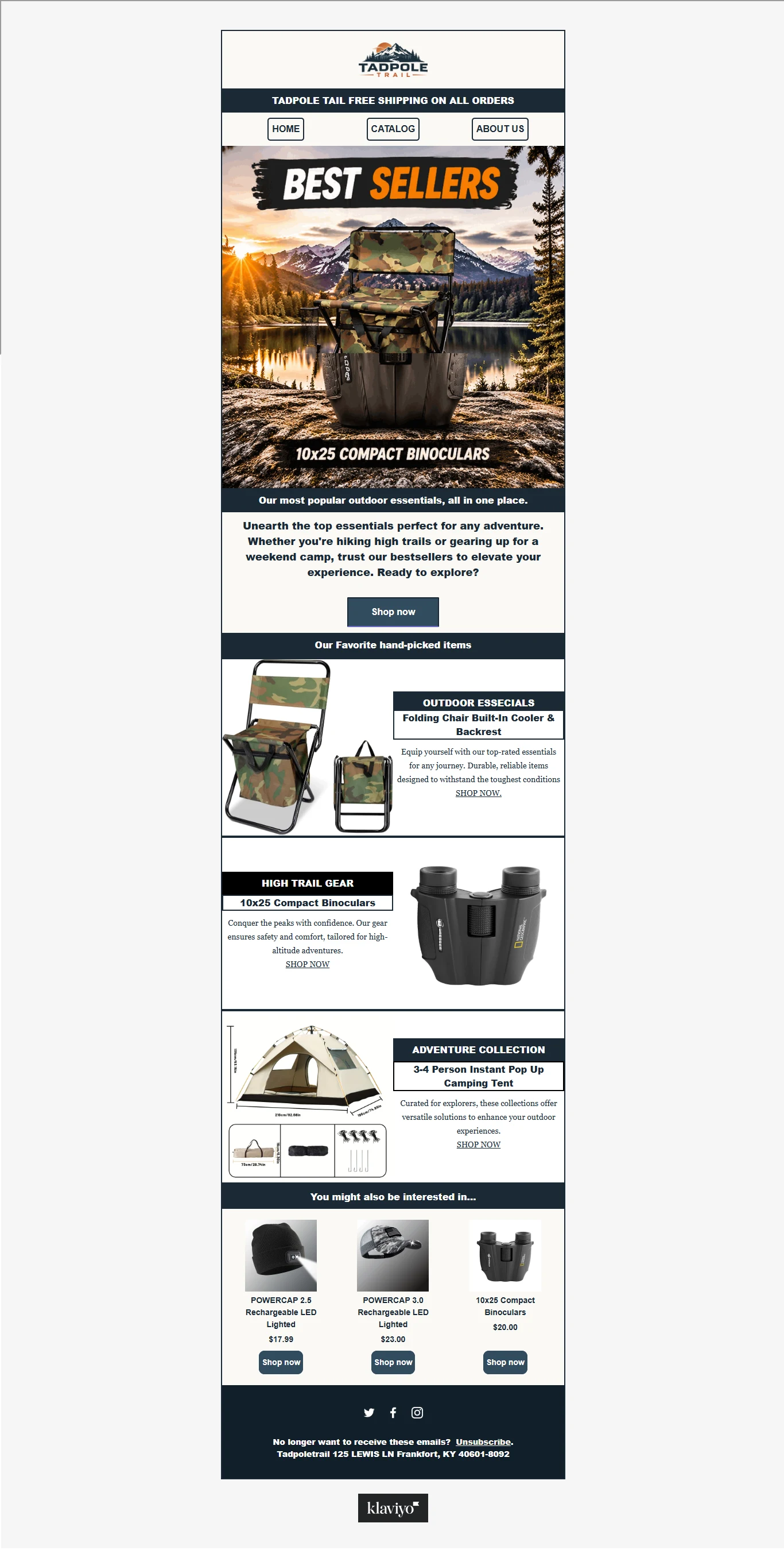
Welcome Flow Klaviyo *BEST SELLERS* for the Tadpole Trail store by Eric
Email 3: Social Proof and Customer Confidence
This email can introduce genuine customer reviews, testimonials, product ratings, or user-generated content to help build confidence and reduce hesitation
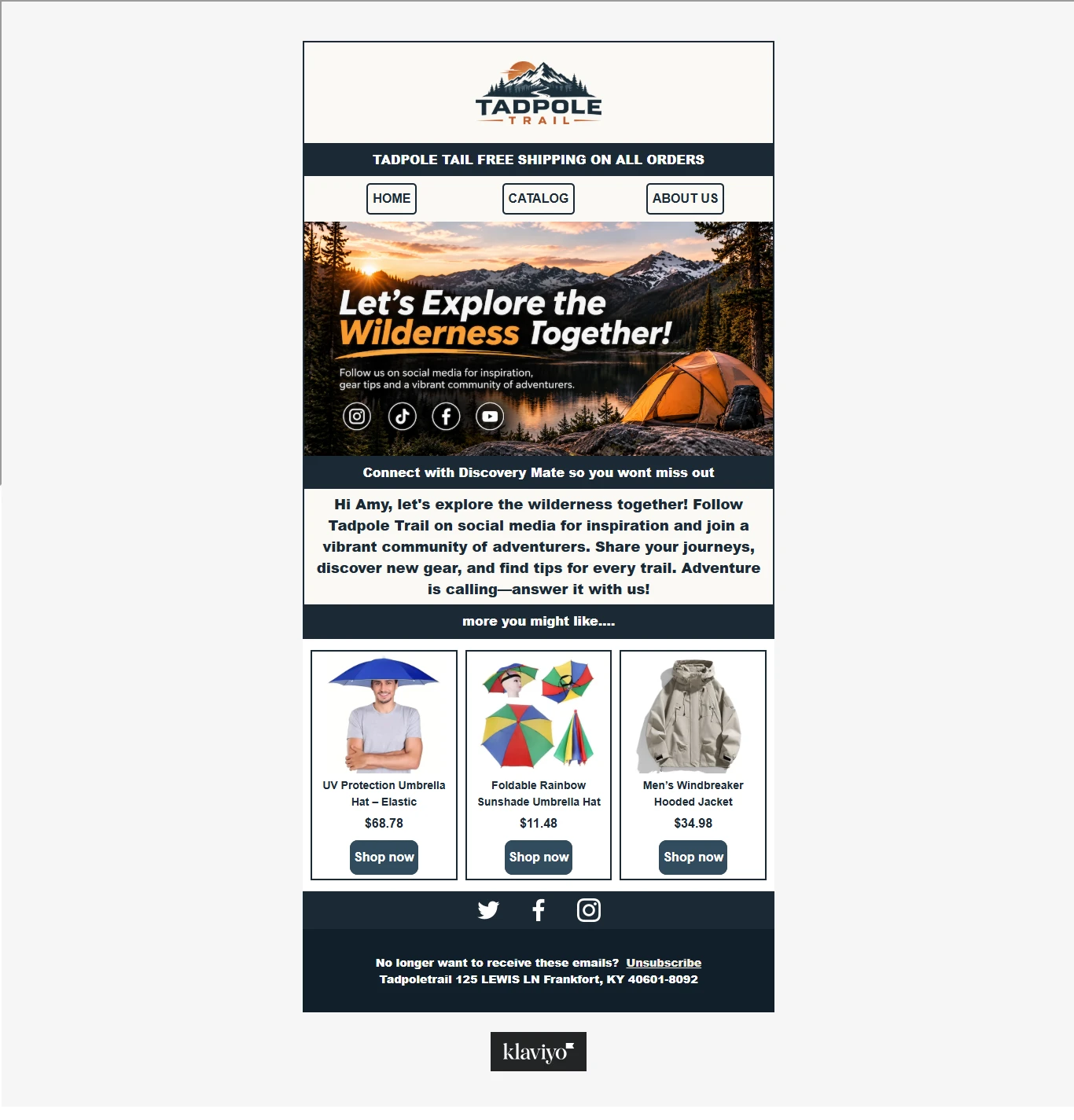
Social Proof and Customer Confidence
Email 4: Purchase Motivation
The final email encourages the subscriber to take action. It can highlight best-selling products, remind them of an available welcome offer, or direct them to relevant product collections
Strategic Purpose
The welcome series helps businesses make a strong first impression, introduce their products, build trust, and convert newly acquired subscribers into paying customers.
It also ensures that new subscribers receive consistent communication without requiring the business to manually contact each person
2. Abandoned Cart Flow
Recovering Potential Sales and Bringing Customers Back
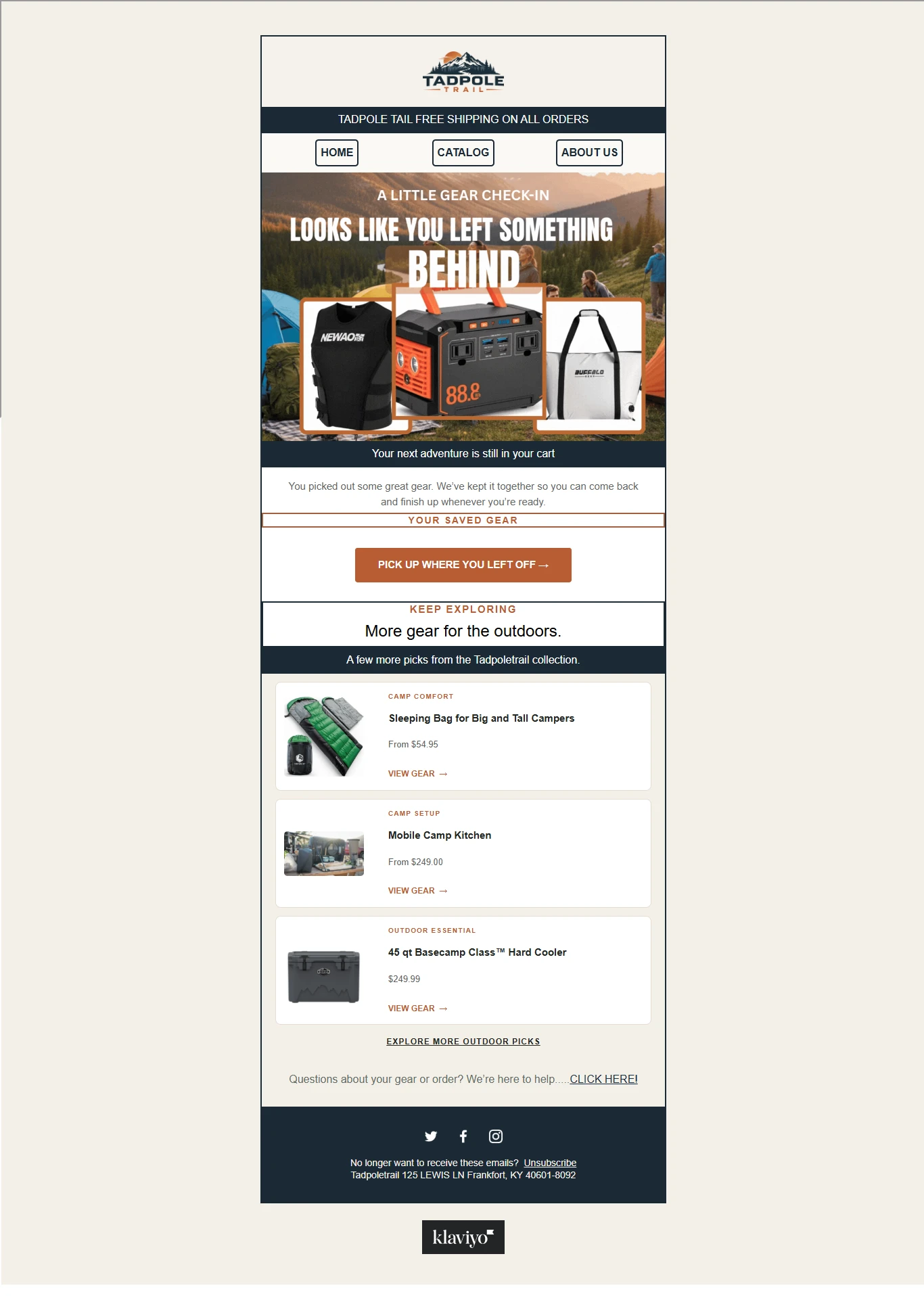
Abandoned Cart Flow
Not every customer who adds a product to their cart completes their purchase. Some become distracted, encounter unexpected costs, need more time to decide, or simply leave the website before checking out.
The abandoned cart flow helps businesses reconnect with these potential customers by automatically sending reminder emails when they leave products behind without completing their purchase.
This automation is designed to recover lost purchasing opportunities by reminding customers of the products they were interested in and making it easier for them to return to checkout.
How the Abandoned Cart Flow Works
The automation is triggered when a shopper adds an item to their cart or starts the checkout process but does not complete the order.
Klaviyo can use the available ecommerce event data to identify the abandoned products and personalize the emails.
Email 1: Abandoned Cart Reminder
The first email reminds the customer about the products they left behind. It can display the product image, name, price, and other available product details.
The objective is to bring the customer's attention back to the purchase they were already considering.
Email 2: Addressing Purchase Hesitation
The second email can address common reasons customers hesitate before purchasing.
Depending on the business, this may include product benefits, shipping information, return policies, customer support information, or genuine customer feedback.
Email 3: Final Purchase Reminder
The final email provides another opportunity to complete the purchase. It can feature a clear call to action and, where commercially appropriate, a limited incentive.
Discounts should be used strategically rather than automatically offered to every customer.
Strategic Purpose
The abandoned cart flow helps businesses reconnect with shoppers who have already demonstrated purchasing interest.
It reduces the need for manual follow-ups, improves the customer experience, and creates additional opportunities to recover potentially lost revenue.
An important part of this automation is ensuring that customers who complete their purchases are automatically excluded from receiving further abandoned cart reminders
3. Customer Thank You Flow
Creating a Positive Experience Immediately After Purchase
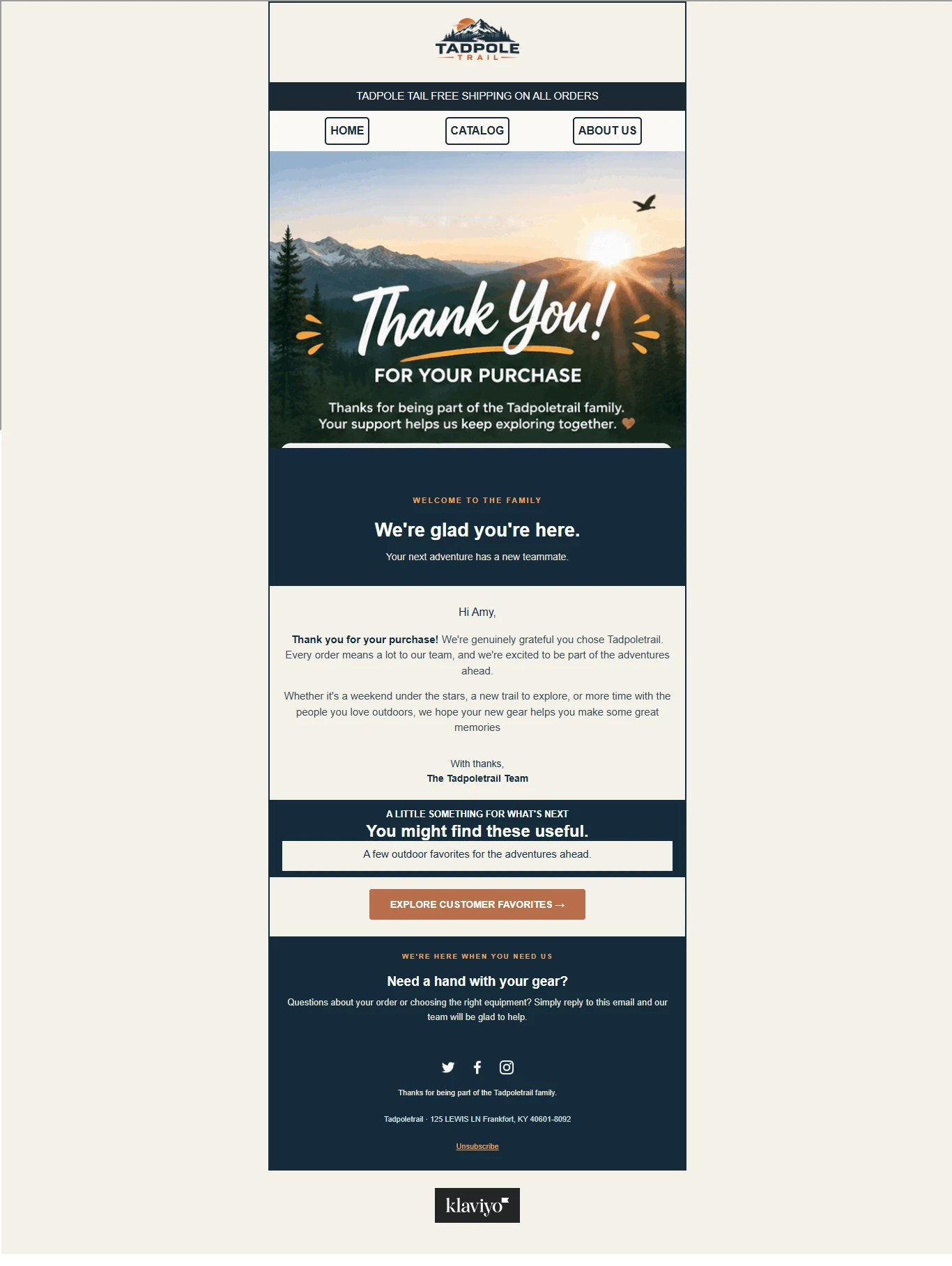
Customer Thank You Flow
A customer's experience with a business should not end immediately after payment. The period following a purchase is an important opportunity to build trust, show appreciation, and strengthen the relationship between the customer and the brand.
The customer thank-you flow is designed to acknowledge a completed purchase and make customers feel appreciated.
Rather than focusing entirely on another sale, this automation prioritizes the relationship that begins once someone becomes a customer.
How the Thank You Flow Works
The automation is triggered when a customer successfully places an order.
It can then automatically send a personalized thank-you email acknowledging the customer's purchase.
Email 1: Purchase Appreciation
The first email thanks the customer for choosing the brand and placing an order.
It creates a positive impression, acknowledges their decision, and reinforces the value of their purchase.
Email 2: Brand Connection
Where appropriate, a follow-up message can introduce the brand's values, customer support channels, community, or additional resources that help customers feel connected to the business.
Strategic Purpose
The thank-you flow helps businesses build stronger customer relationships by making post-purchase communication more personal and consistent.
It also provides an opportunity to reinforce customer confidence and create a positive foundation for future purchases.
The objective is not simply to thank someone for spending money but to make them feel confident about choosing the brand.
4. Browse Abandonment Flow
Re-engaging Visitors Who Show Interest in Products
Best sellers
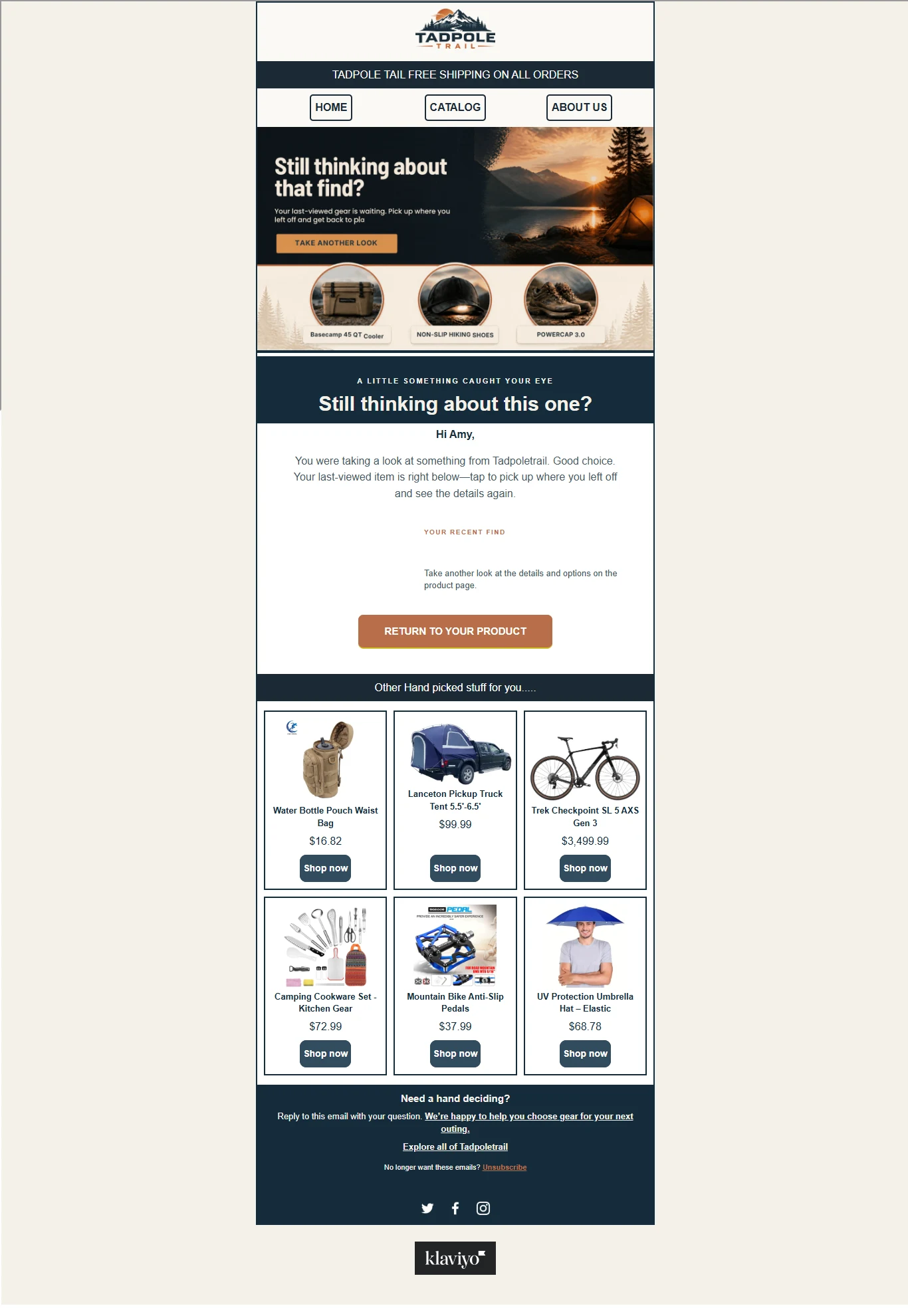
Re-engaging Visitors Who Show Interest in Products
Many shoppers visit an ecommerce store, view different products, compare options, and leave without adding anything to their cart or completing a purchase.
These visitors have shown some level of interest, but they may still need more information or time before making a decision.
The browse abandonment flow helps businesses reconnect with identifiable website visitors who viewed specific products but did not proceed to checkout.
Unlike abandoned cart automation, which targets shoppers who have added products to their carts or started checkout, browse abandonment focuses on earlier stages of the purchasing journey.
How the Browse Abandonment Flow Works
The automation is triggered when an identifiable visitor views a product page without proceeding to purchase or entering a more advanced shopping stage.
Klaviyo can use available browsing event data to personalize the email with information about the product the visitor viewed.
Email 1: Product Reminder
The first email reminds the visitor about the product they recently explored.
It can include the product image, name, description, and a direct link back to the product page.
Email 2: Product Benefits and Information
The next email can provide additional information about the product, explain its benefits, answer common questions, or introduce relevant customer feedback.
The intention is to give the visitor more reasons to consider the product.
Email 3: Encouraging Further Exploration
Where appropriate, the final message can introduce related products, popular collections, or alternative options that may match the visitor's interests.
Strategic Purpose
Browse abandonment automation helps businesses reconnect with interested visitors who have not yet demonstrated the stronger purchasing intent associated with adding a product to a cart or starting checkout.
It creates another opportunity to bring potential customers back to the store, answer questions, and encourage further product exploration.
Because browsing alone represents a lower level of purchase intent, these messages should be more subtle than abandoned cart reminders.
5. Post-Purchase Flow
Turning First-Time Buyers into Loyal, Repeat Customers
Acquiring a new customer is only one part of growing an ecommerce business. Building a relationship that encourages customers to return is equally important.
The post-purchase flow focuses on the customer's experience after placing an order. It helps businesses maintain communication, provide useful product information, collect feedback, and introduce relevant products that may encourage future purchases.
While the thank-you flow focuses on acknowledging and appreciating the customer's purchase, the broader post-purchase sequence focuses on nurturing the relationship after that initial interaction.
How the Post-Purchase Flow Works
The automation is generally triggered when a customer places an order. The messages and timing can then be customized based on the products purchased, customer history, order fulfillment status, and other available information.
Email 1: Product Education and Customer Guidance
This email provides useful information about the purchased product.
It can explain how to use the product, highlight important features, provide care instructions, or share tips that help customers get more value from their purchase.
Email 2: Customer Feedback and Review Request
After allowing the customer enough time to receive and experience the product, the business can request feedback.
This email encourages customers to share their experience through a genuine product review.
Customer feedback can help businesses understand customer satisfaction and provide valuable social proof for future shoppers.
Email 3: Related Products and Recommendations
This email introduces complementary products or relevant product collections based on the customer's previous purchase.
The objective is to recommend products that make sense for the customer rather than sending unrelated promotional messages.
Email 4: Repeat Purchase Opportunity
For products that customers use regularly or may need to replace, the business can send a relevant reminder encouraging them to reorder.
The timing should reflect the product's typical usage and purchasing cycle.
Strategic Purpose
The post-purchase flow helps businesses improve the customer experience beyond the initial transaction.
It creates opportunities to educate customers, collect feedback, introduce complementary products, increase repeat purchases, and develop stronger long-term relationships.
Instead of treating every completed order as the end of a customer journey, this automation helps businesses make the next interaction more valuable.
6. Customer Winback Flow
Reconnecting with Inactive Customers and Encouraging Repeat Purchases
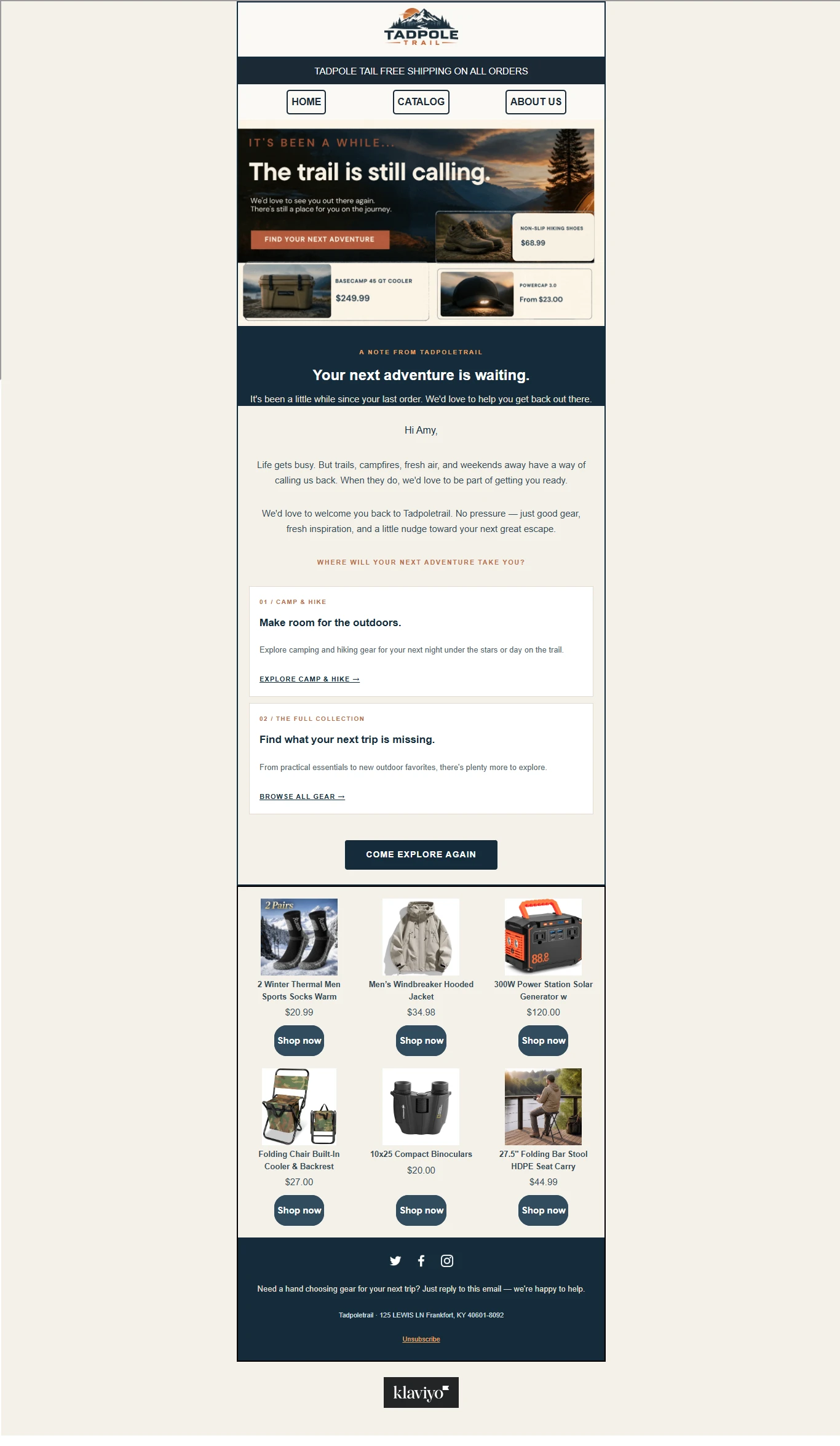
Reconnecting with Inactive Customers and Encouraging Repeat Purchases
Over time, some customers stop interacting with a brand or purchasing its products.
They may have found alternative products, forgotten about the business, lost interest, or simply not needed another purchase yet.
The customer winback flow is designed to reconnect with previous buyers who have not made another purchase within a defined period.
Rather than continuously sending promotional messages to inactive customers, this automation provides a structured way to reintroduce the brand and give them a reason to return.
How the Customer Winback Flow Works
The automation is triggered based on a customer's previous purchase and the amount of time that has passed without another purchase.
The waiting period should be determined by the business's typical repurchase cycle rather than using the same timeline for every product or industry.
Email 1: Reconnecting with Previous Customers
The first email reminds the customer about the brand and welcomes them back.
It can highlight new arrivals, popular products, updated collections, or other relevant brand developments.
Email 2: Personalized Product Recommendations
The second email introduces products based on the customer's previous purchases, interests, or shopping behaviour.
Personalized recommendations make the message more relevant and can help customers discover products they may want to purchase.
Email 3: Special Return Offer
Where appropriate, the final email can include a special incentive, discount, or limited-time offer to encourage the customer to return.
The message should communicate a clear reason to revisit the store without making customers feel overwhelmed by constant promotional emails.
Strategic Purpose
The winback flow helps businesses reconnect with inactive customers, create opportunities for repeat purchases, and maintain relationships with people who have previously purchased from the brand.
It also helps businesses make better use of their existing customer database instead of depending entirely on acquiring new customers.
7. Klaviyo Popup Forms
Turning Website Visitors into Email Subscribers
Popup Form Design Considerations
Before email automation can nurture potential customers, businesses need a way to collect subscribers and grow their email lists.
Klaviyo popup forms provide an effective way to capture visitor information directly from an ecommerce website.
These forms can appear while someone is browsing a store, introducing an opportunity for the visitor to subscribe to the brand's email marketing list.
A well-designed popup form should be visually appealing, easy to understand, consistent with the brand's identity, and clear about the value of subscribing.
How Popup Forms Work
Popup forms can be configured to appear based on different display settings and visitor behaviour.
Depending on the marketing strategy, a form may appear after a visitor spends a certain amount of time on a website, scrolls through a page, or meets another specified display condition.
1. Welcome and Subscription Offer
The popup introduces the brand and encourages visitors to subscribe.
It may offer an incentive such as a first-purchase discount, exclusive promotions, early access to new products, or valuable updates, depending on what the business provides.
2. Subscriber Information Collection
The form collects the information required for the subscription.
This may include an email address, first name, or phone number where appropriate.
The form should clearly communicate what the visitor is subscribing to and obtain the required consent before sending marketing communications.
3. Confirmation and Thank You Message
After successfully subscribing, visitors receive a confirmation or success message.
Where a discount has been offered, the success message can provide the relevant details or explain how to access the offer.
4. Connection to the Welcome Series
Once a visitor successfully subscribes, their information is added to the appropriate Klaviyo list.
This allows the Welcome Series automation to begin, introducing the subscriber to the brand and continuing the customer journey through automated email communication.
Strategic Purpose
Popup forms help businesses convert anonymous website visitors into identifiable subscribers who can receive relevant marketing communications with the appropriate consent.
They create a direct connection between website traffic and email list growth, giving businesses an opportunity to build relationships with potential customers even before their first purchase.
8. Connecting the Entire Customer Journey
Building an Automated Email Marketing System That Works Together
Each Klaviyo flow serves a different purpose, but the real value comes from how these automations work together.
A well-structured email marketing system helps businesses communicate with customers based on their relationship with the brand and the actions they take.
Here is how the complete customer journey can work:
Stage 1: Visitor Acquisition
A visitor discovers the ecommerce store and interacts with a Klaviyo popup form to subscribe to the email list.
Stage 2: Subscriber Nurturing
The subscriber enters the Welcome Series and receives emails introducing the brand, its products, and its value.
Stage 3: Product Interest
If the subscriber visits product pages without making a purchase, the Browse Abandonment flow can provide relevant product reminders.
Stage 4: Purchase Consideration
If the shopper adds products to their cart or starts checkout but does not complete the order, the Abandoned Cart flow can encourage them to return and finish their purchase.
Stage 5: Purchase Appreciation
After completing an order, the customer enters the Thank You flow and receives personalized communication acknowledging the purchase.
Stage 6: Customer Retention
The Post-Purchase flow continues nurturing the customer through product education, review requests, relevant recommendations, and repeat-purchase opportunities.
Stage 7: Customer Re-engagement
When a previous customer becomes inactive beyond the expected buying cycle, the Customer Winback flow creates another opportunity to reconnect and encourage them to shop again.
These automations create a connected communication system that helps businesses manage different customer interactions without relying on constant manual follow-ups.
9. My Approach to Klaviyo Email Marketing
My approach to email marketing goes beyond simply creating emails and placing them into an automation.
I focus on understanding the purpose of each flow, the customer behaviour that triggers it, the message that needs to be delivered, and the action the customer should take.
My work involves:
Flow Strategy and Setup: Planning automated email journeys based on customer behaviour, business objectives, and the overall purchasing process.
Email Design: Creating clean, professional, visually appealing emails that reflect the brand's identity and provide a consistent experience across desktop and mobile devices.
Email Copywriting: Writing clear subject lines, engaging email content, persuasive messaging, and effective calls to action.
Customer Segmentation: Organizing audiences based on their subscription status, purchase history, shopping activity, interests, and engagement where the required data is available.
Personalization: Using available customer profile and ecommerce event data to make email communication more relevant to individual subscribers.
Automation Logic: Setting up triggers, time delays, conditional splits, flow filters, and relevant exclusions to ensure customers receive appropriate messages.
Testing and Optimization: Reviewing email layouts, links, personalization, automation conditions, sending schedules, and campaign performance to identify areas for improvement.
Performance Monitoring: Monitoring important metrics such as delivery, click-through rates, placed orders, and revenue attributed to email marketing.
10. The Overall Objective
The objective of a well-structured Klaviyo email marketing system is to help ecommerce businesses build meaningful customer relationships while making their marketing operations more efficient.
From collecting new subscribers to converting interested shoppers, recovering abandoned purchases, appreciating new customers, encouraging repeat orders, and re-engaging inactive buyers, each automation contributes to a more connected customer experience.
Rather than treating email marketing as a series of unrelated promotional messages, I approach it as a complete customer journey designed to support customer acquisition, conversion, retention, and long-term business growth.
Tools & Skills:
Klaviyo | Email Marketing | Email Automation | Welcome Series | Abandoned Cart Recovery | Browse Abandonment | Post-Purchase Automation | Customer Winback | Customer Segmentation | Popup Forms | Email Campaign Design | Email Copywriting | Ecommerce Marketing
0 likes · 0 views · Nov 14, 2026
Klaviyo automation for Tadpole Trail, covering welcome series, cart recovery, browse abandonment, post-purchase, customer winback, and popup forms


