AsyncE

Kevin Andrian


AsyncE
AsyncEWelcome to AsyncE, a cutting-edge communication platform designed to empower users to connect, collaborate, and communicate on their own schedules. Leveraging the capabilities of the DFINITY Internet Computer, AsyncE offers a unique blend of asynchronous meetings, instant messaging, and video interactions, all aimed at enhancing productivity and flexibility.
To get started, you might want to explore the project directory structure and the default configuration file. Working with this project in your development environment will not affect any production deployment or identity tokens.
Table of Contents
Features
Asynchronous Meetings:
Participate in meetings without the need to coordinate schedules. Add your thoughts and updates whenever it suits you.
Group Collaboration:
Create multiple groups with customizable names and profile pictures.
Each group supports multiple meetings and can have numerous members.
Role Management:
Group owners can assign admin roles to members.
Admins can invite or remove users and promote others to admin status.
Admins cannot remove the group owner.
Interactive Chat:
Engage in group conversations with real-time messaging.
Features include editing and deleting messages for dynamic interactions.
Video Recording and Sharing:
Record videos during meetings with an intuitive interface.
Save videos with custom titles.
Option to add subtitles for subscribed users.
View recorded videos through a scrollable thumbnail gallery.
Play individual videos or view combined videos seamlessly.
Subscription Model:
New users receive 10 coins upon account creation.
Subscriptions cost 5 coins and last for 30 days.
Subscribed users unlock premium features like adding subtitles to videos.
Persistent Memory Hub:
All conversations and videos are saved, allowing users to revisit and reflect on past discussions and shared content.
Why You Should Use AsyncE
Empower Your Communications
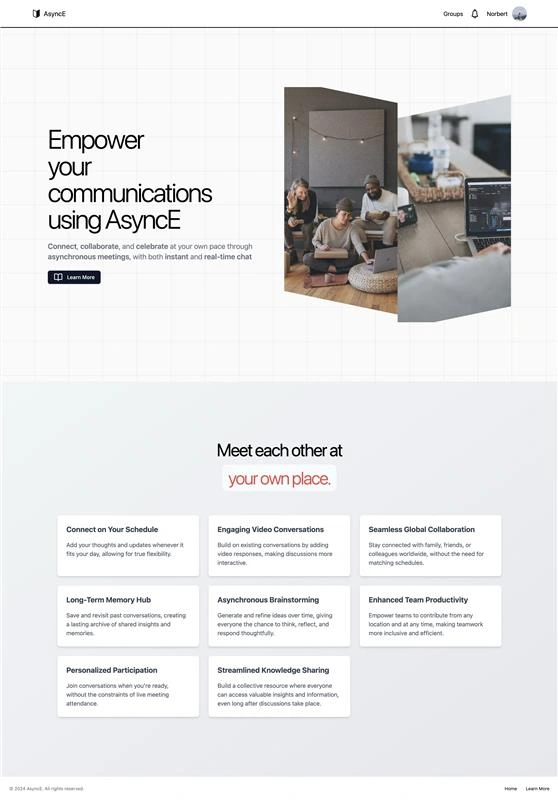
Connect, collaborate, and celebrate at your own pace through asynchronous meetings, with both instant and real-time chat. AsyncE empowers you to communicate on your terms, fitting seamlessly into your schedule.
Connect on Your Schedule
True Flexibility: Add your thoughts and updates whenever it fits your day, allowing for true flexibility.
Personalized Participation: Join conversations when you’re ready, without the constraints of live meeting attendance.
Engaging Video Conversations
Interactive Discussions: Build on existing conversations by adding video responses, making discussions more interactive.
Asynchronous Brainstorming: Generate and refine ideas over time, giving everyone the chance to think, reflect, and respond thoughtfully.
Seamless Global Collaboration
No Time Zone Barriers: Stay connected with family, friends, or colleagues worldwide, without the need for matching schedules.
Enhanced Team Productivity: Empower teams to contribute from any location and at any time, making teamwork more inclusive and efficient.
Long-Term Memory Hub
Save and Revisit: Save and revisit past conversations, creating a lasting archive of shared insights and memories.
Streamlined Knowledge Sharing: Build a collective resource where everyone can access valuable insights and information, even long after discussions take place.
By choosing AsyncE, you embrace a communication platform designed for the modern world—flexible, engaging, and built to enhance collaboration without the constraints of traditional meeting schedules.
Project Demo
Home Page
This is the page where user will be in for the first time, it briefly tells the user about AsyncE platform.
Create User Page
This is the page where user will be prompted to enter his username and profile picture after successfully logged in using DFINITY's Internet Identity.
Profile Page
This is the page where user sees their profile information, as well as information about subscription. In this page, user can buy subscription and enjoy the subscription benefits.
Group List Page
This is the page where user can see all their groups created. User can also create a new group if they want!
Create Group Page
This is the page where user creates a new group.
Group Page
This is the page where user will see the inside of a group. In this page, user can chat with another users on real time. User can also invite another user to the group, which will trigger notification for the other user on real time. User can also create a new meeting to setup a meeting with others!
Meeting Page
This is the page where user will see the inside of a meeting. In this page, user can see all videos that were uploaded by all users on the group. User can also see the combined videos across all videos that were uploaded, hence calling it a "meeting". User can also upload a meeting themselves, with video-cam and screenshare-cam support. If user is subscribed, user can enable the "Subtitles" AI feature to automatically generate subtitles for the video!
Documentation
To learn more before you start working with AsyncE, see the following documentation available online:
Running the project locally
If you want to test your project locally, you can use the following commands:
Once the job completes, your application will be available at
http://localhost:4943?canisterId={asset_canister_id}.Since AsyncE uses WebSocket, you need to set up the WebSocket gateway locally:
Run the WebSocket Gateway
If you have made changes to your backend canister, you can generate a new candid interface with
at any time. This is recommended before starting the frontend development server, and will be run automatically any time you run
dfx deploy.If you are making frontend changes, you can start a development server with
Which will start a server at
http://localhost:8080, proxying API requests to the replica at port 4943.Note on frontend environment variables
If you are hosting frontend code somewhere without using DFX, you may need to make one of the following adjustments to ensure your project does not fetch the root key in production:
set
DFX_NETWORK to ic if you are using Webpackuse your own preferred method to replace
process.env.DFX_NETWORK in the autogenerated declarationsSetting
canisters -> {asset_canister_id} -> declarations -> env_override to a string in dfx.json will replace process.env.DFX_NETWORK with the string in the autogenerated declarationsWrite your own
createActor constructorRunning The Python Server For Video Editing
We use Python to concatonate videos, generate thumbnails, and generate subtitles with AI. To run the python server, we would need python installed, specifically version 3.10 - 3.12
Then, we can start our python environment and install the dependencies required by:
Then, we can run it by executing the command below:
Getting Started
Login:
Visit the AsyncE homepage.
Log in using the DFINITY authentication system.
Profile Setup:
If you're a new user, a dialog will prompt you to:
Create a username.
Upload a profile picture.
Subscription:
Use your initial coins to purchase subscriptions.
Access premium features with a subscription.
Create Groups:
Initiate new groups by:
Providing a group name.
Selecting a profile picture.
Invite Members:
Add friends, family, or colleagues to your groups.
Start Collaborating:
Begin:
Chatting.
Sharing videos.
Organizing meetings asynchronously.
How It Works
Group Management:
Owners and admins can invite or remove members.
Admins can promote other members to admin status.
Ownership remains exclusive; admins cannot remove the owner.
Meetings:
Each group can host multiple meetings.
Meetings serve as hubs for:
Video recordings.
Discussions.
Video Interaction:
Record videos directly within a meeting.
After recording, save your video with a custom title.
Choose to add subtitles if you're a subscribed user.
Videos are processed and then appear in the group's video gallery.
Chat Functionality:
Use the group's chat window for instant messaging.
Edit or delete messages to keep conversations clear and up-to-date.
Like this project
Posted Mar 2, 2025
Welcome to AsyncE, a cutting-edge communication platform designed to empower users to connect, collaborate, and communicate on their own schedules.