Built with Framer
Kamayari Framer Template

Henson Marin


Kamayari — a Framer website template for shops that sell by enquiry
A nine-page Framer template for homeware, furniture and craft shops. Shoppers find the right piece and ask about it in one tap. Owners run the whole site from the CMS.
Overview
A shop website built around the conversation, not the checkout.
Kamayari is a Framer website template we designed and built for local shops that sell homeware, furniture, lighting and craft. Their customers want to see a piece, ask about it and talk it through before they pay. So instead of a cart, every product leads to an enquiry that already knows which product it's about.
We shipped the template, a landing page that lets buyers try the editing before they buy, and the launch assets. The demo shop is imaginary: every product, price and business detail lives in the CMS, so a real shop replaces it completely.
OUR ROLE:
Strategy, UX and copy, UI design, Framer build, CMS, QA
DELIVERABLES:
Nine-page template, landing page, launch assets
BUILT WITH:
Framer, Framer CMS, React code components
The problem
Great pieces, lost in message threads.
Established local shops often sell well in person and over messages. Online, they keep running into the same walls:
The catalogue lives in social posts and chats, so customers scroll to find what's still available.
Enquiries arrive as "How much?" with no product attached, so every reply starts with a question back.
Store builders assume a cart, a checkout and stock counts. Handmade and made-to-order pieces don't fit that shape.
Changing a custom site means waiting for a developer, so prices and availability go out of date.
Who it's for
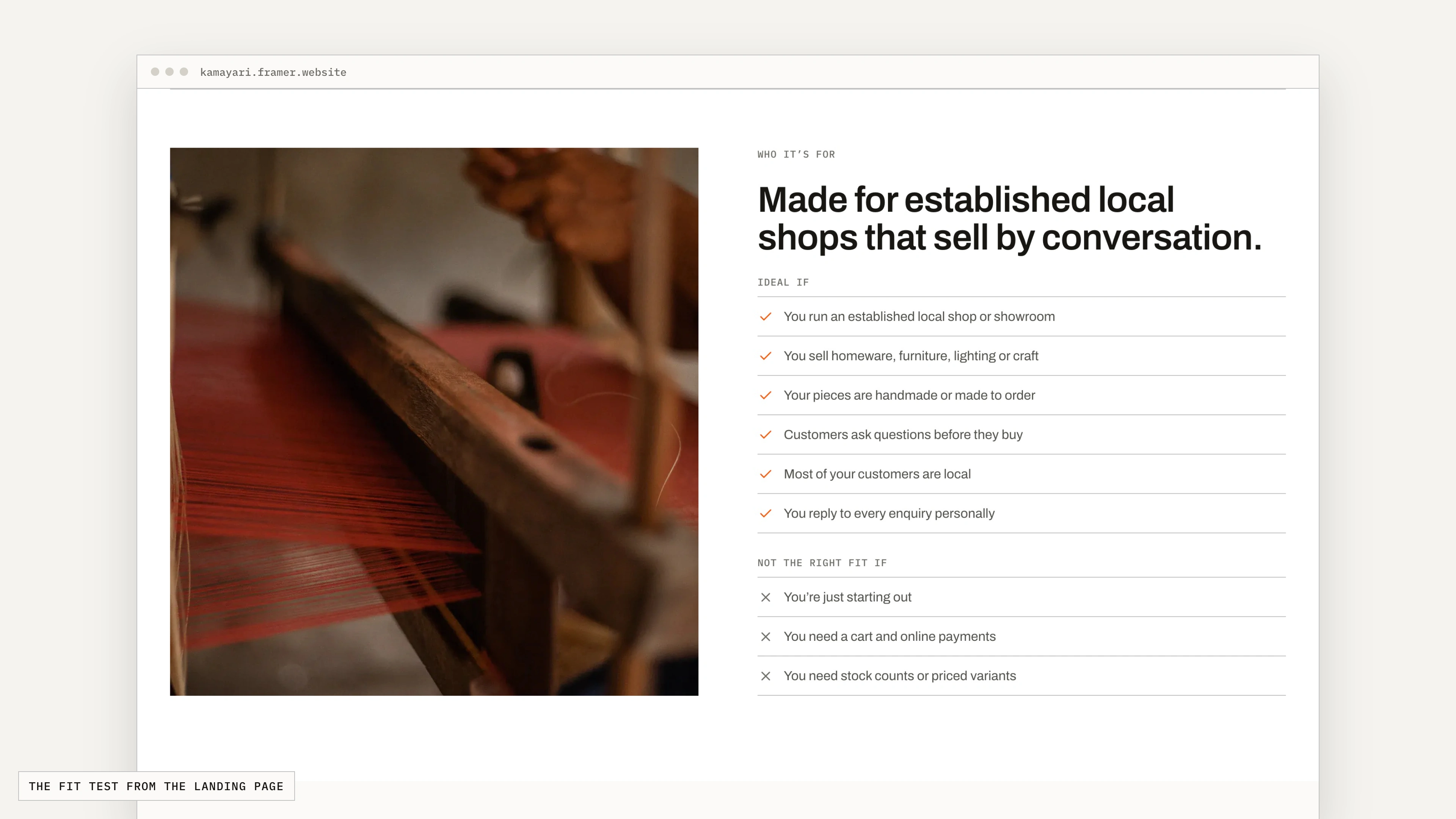
Made for established shops that sell by conversation.
We put the fit test on the landing page, so a shop owner knows before paying whether Kamayari suits them.
Ideal if
You run an established local shop or showroom
You sell homeware, furniture, lighting or craft
Your pieces are handmade or made to order
Customers ask questions before they buy
You reply to every enquiry personally
Not the right fit if
You're just starting out
You need a cart and online payments
You need stock counts or priced variants
The idea
Show the product first. The enquiry follows.
Three decisions shaped every page:
01 Browsing comes first
Categories, filters, search and detailed product pages let shoppers narrow down to the right piece on their own.
02 One tap to ask
Every product has an Enquire button. It opens the contact form with the product, a starter message and the page it came from already filled in.
03 Edited like a spreadsheet
Products, prices, business details and brand colours are rows and fields in the CMS, so owners update the site without a designer or developer.
Process
How we built it.
One engine, many shops
We started from a reusable CMS structure rather than a one-off site: collections for products, product types, attributes, business details and brand settings. Retail is the first shop built on it. A food menu for restaurants is next.
Designed as real pages, then rebuilt natively
We designed every page as responsive HTML first and checked it at desktop, tablet and phone widths. Then we rebuilt it with Framer's own layouts, CMS lists and components, so the canvas the owner edits matches the live site.
Native first, code only where Framer can't
Layouts, filters, category tabs, badges and animations use Framer's own tools, so owners can change them on the canvas. Eight code files cover what Framer can't do on its own: the gallery with full-screen zoom, the to-scale size drawing, carrying the product into the enquiry form, and brand settings that recolour the whole site from the CMS.
A CMS written for shop owners
Every field has plain-language help text and sits under a named section, in the order it appears on the page. Optional fields fail gracefully: a blank material reads "Not specified" and an empty measurement hides its row. A sample product fills in every field as a guide.
Tested the way owners and shoppers use it
We tested the live site in real browsers at desktop, tablet and phone widths: filters, category tabs, the enquiry flow, the size drawing and layout stability, with 105 automated checks in the final pass. When a check caught the contact page jumping as the product card loaded, we fixed it and measured again.
Feature tour
What a shop owner gets.
Every feature below runs on the live demo site. The clips pair the page a shopper sees with the setting an owner changes.
01 · Catalogue
A catalogue you run like a spreadsheet.
Each product is one row in the CMS. Change a price, a photo or a badge and every card, category page and product page follows.
Show an exact price, a "From" price or Price on request
Mark products Featured, New or Out of stock, without unlisting them
Pack sizes like "Set of 3" and your own currency symbol
02 · Shop filters
Filters that help shoppers narrow down.
Shoppers filter by material, size, brand and price, or show only pieces in stock or new arrivals. New materials and brands added in the CMS appear in the filters on their own.
Search, categories and filters that work together
A filter sheet on phones
Every filter is in the address, so a filtered view can be shared
03 · Category pages
Category pages that switch without reloading.
Each product type has its own page for search engines and sharing. On the page, the tabs filter in place: the heading and the grid change instantly and the shopper keeps their scroll position.
04 · Product pages
Product pages that answer the first questions.
Before anyone asks, the page shows the photos, the price, what it's made of and whether it fits the room.
A photo gallery with thumbnails and full-screen zoom
Height, width, depth, seat and arm height, drawn to scale
Materials, finishes, weight, load capacity and assembly
Care instructions in a panel shoppers open when they need it
05 · Enquiries
Enquiries that arrive ready to answer.
Enquire opens the contact page with the product beside the form, a starter message and the page it came from. The owner gets an enquiry they can answer in one reply.
The product, message and source page are filled in
A thank-you panel confirms the enquiry was sent
Enquiries go to email, a webhook or Framer's form integrations
06 · Business details
Business details, typed once.
Store name, phone, email, showroom address, opening hours and the announcement bar live in one CMS item. The header, contact page, footer and privacy policy all read from it.
Tap-to-call numbers and a Get directions link
An announcement bar that hides when it's empty
A privacy policy that fills in the shop's details
07 · Brand settings
Their brand, not ours.
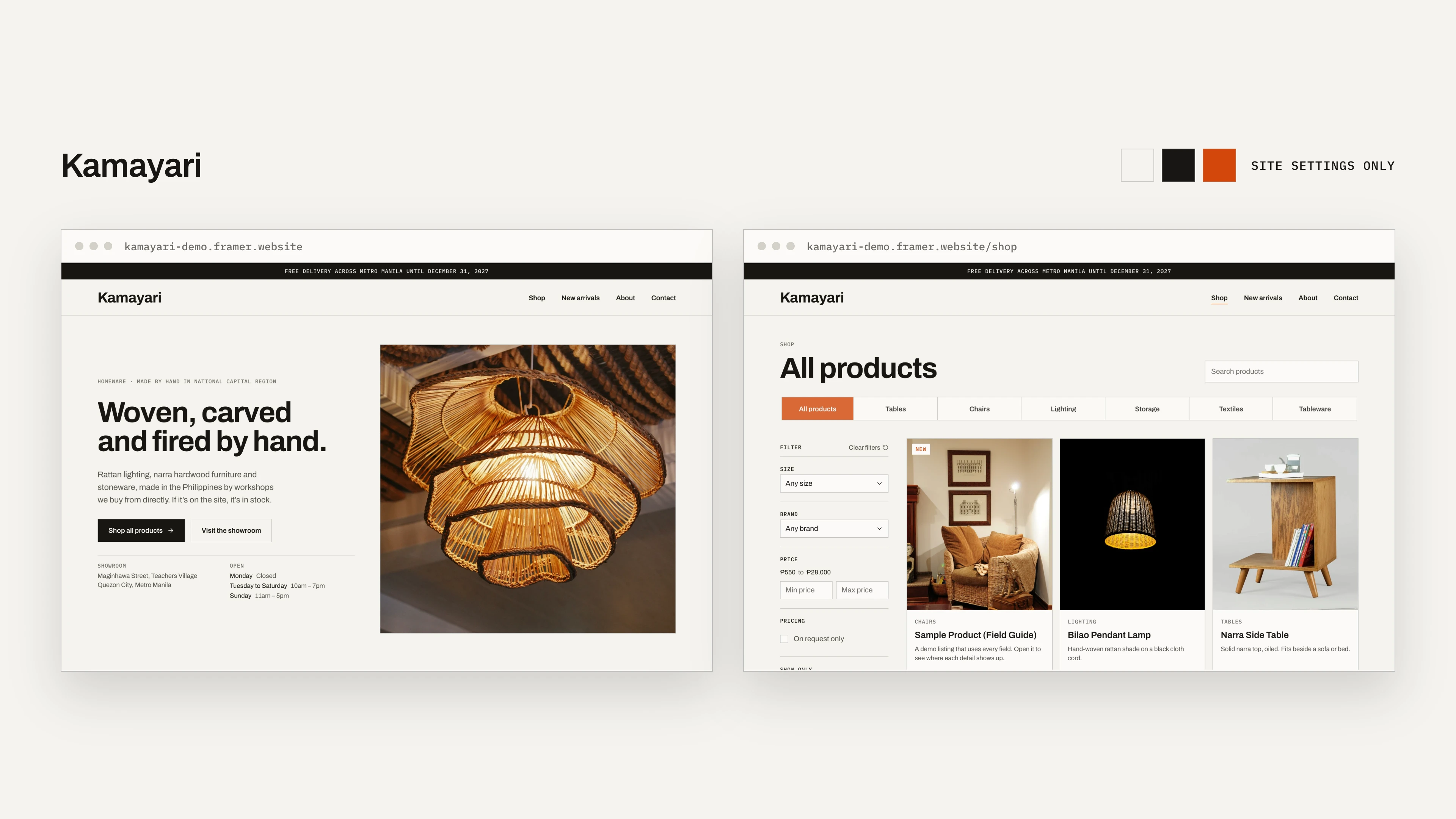
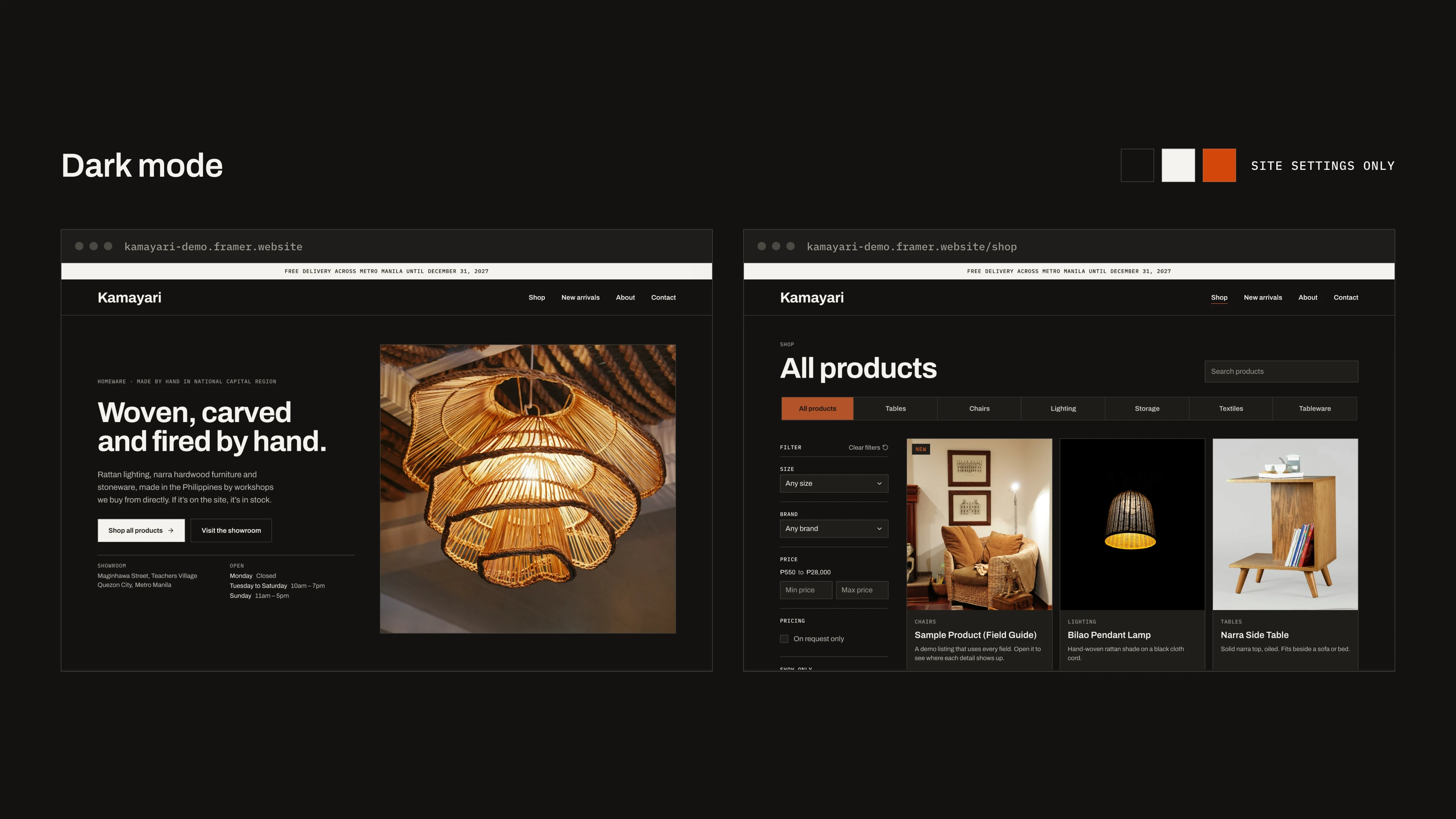
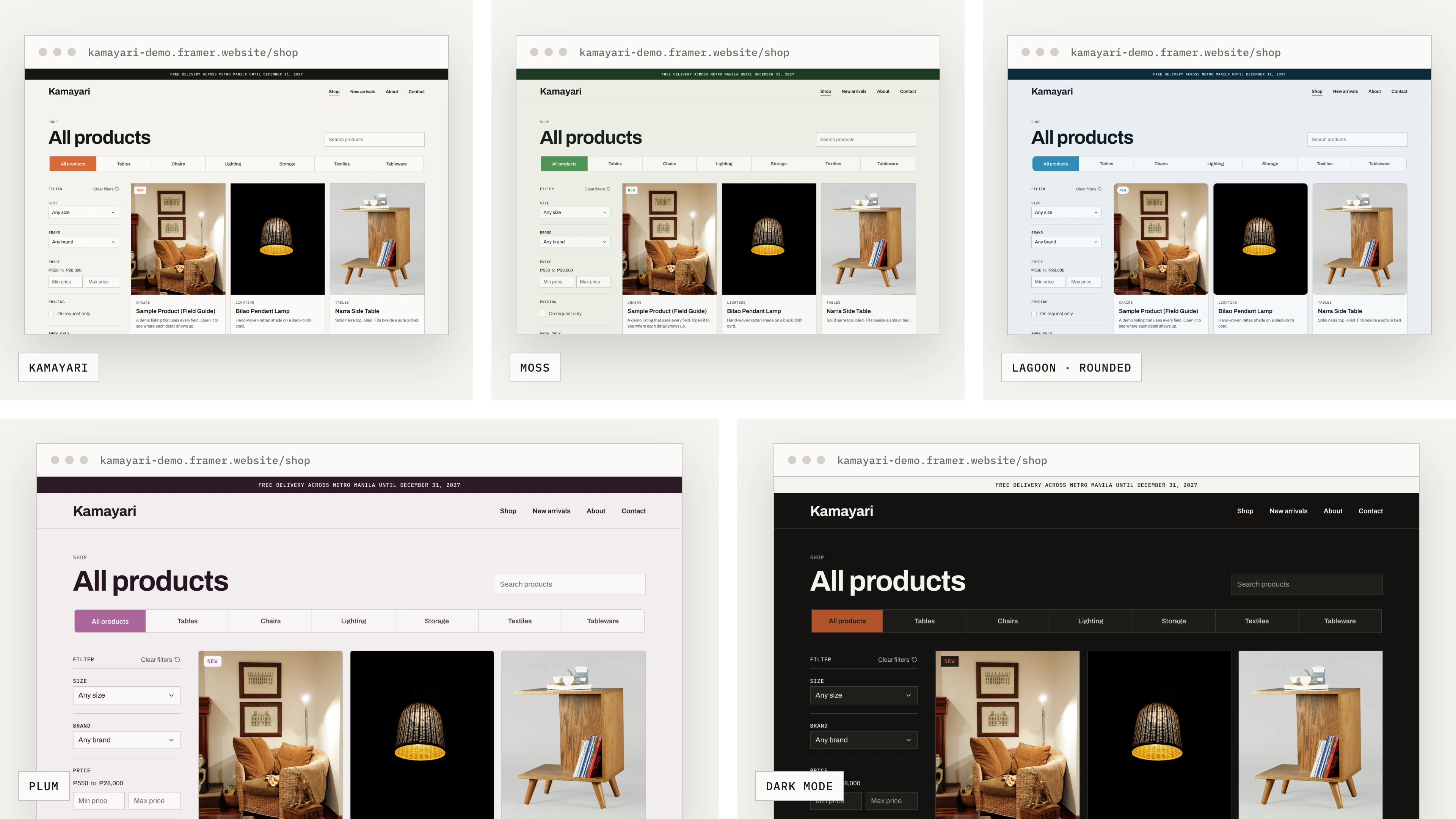
Six brand colours, a dark mode switch and three corner sizes live in the CMS. Change a value and the whole site follows, with hover shades and dark-mode versions worked out automatically.
The same shop, re-skinned only through Site Settings:
08 · Every screen
Built for every screen.
All nine pages have their own desktop, tablet and phone layouts, not a squeezed desktop. Motion is gentle and turns off for visitors who prefer reduced motion.
What the owner sees in Framer.
Buying the template copies the whole project into the owner's Framer account. These are captures of the real project, not mock-ups.
Collections for products, types, attributes, business info and site settings
Fields grouped into sections, each with help text
Components whose properties are linked to CMS fields
Colour styles named after where they're used
A landing page that lets buyers try
before they buy.
A buyer can't open our Framer project before paying, so the landing page does the next best thing. Its previews behave like the CMS: type a product name, mark something out of stock or pick a brand colour, and the demo site beside it updates. They play on their own and hand over as soon as a visitor touches them.
An illustration of Framer's editor then shows where each setting lives after purchase, followed by an honest fit test, three steps from remix to published, and answers to the questions shop owners ask first.
Landing Page Demo → (Work in Progress)
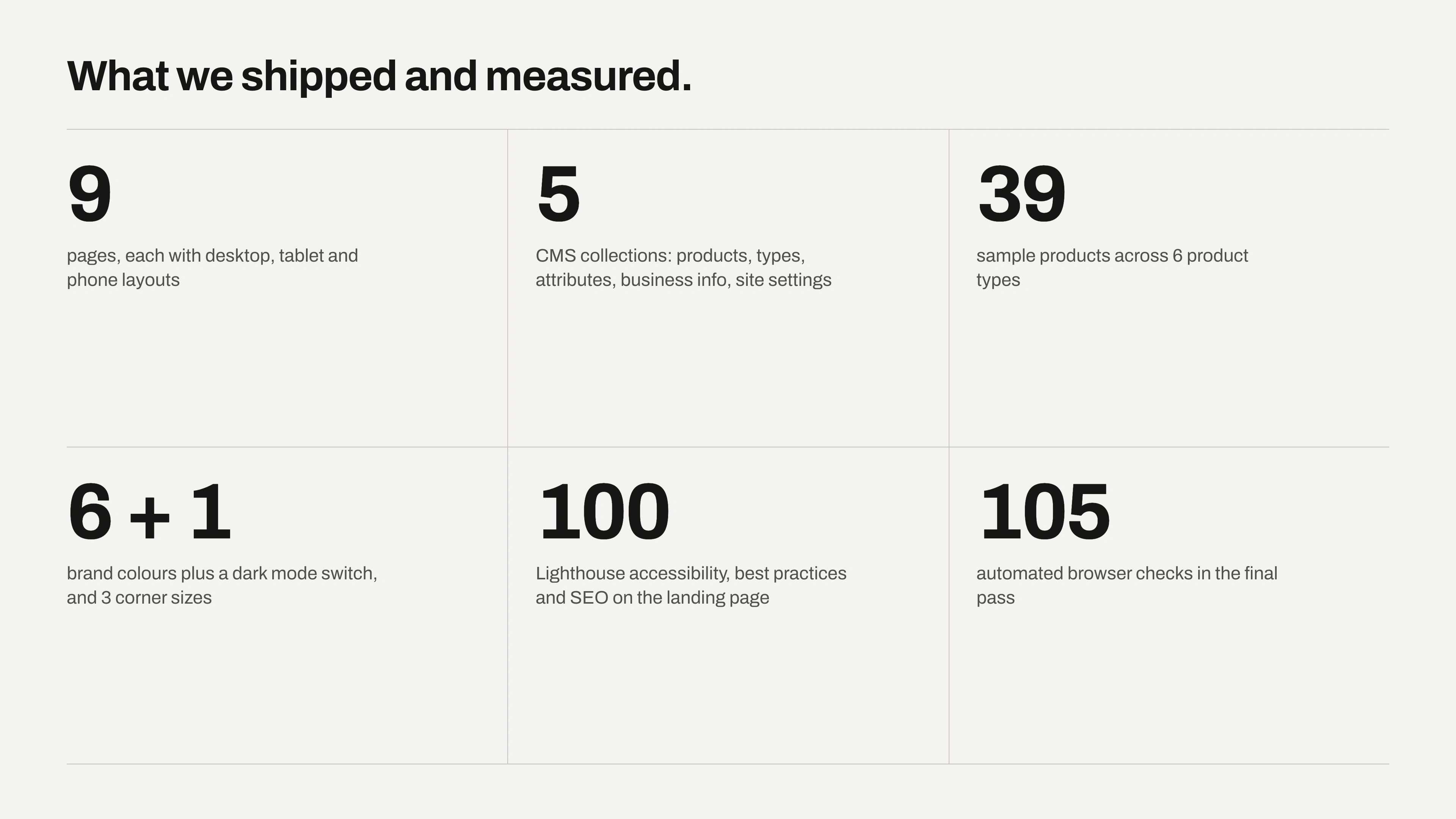
What we shipped and measured.
Numbers from the finished build and our final test pass.
Next on the same engine: A food menu.
A virtual menu for restaurants, cafés and food stalls. Customers scan a QR code at the table; owners update dishes, prices and sold-out items in the CMS, just like Kamayari. Shop owners can also request a template built around their kind of business.
Work with us
Want a website your team can run on its own?
We design and build Framer websites that owners update without us. Explore the Kamayari demo, or tell us about your business.
Like this project
Posted Sep 16, 2026
A nine-page Framer template for homeware, furniture and craft shops. Shoppers find the right piece and ask about it in one tap.
Likes
0
Views
15