WhatFishDo: A Behavior Annotation Tool for Videos

Shawn Dsouza


WhatFishDo: A Behavior Annotation Tool for Videos Collected from the Field
Overview
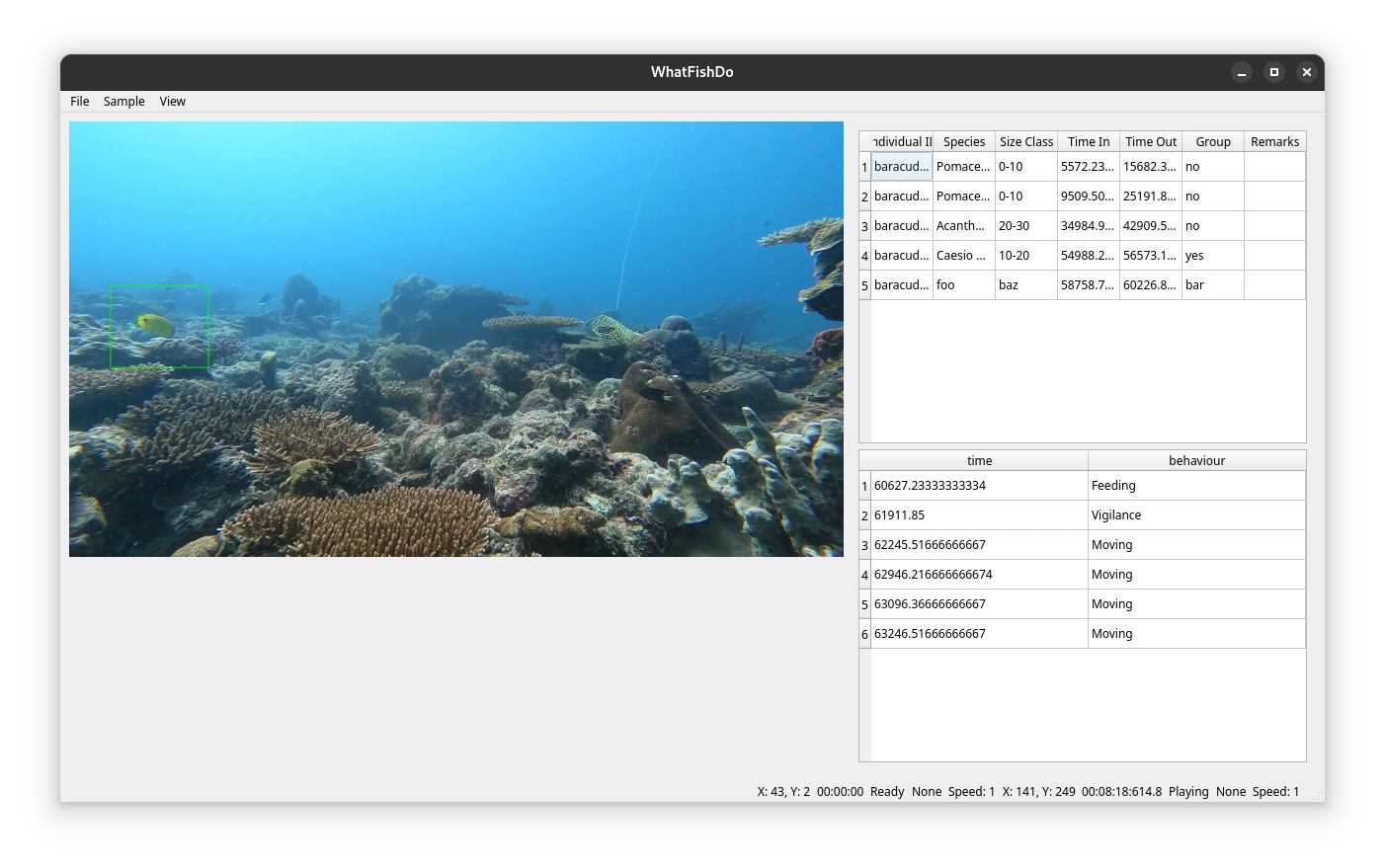
WhatFishDo is a tool designed to assist researchers in annotating behavior from video footage. The tool supports detection, tracking, and annotation of animals in videos, leveraging YOLO for detection and OpenCV for tracking. It also supports GPU acceleration for faster processing.
Features
Detection: Uses YOLO model to detect fish in video frames.
Tracking: Tracks detected fish across frames using OpenCV trackers.
Annotation: Allows users to annotate fish behavior by drawing bounding boxes and entering data.
GPU Acceleration: Supports CUDA for faster processing on compatible hardware.
Session Management: Supports resuming from previous sessions.
Installation
Prerequisites
Python 3.13 or higher
pip (Python package installer)
Steps
Clone the repository:
Install dependencies:
Note for GPU users: You will need to compile OpenCV with CUDA support. Instructions can be found here.
Download YOLO model files:
Download config and weights for a pretrained model of your choosing.
Place them in the
model/ directory of the project.Rename them to
model.cfg and model.weights respectively.I recommend YOLO-Fish for videos of fish in heterogeneous environments.
Usage
Command Line Arguments
-g, --gpu: Run detection model with CUDA.-d, --detect: Run with detection model.-t, --track: Run with tracking algorithm.-p, --project: Specify project file.Running the Tool
I recommend using
uv package and environment manager. With uv you can simply use the following command to run the application:If you are on Windows, you can use the following command:
If you are not using
uv, you can run the application using the following command:Key Bindings
Press
[space] to pause the video.Press
LEFT to skip backward 1 second.Press
RIGHT to skip forward 1 second.Press
UP to skip forward 10 seconds.Press
DOWN to skip backward 10 seconds.Press
j to increase speed.Press
k to decrease speed.Press
z to stop the observation.Press
p to record a predator in frame.Data and Images
Data and images are saved automatically in the data folder.
Annotation
Click and drag to draw a bounding box around the fish and start an observation. Use the number keys to record the fish's behavior.
Project Files
When creating a new project, you will be prompted to choose a model. This project supports two project models:
Individual: Each video in your dataset is a separate individual. This is appropriate for experimental studies and focal follows.
Plot or Treatment: Each folder in your dataset is a separate plot or treatment. This is appropriate for observational studies and in-situ experiments.
Project properties are stored in
.json files in the project directory. You can edit these files to change the project settings.Subsampling
Having large datasets can be computationally expensive. You can specify the number of subsamples to use in the project settings. This will create random non-overlapping subsamples of the specified duration which are stored in project propertes file.
Behavior Codes
You can specify an ethogram using a
.json file. The file should cotain the key bindings follwed by names and types for each behavior. You can optionally add a description for each behavior. See the below example:In the above example,
1, 2, and 3 are the key bindings for the behaviors. The names are the names of the behaviors, the type is the type of behavior, and the description is an optional description of the behavior.Size classes
You can specify size classes for the indiviudals in the dataset. This is useful for studies that require size-based analysis. You can specify the size classes in a
.json file. See the below example:License
This project is licensed under the MIT License - see the LICENSE file for details.
Acknowledgments
YOLO-Fish for the pretrained model.
OpenCV for the computer vision library.
Like this project
Posted Jul 27, 2025
Developed WhatFishDo, a tool for annotating fish behavior in videos using YOLO and OpenCV.