PixConvert: Private Browser-Based Image Converter

Eduard Tymchenko


The Problem
Online image converters upload your files to remote servers. That's slow, raises privacy concerns, and often comes with file size limits, watermarks, or forced signups. People just want to convert an image quickly without jumping through hoops.
The Solution
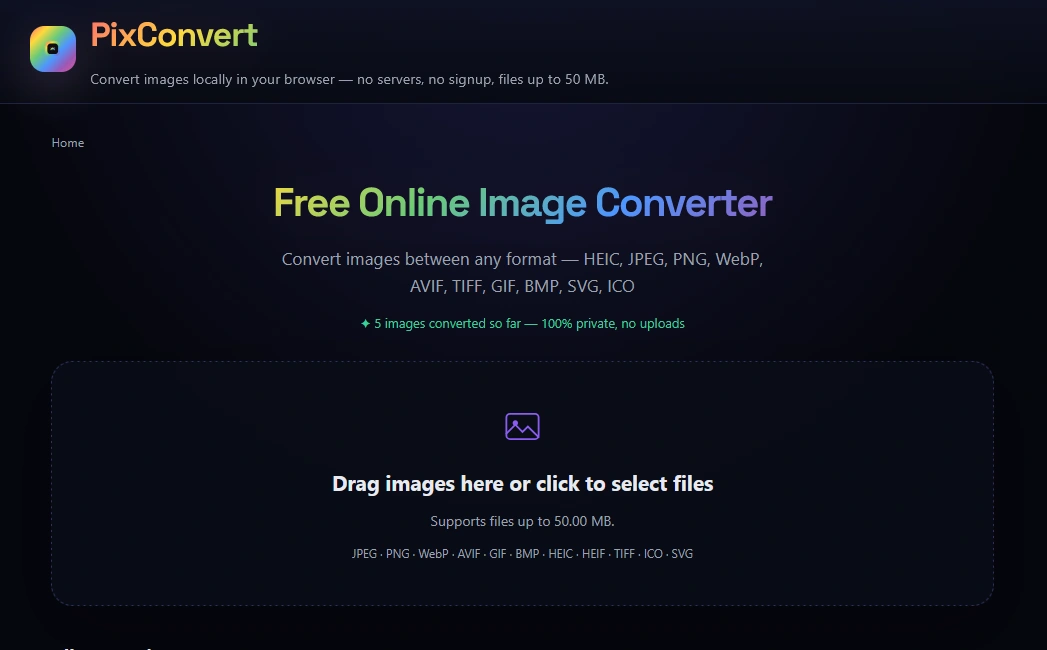
I built PixConvert — a free image conversion tool that runs 100% in the browser. No uploads, no servers, no signup. Your files never leave your device.
Supported Formats
HEIC, JPEG, PNG, WebP, AVIF, TIFF, GIF, BMP, SVG, and ICO — 14 different conversion combinations covering everything from iPhone HEIC photos to next-gen web formats.
Core Features
100% private — all processing happens locally in the browser using client-side APIs. Zero server uploads.
No signup required — open the page and start converting immediately
Works offline — after the first load, the entire engine runs without internet
Batch processing — convert multiple images at once and download individually or as a ZIP archive
Drag & drop — simple file selection with drag-and-drop support
Files up to 50 MB — generous limit for a browser-based tool
Popular Use Cases
Converting iPhone HEIC photos to JPG for sharing
Compressing PNG to JPEG for faster web loading
Converting modern WebP/AVIF files to universally compatible formats
Generating ICO favicons from any image
Tech Stack
JavaScript with browser-native image processing APIs
Canvas API and Web Workers for performant conversion
HTML5 / CSS3
Deployed on Vercel
Result
A fast, private image converter that handles real-world use cases without compromising on privacy or speed. No accounts, no uploads, no limits — just drag, convert, download.
Like this project
Posted Jul 5, 2026
Free browser-based image converter supporting HEIC, PNG, JPG, WebP, AVIF, TIFF, GIF, SVG, and ICO. 100% private — all processing runs locally, no server uploads, no signup.
Likes
0
Views
13